Dansk

When AI Max launched, I spent an entire video explaining how poor the reporting was. You could switch it on, watch the spend go out the door, and have almost no idea what it was doing with your money. I also said I was confident Google would fix it.
I’m happy to report that they have (and yes, I’m enjoying being right on this one).
With the new reporting, you can finally audit AI Max properly instead of relying on a blended ROAS number and a hunch. In this article, I’ll walk through how we evaluate AI Max at SavvyRevenue and the new columns that make it possible, plus what each finding means for your optimizations. I’ll also share what we’ve learned from running AI Max across client accounts for the last six months.
AI Max is not plug and play. But “it doesn’t work out of the box” is not the same as “it doesn’t work.”
The New AI Max Columns (And What They Actually Mean)
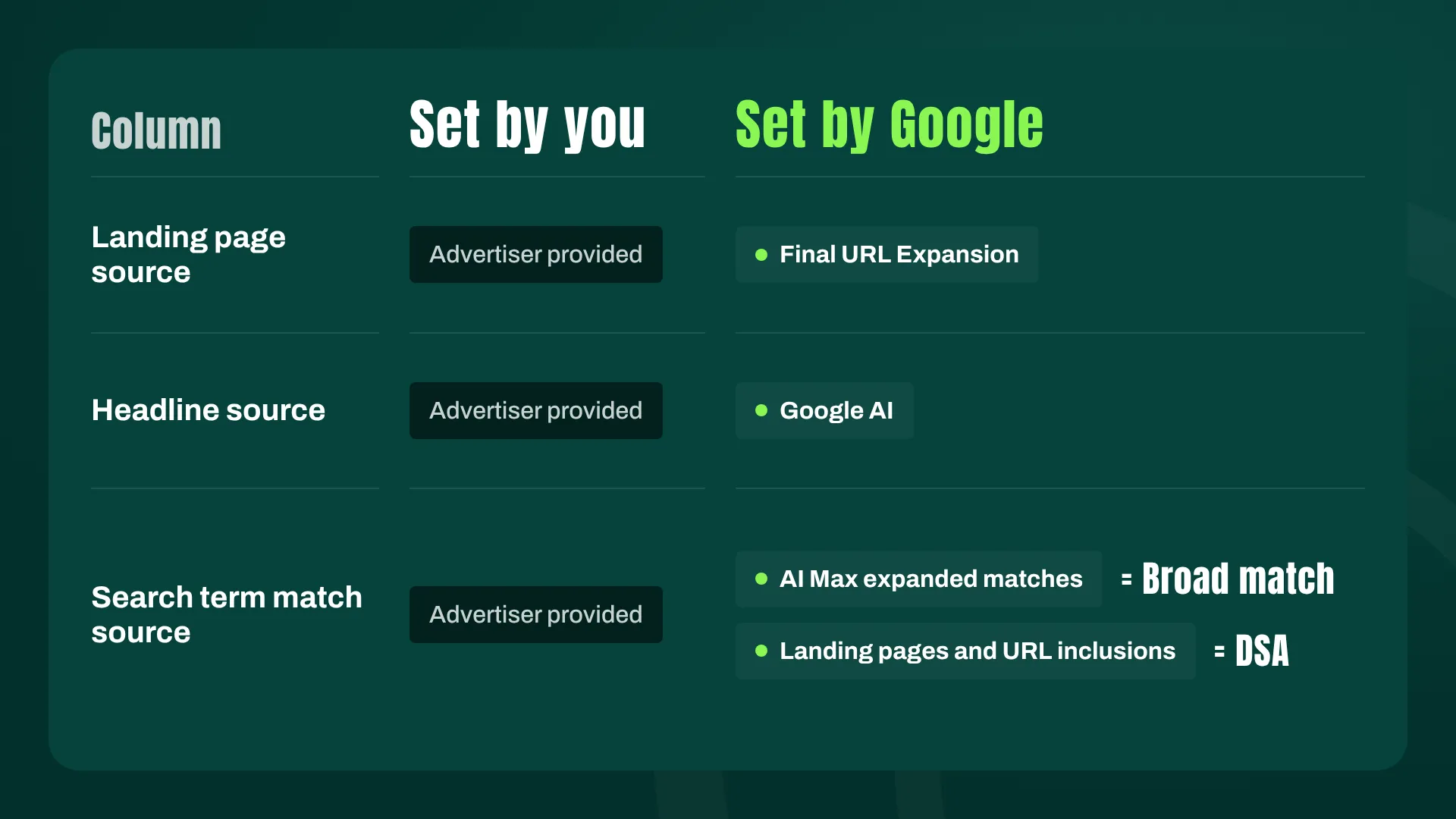
In August, Google added three new columns that expose what AI Max is doing:
- Landing page source
- Headline source
- Search term match source
The first two are simple. Either you provided the landing page or headline, or Google did.
The third one needs a little more explanation. Search term match source can show one of three values:
- Advertiser provided: The search term matched one of your keywords. Nothing new here.
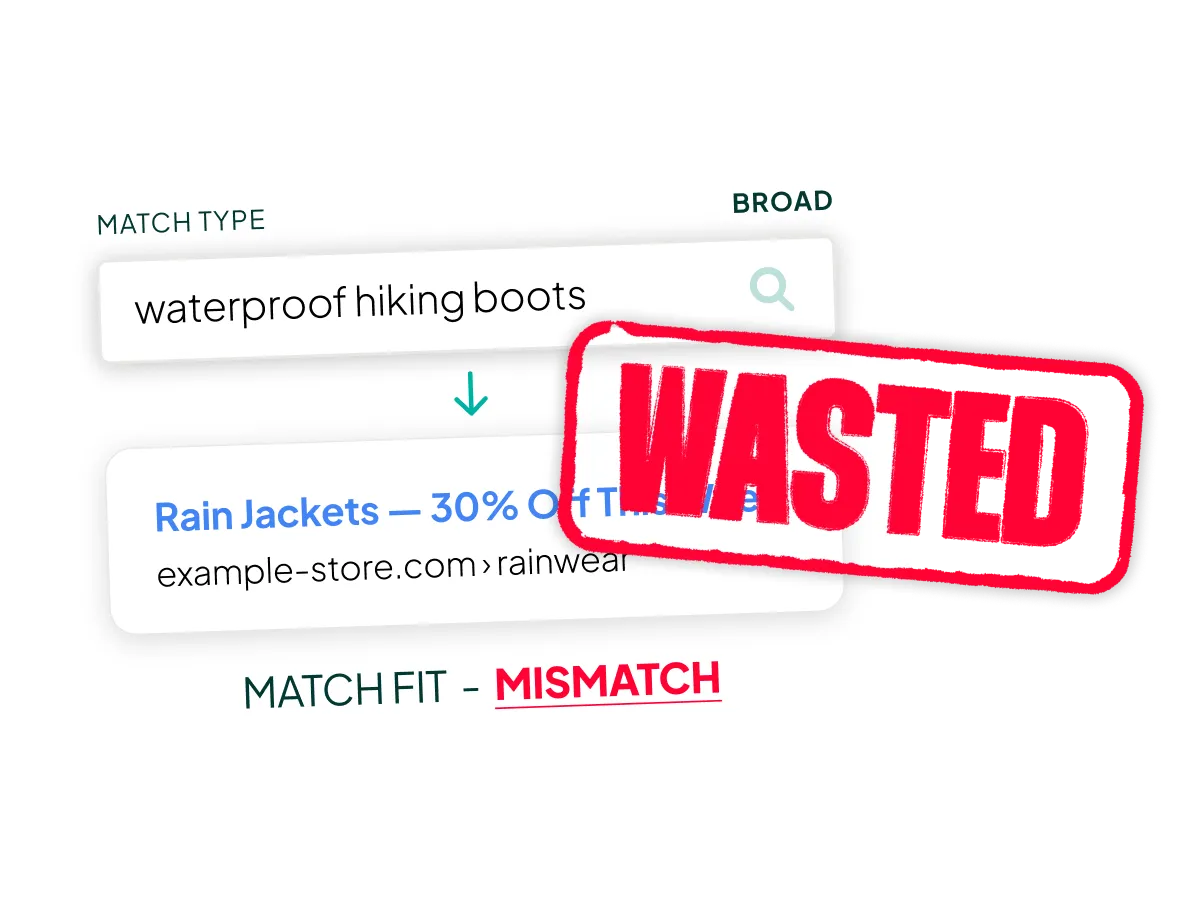
- AI Max expanded matches: This is broad match, plain and simple. In the API, it’s called `AI_MAX_BROAD_MATCH`. Google isn’t even pretending.
- Landing pages and URL inclusions: This is Dynamic Search Ads in a new outfit. Google reads your site and matches queries to your pages.
For day-to-day management, the distinction between the last two doesn’t matter much, but it becomes useful once you start segmenting the data.
Where to Find the Data
The location is a bit odd. To find the new columns, go to the Search Terms report and click “Search terms and ad combinations.” That’s where the AI Max data lives for now.
You can’t pull it into the regular report editor yet. I expect that to change soon, because the current setup feels like a temporary home. In the meantime, the data is also available through MCP, which means it’s available through the API.
How to Read the Columns Without Drowning in Them
You could build a pivot table. Technically. But who does that anymore?
The way we evaluate AI Max is to export the data and feed it to Claude. The combinations quickly get complex (three sources, multiple values each, multiplied by campaign types and match types), and an LLM is far better at slicing that than you are at 4 PM on a Thursday.
The method matters more than the tool, though. Start with the big picture, then dig into the combinations of segments. And make sure you have enough data. With AI Max, you’re segmenting already-segmented traffic, and it doesn’t take long before you’re drawing conclusions from 14 clicks, which is just noise.
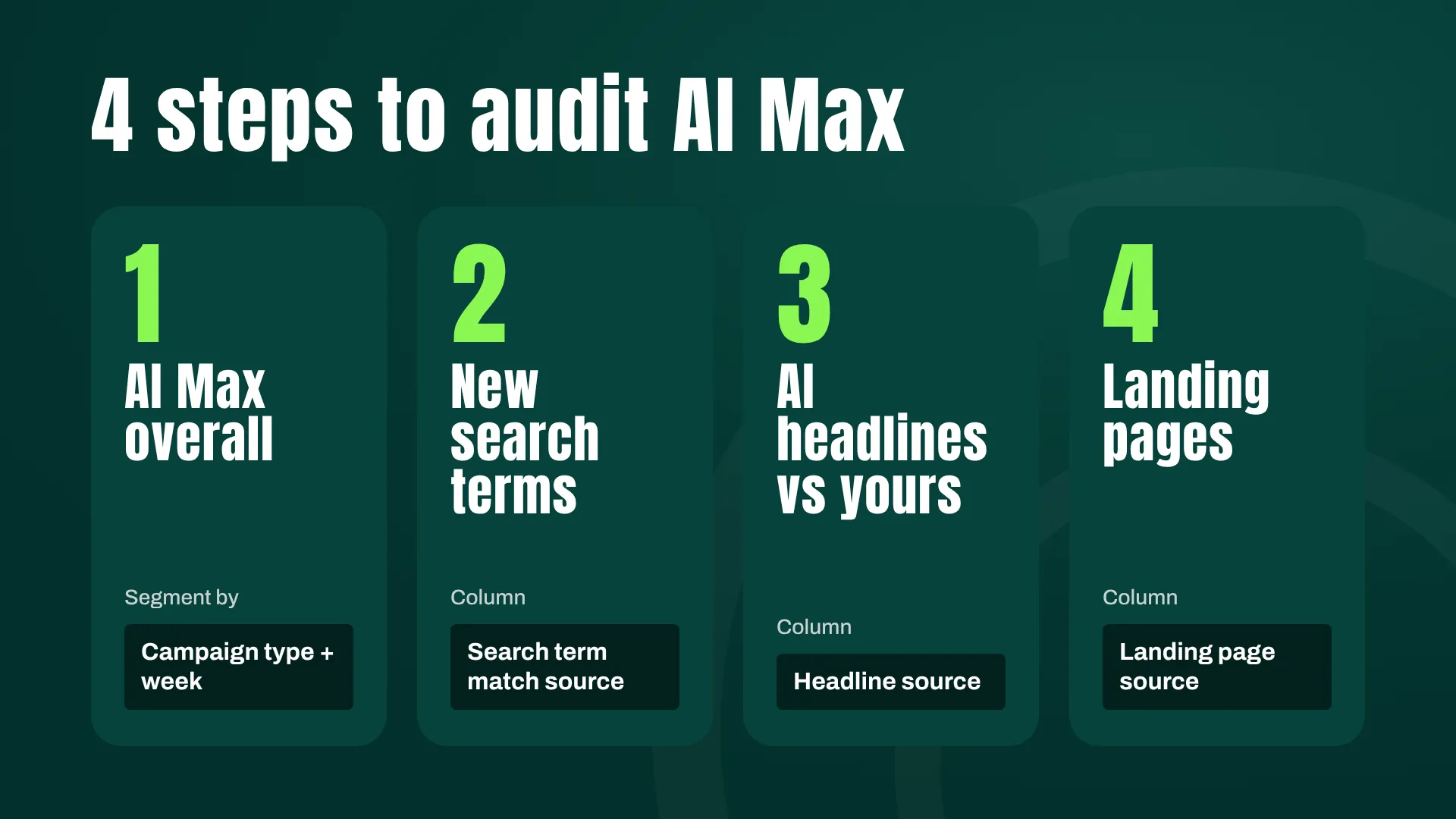
Our audit answers four questions, in this order:
- How is AI Max doing overall?
- How are the new search terms from AI Max performing?
- Are the AI-written headlines doing better or worse than mine?
- Is AI Max good at finding better-performing landing pages?
1. How Is AI Max Doing Overall?
There are two reports I consider essential here.
Performance by Campaign Type
In ecommerce, we typically run three types of search campaigns:
- Brand/product campaigns (third-party brands you sell)
- Category campaigns
- Generic campaigns
“AI Max is working” is a useless conclusion on its own. The question is where it’s working. In the account I’m using as an example, AI Max performed badly in the brand/product campaigns. If you only looked at the account-level average, you could easily miss that, or worse, let the weak segment drag down a verdict on segments that were doing fine.
Performance Over Time
The second report shows how AI Max develops over time, and I’d argue this is the one most advertisers skip.
Like everything algorithmic in Google Ads, AI Max is supposed to improve as it learns. So if you evaluate it after two months, you may be averaging a poor first month with a strong second month. The result looks “so-so,” and you turn off something that was actually working by the end.
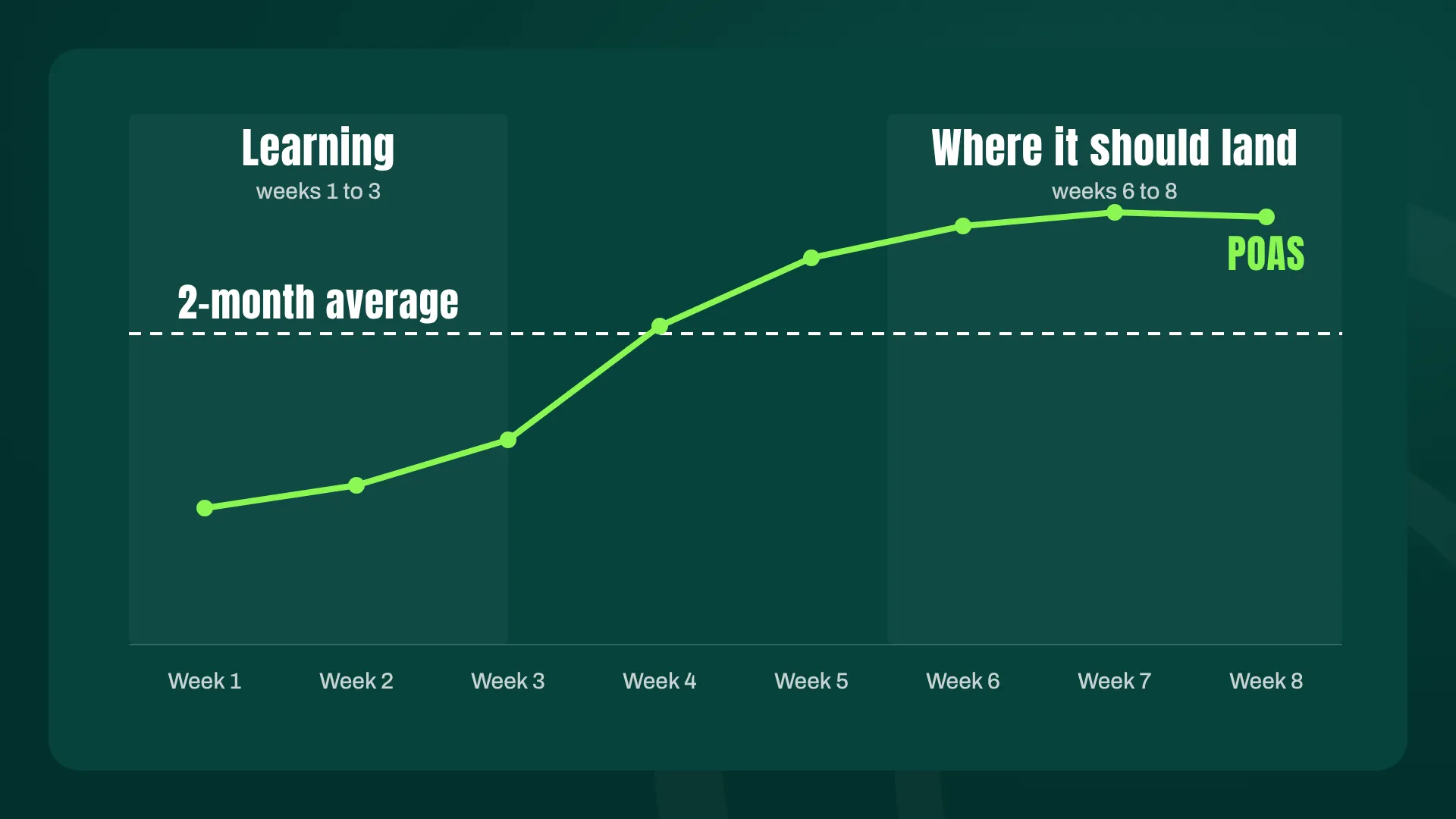
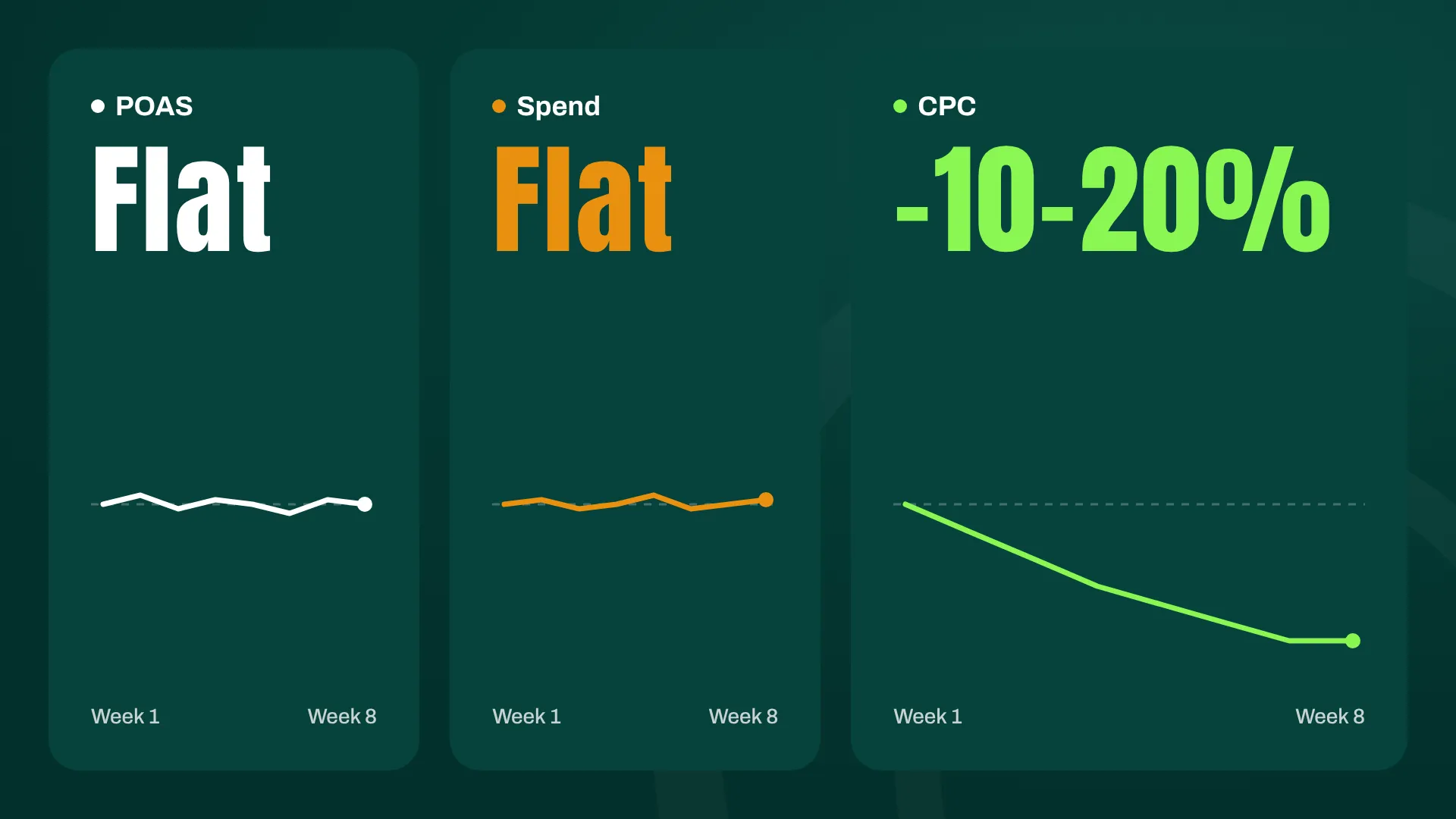
In this particular case, there was no learning curve to speak of. Performance was stable from day one. Almost unnervingly so. POAS barely moved week over week, and neither did spend.
The one number that did move was CPC, which decreased 10-20% over the weeks. So the algorithm was getting more efficient at buying the same traffic, even if that didn’t show up as a dramatic jump in profitability.
So look at the trend before you trust the average. Sometimes the trend tells you to be patient. Sometimes, like here, it tells you there’s nothing to wait for.
2. How Are the New Search Terms Performing?
AI Max has to justify its existence here. Broad match expansion is only worth paying for if it finds traffic that’s both profitable and new.
AI Max vs. Phrase and Exact
Start by building a report that compares the search term match sources: AI Max, phrase match, and exact match. You want to understand two things: how much volume AI Max is driving, and how its efficiency compares to your existing match types.
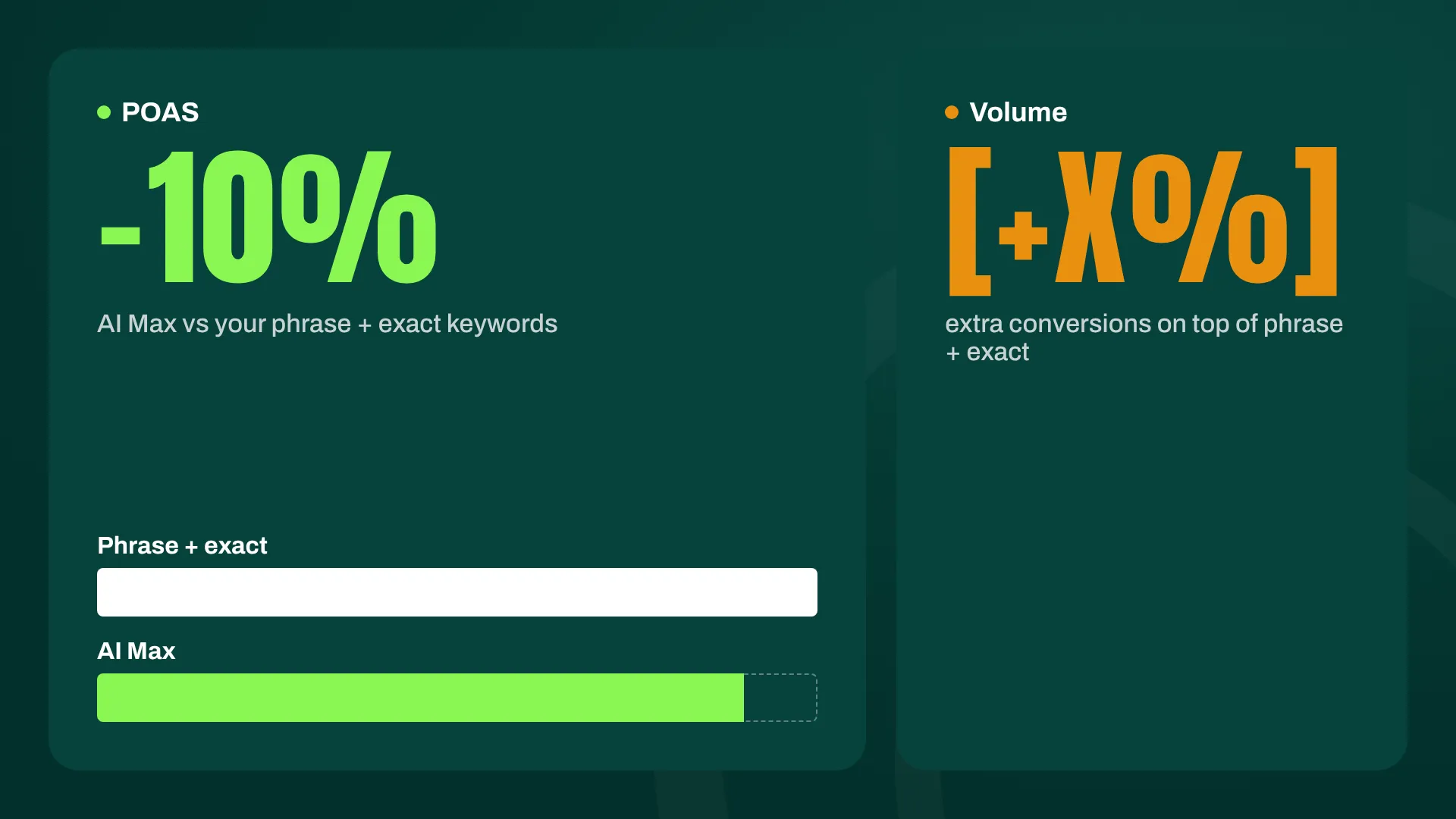
In our example, AI Max did pretty well. POAS was only about 10% lower than the main keywords, and given the additional volume it brought in, I was happy with that trade-off. In most accounts, I’d take a 10% efficiency hit for meaningful extra volume.
How Incremental Is AI Max, Really?
The second thing to check is incrementality: whether the AI Max search terms that perform well are search terms you weren’t already getting.
To check, have Claude take every search term labeled as AI Max, then check whether the same search term also appears under your phrase or exact match keywords. If it does, AI Max didn’t find anything new. It just claimed a query you already covered.
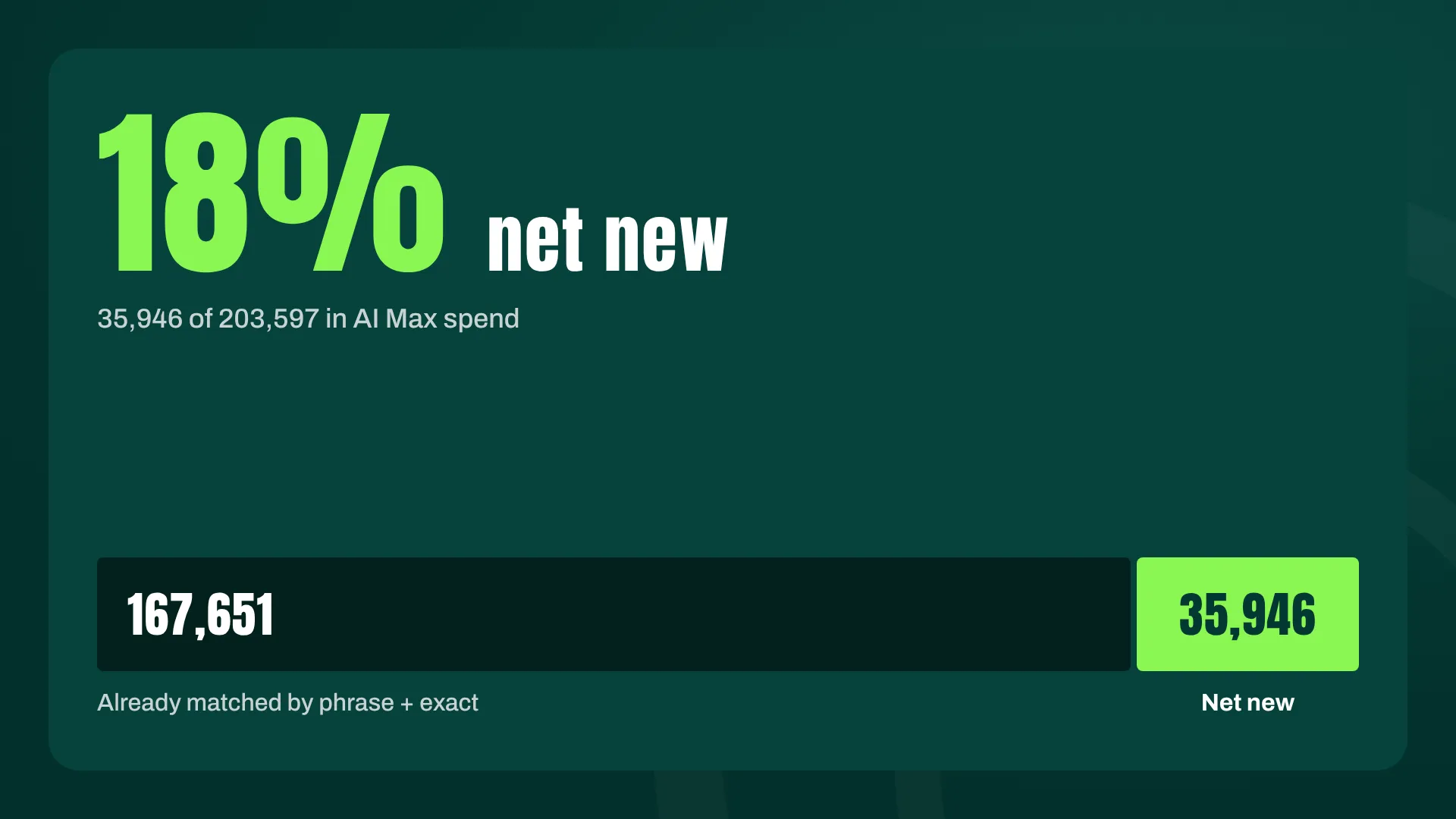
In our example, 85% of the search terms labeled as AI Max were already matched to phrase and exact keywords. Looked at by spend, out of 203,597 in AI Max ad spend, only 35,946 went to search terms we didn’t already cover. That’s roughly 18% net new.
One caveat: this analysis didn’t compare against DSA, which you should do (it just wasn’t part of the scope here). If anything, adding DSA would likely shrink the net-new share further.
I’d be surprised if any account found a substantial amount of truly net-new search terms from AI Max. If your keyword coverage is decent, most of what AI Max “finds” is traffic you were already buying. That doesn’t make it worthless, but it should change how you value that 10% POAS gap.
3. Are the AI-Written Headlines Better or Worse Than Yours?
Next up is the ad copy. How well does the stuff Google writes actually perform?
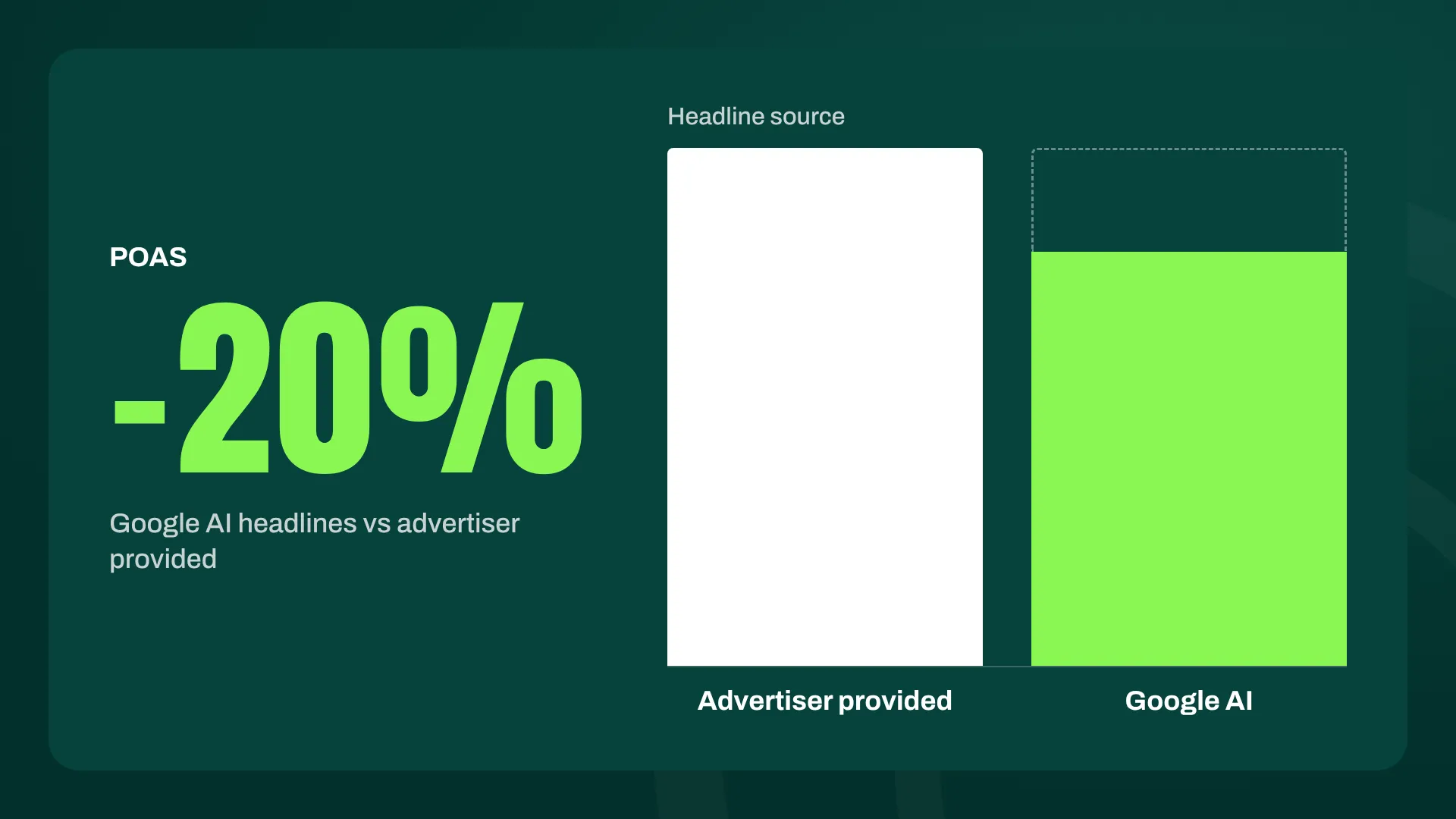
In our example, when the headline was provided by Google, POAS dropped 20%. That’s not good, and at first glance, it looks like an easy verdict: turn off AI headlines.
Look a step deeper before you do.
Think about how Dynamic Search Ads work. They often do very well on long-tail search terms, because they match a very specific query to a very specific product page. But they perform poorly when they try to “improve” on a core keyword you’ve already built a tailored ad and landing page for. AI-generated headlines follow the same logic: context determines whether they help or hurt.
So segment the AI headline performance by search term source. Compare AI headlines served on your own keywords against AI headlines served on AI Max search terms.
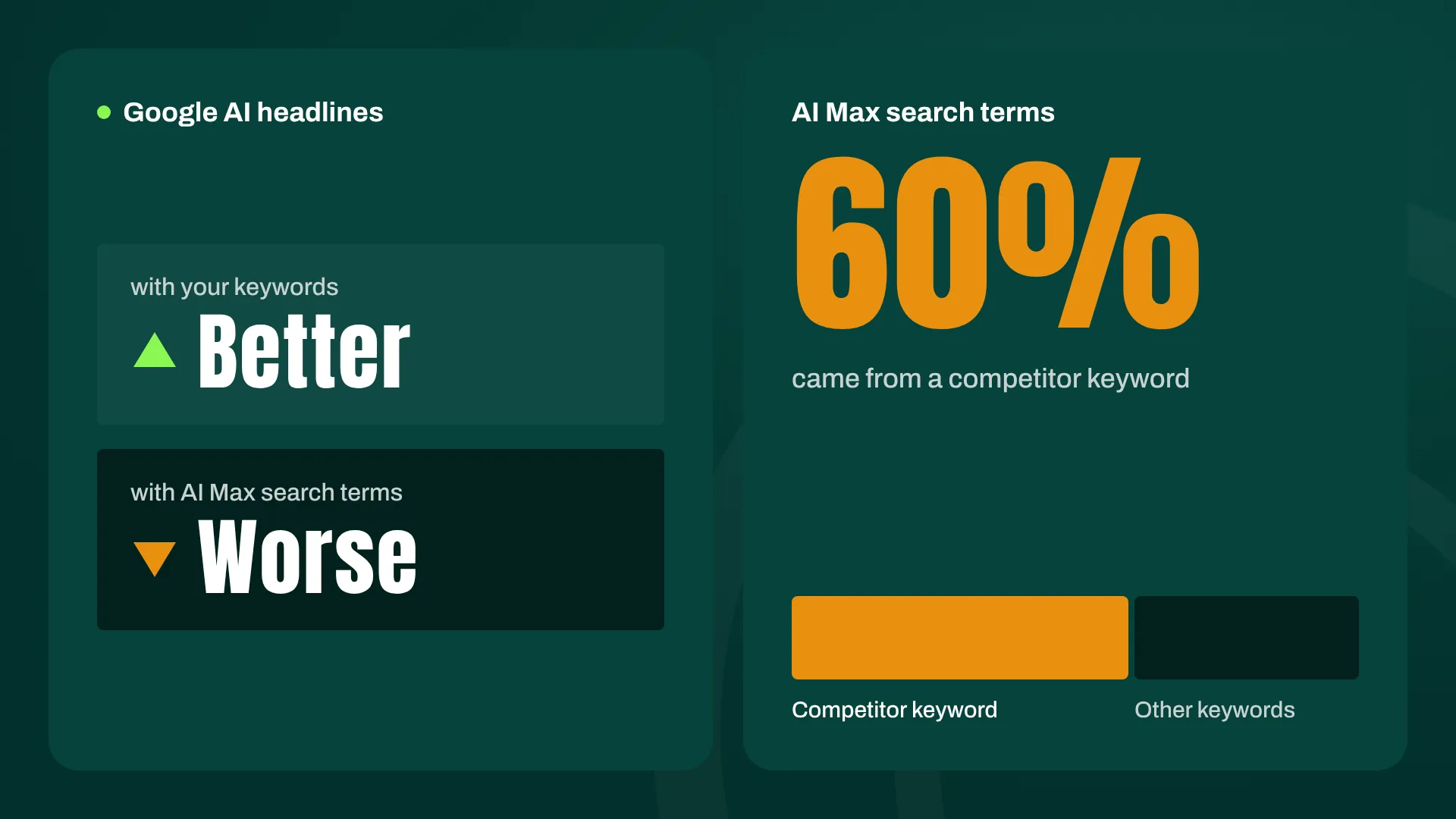
Here, the results surprised us. The AI headlines did better when combined with our existing keywords than when combined with AI Max search terms. That’s the opposite of what I expected, since I assumed Google’s copy would shine on the long-tail queries it found itself.
When we dug into it, the explanation was clear: 60% of the AI Max search terms came from a competitor keyword. Our own headlines performed better on that traffic, which makes sense. Writing compelling copy for someone searching for a competitor requires positioning, and that’s not something AI Max does well yet.
Without that segmentation, we’d have concluded “AI headlines are 20% worse” and moved on, without ever seeing that the problem was concentrated in competitor traffic.
4. Is AI Max Good at Finding Better Landing Pages?
Landing pages are more complicated to evaluate than they should be, because the elements of AI Max don’t operate independently. If Google picks a new landing page but pairs it with a static headline you wrote, or with a keyword you chose for a different page, you should expect poor performance most of the time. The ad promises one thing, the page delivers another, and the user bounces. Usually that means the pieces don’t fit together, and it says little about whether Google picked a good page.
So you can’t read the landing page source column on its own. A Google-selected landing page combined with your headline and your keyword is a different test from a Google-selected landing page combined with an AI headline on an AI Max search term. The first is often set up to fail. The second is the scenario where AI Max is actually doing what it was designed to do: matching a new query, writing copy for it, and sending the user to a relevant page.
To read the report, cross the landing page source with the headline source and the search term source. Then judge Google’s landing page choices primarily where the surrounding elements are coherent, rather than penalizing them in combinations that were never going to work.
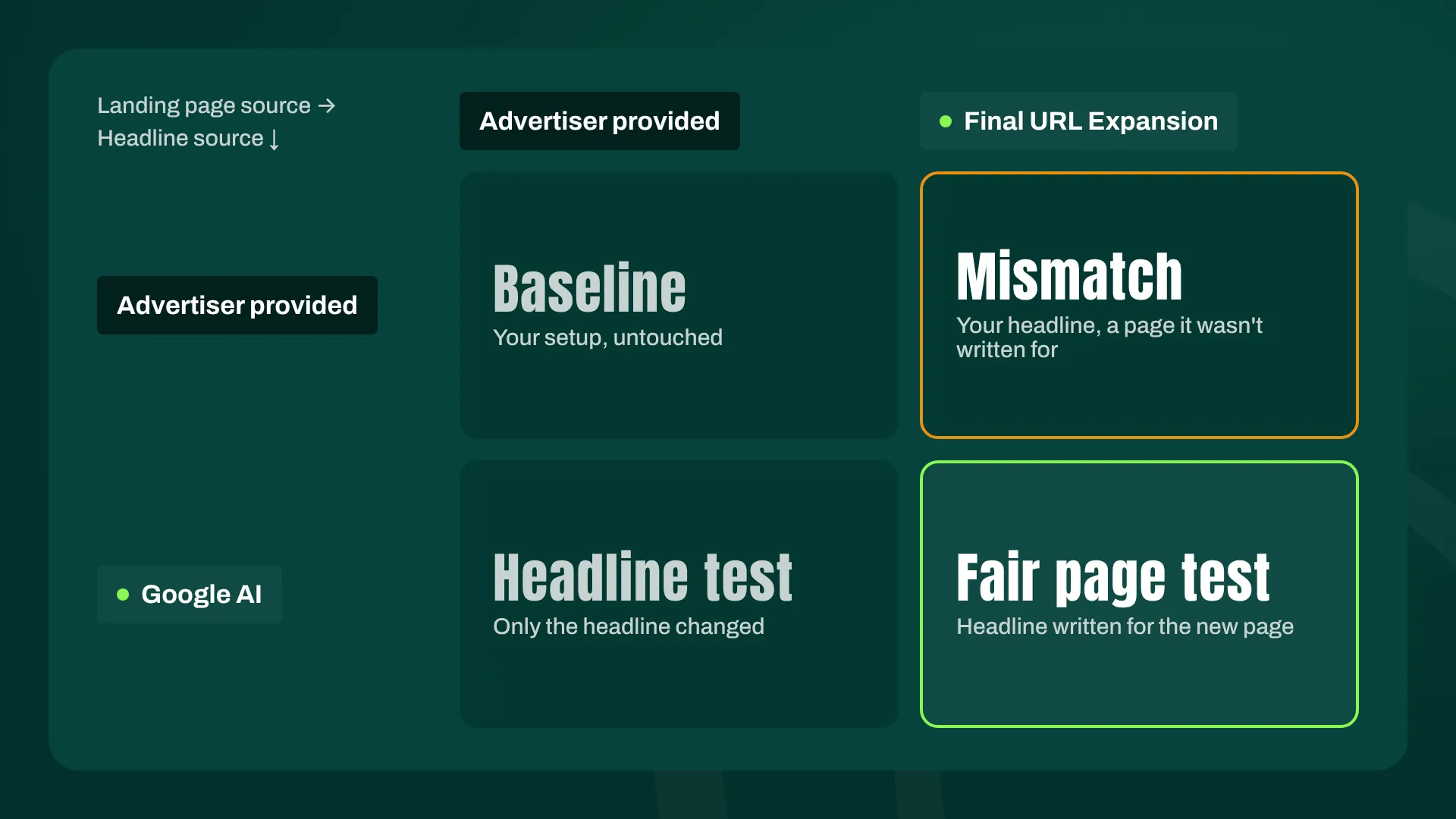
It’s a tad more work, but “AI Max picks bad landing pages” and “AI Max picks bad landing pages when it’s forced to work with mismatched copy” lead to completely different optimizations.
Turning Your AI Max Audit Into Optimizations
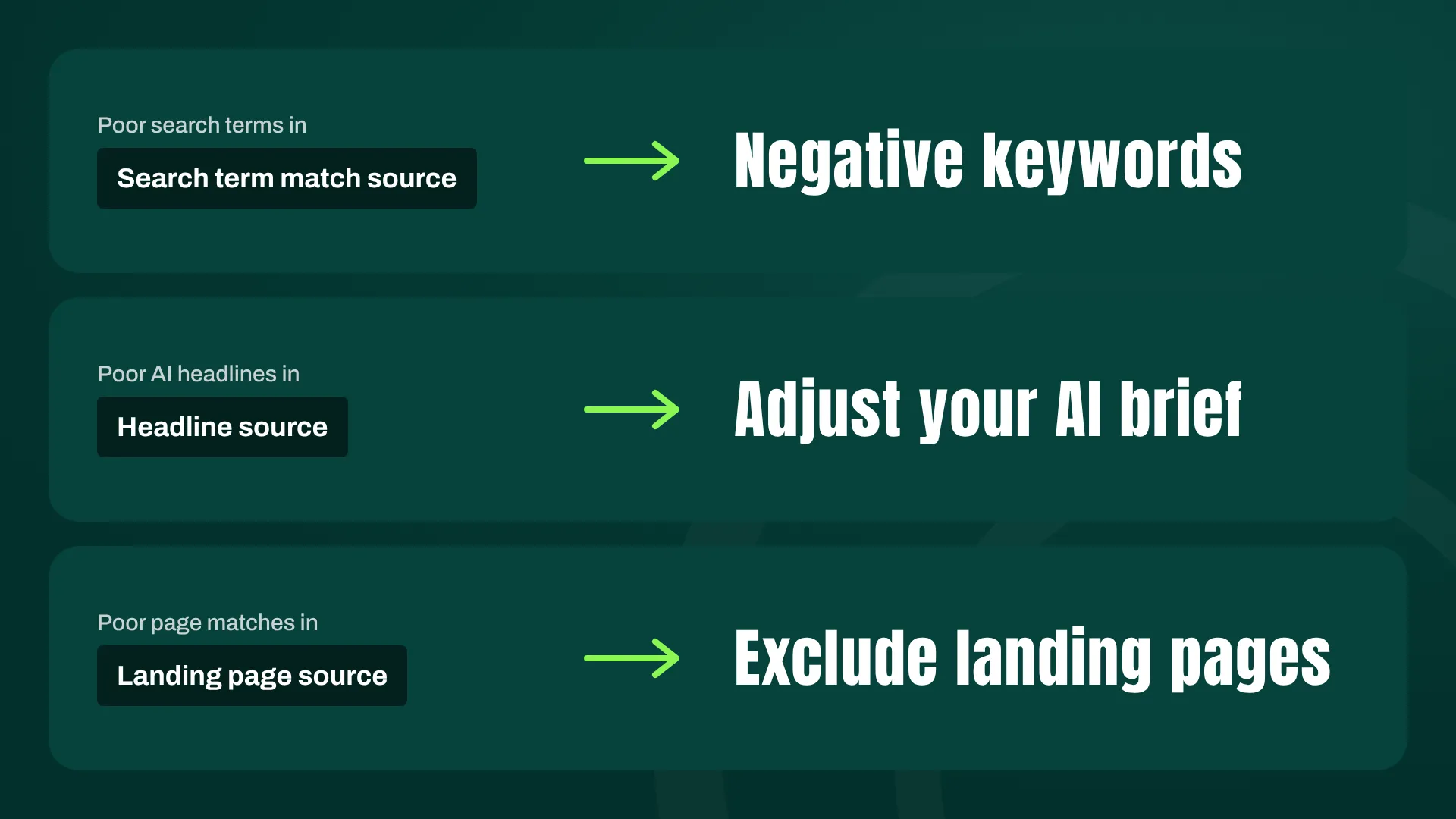
An audit is only worth doing if it changes what you do next. Fortunately, each finding maps directly to a specific lever:
- Poor search terms → Add negative keywords
- Poor AI headlines → Adjust your AI brief
- Poor landing page matches → Exclude landing pages
Each part of AI Max can be steered independently, which is why you need to evaluate each part independently.
Different Campaign Types Need Different AI Max Settings
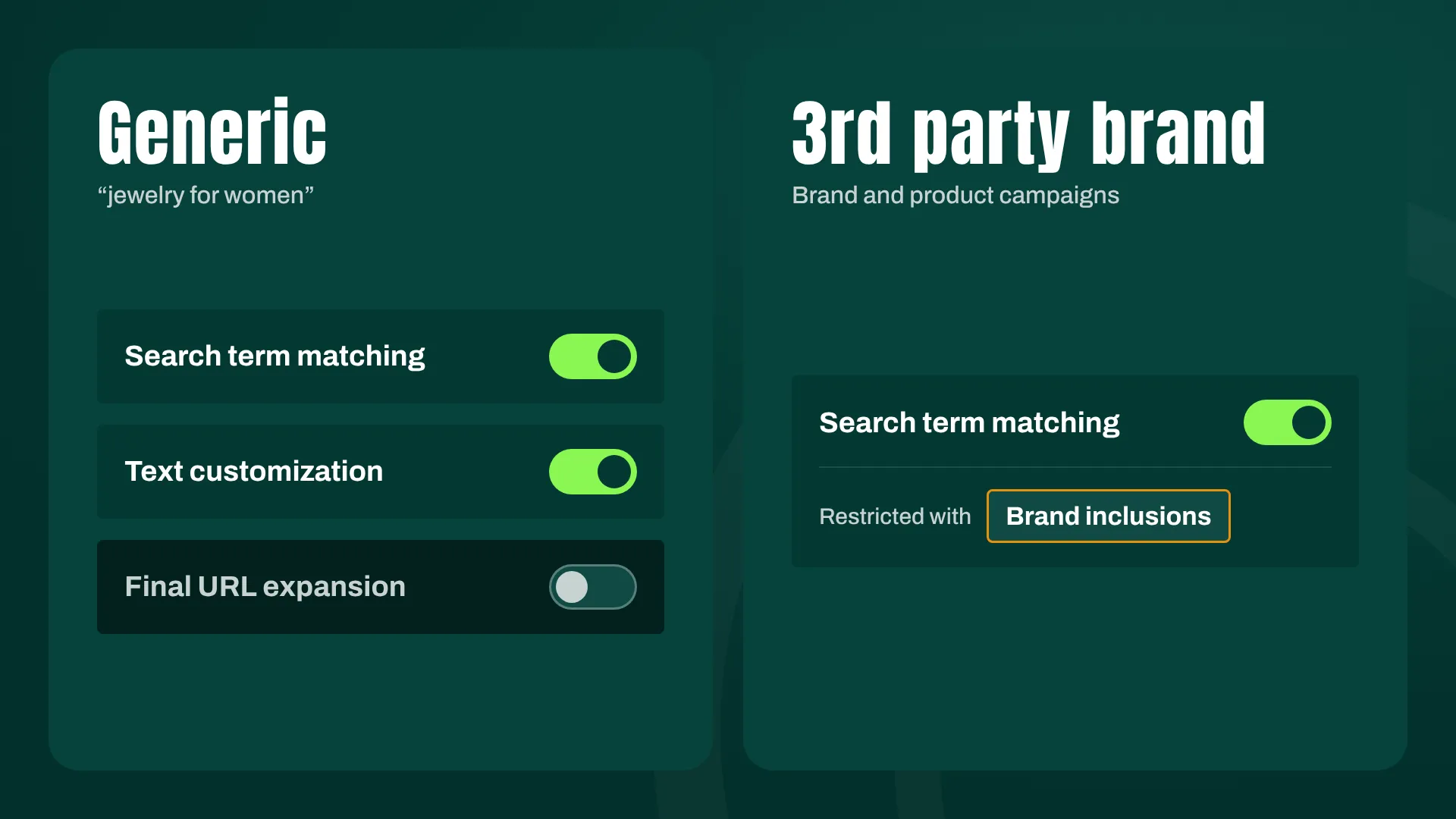
The biggest takeaway from our testing was how differently the components of AI Max performed depending on the campaign type.
Generic campaigns (think “jewelry for women”) benefited from search term expansion and AI headlines, but performed poorly with the new landing pages. So we turned off landing page expansion for those campaigns and kept the rest.
Third-party brand campaigns performed poorly on search term expansion, because too much non-brand traffic started showing up. A brand campaign that pulls in generic traffic is no longer a brand campaign. So we applied brand inclusion rules to keep the expansion on a short leash.
Neither fix is complicated, but both required evaluating each component of AI Max separately instead of treating it as a single on/off switch.
Why Most Advertisers Are Giving Up on AI Max Too Early
Too many advertisers turn it on, see that it doesn’t work great out of the box, and turn it off again. Imagine doing that with any other campaign type. Nobody launches Shopping campaigns, skips the feed optimization, ignores the search terms, and then declares Shopping “doesn’t work.” Yet that’s exactly how AI Max is being judged in a lot of accounts.
To be clear, AI Max has some serious flaws. The incrementality is lower than Google would like you to believe, the AI headlines struggle with competitor traffic, and the landing page selection can backfire in generic campaigns. But it’s still a work in progress, and when you combine it with deliberate optimizations, you can get pretty decent results.
The Real Reason to Get Good at AI Max Now
There’s also a strategic reason I’m investing time in this. I believe the true value of AI Max will show up when we get ads in AI Mode.
The ads in ChatGPT are, in my opinion, a recipe for ad blindness. They look and feel like banners. We’ve had 20 years of online advertising to learn what works, and ChatGPT has essentially recreated the Display Network. (Yup, I’m old enough to remember when banner blindness was the hot new problem. It wasn’t fun then either.)

That’s where Google has a huge advantage. AI Mode is built on the search intent and ad infrastructure Google has spent two decades refining, and AI Max is the bridge into it. When Google turns on that faucet, I want to be there with campaigns that are already tuned and understood.
You should too. And that starts with auditing what AI Max is doing today, instead of switching it off and hoping the problem goes away.
[TL;DR]
- Google fixed AI Max reporting: the new Landing page source, Headline source, and Search term match source columns live in the Search Terms report under “Search terms and ad combinations” (and via MCP/API).
- Audit AI Max in four steps: overall performance (by campaign type and over time), search term quality and incrementality, AI headline performance, and landing page matching.
- Check incrementality, not just performance: in our example, AI Max POAS was only 10% below our main keywords, but only about 18% of its spend went to search terms we didn’t already cover.
- Always segment deeper: AI headlines looked 20% worse at first glance, but the real driver was competitor search terms, where our own copy outperformed Google’s.
- Configure AI Max per campaign type: we kept expansion and AI headlines but turned off landing page expansion for generic campaigns, and applied brand inclusion rules for third-party brand campaigns.