I’ve switched countless Performance Max campaigns to Standard Shopping and seen performance improve. The process is fairly simple, but there are a few mistakes I see happen all the time, especially if you’re not used to making the switch. Get it wrong, and you can kill your ROAS overnight. Get it right, and you unlock a new level of control and performance.
So, stick with me. I’ll show you how to diagnose your current setup, transition without lighting your budget on fire, and avoid the three most typical reasons I see agencies fail when moving away from PMax.
Go Beyond the Article
Why the Video is Better:
- See real examples from actual client accounts
- Get deeper insights that can’t fit in written format
- Learn advanced strategies for complex situations
Before You Flip the Switch: 3 Critical PMax Checkpoints
Before making any moves, you need to understand what’s actually driving results in your PMax campaign. This isn’t optional. Skipping this step is the primary reason why so many attempts to move to Standard Shopping end in failure. We have three things to look out for.
Checkpoint #1: Analyze Your Channel Breakdown
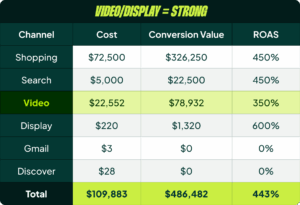
First, pull up your channel breakdown. It doesn’t matter if you use a script or the built-in Google Ads report; you just need to see where your conversions and spend are coming from. You’ll see a mix of Search, Shopping, YouTube, Display, and maybe some Gmail and Discover.
Here’s the most important part: If Shopping is doing all the heavy lifting, you’re definitely fine to switch. But if Search represents a significant portion of your conversions, you need to dig deeper. The same goes for YouTube and Display. If they are driving solid conversions, you can’t just drop them. You’ll need to plan for standalone campaigns to take over that volume or retain PMax without any product listings to handle it.
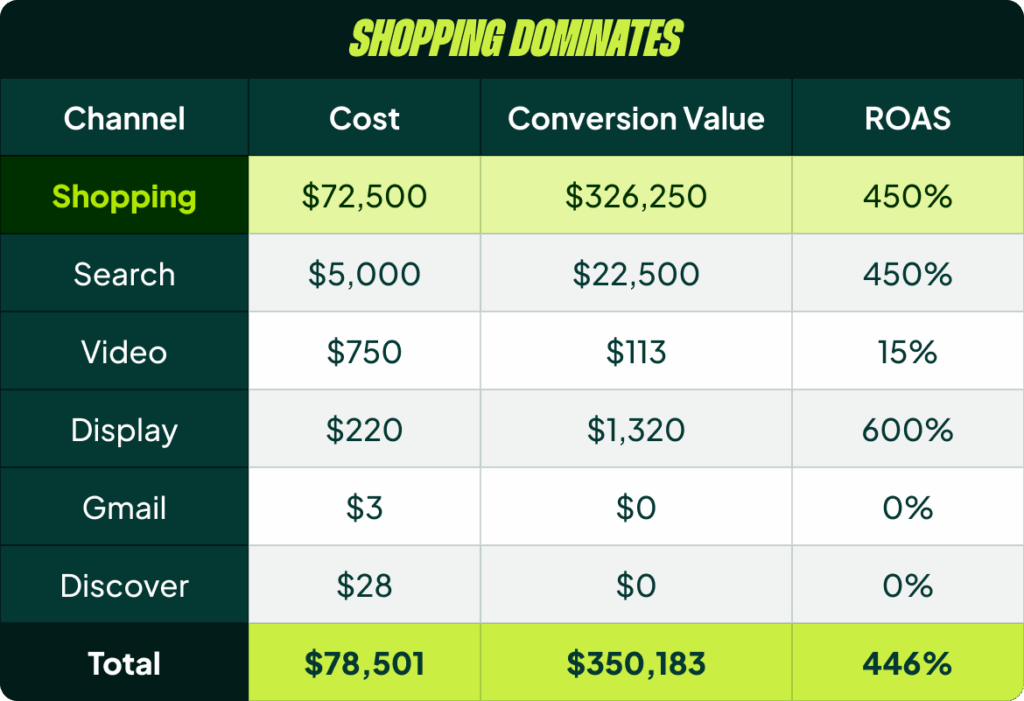
In most cases, you’ll find the bulk of the spend goes to Shopping anyway. Your main job here is to verify that and see how much is happening in Search, which leads us directly to the next point.
Checkpoint #2: Isolate Your Brand vs. Non-Brand Performance
This is critical. You absolutely must know how much of your ROAS is coming from branded terms in both Search and Shopping. This breakdown is the single most important factor for setting the correct ROAS target once you transition to Standard Shopping.
I can’t emphasize this enough. This is where most people get it wrong. They look at their blended PMax ROAS, apply it to a new non-brand Standard Shopping campaign, and wonder why performance craters. I’ll show you a foolproof way to get around this in the transition section below.
Checkpoint #3: Check Your Conversion Volume (The Algorithm’s Fuel)
If you’re getting fewer than 100 conversions per month inside PMax, be careful. If you’re under 30, you’re basically flying blind. The algorithm will have almost nothing to work with when you switch to Standard Shopping, and it isn’t going to magically outperform PMax. You’ll have the same data scarcity problem, but now it’s even worse because you’ve split Search and Shopping apart.
There are two cases where I’d still consider the switch with low conversion volume:
- You’re switching proactively to grow volume. If you know PMax is overspending on non-Shopping channels and you want to force more budget into Shopping, then go for it. Just keep your expectations in check; this isn’t a magic bullet.
- You’re cleaning up a bloated campaign. If you’re removing a bunch of non-converting products that are eating up spend, you can consolidate your budget on what works. This can be a smart move even with lower total conversions.
One final warning: if you have 100 conversions split 60/40 between Search and Shopping, that combination might be the only reason PMax is working at all. Aggregating that data might be what’s keeping it afloat. Splitting them into standalone campaigns might not work. It’s a risk you need to be aware of.
Choosing the Right Standard Shopping Campaign Structure
A successful switch to Standard Shopping is all about finding the right campaign structure. The core concept is to match your structure to your marketing strategy, but without overcomplicating things.
For a basic e-commerce store, a simple Bestsellers vs. Everything Else split might be perfect. For a DTC brand, you might want a “Hero” campaign for your core products and another for add-ons. If you compete heavily on price, a structure based on price competitiveness could work.
The main takeaway here is: don’t overcomplicate it. Choose the simplest setup that matches your strategy and adheres to the minimum conversion thresholds (ideally 100+ conversions per campaign). You can always build out a more complex structure later. One of the best things about Standard Shopping is how easy it is to test new structures once you have a stable baseline.
The Transition Plan: How to Actually Make the Switch
Okay, you’ve done your due diligence. Now let’s talk about the mechanics of the transition.
Setting Your Initial Target & Budget
If your PMax campaign was already excluding branded search, this is easy. Just copy the same ROAS target over to your new Standard Shopping campaign. For the budget, don’t just match the PMax budget setting; match the actual average daily spend. If you want to be extra cautious, start your Standard Shopping budget at 50% of PMax’s average spend and scale up from there.

But what if you have brand traffic mixed in? This is where things get interesting.
The Foolproof Method for Handling Brand Traffic
If you have brand traffic in PMax, you cannot simply copy the ROAS target. You will fail. First, you need to break out your non-brand ROAS.
Here’s what we do:
- Create your new Standard Shopping (for brand) and Search (for brand) campaigns.
- In your PMax campaign, exclude your brand terms.
- Let it run. Your overall PMax ROAS will almost certainly drop.
Let’s say your PMax campaign had a 400% blended ROAS. After you exclude brand terms, you see the non-brand traffic in PMax is actually only hitting a 300% ROAS. The brand traffic now flowing to your new campaigns is hitting 900% or more.
Bingo. Your real target for a non-brand Standard Shopping campaign is 300%, not 400%. By doing this first, you discover the true performance of your non-brand shopping traffic and can set a realistic target from day one.
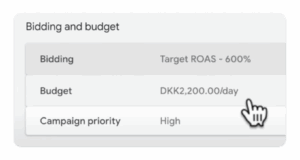
Option A: The Gradual Campaign Overlap (My Go-To)
This is my preferred method. You launch your new Standard Shopping campaigns and run them in parallel with PMax for one to two weeks. Initially, you’ll probably see very little spend go to Standard Shopping (maybe 10%).
Now, you need to force more spend into Standard Shopping by making PMax less competitive. The best way to do this is by gradually increasing the ROAS target on PMax.
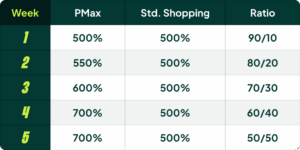
As you do this, you’ll see more and more spend shift to Standard Shopping. Once you’re at or near a 50/50 spend split, pause PMax and let Standard Shopping take over completely. Don’t be tempted to let them run in parallel forever; you’re just splitting data and hurting long-term performance.
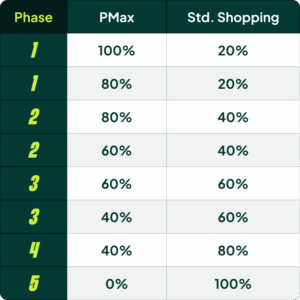
Option B: The Inventory-Based Migration
If you have a massive catalog with thousands of SKUs, you can migrate in phases. The process involves moving chunks of your inventory over bit by bit, always ensuring a slight overlap before removing the products from PMax. For example:
- Move 20% of your SKUs into a new Standard Shopping campaign.
- Run both for a week.
- Exclude those 20% of SKUs from your PMax campaign.
- Add the next 20% of SKUs to Standard Shopping (now at 40%).
- Repeat until 100% of your inventory is in Standard Shopping and PMax is either paused or running without products.
The 3 Reasons Why This Switch Fails (And How to Avoid Them)
I’ve been teasing this, but here are the top three reasons I see this process go wrong when people try to do it themselves.
Reason #3: Your ROAS Target is Just Plain Wrong
This is the main problem. The target doesn’t align with the actual, non-brand shopping performance inside PMax because you didn’t do the brand/non-brand analysis. Or, you forgot to account for the conversions that were coming from the Search channel within PMax, and now that volume is gone.
The Fix: Go back and do your homework. Revisit the channel breakdown and brand split. If you can’t figure it out, just try lowering your Standard Shopping target by 20-30% and see if it gets traction.
Reason #2: You’re Starving the Algorithm with Too Few Conversions
You split your campaigns into a beautiful, granular structure, but now each campaign gets 15 conversions a month. That’s not enough data. As I said before, anything below 100 conversions per month is tricky.
The Fix: Consolidate. Go back to a simpler campaign structure to pool your conversion data. Give Google’s Smart Bidding something to actually work with.
Reason #1: You Chose the Wrong Campaign Structure
This is the big one. You heard about some awesome, complex campaign structure and tried to implement it from day one. It’s too complicated, you’ve split the data too much, and it doesn’t actually align with what performs well in your account.
The Fix: Simplify first. Start with a single, simple Standard Shopping campaign. Once you’ve stabilized performance and are beating your old PMax numbers, then you can start testing more advanced structures.
Can You Run PMax and Standard Shopping Together?
No, not in the way that most people want to. Running the same products in both campaigns to “see what wins” is a terrible idea. You just end up splitting the data and killing the performance of both campaigns. Google thrives on consolidated data and learning.
The only setups that work are when they serve different purposes. For example, you could have PMax for non-brand and a Standard Shopping campaign for brand. Or you could use Standard Shopping as a small, low-priority “fall back” campaign to catch any gaps PMax might be missing. But for your core products, pick one and commit to it.
[TL;DR]
- Do Your Homework First: Before you switch, analyze your PMax channel breakdown, brand vs. non-brand split, and total conversion volume. This is non-negotiable.
- Choose a Simple Structure: Match your campaign structure to your business strategy, but prioritize simplicity to consolidate conversion data. Don’t start with a complex setup.
- Transition Gradually: Use either a campaign overlap method (gradually increasing PMax’s ROAS target) or an inventory-based migration to move products over in phases. Don’t just flip a switch overnight.
- Set the Right Target: The most common failure is setting a ROAS target based on blended PMax performance. You must isolate your non-brand Shopping performance to find the true target.