


Most Google Ads accounts I audit are still running a Search setup that belongs in 2020. That’s strange when you think about how much else has changed. We’ve rebuilt how we approach Performance Max, Standard Shopping and Demand Gen. Search is the one channel that still clings to over-segmentation.
That habit actively hurts accounts today, because it works against Smart Bidding, against responsive search ads and against the way Google’s keyword matching actually works.
In this article I’ll walk you through the search campaign structure we use at SavvyRevenue, why the old frameworks no longer hold up, and the five rules we follow to make Search work for e-commerce. The goal is to give the algorithm fewer, clearer decisions to make, so it makes better ones.
Go beyond the article
Why the video is better:
- See real examples from actual accounts
- Get deeper insights that can’t be conveyed in writing
- Learn advanced strategies for complex situations
Why Every Old Search Campaign Structure Is Broken
Let me start with a core belief of mine: no campaign structure is perfect for every case. I’m focusing on e-commerce here, but most of this applies elsewhere too, because it all comes back to the same algorithms running underneath Google Ads.
With that caveat in place, let’s go through the frameworks the industry has relied on over the years.
SKAGs Were Built for a Bidding Model That No Longer Exists
Single Keyword Ad Groups made a lot of sense back in the day. Mobile bid adjustments lived at the ad group level, so putting one keyword in each ad group gave us a mobile bid adjustment per keyword. That was the whole reason we did it. (Yes, I built my fair share of SKAG accounts too.)
Today that advantage is gone, and what’s left is the mess. SKAGs make ad testing nearly impossible, and campaign organization falls apart when people take the concept literally, which most people still do.
STAGs Put the Wrong Keywords Next to the Wrong Ads
Single Theme Ad Groups (a horrible name, by the way) group keywords loosely by theme. In practice, that usually produces an irrelevant relationship between keyword and ad. Lead gen might have a case for it, since you can run many more ads under a single theme. For e-commerce, it mostly means people search for one thing and see an ad about something adjacent.
SLAGs Leave Too Much Room for Interpretation
Single Landing Page Ad Groups are very similar to STAGs, and from an e-commerce standpoint, I consider them useless. Online stores have far too many keywords that could reasonably point to multiple pages. If your framework allows keyword A to live in three different places in the account, you’ve built an interpretation exercise, and everyone on the team will interpret it differently.
Hagakure Has a Bad Name and the Right Idea
Then there’s Hagakure (however you prefer to pronounce it). It’s a name nobody understands, and to me it’s mostly a marketing ploy. But the underlying concept, consolidating into fewer, broader ad groups, is fundamentally where we’ve ended up.
So the scorecard: SKAGs, STAGs and SLAGs don’t work. The consolidation idea behind Hagakure does, and you don’t need the branding to use it.
What Over-Segmentation Looks Like in a Real Account
Here’s an account I came across recently. It’s in Danish, but the pattern is easy to spot. There are separate ad groups for “Christmas lunch delivered,” “food for Christmas lunch,” “Christmas lunch menu,” “order Christmas lunch” and many more.
These are all the same search intent. When you open the ads, they aren’t meaningfully different either. The result is roughly 150 ad groups where someone has to review CPCs and bids one by one (this account runs manual bidding), and that takes far too long for no real benefit.
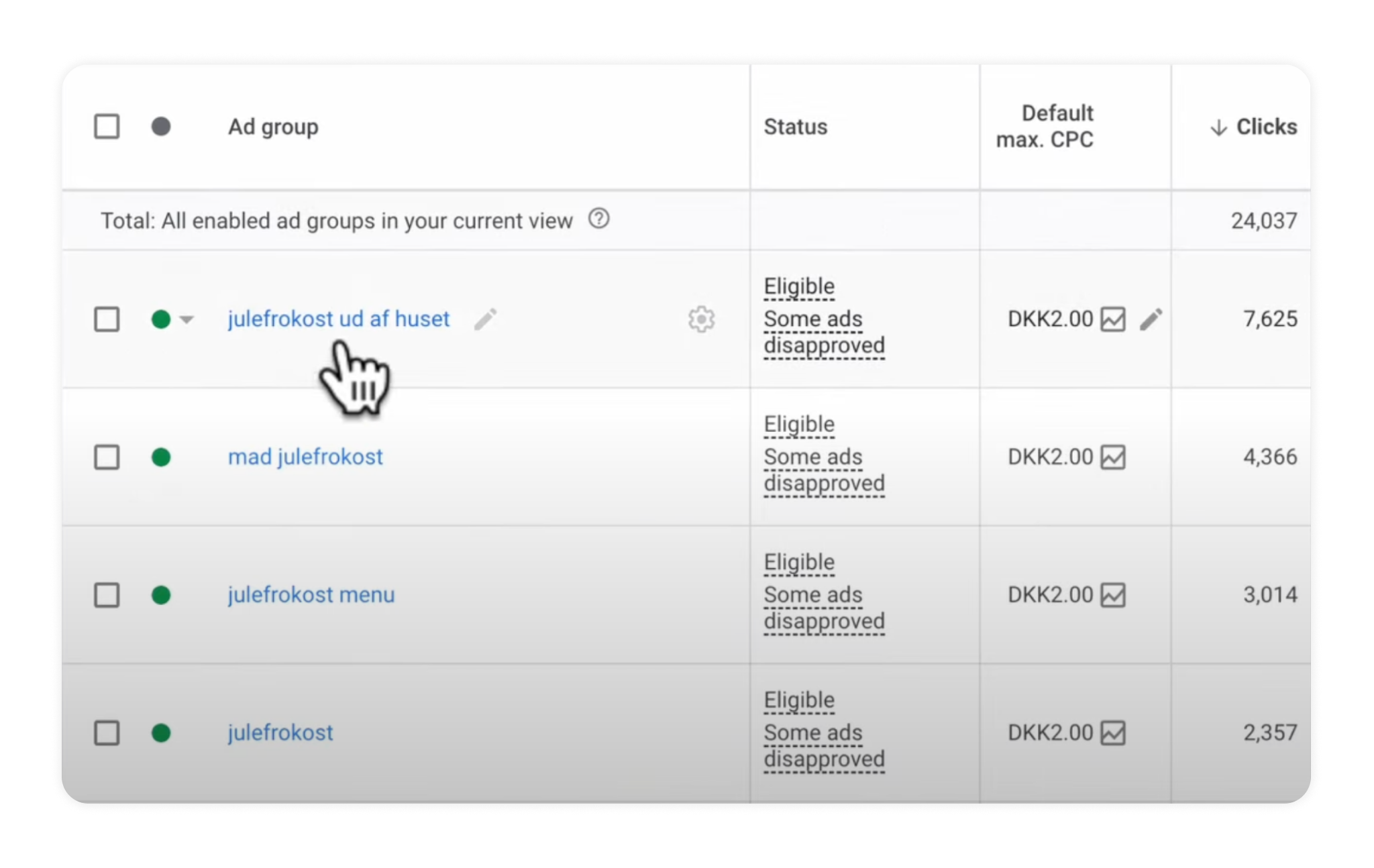
The bigger problem is control, or the lack of it. Because the same search term can match this ad group, that one and three others further down, there’s no real way to know which keyword is responsible for the search term entering the auction. Close variant matching means there are simply too many entry points for the same query.
Smart Bidding Enters the Same Auction From Multiple Places
Every time I open an account structured like the one above, Smart Bidding can reach the same auction from several different places in the account, and that confuses it. If you take one thing from this article, take that.
Think back to manual bidding. If you raised the bid in one ad group, lowered it in another, raised it in a third and lowered it in a fourth, and the same search term could enter through any of them, you’d struggle to understand what was happening. Smart Bidding struggles with exactly the same thing. It’s just better at hiding it from you.
The fix is structural: limit the number of places Smart Bidding can enter any given auction from.
That’s what the five rules below are designed to do. This is routinely what we implement at SavvyRevenue, and in many of our accounts it means Search outperforms Shopping, largely because most agencies are still running Search the 2020 way.
1. Keep It Tight
Use as few keywords, as few ads and as few ad groups as you can get away with.
The whole framework revolves around one relationship: the search term matches the keyword, which matches the ad, which matches the landing page. As long as those four pieces fit together, the structure works. That’s basically always been true, and it matters far more now.
You have one primary goal: limit the number of auction entry points in your account. The secondary goal is to concentrate traffic into as few responsive search ads as possible. Google is algorithmically testing which headlines perform best, and that needs data. Every extra ad group splits the data further and makes the testing worse. (You can use campaign-level assets and headlines to soften this, but most advertisers don’t, so I’ll save that conversation for another day.)
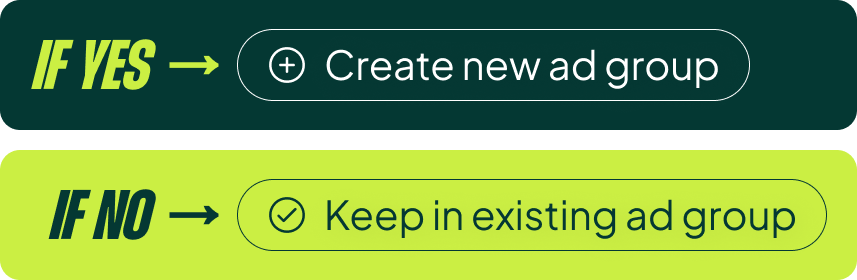
When deciding whether a keyword gets its own ad group, ask yourself one question: will I write a meaningfully different ad for this keyword? If yes, create a new ad group. If no, add it to the existing one.
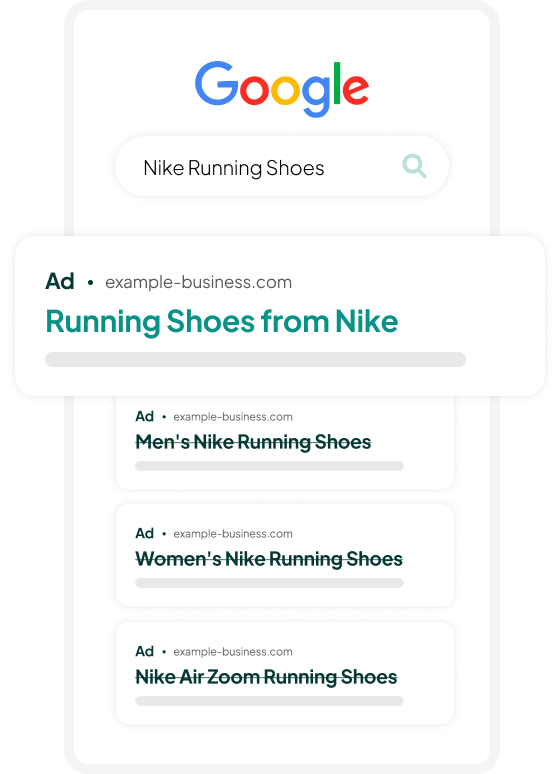
Nike Running Shoes
Take an ad group for “Nike running shoes.” The keyword “running shoes from Nike” fits perfectly: same ad, same landing page.
But “men’s Nike running shoes,” “women’s Nike running shoes” and “Nike Air Zoom running shoes” don’t belong there. Each of them deserves a different ad and points to a different landing page. Putting them in the same ad group breaks the search term → keyword → ad → landing page chain.
Marathon Running Shoes
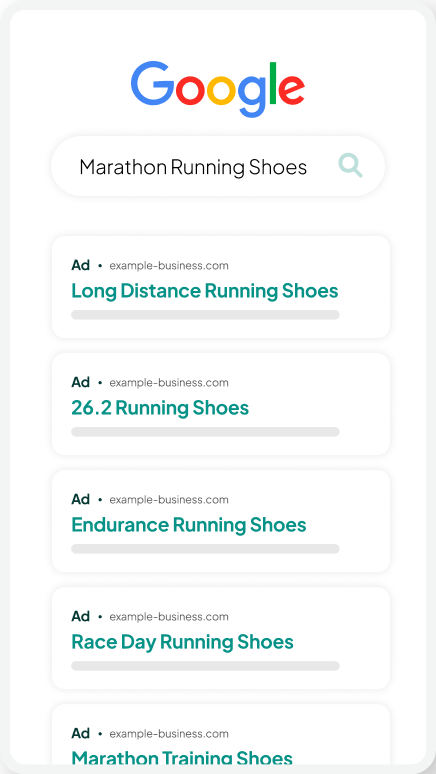
Now look at an ad group for “marathon running shoes” with five additional keywords: long distance, 26.2, endurance, race day and marathon training shoes. All five can go to the same marathon running shoe landing page with the same ad.
If any of those keywords had meaningful search volume on its own, I’d consider splitting it out so the headline could say “endurance running shoes” or “race day running shoes.” That can matter. But in this case the volume isn’t there, and keeping everything together actually feeds the system better. If I need the keyword in the headline, dynamic keyword insertion handles it.
The same logic applies to trail running shoes. “Off-road running shoes,” “mountain trail running shoes” and “all-terrain running shoes” all fit the same ad and land on the same subcategory page, so they share one ad group.
Lightweight Running Shoes
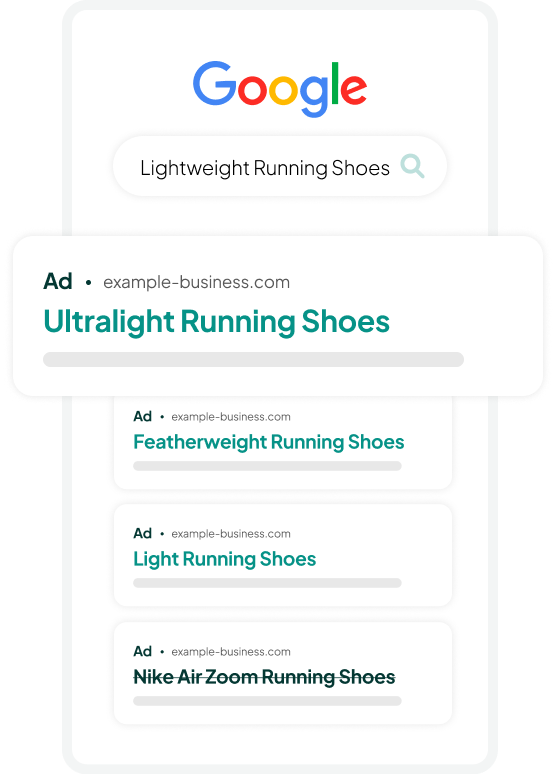
This one requires knowing the category. An ad group for “lightweight running shoes” can comfortably hold ultralight, featherweight and light running shoes.
Minimalist running shoes, on the other hand, get pushed out. Technically, minimalist shoes are lightweight. But anyone who knows running shoes knows minimalist is a completely different category. Someone searching for minimalist running shoes who sees an ad for lightweight running shoes isn’t getting what they asked for, so minimalist gets its own ad group.
The decision rule handles this case well, because it ignores word similarity and asks whether the person searching expects a different ad and a different page.
2. Skip Keyword Variations
We all love to complain about Google’s keyword matching. (How on earth did it show my ad for that?) Instead, flip the question: how can I take advantage of it?
The point of this rule is to lean into Google’s matching rather than fight it, and to drastically lower the number of keywords you need.
This is where most Search accounts are stuck in 2020. For a single intent, roughly 80% of the accounts I see would do this:
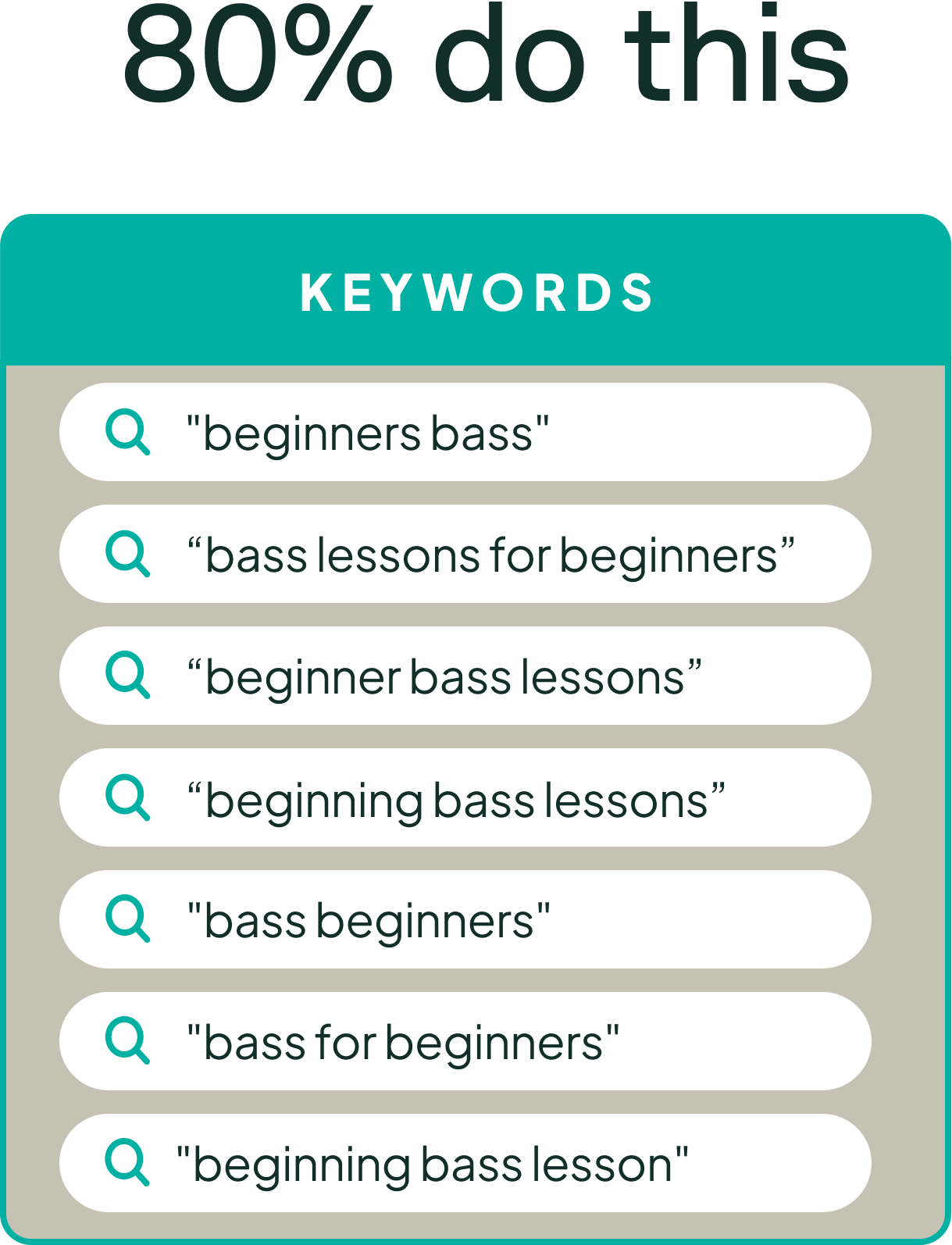
Beginners bass, bass lessons for beginners, beginner bass lessons, beginning bass lessons, bass beginners, bass for beginners, beginning bass lesson. Then all of them again in exact match. And if someone read the wrong LinkedIn post, all of them again in broad match.
Then everyone wonders why Smart Bidding has a hard time figuring out where to enter the auction and how much to bid. Twenty-one keywords competing for the same handful of search terms is exactly the multi-entry problem I described above, just built deliberately.
What we implemented for this client instead was two keywords: “bass for beginners” and “bass guitar for beginners.” Google’s matching covers the rest.
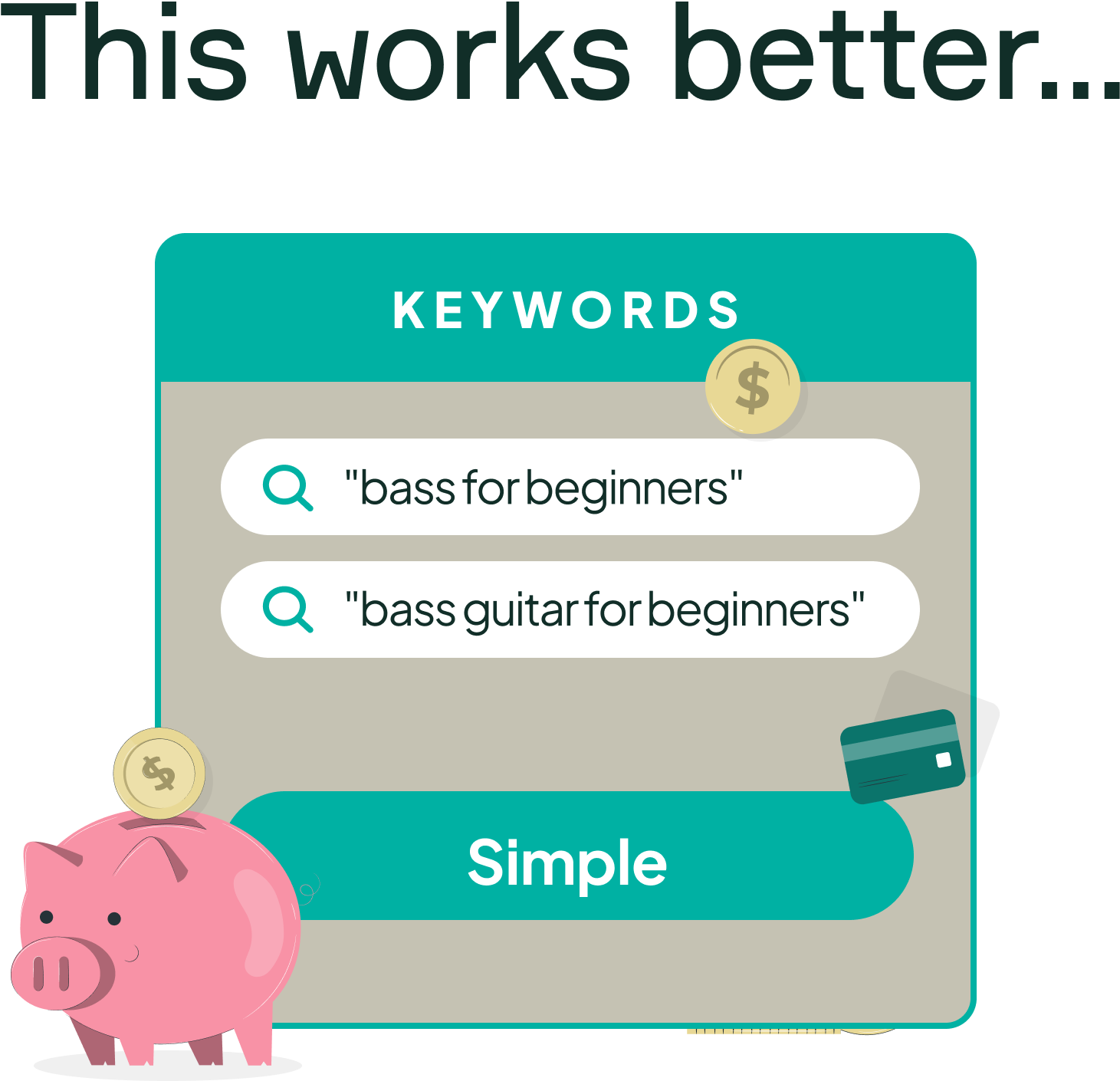
The result: 3x the volume at a 3x lower cost per conversion. Cutting down to two keywords concentrated the data and removed the internal competition, so Smart Bidding had one clear path into each auction.
3. Phrase and Exact Match Work Just Fine
There’s a lot of noise about match types. Some people insist you need broad match. Others say exact only. I even have good friends who tell me running phrase match is crazy. I just don’t see it.
I think about the match types like this:
- Exact match: what you see is what you get.
- Phrase match: extra cover. It captures far more variation, and from an e-commerce perspective that’s usually a good thing.
- Broad match: for scale, and only added toward the end, once we know we need more volume and have the profit and ROAS room to support it.

Technically, you could run phrase match alone, because it covers your bases. I still prefer running phrase and exact together, for a practical reason: it lets me quickly see whether the majority of traffic flows through my exact match keyword or through looser variations within phrase match. That tells me a lot about whether my keyword choice actually reflects how people search.
4. Write Meaningful Headlines, or None at All
Once you’ve chosen your keyword in Search, you only have two levers left to improve performance: bid differently or write a better ad. Smart Bidding handles most of the first. So write better ads.
I prefer a structure where specific headline slots are reserved for specific angles:
- Headline 1: the keyword, maybe with something small added.
- Headline 2: the keyword plus a modifier (most popular, on sale, 2025, whatever fits).
- Headlines 3-4: price or sales focused: the current offer, some form of urgency.
- Headlines 5-6: e-commerce trust factors: fast shipping, free returns, stock status, guarantees, member discounts.
- Headlines 7-8: social proof: number of reviews, popularity, awards.
- Headlines 9-10: seasonal. I like these a lot, because they always give you something new to write, and seasonal messaging performs well in ads.
- Headlines 11-12: benefit focused: the practical or emotional payoff for the user.
- Headlines 13-15: feature focused, for high-SKU categories where something specific deserves highlighting.
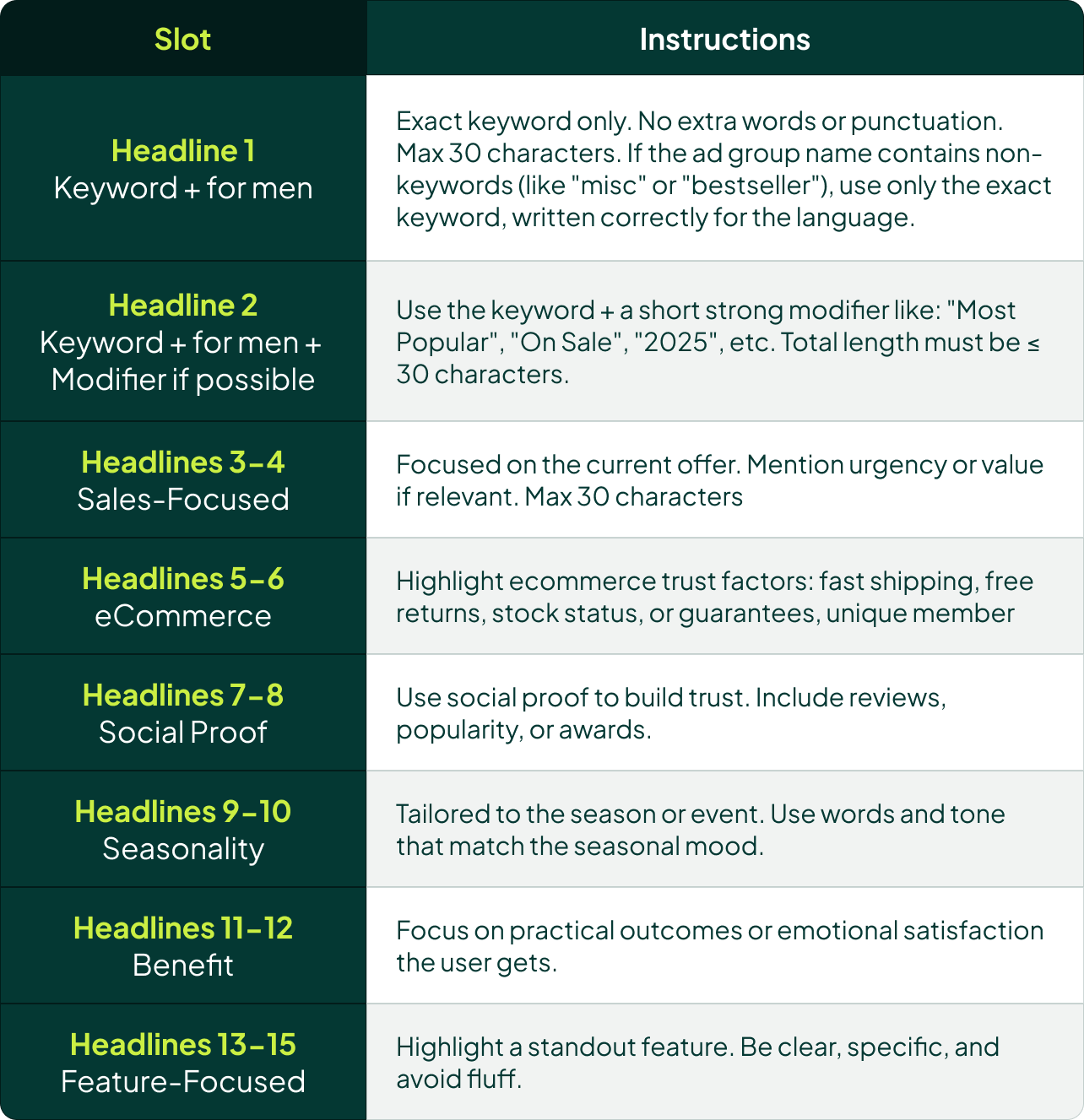
The feature headlines need to be clear and specific. No fluff. For a slim wallet, something like “The Wallet That Fits in Your Front Pocket” does the job. “Premium Quality Craftsmanship” does not.
Treat the framework as a menu to fill only where you have something to say. Sometimes we use all 15 slots. Sometimes we use five. It depends on how much we have to say that’s different. Some clients are really just a price play, so that’s where we focus. After a while, we might learn that social proof doesn’t move the needle for a specific client, and we remove those headlines entirely. It’s rare that we run every slot all the time.
That’s the “or none at all” part of this rule. A filler headline takes impressions away from the headlines that actually sell, and it dilutes the data Google uses to figure out what works.
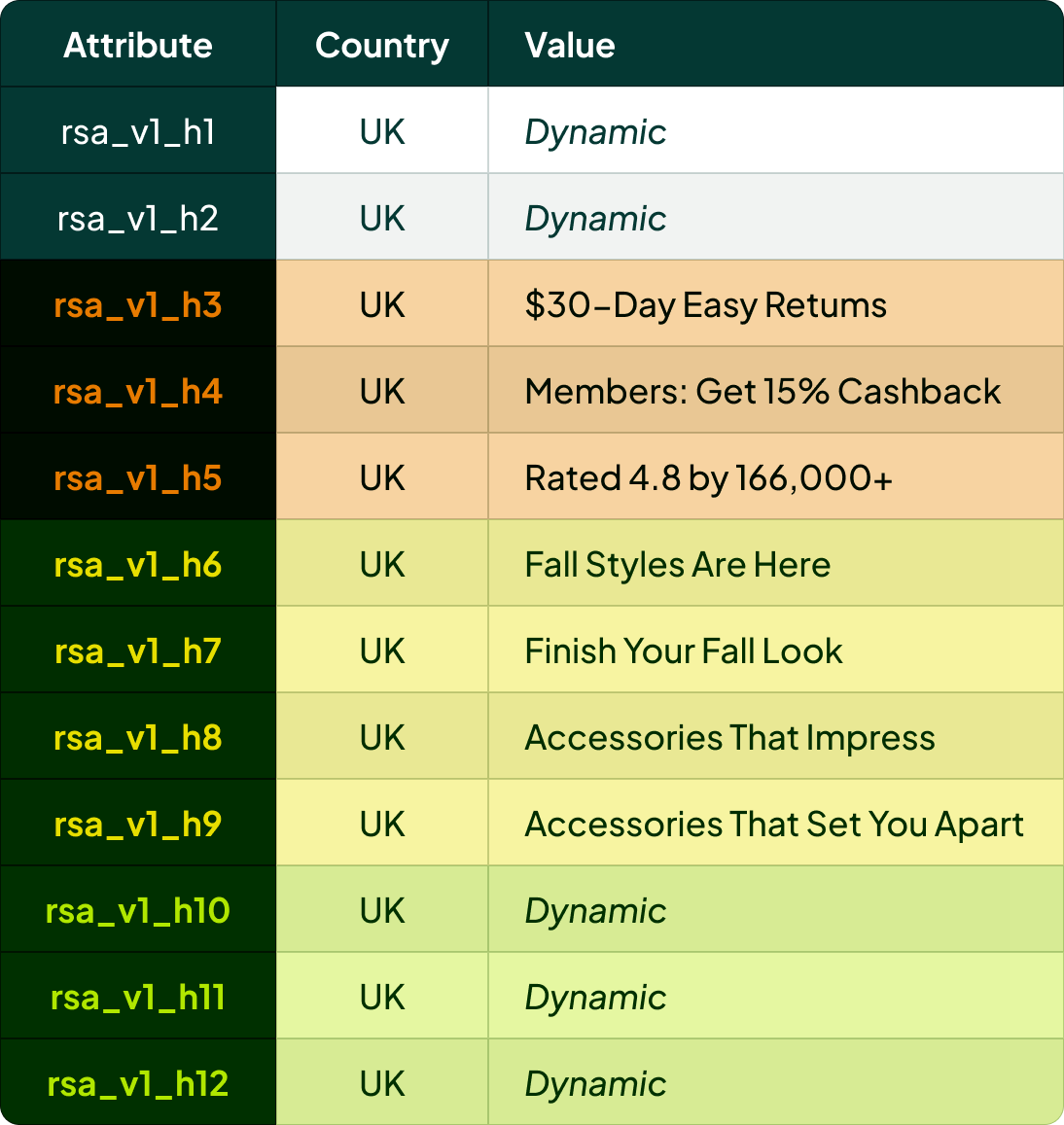
In a real client account in the UK, headlines 1 and 2 are dynamic keyword. Headlines 3 and 4 are “30-Day Easy Returns” and “Members: Get 15% Cashback” (those are fallback values, since dynamic sale values run in those slots). Headline 5 is “Rated 4.8 by 166,000+.” The seasonal slots carry fall messaging like “Fall Styles Are Here,” “Finish Your Fall Look,” “Accessories That Impress” and “Accessories That Set You Apart.” Headlines 10-12 are dynamic per category.
5. Feed First-Party Audiences
Keep this one simple. We feed four audiences into Google:
- Website visitors
- All converters
- Email subscribers
- Email customers
Send those in and Google will know what to do with them. With very few exceptions, every other audience is irrelevant for e-commerce Search. Unless you plan to treat an audience differently (write different ads for it, bid on it differently) it doesn’t add anything. And most advertisers don’t have the data volume to do that meaningfully anyway.
The Core Search Setup for E-commerce
With the rules in place, the core setup we build is three campaigns:
- Category keywords
- Category + brand keywords
- Dynamic Search Ads
In most accounts, 80-90% of first-round Search volume comes from these three campaigns. Everything else is an add-on, depending on the niche:
- Generic keywords
- Category + standard filter (color, material and similar)
- Category + niche filter
- Product keywords, toward the end
Niche filters are whatever matters specifically in that vertical. For a bike shop we work with right now, that’s tire size and number of gears.
Don’t Sleep on Generic Keywords
This is especially true for bigger brands. I spoke to an advertiser recently who told me they only run long-tail. So I asked: in Scandinavia, are you the top choice in your niche? Yes, they said, we’re number one.
Then why shouldn’t you own the number one generic keyword in your niche? Avoiding it doesn’t solve anything. The job is figuring out how to make it profitable.
What This Search Campaign Structure Looks Like in Real Accounts
Again, the core of all of this is keeping it simple.
In one account, the campaign overview follows the main categories: apparel, bags, eyewear and jewelry. Jewelry accounts for 50% of the business’s revenue, so it’s split into its own campaigns to give it more room, for five campaigns in total, plus a Dynamic Search Ads campaign.
Open the bracelets ad group and you’ll find the core keyword “bracelets,” followed by bracelets plus color and material filters. Every keyword runs in phrase and exact, and each one has its own final URL at the keyword level, so it lands on exactly the right filtered page. The ads use dynamic keyword insertion, which means we get the keyword into the headline without building an ad group for every keyword. Some of these keywords wouldn’t have enough volume to justify their own ad group anyway, and this setup lets them share data.
The second account is a German swimwear retailer. Here, the major brands get their own ad groups: Arena, Speedo, Aqua Lung and so on. Every smaller brand on the site goes into a single miscellaneous ad group, because none of them is big enough to deserve its own, and I’m not going to create a mess just to be thorough. A brand keyword goes straight to that brand’s swim caps page.
Both accounts follow the same chain: the search term matches the keyword, which matches the ad, which matches the landing page. When that holds, keywords share an ad group. When it doesn’t, they get a new one.
[TL;DR]
- Old frameworks like SKAGs, STAGs and SLAGs are broken for e-commerce; consolidation (the idea behind Hagakure) is where Search structure has landed.
- The core problem is multiple entry points: when the same search term can enter the auction from several places, Smart Bidding gets confused and performance suffers.
- Keep it tight: only create a new ad group if you’d write a meaningfully different ad, and make sure search term, keyword, ad and landing page all match.
- Skip keyword variations and lean into Google’s matching. Cutting one client’s keyword list down to two keywords delivered 3x the volume at a 3x lower cost per conversion.
- Run phrase and exact match (broad only for scale), assign each RSA headline slot a specific job, and feed in just four first-party audiences.




4 thoughts on “Stop Over-Segmenting: The New Rules for Search Campaign Structure”
Love this so much. Other than your comments about phrase match; it’s way worse than broad match these days. I’ve turned it off for a lot of clients because the amount of horrible matches it gets is just awful.
Hey Nikki! It’s so interesting you say that (I’ve seen you comment on this before). We test phrase vs broad match all the time, and don’t get to the same conclusion.
I wonder if there is something around client type, bidding approach, campaign structure or something else that causes us to see phrase match continue to beat broad match.
It’s not that it outright beats broad match. It’s more that when we enable and analyze broad match, then it doesn’t increase our volume considerably, but opens the door for the same search term to show different places in the account — which lowers the conv. rate on that search term.
Hi Andrew, this is super insightful and has given me a lot of clarity with some older accounts that have those outdated, very granular, campaign/ad groups structures that work against you nowadays.
When you talk about exact and phrase match keywords, I’m assuming these now just go into a single ad group rather than having campaigns split by match types? We’ve been gradually dropping phrase campaigns/ad groups entirely over time but this is making me think again 🙂
I’m glad you liked it!
Reg. phrase/exact: Exactly. No more individual ad groups or campaigns per match type 🙂
Even with broad match we prefer testing inside existing campaigns. It’s how the system works best.