Dansk
Dansk
In my experience, there are three ways to lose Black Friday.
The first is bad prep. You walk into Black Week with the wrong conditions in the account (targets that are too strict, bid limits that block your adjustments, budgets that cap out at 2pm), and no amount of clever bidding during the week will fix that.
The second is the most common: you don’t execute well. You don’t know what to look for during the week, so you end up spending too much, too little, or heavily on the wrong days.
The third is the one almost nobody plans for: the week after. If you’re not careful, Smart Bidding will happily burn through your margin on the Tuesday and Wednesday after Cyber Monday. We see this in nearly every account we audit at Savvy. Every single year.
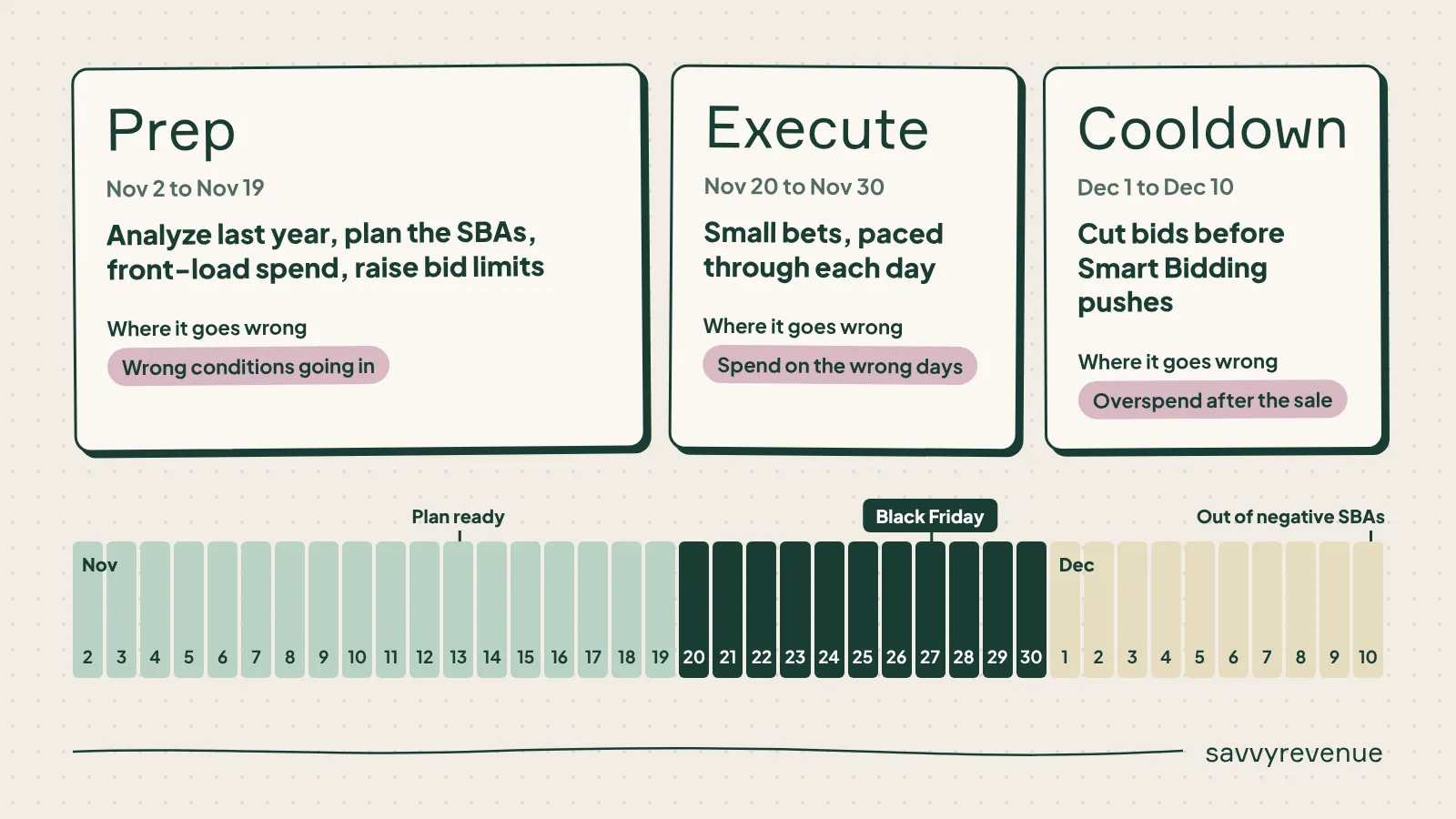
So this article walks through exactly how we run Black Friday at Savvy, in three parts:
- Prep: what to do in the account before the sale, and how to use last year’s data to do it
- Execute: how we bid and pace during Black Week
- Cooldown: how to bring spend down before Smart Bidding overspends
Prep the Account Before the Sale
Everything in this section should be done at least one week before the sale starts. And the biggest part of the prep, by far, is analyzing last year.
Why Last Year’s Data Is Your Best Asset
Black Friday only happens once a year, which is exactly why most advertisers treat it like a coin toss. They show up, crank everything up, and hope.
That’s a mistake. You only get one Black Friday per year, but you can still learn a lot from it. The goal of the analysis is simple: find out, day by day, where you were:
- Too aggressive
- Not aggressive enough
- Right on the money
We’ve built a six-step process to review last year’s performance.
1. Look at All of November, Not Just Black Week
If you only look at Black Week, you’ll conclude that Black Week did all the work. It didn’t.
Front-loading (more on that later) only becomes visible when you zoom out to the full month. Shoppers research and add to wishlists in early November, then buy when the discount drops. If your analysis starts on the Friday before Black Friday, you’re looking at the payoff and ignoring the investment that created it.
2. Find Your Timing Gap (ROAS by Click vs. ROAS by Conversion Time)
This is the step most people skip, and it’s arguably the most valuable one.
Google Ads can report conversions in two ways: attributed to the day of the click, or attributed to the day the conversion actually happened. Compare the two, week by week, across November.
The difference is what I call the timing gap: the share of Black Week conversions that actually belong to clicks from the weeks before.
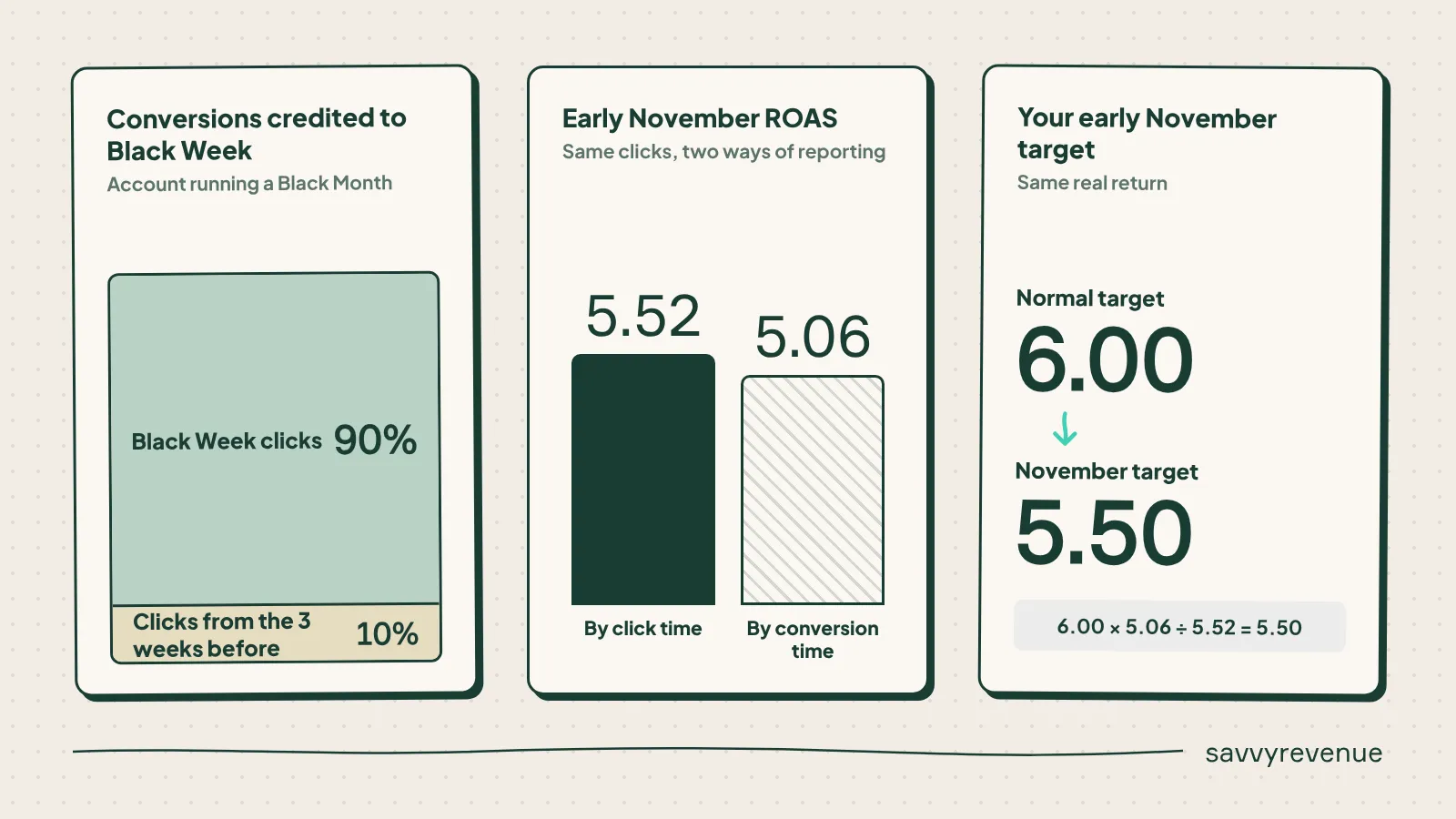
We had an account that ran a Black Month last year (so the sale was live all of November). You’d expect the timing gap to be close to zero, since there was no reason to wait. Even so, 10% of the conversions credited to Black Week belonged to clicks from the three weeks prior.
In the first weeks of November, ROAS by click was 5.52, while ROAS by conversion time was 5.06. Then Black Week flips it, and conversion time suddenly looks better than click time, because all those earlier clicks finally convert.
In practice, this means you can push harder before Black Week than your reporting suggests. If your normal target is 6.00, the timing gap tells you that a target of roughly 5.50 in early November is actually hitting the same real return.
One watchout: when you set up the analysis, set the promotion period to Black Week, even if the client runs a Black Month. Otherwise the comparison gets muddied by the sale itself.
3. Rebuild the SBAs You Ran Last Year
Next, pull last year’s Seasonality Bid Adjustments (SBAs) along with the change history (filter for bid changes only).
Then calculate a spend-weighted SBA per day. This matters because SBAs rarely run for a clean 24 hours. If half of your spend that day came between 7pm and midnight, the SBA active in that window should count for half the day. A simple average of the SBAs you set will lie to you.
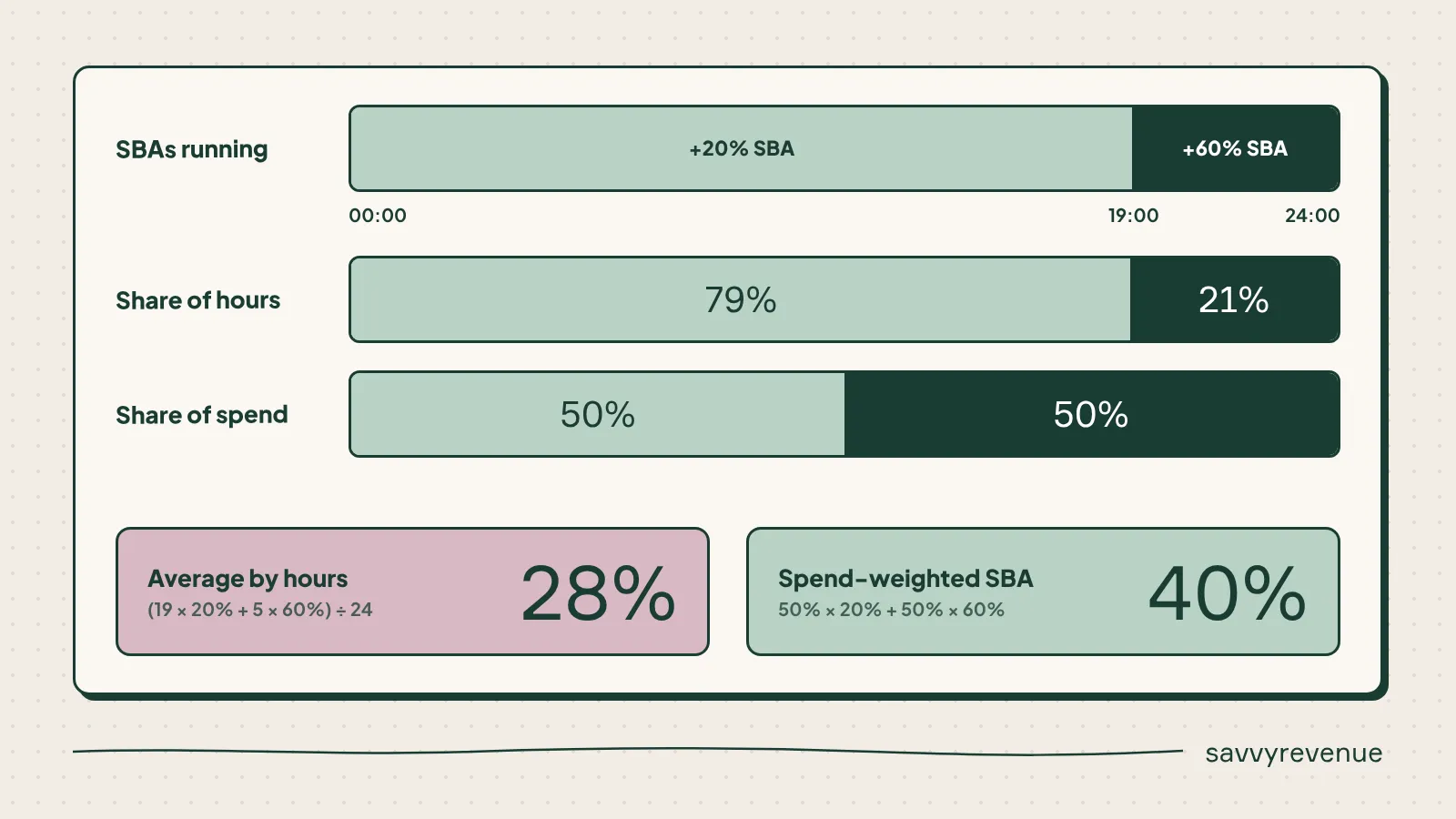
Then read the result honestly. And yes, I’m including myself here. My own account started the week roughly right, wasn’t aggressive enough in the early days, and got way too aggressive on Black Friday itself.
Google Ads ROAS looked bad on Black Friday, though MER (marketing efficiency ratio, total revenue divided by total ad spend) was still good. So before you label a day as a mistake, always check your blended number. Platform ROAS alone can make a good day look terrible, and vice versa.
4. Simulate This Year’s SBAs
Now you flip from analysis to planning. Enter an SBA per day and look at the simulated ROAS.
In my own example, the suggestion was 50%. That felt high, so I tested 10% across the board to see the baseline. From there, I landed on roughly:
- Saturday: 10%
- Sunday: 30-40%
- Friday: around 25%
Why am I less aggressive on Black Friday this year? Because I want to test what happens before CPCs go crazy, and then push during the day. Last year taught me that opening at the top is expensive.
A word of caution: this is not an exact science. A 30% SBA in one account can do what 10% does in another. Some accounts need 80-100% to move at all. Use the simulation as a rough guide.
5. Plan Your Negative SBAs for After Black Friday (Now, Not Later)
Do the same exercise, but with negative SBAs for the days after the sale.
I paid for my own mistake here last year. I ran no negative SBA on Cyber Monday and paid a CPC that was way too high for the demand that was actually left (Europe has different Cyber Monday performance than Black Friday).
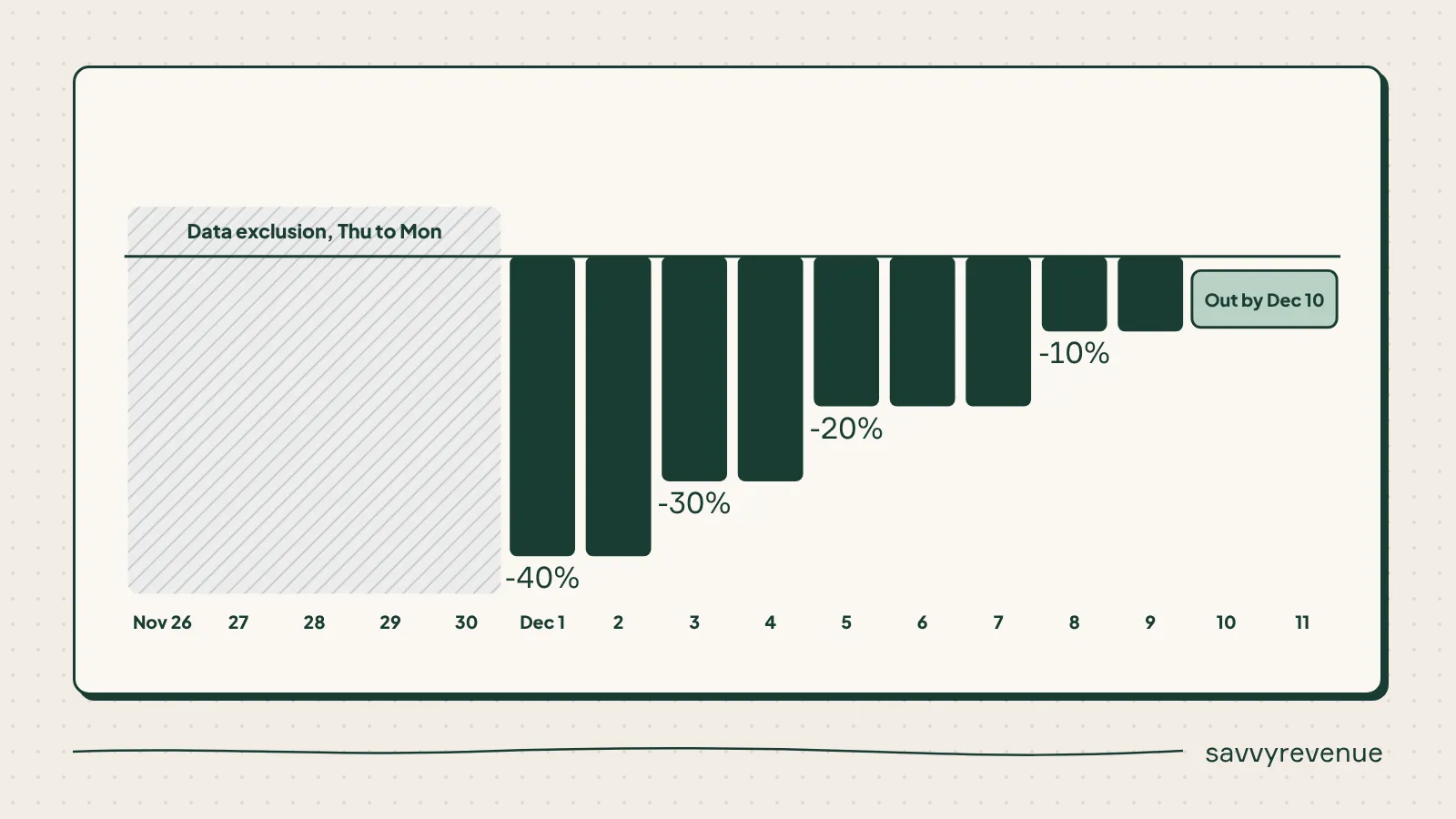
This year, the plan is -40% → -30% → -20% → -10% from the Tuesday after Cyber Monday, stepping down every 2-3 days, and out by December 10th.
Watchout: the simulator ignores last year’s SBAs. So if you ran a -38% SBA last year, the suggestion will be built on numbers that were already suppressed. Adjust it by hand.
Plan this now, because by the time you’re in the week after Black Friday, you’ll be tired and buried in reporting. This is the plan you’ll execute after the sale, and it should already be written down before Black Friday starts.
6. Show the Plan to the Client
One line on this, because it’s that simple: a screenshare of this analysis builds more trust than any update you’ll send during the week. When the client can see that your plan is built on their own data, the conversations during Black Week get a lot easier.
Front-Load Spend in November
Going into Black Friday with spend that’s too low in the weeks before results in lower Black Friday revenue (controversial, I know). We see it every year in the accounts we audit.
Black Week converts the demand you’ve built. If you’ve been starving the account of traffic in October and early November, there’s less demand in your funnel to convert. And if your ROAS is too high in October, it means you’re behind going into November.
Lower the Target, Don’t Rely on SBAs
This is a distinction a lot of advertisers miss. SBAs only apply to auctions you’re already in. If your target ROAS has been too strict, an SBA won’t get you into the auctions you’re missing. Lowering the target will.
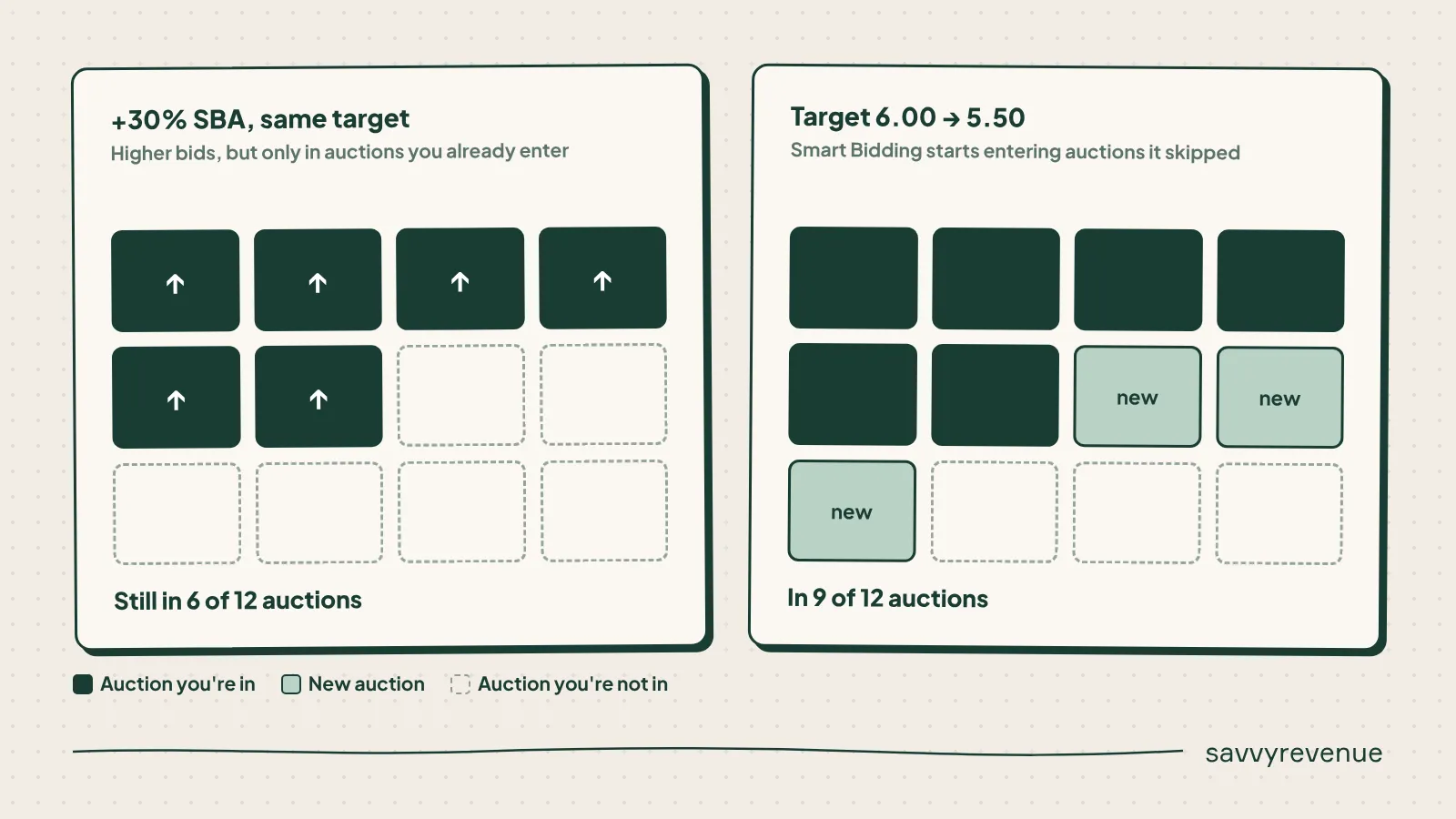
So use the timing gap from Step 2 to set your November target. In the example above, that’s moving from 6.00 to around 5.50.
If you still have room in ROAS, enable Smart Bidding Exploration (Search only). And remember from our SBA video: an SBA is a bid multiplier, so a +30% SBA does not mean your CPCs go up 30%.
Bidding Prep
Two things to handle before the week starts:
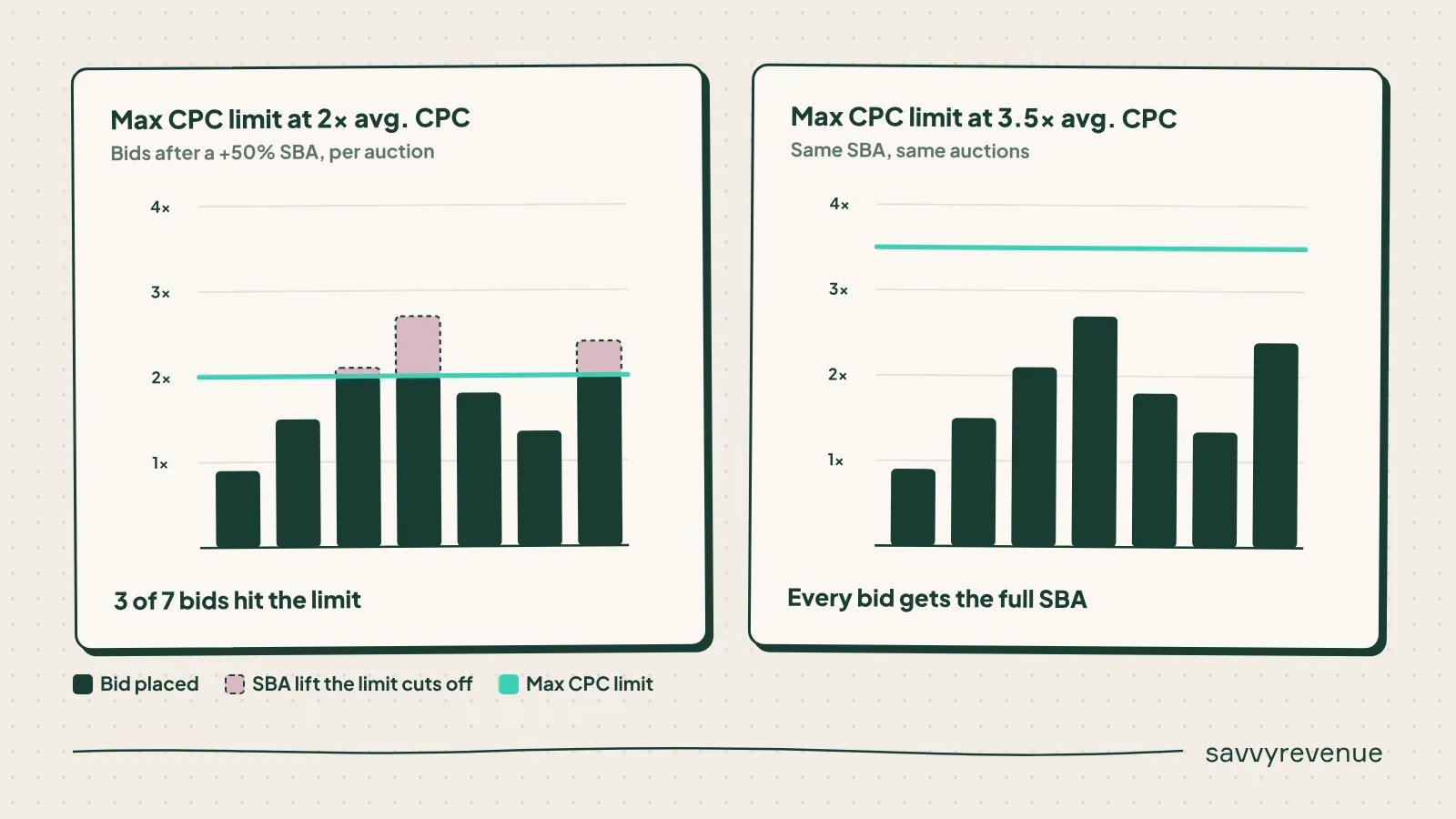
- Max bid limits: if your max CPC limit is below 3x your average CPC, raise it to 3-4x. Otherwise your SBAs do nothing, and you won’t know why. This is the most common silent failure I see.
- Upload the SBAs you planned in Step 4.
And in general: don’t be too careful going into November.
The Quick-Fire Prep Checklist
The analysis is the heavy lifting. These are the operational details that will still sink you if you miss them.
- Budgets: raise them to expected spend. Use 2-4 shared budgets instead of individual campaign budgets, so spend can flow to whatever is working that hour.
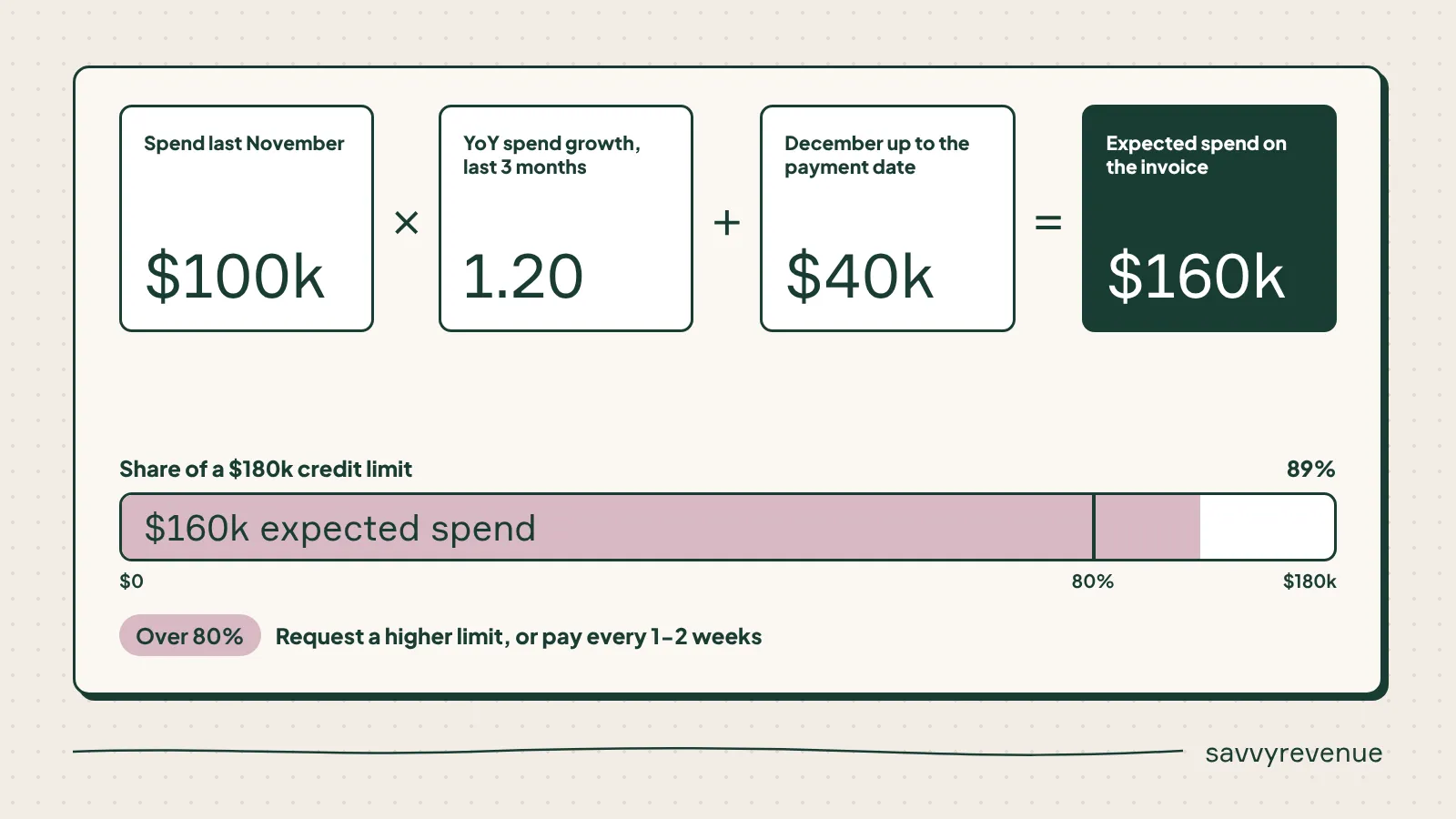
- Credit check: expected spend = last November × your YoY spend growth from the last 3 months. Include December up to the payment date. If you’re at 80% of your credit limit, request an increase or switch to paying every 1-2 weeks. Getting paused on Black Friday because of a credit limit is entirely avoidable (and entirely painful).
- Ad copy: put Black Friday in headlines and descriptions, and add promotion extensions and countdowns. Pinning is not needed 9 times out of 10.
- Christmas ad copy: set it up the week before Black Week. It feels over the top, but you’ll be very happy you did on Cyber Monday.
- What not to do in Q4: no structure changes, no sitelink overhauls, and forget about negative keyword cleanups and ad tests.
Execute During Black Week
Context First
Three things shape how you bid during the week:
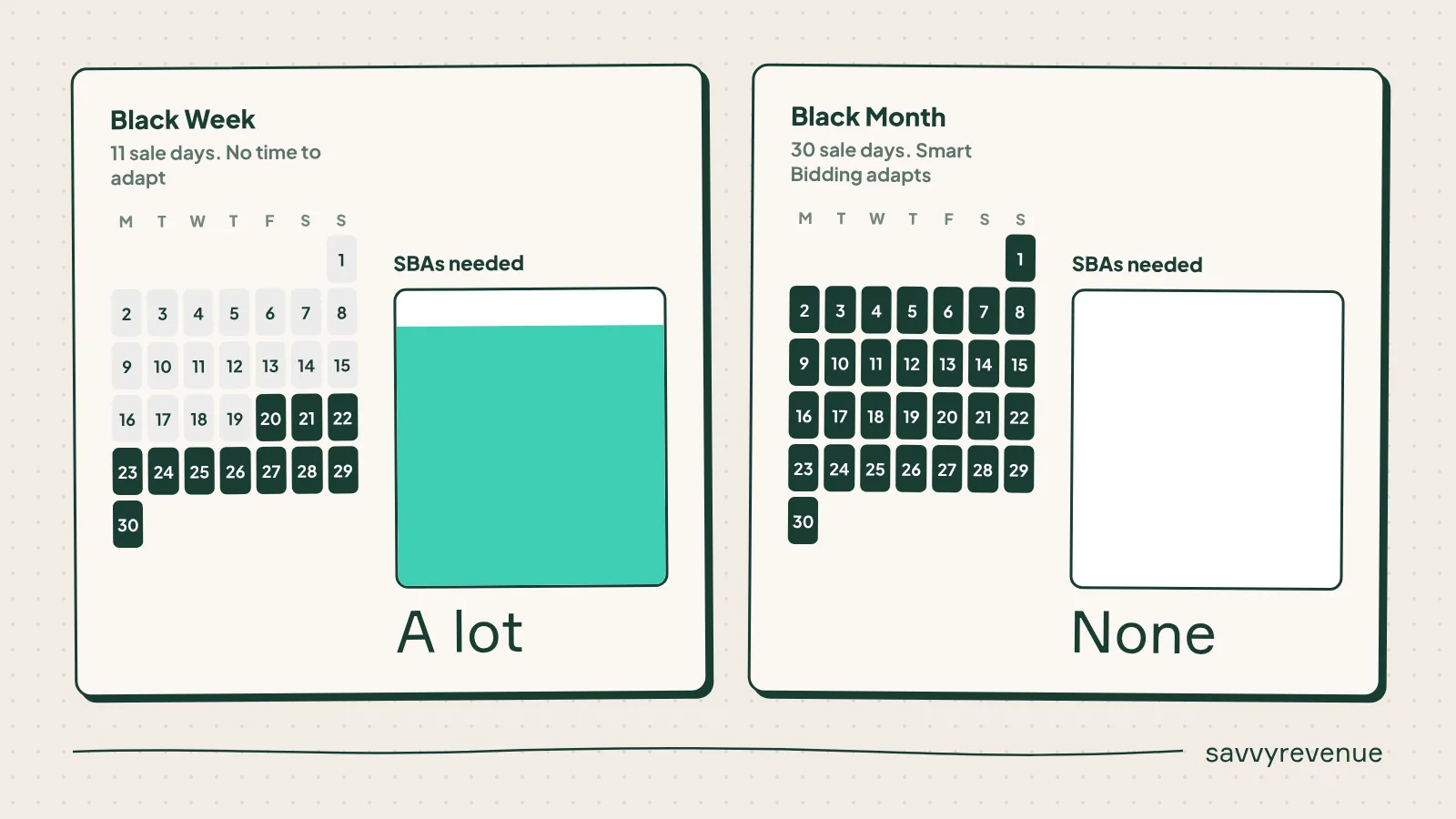
- The longer the sale, the less you need SBAs. A Black Month needs none, because Smart Bidding has time to adapt. A Black Week needs a lot.
- Black Month pulls revenue forward. If you compare a Black Week this year against a Black Month last year, Black Week will look worse. That gap comes from the comparison itself, so don’t treat it as a performance problem.
- We bid on Blended ROAS. The delay in Google Ads conversion data makes platform ROAS useless in the moment.
Bidding Is a Series of Small Bets
Black Week bidding is a series of small bets. You place one, you read the result, and then you place the next one.
You already did the heavy lifting in prep. You have an SBA plan per day based on last year’s data. During the week, your job is to check whether reality matches the plan, and adjust when it doesn’t.
The One Question You Answer at Every Check-In
Is there more profitable volume out there, and am I getting it?
Two numbers answer that:
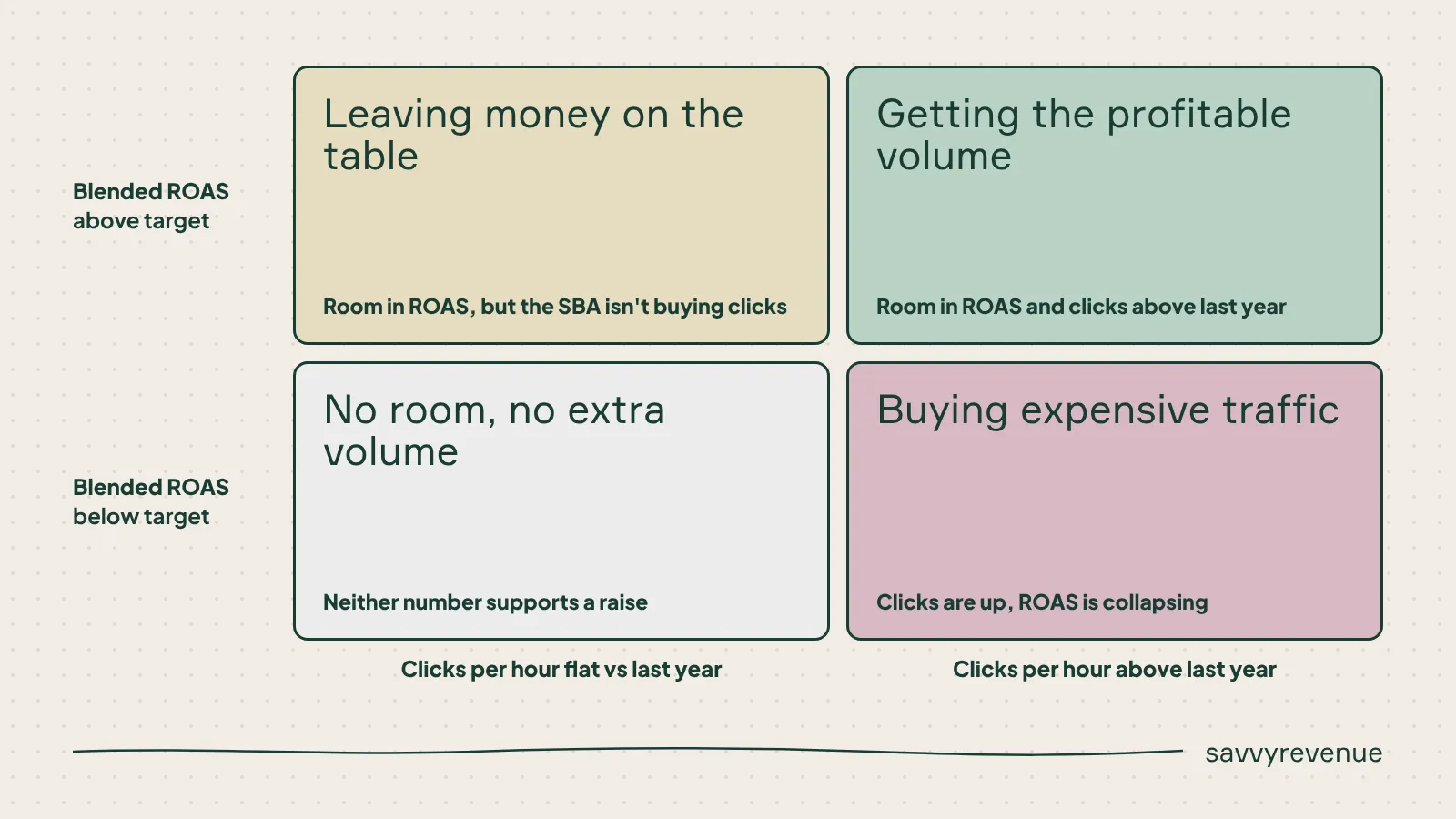
- Blended ROAS vs. target (day so far). This tells you whether you have room. Use Blended ROAS here, because the delay in conversion data makes Google Ads ROAS useless in the moment.
- Clicks and CPC per hour vs. the same weekday last year. This tells you whether your SBA is actually buying volume, or just inflating CPCs.
You need both. A great Blended ROAS with flat clicks means you’re leaving money on the table. Rising clicks with collapsing ROAS means you’re buying expensive traffic.
My Decision Rules
These are the rules I use to keep the bets small and readable:
- One step = 10-20 percentage points. For example, +40% → +55%. Not a doubling.
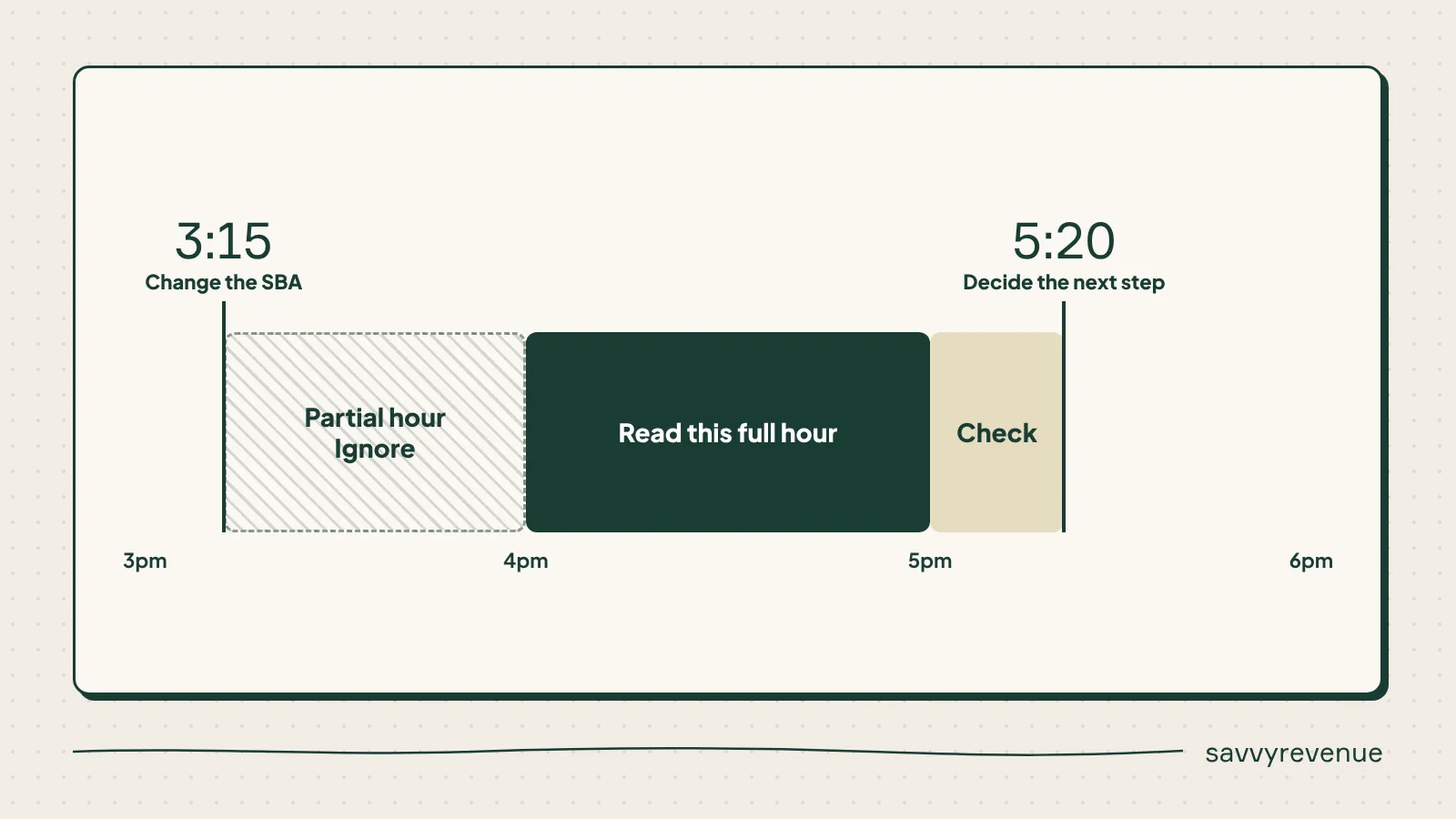
- Read a full hour before the next change. If you change at 3:15pm, read 4-5pm, and decide again around 5:20pm. Anything faster and you’re reacting to noise.
- Don’t edit the same SBA more than 1-2 times. In our experience, they stop working reliably after 3-5 edits. Create a new one instead.
- Different campaign groups, different SBAs. Group campaigns by how they performed last Black Week. One SBA for the whole account is a blunt instrument.
The Week, Day by Day
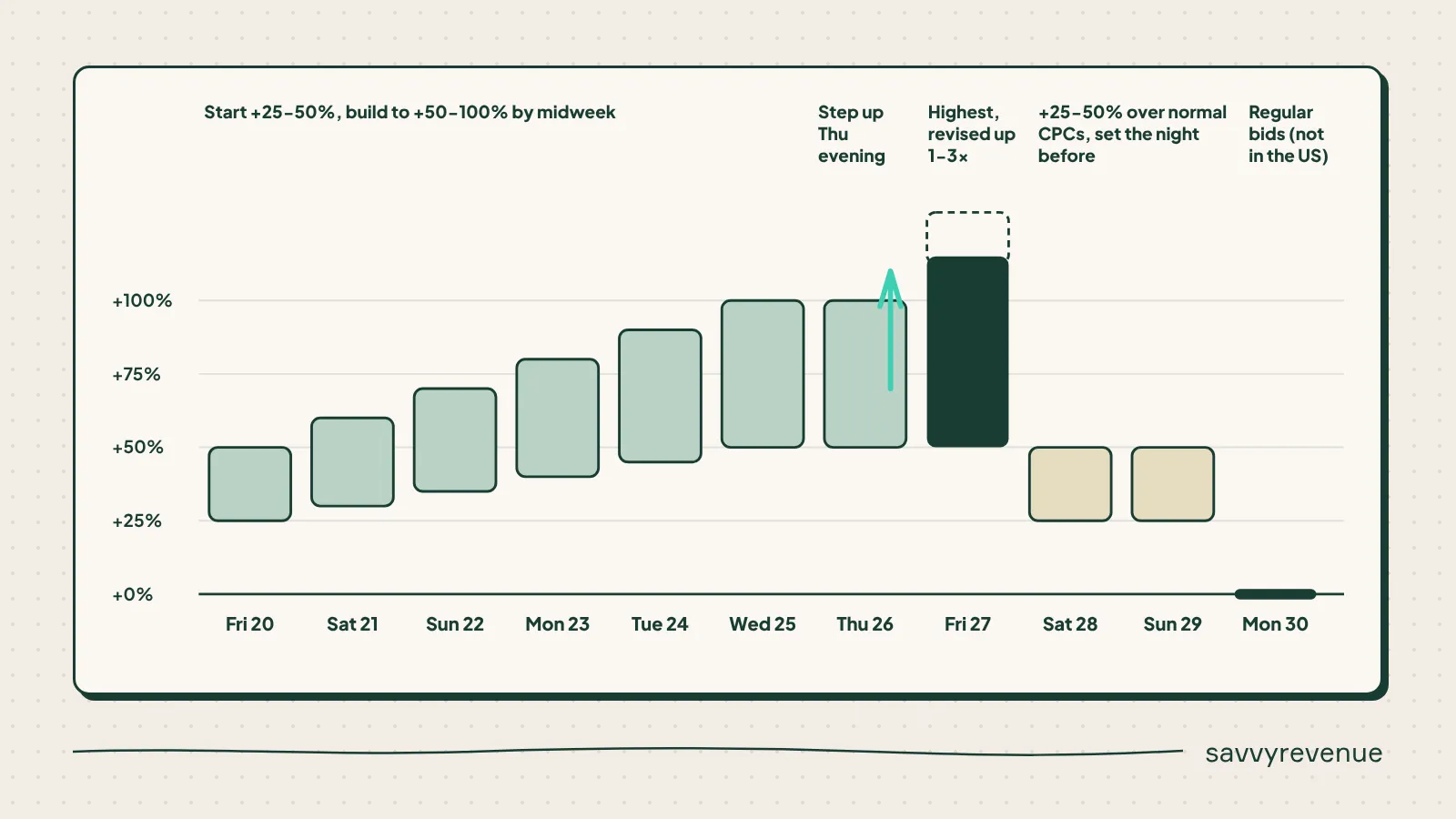
- Opening days (Friday to Wednesday): start 25-50% above normal bids. Review 1-2 times a day. Getting to +50-100% by midweek isn’t unusual.
- Thursday evening: step up ahead of midnight if ROAS allows. This is where Black Friday actually starts.
- Black Friday: the highest SBA of the week. Expect to revise it up 1-3 times during the day, and review 2-4 times.
- Saturday and Sunday: more defensive, at 25-50% above normal CPCs. Set the lower SBA the night before, so you don’t wake up to a Friday-level spend.
- Cyber Monday: back to regular bids. The exception is the US, where Cyber Monday is bigger than Black Friday.
A Great Black Friday ROAS Is Not a Blank Check
I made this mistake last year and got way too aggressive on Black Friday. MER held up, but what we actually got out of Google Ads in that window was poor.
The later into Black Week you get, the more of the people already in your funnel buy. If you spend heavily on Friday just because Blended ROAS allows it, you’re paying for customers who would have bought on Sunday anyway.
That’s why my plan this year starts Friday at around 25% and pushes during the day, instead of opening at the top.
When SBAs Don’t Work
If you’ve raised your SBA and nothing seems to happen, it’s almost always one of three things:
- CPCs don’t move: your max bid limit is too low. That’s exactly why you raised it to 3-4x average CPC during prep.
- Spend stops mid-afternoon: you’ve run out of budget. Check this before you raise the SBA again (raising an SBA into a capped budget accomplishes nothing).
- Volume is low across the board: the SBA can’t get you into auctions you’re not in. Drop the ROAS target by 10-20% to trigger exploration.
Build Spend Up Through the Day
It’s better to build spend up through the day than to start aggressively and spend the rest of the day playing defense.
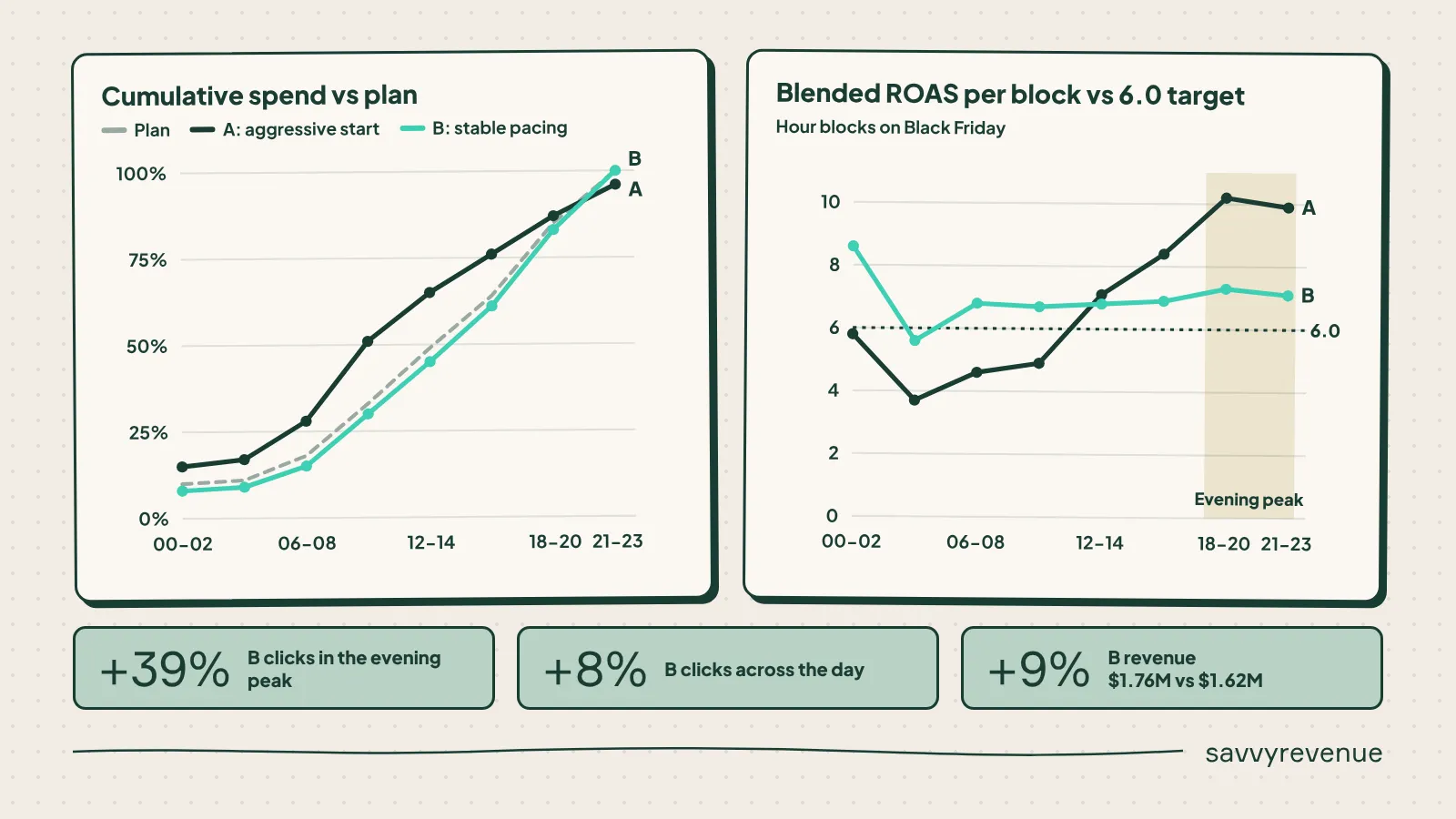
To show why, I built an illustrative scenario (dummy data, but the pattern is one we see constantly). Same account, same Black Friday, same $200,000 budget, and a Blended ROAS target of 6.0. Two ways to run it.
Scenario A: The Aggressive Start
The SBA is set to +100% from midnight. By noon, half the budget is gone, when the plan says it should be a third. Blended ROAS sits at 3.7-4.9 all night and through the morning, well below the 6.0 target.
So I panic. I cut to +40%, then to -10% at 4pm. The evening runs at a Blended ROAS of 10. Looks great on paper. But the evening is the peak, and I’m barely in the auctions.
Scenario B: Stable Pacing
The SBA starts at +30% from midnight, moves to +50% at 10am, and +60% at 5pm. Spend tracks the demand curve all day. Blended ROAS stays between 5.6 and 8.6 in every block.
The Result
Scenario B gets 39% more clicks in the evening peak (5pm-10pm), 8% more clicks across the day, and 9% more revenue ($1.76M vs. $1.62M). With a higher Blended ROAS.
Scenario A wasn’t too aggressive overall. It was aggressive at the wrong time.
How to Pace in Practice
- Plan your spend curve before the day starts. Use last year’s hourly spend share for the same weekday. That’s your line to beat.
- Check cumulative spend vs. plan at every check-in. If you’re more than 10 points ahead of plan before noon, don’t raise. If you’re behind plan and ROAS is above target, raise one step.
- Save your biggest step for just before the evening peak, because midnight is too early to spend it.
Get Into the Accounts
One last point on execution: campaigns break, and you won’t see it when you’re looking at all Shopping or all Search in one dashboard. Go into the individual campaigns at every check-in.
Cool Down the Week After Black Friday
Nothing is more avoidable than overspending in the week after Black Week. And yet it’s the phase I see handled worst. The focus here is simple: lower spend before Smart Bidding starts pushing.
Why It Happens
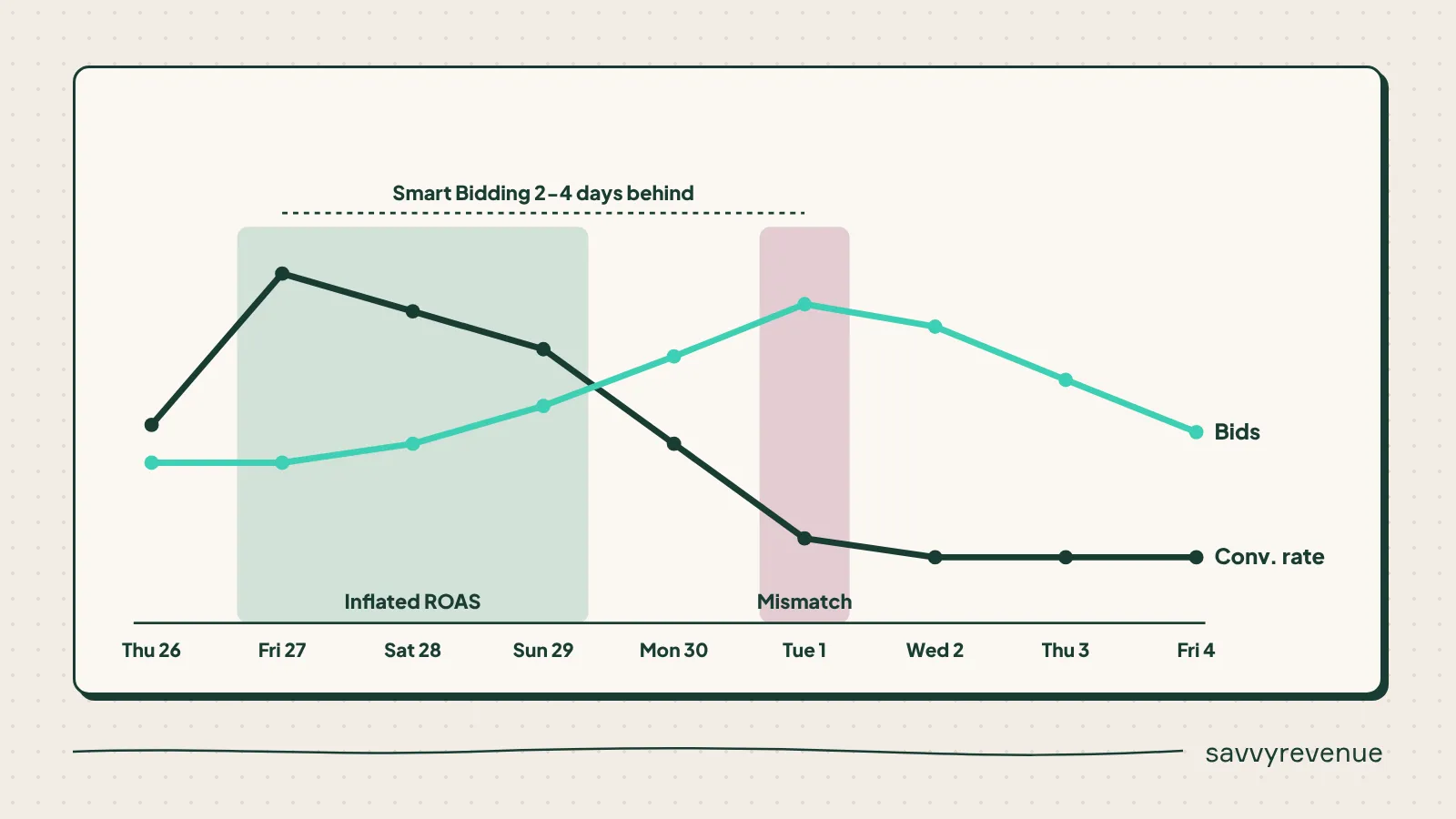
Smart Bidding is 2-4 days behind. It sees the inflated ROAS from the weekend and raises bids on Tuesday, which is exactly when conversion rates drop. The algorithm is doing what it was designed to do. It’s just reacting to a world that no longer exists.
For one client, we estimated that cutting the overspend after their six big promotions a year would save the equivalent of our $150,000 annual fee. On its own.
Lower Spend Proactively
- Max bid limits back to normal as soon as the sale ends.
- Data exclusion for Thursday to Monday, so Smart Bidding doesn’t learn from conversion rates it won’t see again until next year.
- Waterfall negative SBAs from Tuesday: -40% → -30% → -20% → -10%, stepping down every 2-3 days. Use the plan you built in Step 5.
- Budgets back to normal or to expected Christmas levels.
- Check CPC levels twice daily until you’re where you want to be.
- Raise the target ROAS if actual ROAS beat the average target by 20% or more over the last two weeks. As I covered in our overspend video: every increase needs a planned decrease.
Watchouts
- Be out of negative SBAs by December 10th. Christmas demand needs room.
- Don’t assume you’ll go back to October CPCs. Heavy Christmas sellers will still see high CPCs.
- Expect to bite the bullet. A 10-15% ROAS drop that week is normal. Don’t overcorrect.
- Clean up: pause leftover Black Friday ads and extensions, and check that your Christmas ads actually went live.
Black Friday Is Won in the Prep
If there’s one thing to take away from this, it’s that Black Friday is won in the weeks before Black Week.
Last year’s data tells you exactly where to push and where you got burned. Use it. Front-load spend in November, plan your SBAs before the week starts, pace your spend through each day, and plan the cooldown before Friday.
If you want to go deeper on the mechanics, watch our video on Seasonality Bid Adjustments and our video on preventing overspend. Between those and this playbook, you’ll have everything we use at Savvy.
[TL;DR]
- Analyze last year’s full November (not just Black Week), including the timing gap between ROAS by click and ROAS by conversion time, to see where you were too aggressive or too timid.
- Front-load spend in November by lowering your target ROAS (SBAs can’t get you into auctions you’re missing) and raise max bid limits to 3-4x average CPC so your SBAs actually work.
- Treat Black Week bidding as a series of small bets: steps of 10-20 percentage points, judged on Blended ROAS and hourly clicks/CPC vs. last year.
- Build spend up through the day instead of starting aggressively; being aggressive at the wrong time costs you the evening peak.
- Plan your post-sale negative SBAs before Black Friday and waterfall them from Tuesday, because Smart Bidding lags 2-4 days and will overspend if you let it.