Every morning, I spend 15 minutes checking my Google Ads accounts. This isn’t a performance review or a deep strategic dive. It’s a simple, proactive check-in to make sure everything is running smoothly so I can get back to actual projects instead of constantly reacting to alerts from clients.
Some people argue you only need to do this twice a week. The problem with that logic is that life happens. If your checks are on Mondays and Thursdays, you’ll inevitably miss one. Suddenly, a week has passed. Maybe you miss the next one, too. Before you know it, weeks have gone by, and a small issue has become a major one.
You don’t want to discover something is wrong only after you’ve overspent on a campaign by 100%. You don’t want to find out that Merchant Center disapproved 15 products that account for 20% of your weekly revenue from your client. Nothing breeds mistrust faster than your boss or your client finding a problem and asking, “Hey, what’s happening here?” You want to be the one who finds every issue, first.
This 15-minute routine ensures you are proactive. It helps you spot things before they become a big deal. The check covers three specific areas: core spend metrics, revenue performance, and account settings that can break without you ever noticing.
Go Beyond the Article
Why the Video is Better:
- See real examples from actual client accounts
- Get deeper insights that can’t fit in written format
- Learn advanced strategies for complex situations
Why a Daily Check-In is Non-Negotiable
The core issue with less frequent check-ins is the risk they create. A simple mistake, a disapproved product, or a campaign that’s been accidentally paused can go unnoticed for days. By the time you catch it, you’ve lost significant revenue or wasted a chunk of your budget.
Another common mistake is relying solely on a high-level dashboard. You open your dashboard, see that you hit yesterday’s targets, and assume everything is fine. This is a trap. That top-line number can easily mask a serious underlying problem. Maybe your branded campaign is massively overspending to compensate for a non-brand campaign that got paused. The overall performance looks good, but the account is unhealthy.
You need to actually open the account and check. If you don’t, you’ll get into a rhythm of “everything is good, everything is good,” and three weeks later you open the account and realize, “Whoa, what happened here?” This happens all the time, especially for agencies or in-house teams managing multiple accounts (think different countries or brands).
The Framework: What to Check (and What to Ignore)
There’s a big misunderstanding that you should check all your KPIs all the time. I don’t believe in that. For a daily health check, you should only focus on metrics that are stable and not subject to data delays.
The “True” KPIs You Can Trust Daily
These are the metrics where yesterday’s data is solid and reliable. They don’t change.

- Core Ad Metrics: Clicks, Cost, and CPC. These numbers are locked in. Your clicks and costs from yesterday will not go up or down.
- Core Business KPIs: Total business revenue, blended ROAS, gross profit, or contribution margin. What’s been booked has been booked. Yes, there are refunds and returns, but you can typically account for that with a stable return rate (e.g., just reduce total revenue by your standard 10%). Don’t overcomplicate it.
- Account Settings: Billing issues, ad disapprovals, keyword disapprovals, product disapprovals. These things happen in real-time, and you can see them and fix them immediately.
What NOT to Look At (This is a Common Mistake)
This is not a performance review. The goal is to ensure nothing is broken. Trying to analyze performance on a single day’s data is a waste of time and will lead you down a rabbit hole.
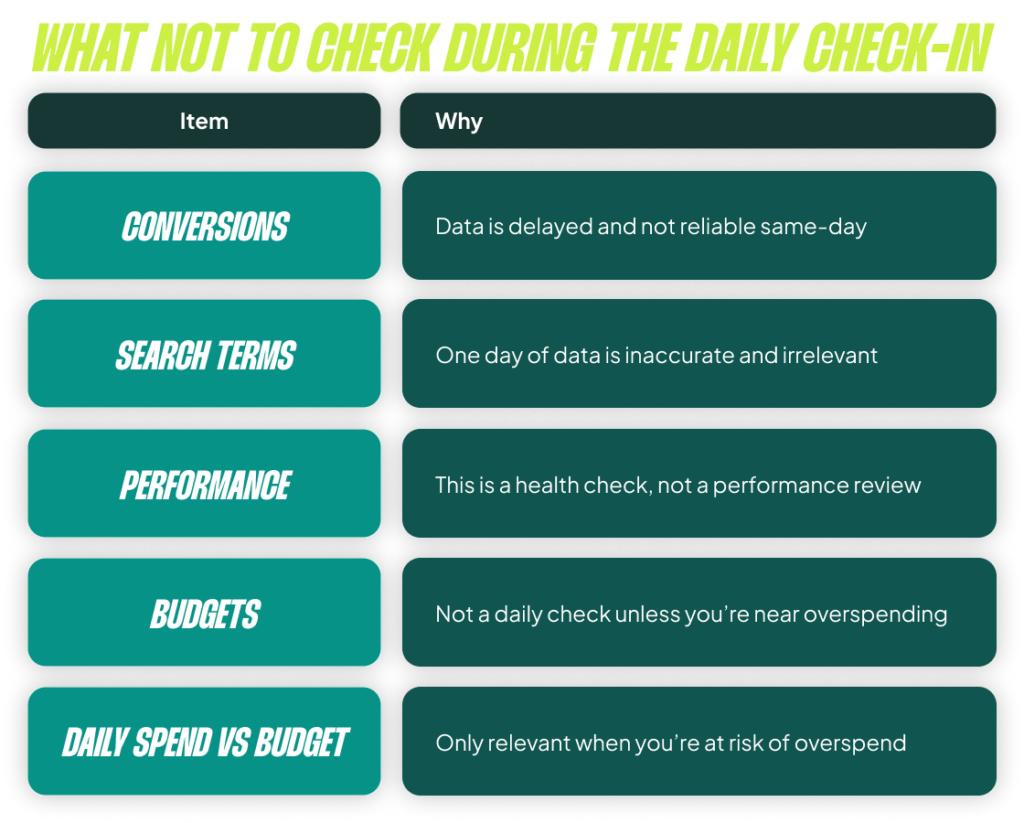
- Conversions: Any conversion data from today or yesterday is so delayed that it’s useless for this check-in. Don’t look at it.
- Search Terms: A single day of search term data is irrelevant in 99.99% of cases and isn’t even fully accurate that quickly.
- Budgets: Personally, this is a separate task for me. If you have to check your budgets daily, you might be doing something wrong with your bidding strategy. The only exception is if you are right on the edge of your monthly budget, but even then, I’d consider that a separate daily bidding task, not part of this health check.
My 15-Minute Execution Plan
Don’t overthink the execution. I know many of us immediately jump to scripts and automation, but if you only have a handful of accounts, just bookmark the pages you need to check. It takes less than 10 minutes.
At Savvy, every person on my team has a “Daily Check-in” bookmark folder for each client. We click it, open all the tabs at once, and run through the process.
Step 1: Merchant Center & Disapprovals
The first tab open is always the Merchant Center Diagnostics page. How many products are active? How many are disapproved or limited? This morning, I did my check and saw a spike in disapproved products. Now I know there’s an issue that needs to be fixed today.
Step 2: Campaign-Level Health Check
Next, I open the main campaigns view in Google Ads, set the date range to “Yesterday,” and compare it to the “Previous day.” I have a saved column set called “Daily Check” that only shows Clicks, CPC, and Cost. I sort by cost change to see if anything has dramatically shifted. Did a campaign spend 140% more than the day before? Did another one stop spending entirely? This takes two minutes and immediately flags any major anomalies.
Step 3: Business Performance Overview
Finally, I look at our internal dashboard that pulls in back-end revenue data. This allows me to see the true business impact. How was total revenue yesterday? What was our cost of sale from Google Ads? If our target is to stay below 15% and we’re at 10%, it tells me things are healthy (and maybe we can even afford to be more aggressive).
That’s it. This entire process took me about five minutes while writing this, and I found a real issue with disapproved products that needs fixing.
The Golden Rule: Don’t Fix Anything During the Check-In
This is the most important rule. Anything you find that requires action—like the disapproved products I found—gets created as a task for later. Do not do it in the moment.

The moment you start fixing things during your check-in, the process gets longer. Your 15-minute check becomes an hour-long task. Then, when you sit down to do it tomorrow, you’ll think, “I don’t have an hour for this,” and you’ll skip it. Don’t fall into that trap.
Find the issue, add it as a task, prioritize it with your other work, but do not derail the check-in itself.
How to Scale This for Multiple Accounts
If you have a lot of accounts, you can’t go through this manual process for every single one. It would take all day. The solution is to use a simple script that outputs the key data you need (Clicks, Cost, CPC from yesterday) into a Google Sheet. Then you can just scan the spreadsheet for anomalies.
You can set up conditional formatting to highlight any campaign where the cost changed by more than 50% day-over-day. This allows you to review dozens of accounts in minutes. It’s not a dashboard for clients; it’s just the raw data you need to ensure nothing is on fire.
The less time you spend in Google Ads on a daily basis, the more important this check-in becomes. I’m ashamed to admit the number of times in the past I’ve let something run for a week or two because, on the surface, everything looked good. I didn’t dig deeper, only to find out a core campaign was no longer working or a brand split had broken. Performance was good, but it could have been so much better. Don’t make that mistake.
[TL;DR]
- Do it daily. A 15-minute daily check is better than a twice-weekly check because you’re less likely to miss it and let problems fester for days.
- Focus on stable metrics. Only check Clicks, Cost, CPC, backend revenue, and account disapprovals. Avoid delayed data like conversions or noisy data like search terms.
- It’s a health check, not a performance review. The goal is to spot things that are broken (overspending, paused campaigns, disapprovals), not to optimize performance based on one day of data.
- Don’t fix issues during the check-in. Find a problem, create a task for it, and move on. Keeping the check-in short ensures you’ll do it consistently.
- Don’t just trust a dashboard. You must open the actual account to spot problems that high-level numbers can easily mask.