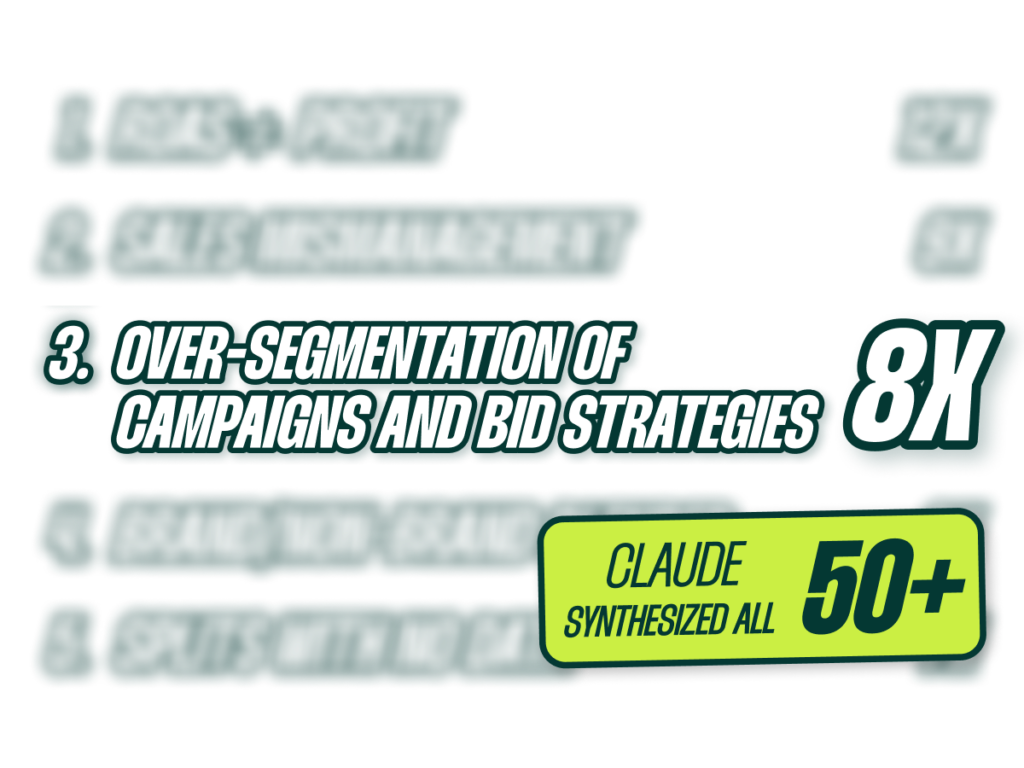
I recently took our last 50 audits, roadmaps, and assessments from the past 18 months and had them synthesized to identify the most common patterns. As I read through the findings, five mistakes stood out. These aren’t the usual tactical nitpicks; they’re bigger, more strategic errors that I see again and again.
This is particularly relevant for CMOs who have oversight on Google Ads accounts but aren’t necessarily in the weeds every day. That said, if you’re hands-on with Google Ads, this will be just as valuable. Let’s jump in.
Go Beyond the Article
Why the Video is Better:
- See real examples from actual client accounts
- Get deeper insights that can’t fit in written format
- Learn advanced strategies for complex situations
Mistake 1: Treating In-Platform ROAS as Gospel
The single most common issue I see is businesses treating Google Ads ROAS as the source of truth instead of blended ROAS or contribution margin. Most businesses big enough to care about growth are still making major bidding decisions based on in-platform numbers alone. This means the entire account is being optimized for a metric that doesn’t actually reflect whether the business is making money.
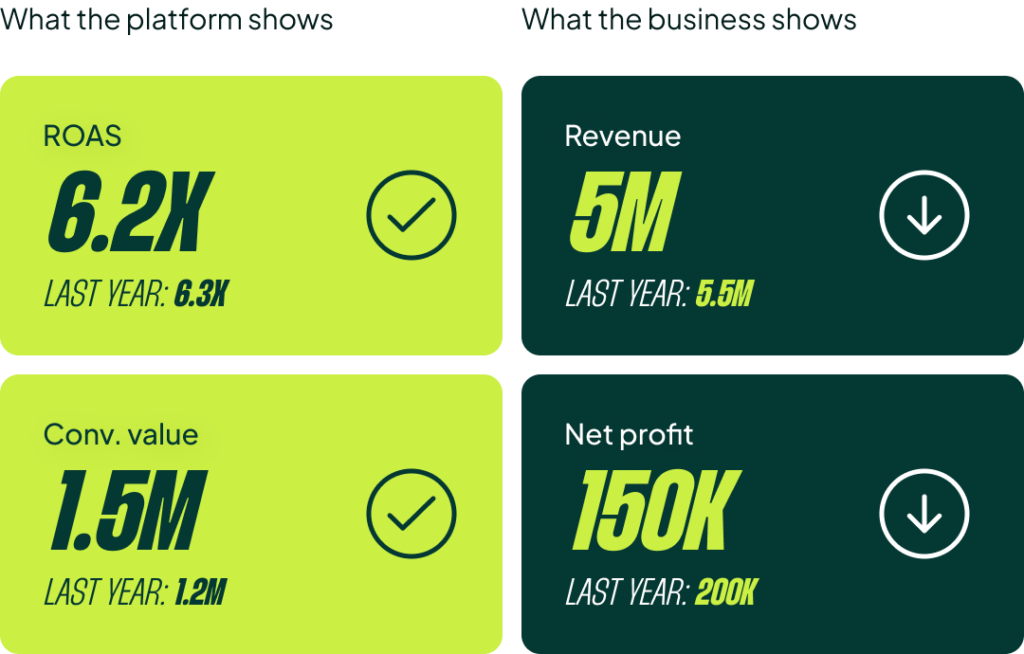
The solution doesn’t have to be fancy. A simple Google Sheet that joins your in-platform ROAS with your back-end data is enough. Review it weekly and challenge your assumptions. One of the sub-mistakes I see is that ROAS targets are set once and never revised. I’ve seen accounts with the same target for two, three, or even four years.
With the data loss we’ve all experienced, nobody stopped to ask, “Hey, our business is getting more profitable, but Google Ads isn’t growing with it.” Often, we can come in, analyze the relationship between back-end data and Google Ads data, and push for 25% higher spend simply by challenging the outdated ROAS target. Suddenly, a stalled business starts scaling again.
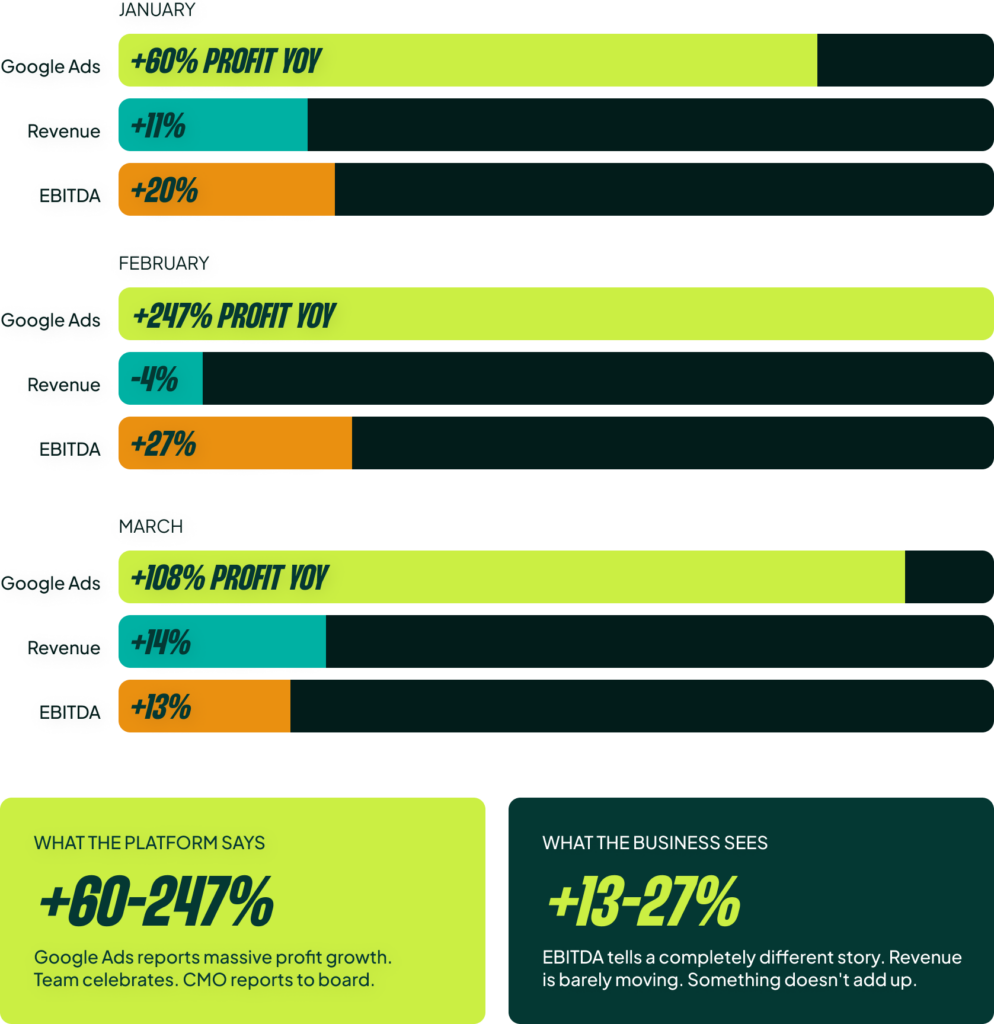
Here’s a real example of what goes wrong without this alignment. This spring, we saw a client’s account reporting substantial year-over-year profit gains in Google Ads: +60% in January and a staggering +108% in March. However, total business revenue was only up 11% and 14% in those months. The profit and loss statement definitely didn’t show a 3-4x increase in profit. The in-platform data was lying.
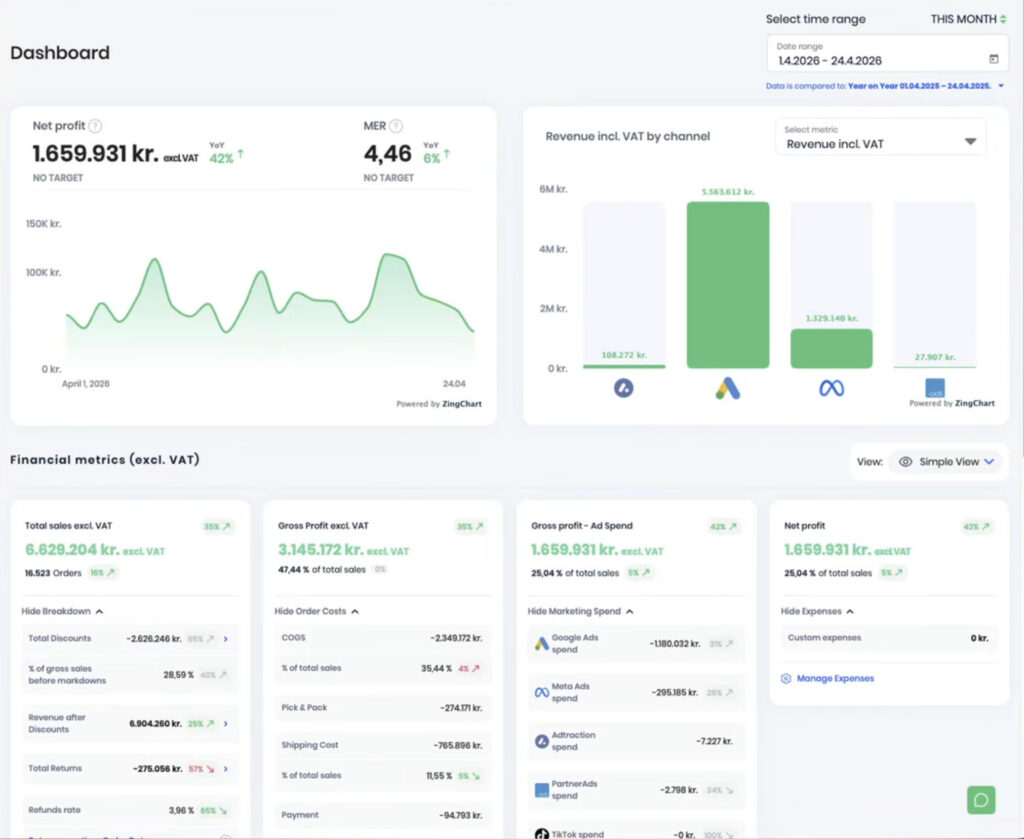
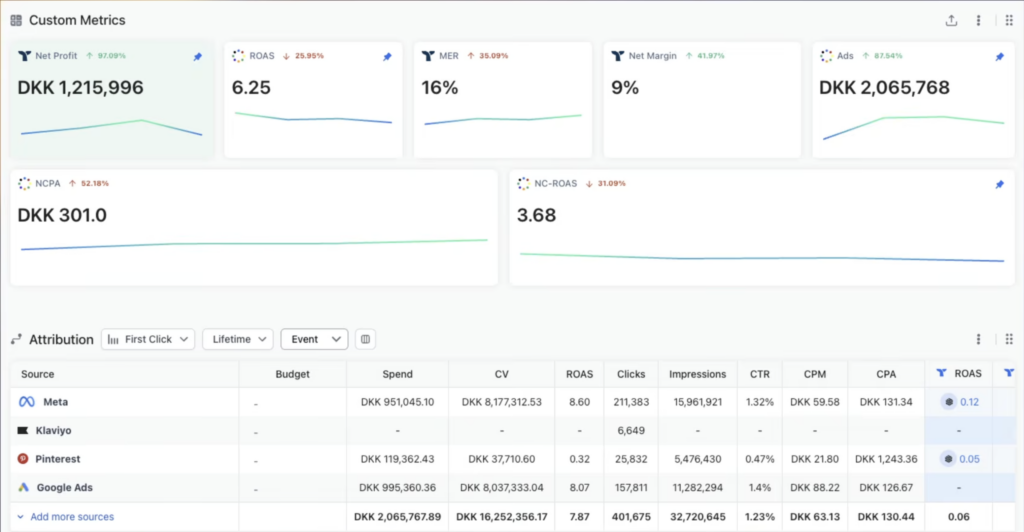
You need to correlate your marketing spend with your actual business data. Whether it’s a simple sheet or a tool like Triple Whale, Profit Metrics, or Reaction, get your data in one place. That’s the whole idea.
Mistake 2: Reactive (Not Proactive) Sales Period Management
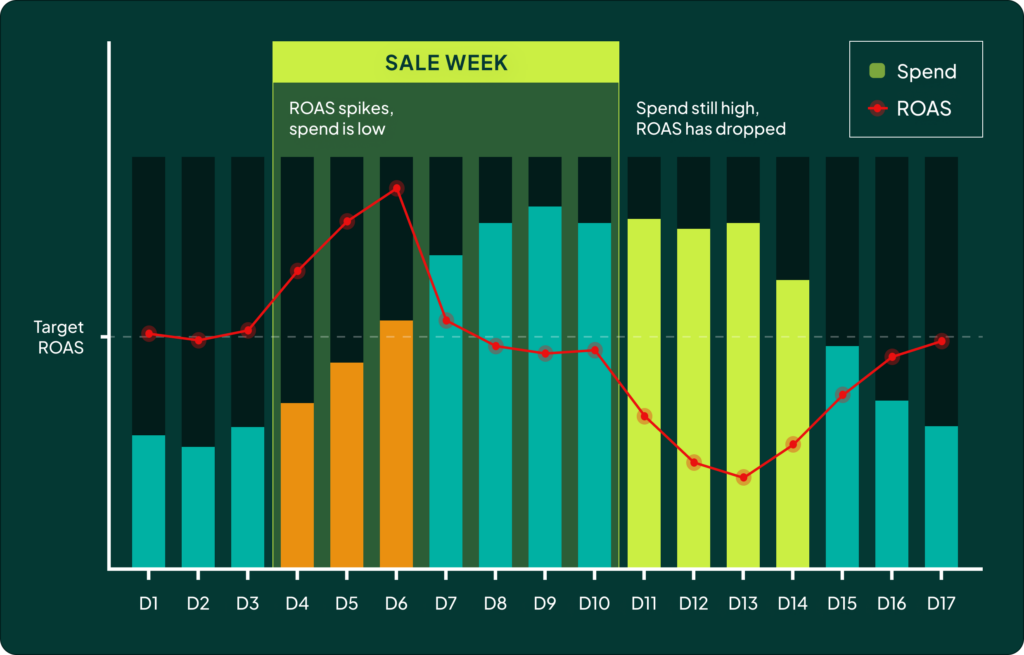
Most accounts I audit are poor at managing sales periods. They routinely underspend going into a sale, ramp up spend too late, fail to react to real-time business data during the sale, and don’t decrease spend fast enough when it ends.
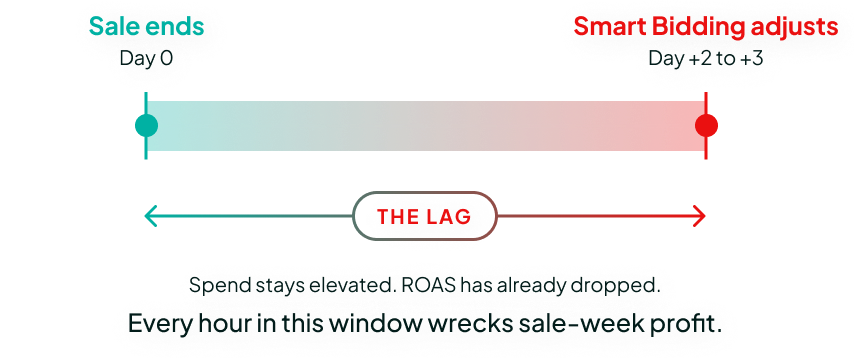
This is incredibly impactful. For one major advertiser we’ve worked with for years, we recovered our entire annual fee (around $180k) simply by overriding Smart Bidding in the week after their major sales concluded. The problem is that Smart Bidding is reactive, not predictive. It’s a great tool, but it takes at least two to three days to correct spend after a huge promotional spike. If you spend double what you should in the days after a big sale, you can wipe out a significant chunk of the profit you just made.
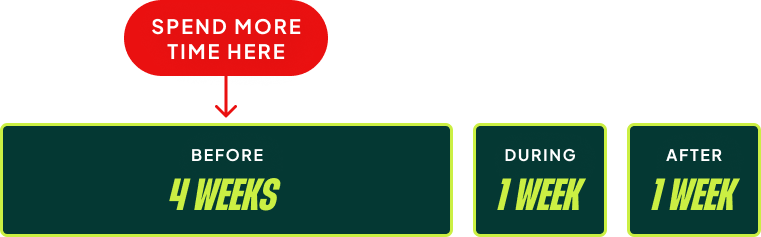
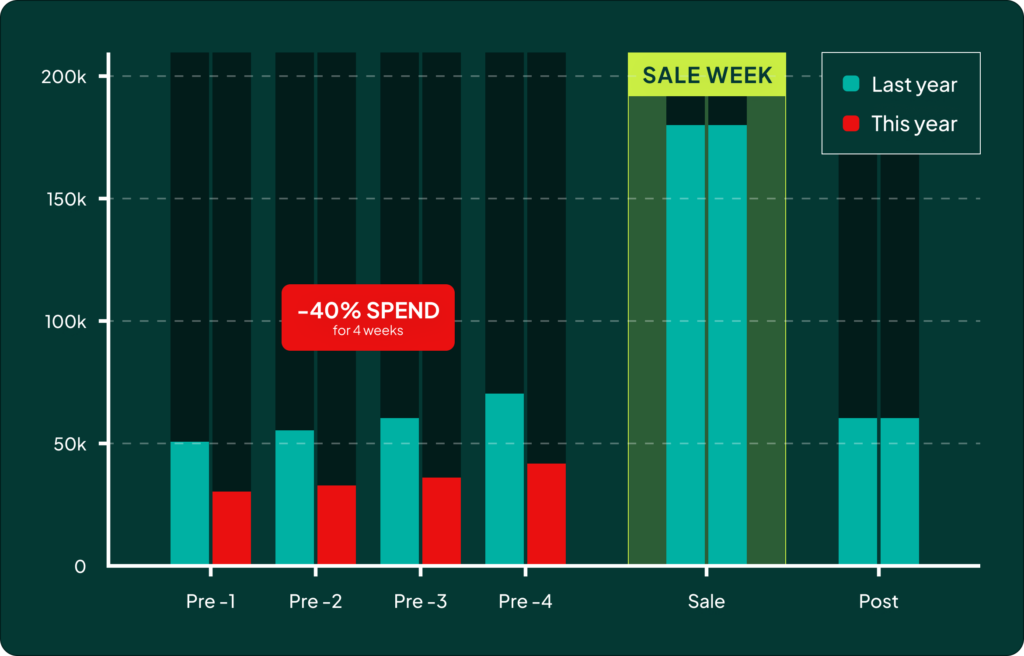
But the problem isn’t just *after* the sale. During a postmortem for a client’s birthday sale last year, we were trying to figure out why we missed expectations. Our team pulled up a simple graph comparing spend and traffic levels leading into the sale versus the prior year. While we had hit the same numbers *during* the sale, the total contribution margin was down 20% compared to the forecast.
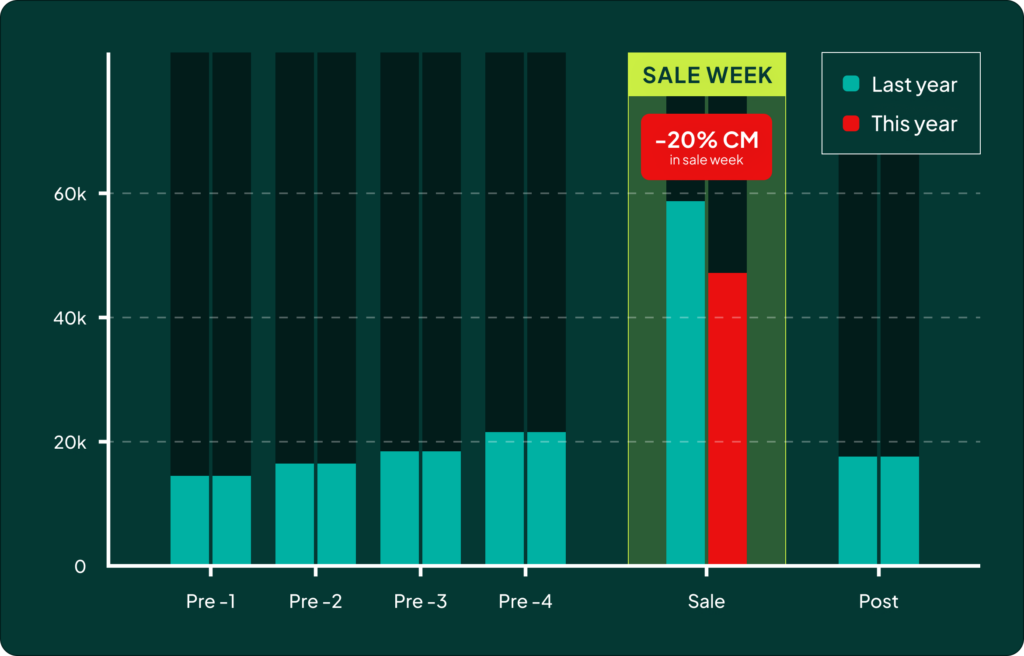
The issue was clear: we had spent 40% less in the month and a half *before* the sale compared to the previous year. Everyone had been chasing short-term contribution margin, so we had lost exposure. That loss of exposure going into the big sale cost us far more in the end. It’s a cautionary tale about the need to build demand before you try to capture it.
Mistake 3: Over-Segmentation and Constraining Smart Bidding
I talk to some of the best CMOs out there. They’re incredibly smart and have great insights. Their problem is that they want to use those insights a little *too* much. They want to split bestsellers into their own campaigns, create campaigns per category, give new arrivals their own budget, and run dedicated campaigns for top geo-locations. All of this results in a lot of campaign segmentation, which leads to scattered data.
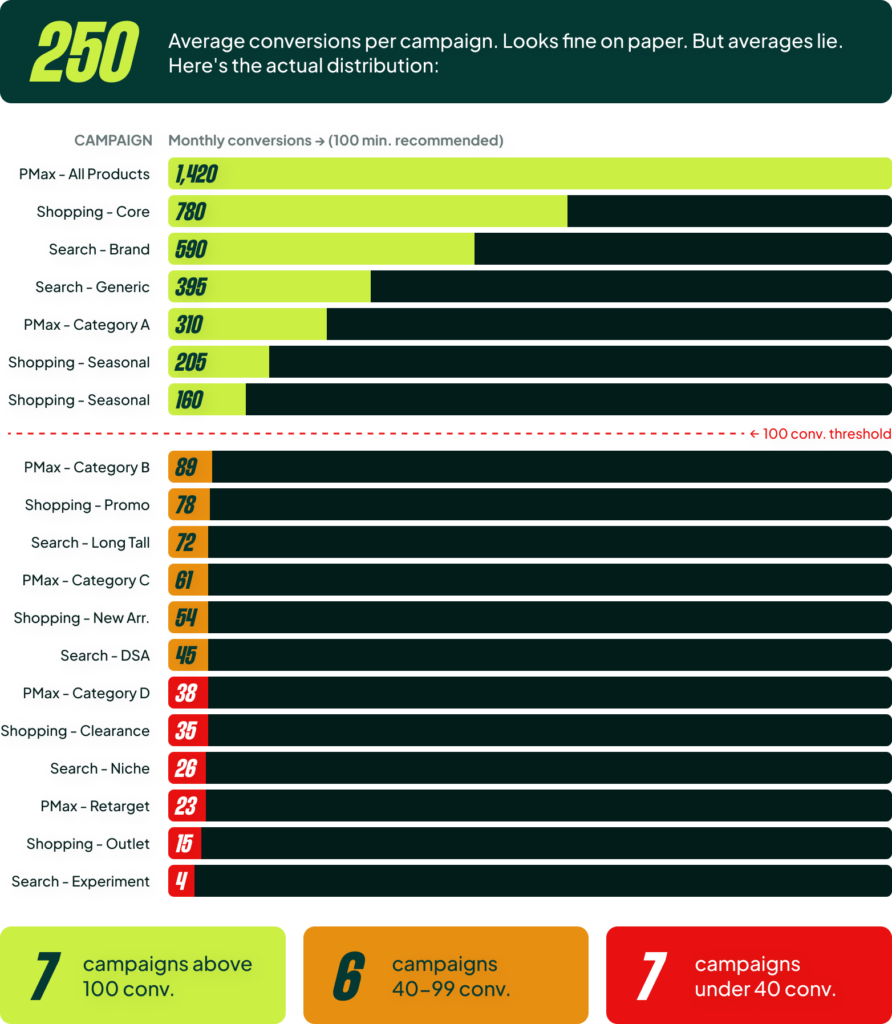
Just because you have 5,000 conversions per month doesn’t mean you can create 20 campaigns. Google recommends 30-50 conversions per campaign per month; I say you need at least 100. Once you start segmenting, you’ll find that many of your campaigns fall below that threshold. The secret to Smart Bidding is that it gets better with more volume. Every time you split your data, you better have a very good reason, because performance can drop 10-20% over time without you even noticing.
A bonus mistake here is that many CMOs also overly constrain Smart Bidding with budgets, bid limits, and frequent target changes. It often takes a really strong account manager to say no and explain why it’s a bad idea. Budget limits are the most common tool. As a CMO, you have a budget you can’t exceed, and setting a hard cap is the easiest way to ensure you don’t overspend.
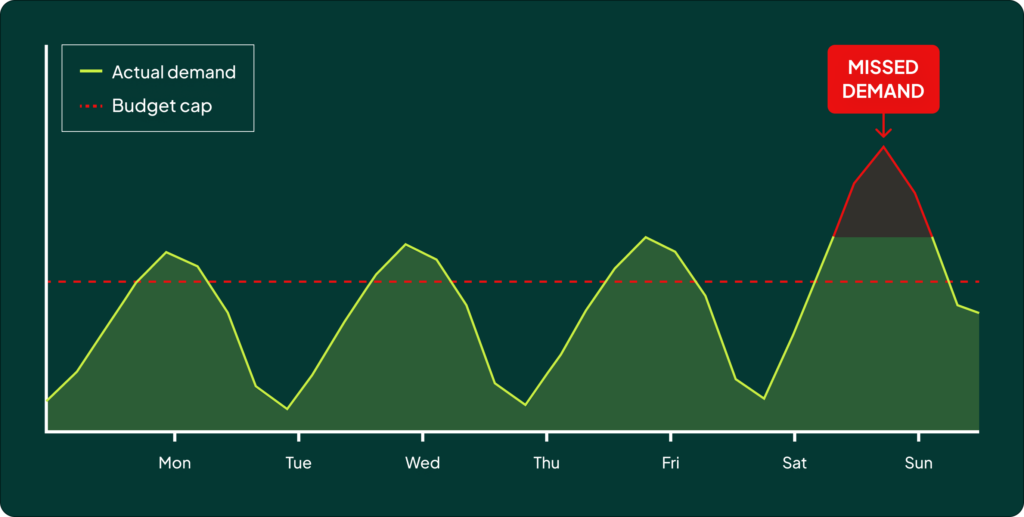
But over time, you’ll notice that when you want to increase the budget, your ROAS drops. That’s because the budget limitation signals to Smart Bidding to only focus on the absolute highest-ROAS auctions. It sounds great on paper, but it makes it nearly impossible to scale and you end up missing out on valuable demand. It can also create a “yo-yo effect” where the account manager is constantly reacting to top-down orders to raise or lower spend, never getting a chance to optimize based on actual performance trends. The solution is to create a process and trust the team running the account.
Mistake 4: Blending Brand and Non-Brand in the Same Campaigns
 For me, this is a cardinal sin of marketing. There’s no defending it once you reach a certain size. I was honestly surprised to see I’d mentioned this eight times in my recent audits, but it’s true what they say: just because an account gets bigger doesn’t mean it gets more sophisticated.
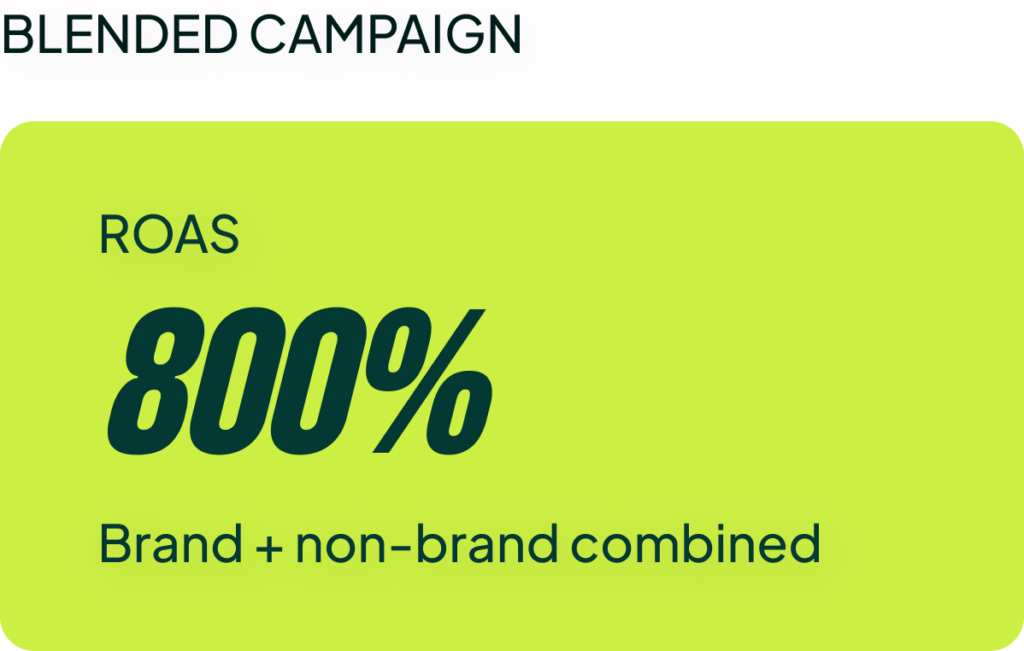
The problem is that when brand terms sit inside PMax or Shopping campaigns, the inflated ROAS from brand searches hides the real non-brand performance. You can’t make any meaningful decisions about scaling until you isolate your brand terms.
Increasing your spend on branded terms usually won’t bring in extra revenue; it’s simply not incremental. But increasing your spend on non-brand campaigns not only provides incremental revenue, but it also feeds your other channels (like Meta Ads) with new audiences. It’s so important to split out non-brand, run it by itself, and scale it properly.
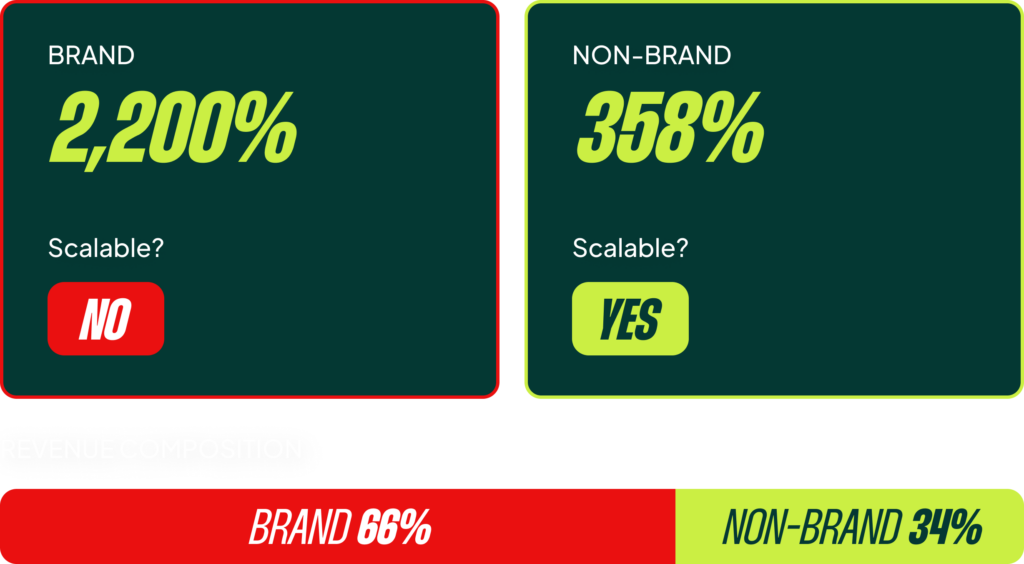
In all honesty, most CMOs would be better off just turning off their branded search campaigns entirely if they don’t have them under control. (Yes, there are nuances to this, but I stand by it). The potential downside of mismanaging branded spend is often worse than the potential upside of running it.
Mistake 5: Campaign Splits That Don’t Reflect Performance Differences
You see this all the time: “bestseller vs. normal” or “high vs. low margin” campaign splits. But half the time I open these accounts, the conversion rates are nearly identical across the different buckets. This means you’ve fragmented your data for a split that shouldn’t exist. There’s no performance difference, so there’s no reason to have them in separate campaigns.
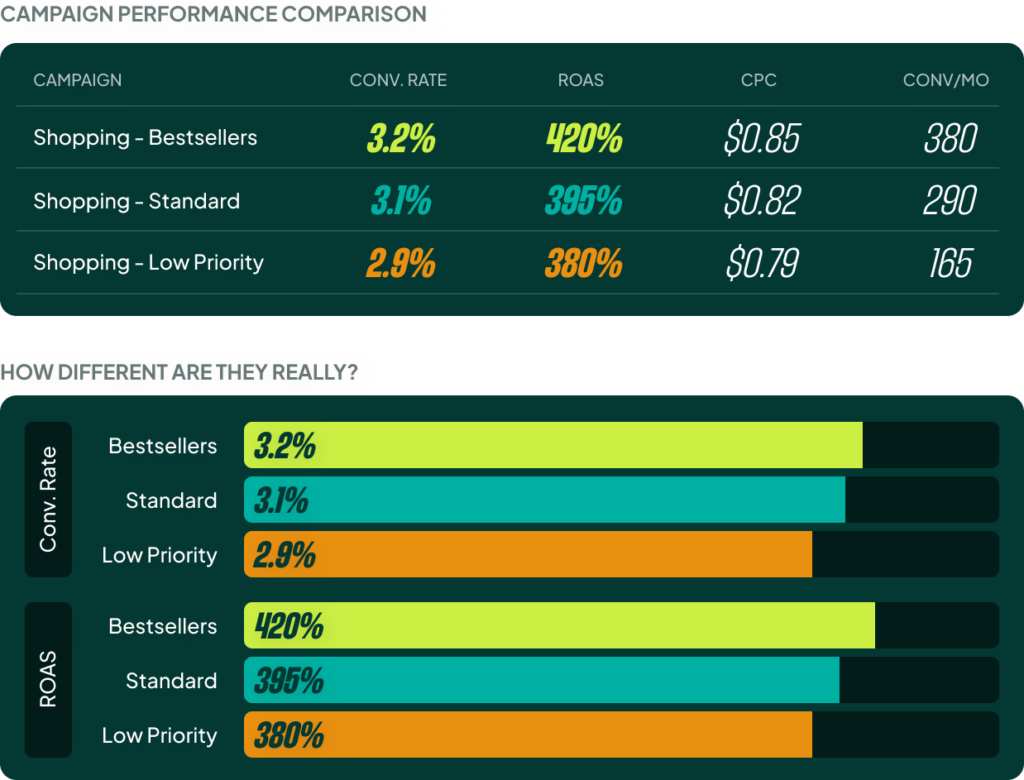
In one example I reviewed, there was just a 0.3 percentage point difference in the conversion rate between three “strategic” campaign buckets. This is just noise, not signal. All they did was split 800 monthly conversions into three smaller, less effective pools. The lesson is simple: if the data doesn’t show a meaningful difference, merge the campaigns and let the algorithm do its job.
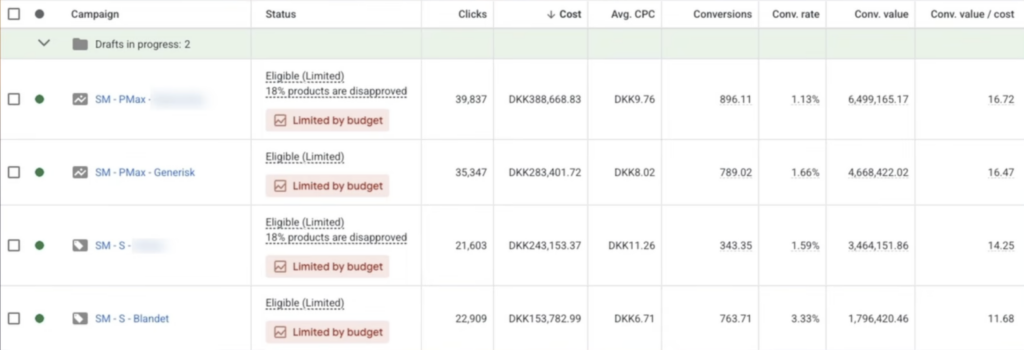
You shouldn’t be afraid of rolling back a sophisticated setup that you really love. I’ve done it multiple times. I’ve pitched clients on what I thought was the next big thing, only to look at the data after three months and say, “Okay, this was a bad idea.” That is perfectly fine.
This also applies to indecisive splits. I audited an account where they were running the same products in both Standard Shopping and PMax. The CMO and the agency couldn’t agree on which to use, so they decided to run both. Twelve months later, it was still running. That’s not a test; it’s just scattering data and budgets. CMOs need to get out of the weeds and trust their team to make tactical decisions like PMax versus Standard Shopping—but that obviously requires you to trust the people managing your account.
[TL;DR]
- Stop trusting in-platform ROAS blindly. Align your Google Ads data with your back-end business metrics (like contribution margin) to make decisions based on actual profitability.
- Manage sales periods proactively. Don’t just focus on the sale itself. Manage spend carefully before (to build demand) and after (to avoid wasted ad spend on post-sale lulls).
- Avoid over-segmenting your campaigns. Consolidate campaigns to give Smart Bidding more conversion data to work with. Stop overly constraining the algorithm with tight budgets and constant target changes.
- Separate brand and non-brand campaigns. Mixing them inflates your performance metrics and hides your true non-brand ROAS, making it impossible to scale effectively.
- Only split campaigns if the data supports it. If there’s no meaningful difference in conversion rate or ROAS between product groups, merging them into a single campaign is almost always better.