I’ll be direct: I personally believe that dedicated Shopping and Search campaigns will outperform Performance Max most of the time. But that opinion is worthless if I can’t build a best-in-class PMax campaign to compete against. It would be like claiming I’m a great runner because I can beat my mom in a race. To prove anything, I need to go up against Usain Bolt.
So, that’s what we’re doing today. We are building the Usain Bolt of PMax setups for e-commerce. This isn’t a feed-only approach. This is for advertisers who want to spend as little time as possible in Google Ads but still want a proper setup using the assets they already have.
And we’re going to start with the single biggest thing most people get wrong: structure. The question isn’t “how many asset groups should I have?” The real question is, “Can I write distinct headlines and provide unique videos for each asset group?” The answer changes everything.
Go Beyond the Article
Why the Video is Better:
- See real examples from actual client accounts
- Get deeper insights that can’t fit in written format
- Learn advanced strategies for complex situations
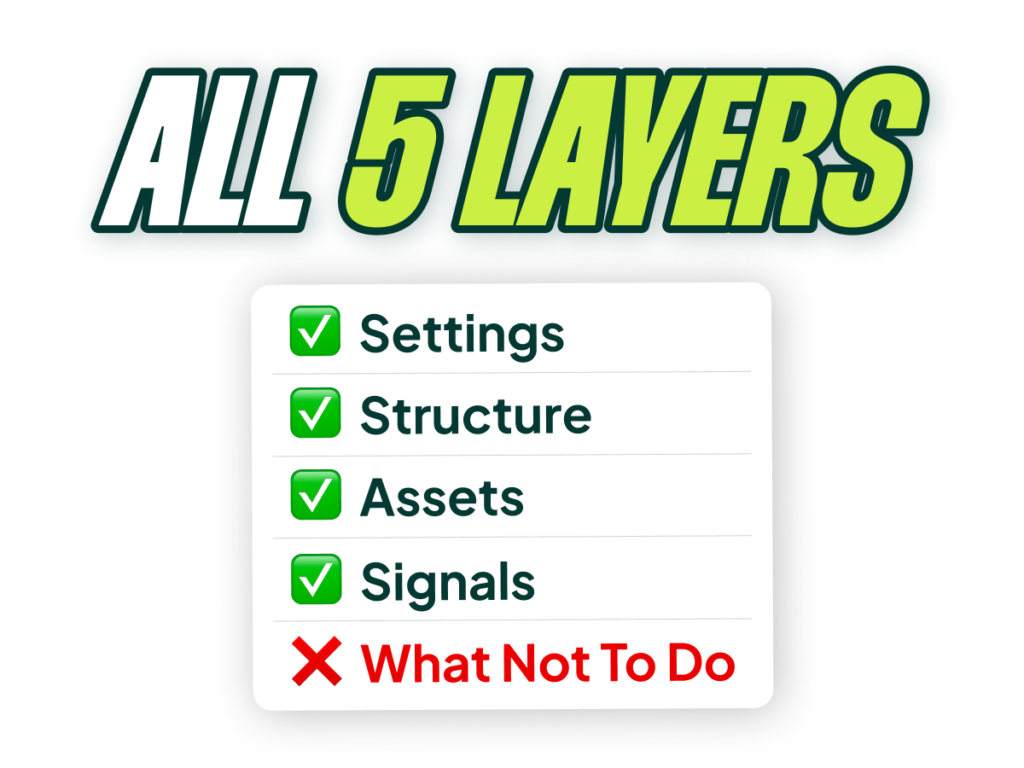
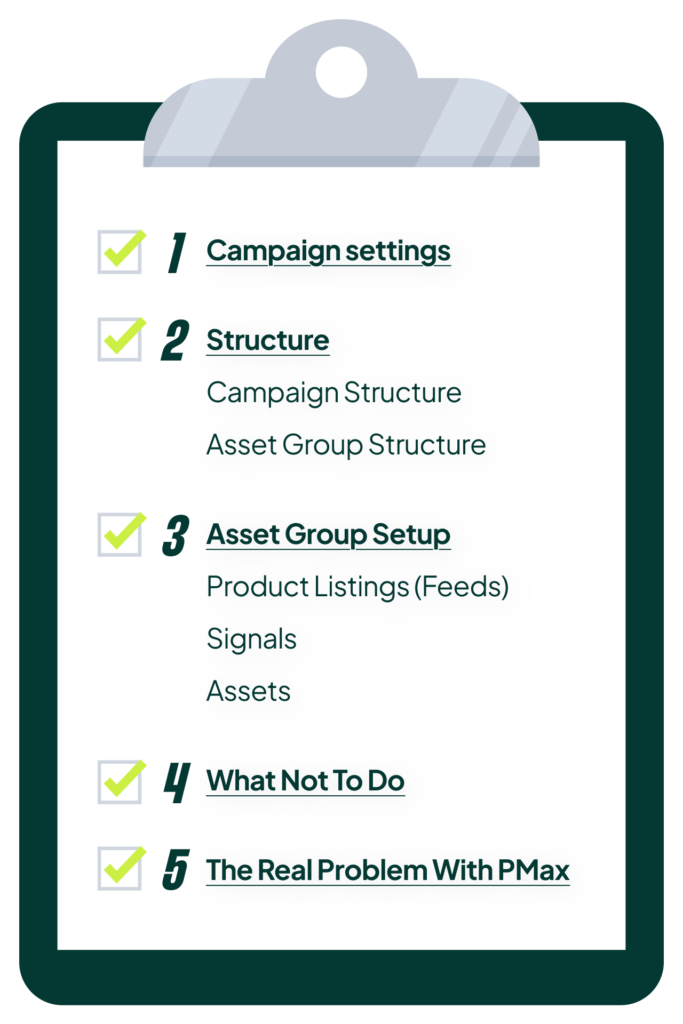
Layer 1: Campaign-Level Settings
Before we get into structure, let’s get the simple campaign-level settings right. These are the foundational levers for the entire campaign.
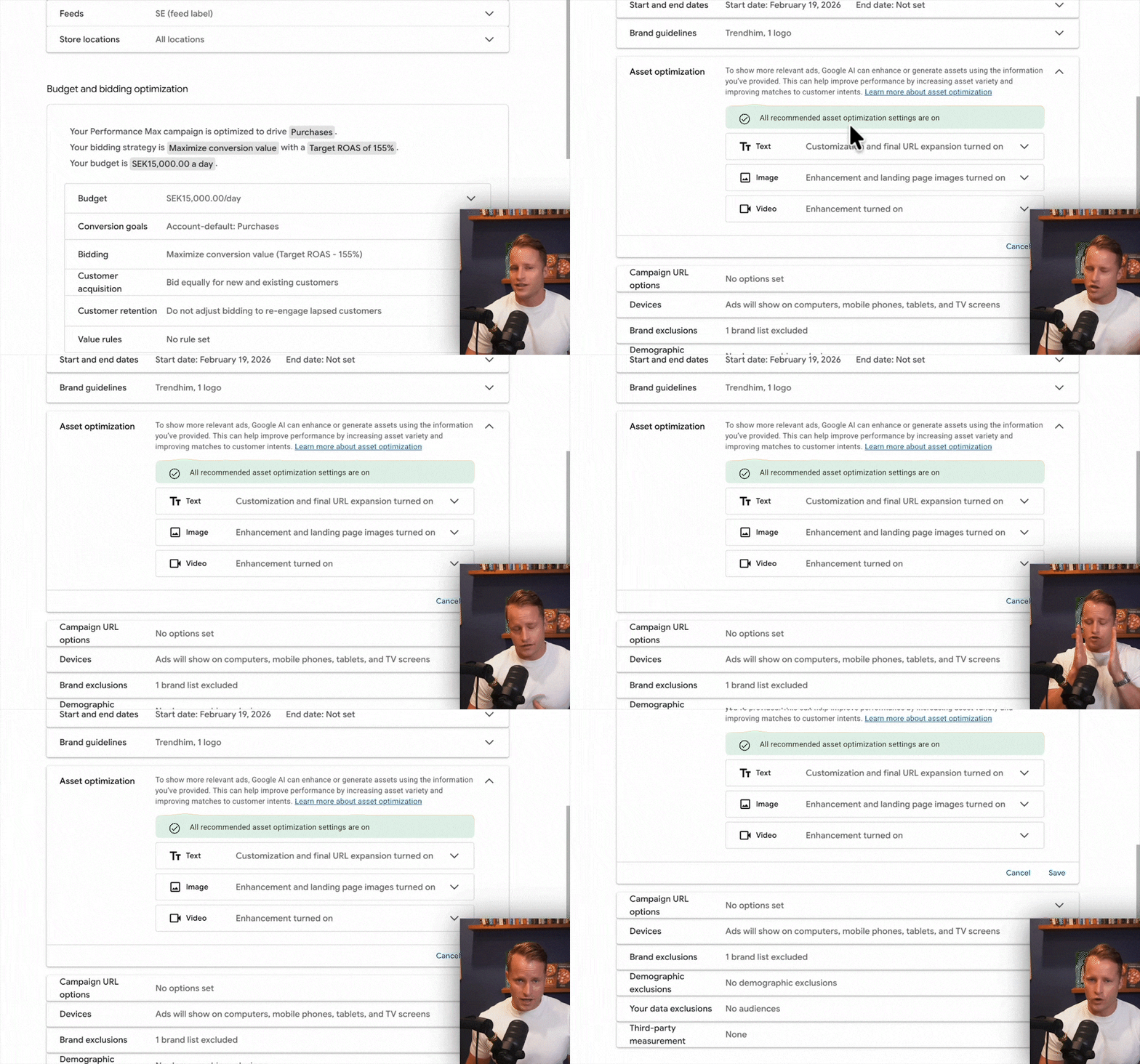
Budget & Bidding
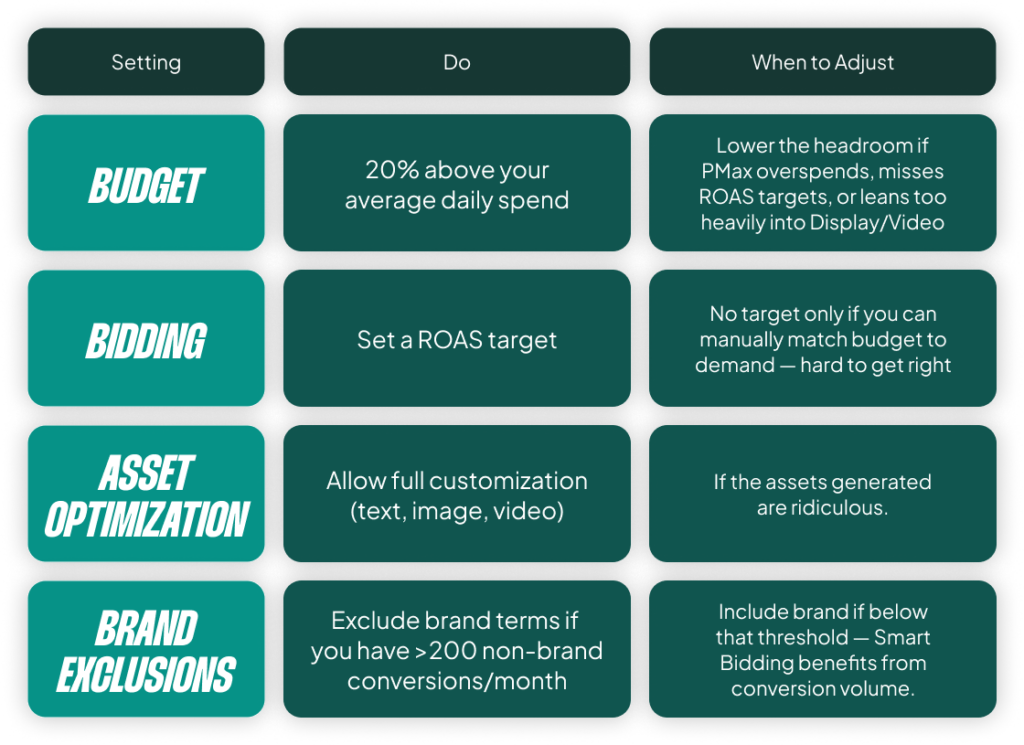
For your budget, a good starting point is to set it about 20% higher than your expected average daily spend. This gives PMax the flexibility to spend more on days when there’s higher demand. If you find your campaign is consistently overspending without hitting its ROAS target, lowering the budget can force the algorithm to focus on your best-performing channels and products.
On the bidding side, you should use a ROAS target in most scenarios. Without one, you’re just telling Google to spend your full budget, which makes it incredibly difficult to manage performance. Set the ROAS target you’re aiming for and let the budget be a secondary control.
Asset Optimization
This one is simple. Turn on all the asset automation features. Where these tools used to create silly, horrible slideshows, the AI has gotten much better. Since you’re providing better assets to begin with, the optimizations are genuinely useful. Google’s AI can now intelligently change video ratios and perform other enhancements that are worth testing. If you’re leaning into PMax, you should lean into its AI capabilities. Don’t hamstring the machine.
Brand Exclusions: A Simple Rule
This gets a bit more complicated, but we can simplify it with a few rules:
- If you have a lot of brand search volume, exclude your brand terms from the PMax campaign.
- If brand accounts for less than 10% of your revenue, it doesn’t really matter either way.
- If you have fewer than 100 conversions per month in total, I would keep your brand terms in the campaign. You need those conversions to give Smart Bidding the data and stability it needs to perform well.
Layer 2: The Right Campaign & Asset Group Structure
This is where most PMax campaigns fail. Getting the structure right from the beginning is critical because PMax campaigns are notoriously siloed; they don’t share data with each other. The more you split your campaigns, the less data each one gets, and the worse they perform.
When (and When Not) to Create Multiple Campaigns
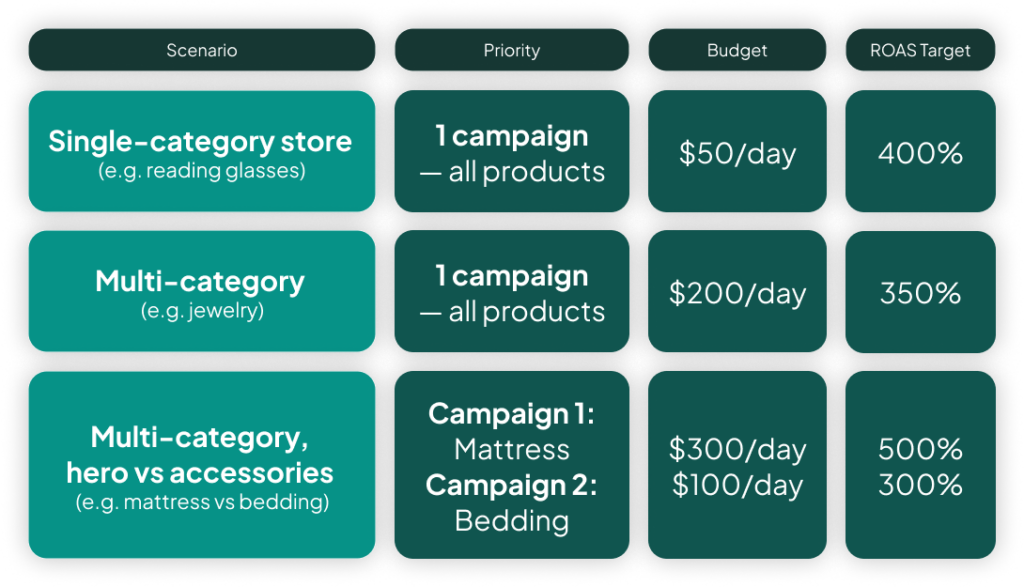
Your default should be to keep all products in a single campaign. The only two meaningful levers you have at the campaign level are budget and ROAS target. If you are not going to set a different budget or ROAS target for a specific group of products, creating a separate campaign is more harmful than helpful.
For example, if you have hero products and accessory products with different profit margins, it makes sense to split them into two campaigns. This allows you to set a lower ROAS target for the hero products you want to push and a higher one for the accessories. But splitting campaigns just for different categories (like “bracelets” and “earrings”) is a mistake.
Asset Group Structure: Real-World Examples
Your asset group structure depends entirely on your product catalog and whether you can create genuinely different assets for different product sets. Let’s look at three examples.
Example 1: Looks Readers (Few Products)
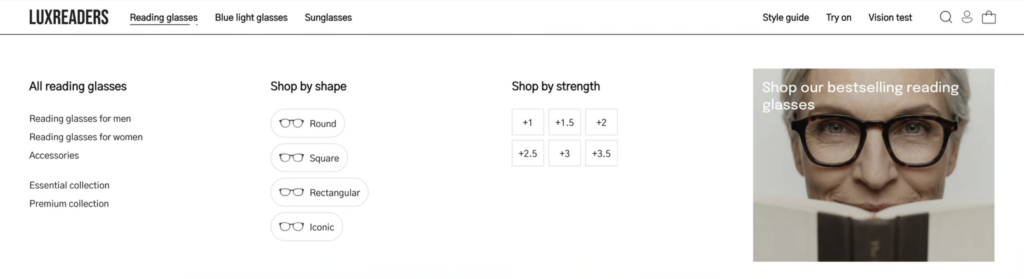
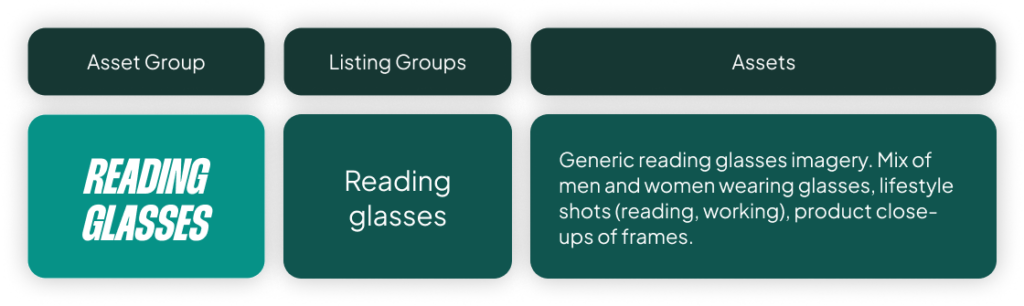
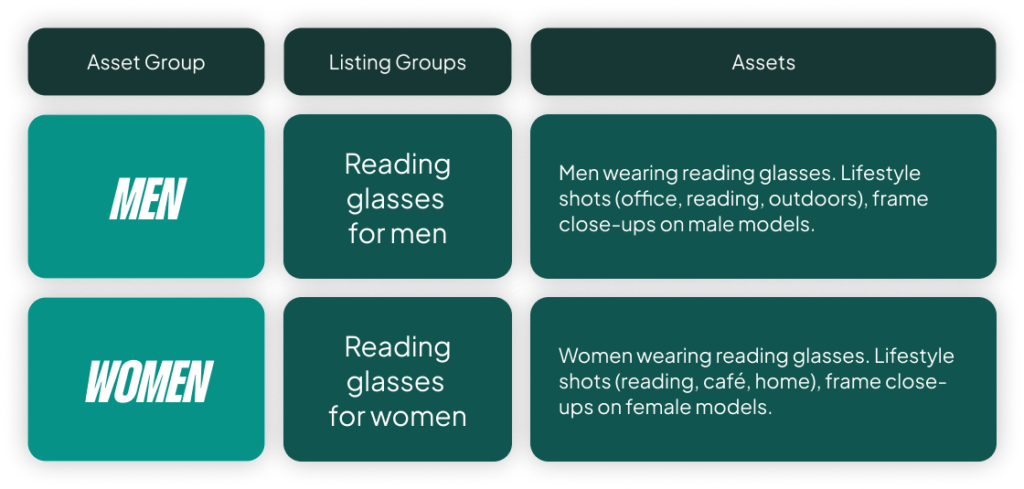
This store has one dominant category: reading glasses. The baseline setup here is simple: a single asset group for all reading glasses. You could argue for splitting it into “men’s” and “women’s” asset groups if you have creative that speaks very differently to each demographic, but starting with one combined group is the most logical approach.
Example 2: Hairloss.com (Medium, Niche Catalog)
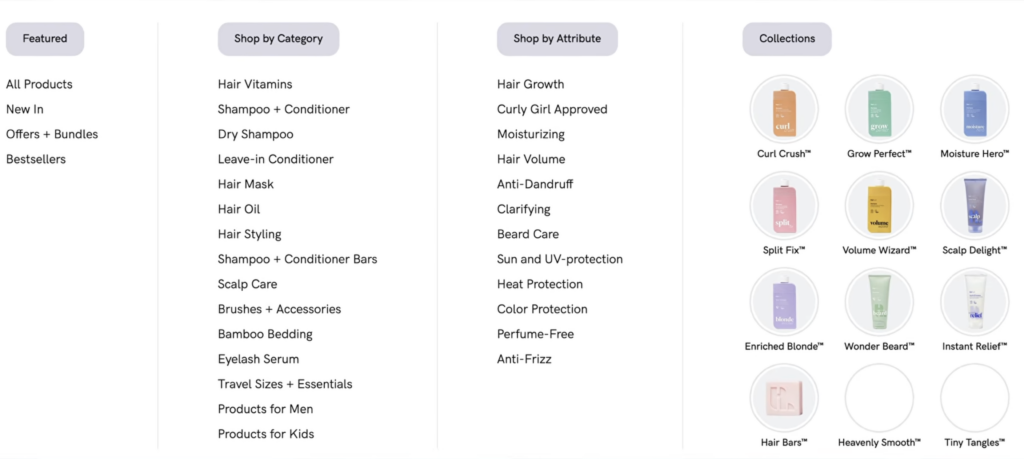
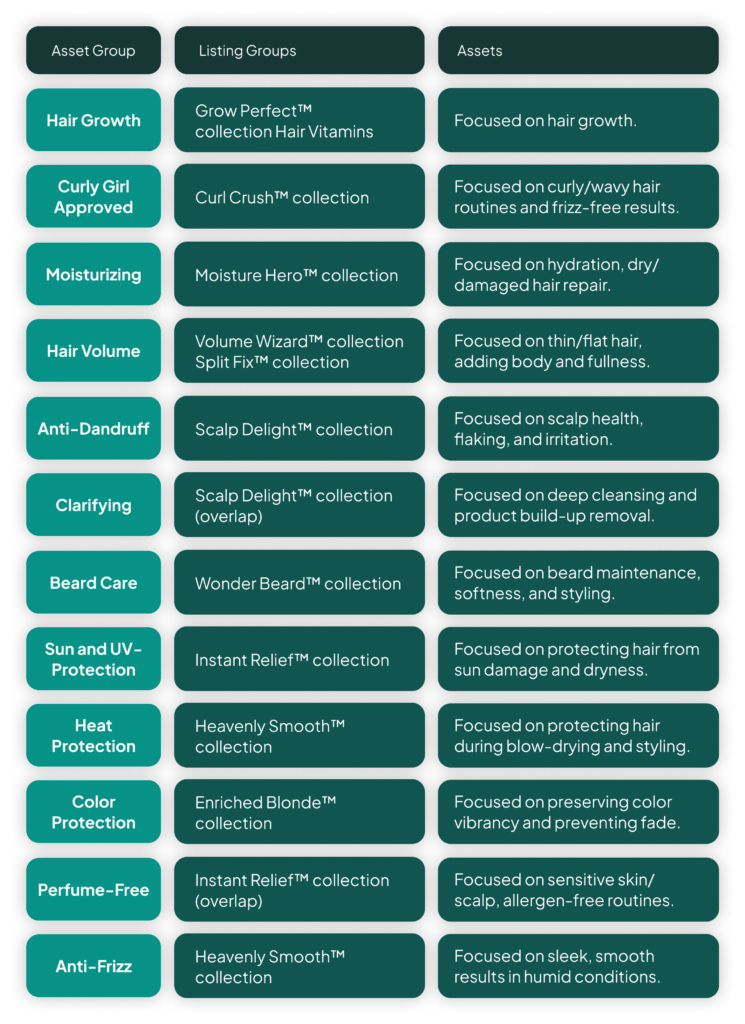
This store has around 300 products focused on very specific use cases (e.g., curly hair, regrowth, shine). In this case, creating tightly-themed asset groups for each major product line or “issue” makes perfect sense. You can combine products for “regrowth” with images, videos, and headlines that all speak directly to that specific problem. This is the ideal PMax setup.
Example 3: Trendhim (Massive Catalog)
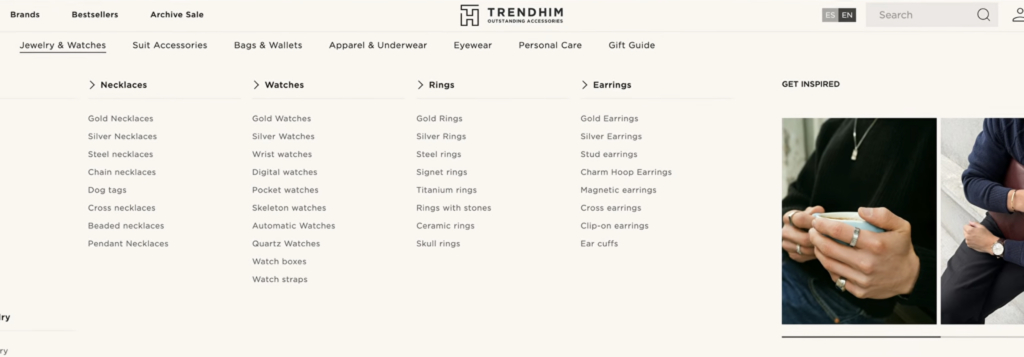
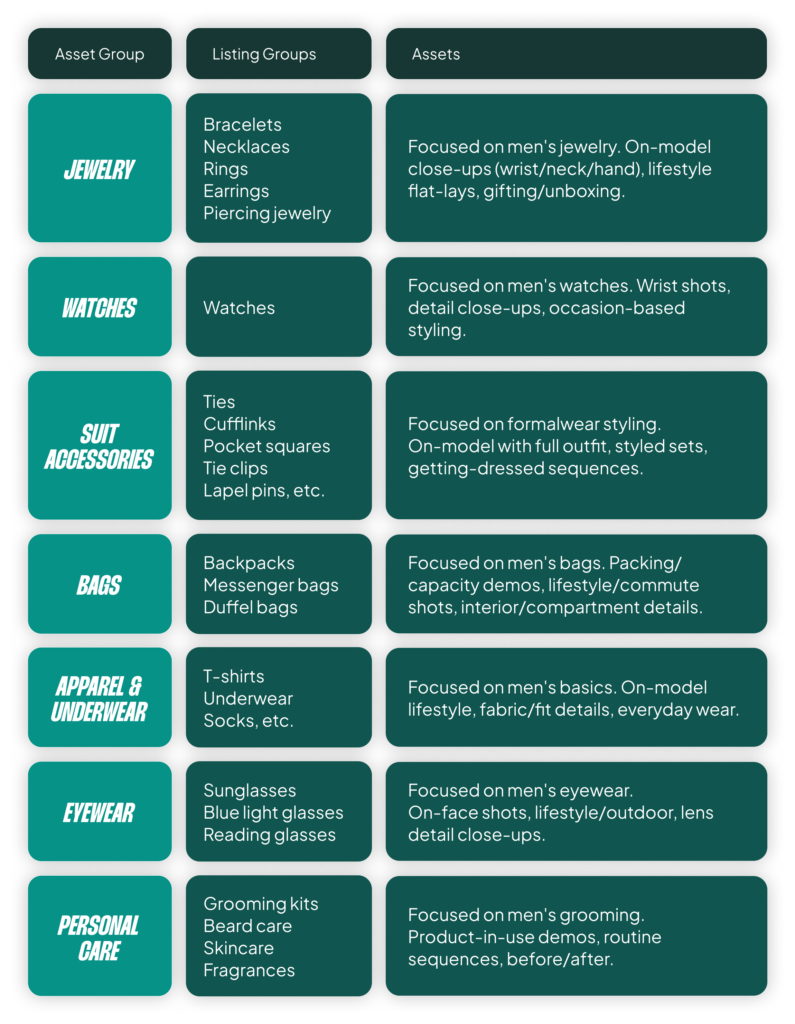
With over 10,000 products across 100+ subcategories, creating a tightly-themed asset group for every single product type is impossible and unnecessary. The messaging for a “steel men’s bracelet” isn’t that different from a “beaded men’s bracelet.” The solution is to create asset groups for the broader parent categories: Jewelry, Watches, Suit Accessories, Bags, etc. This is the only manageable and effective approach at scale.
Layer 3: Populating Your Asset Groups
Once your structure is defined, you need to tell each asset group which products to show and who to show them to.
Listing Groups (Don’t Screw This Up)
Listing groups are simply product filters within each asset group. This is how you connect your products to your assets. Using the examples above, you would filter one asset group to your “reading glasses” product type, another to your “regrowth” collection, and another to your “jewelry” category.
The biggest mistake people make here is leaving “All products” included in every asset group. If you do that, your asset groups are meaningless. They will all compete with each other for the same products, and Google has no reason to match your carefully crafted jewelry headlines to actual jewelry searches. One asset group, one set of products. No overlap. It’s stupid to have any overlap.
Audience Signals (First-Party Data is All That Matters)
When it comes to signals, you have two options: first-party data (your lists) and Google’s data. In my opinion, first-party data is all that matters. Upload your customer list and your email subscriber list. This is the single most powerful signal you can give PMax to help it find the right people. You can get fancier with high-value customer segments later, but it’s not necessary on day one.
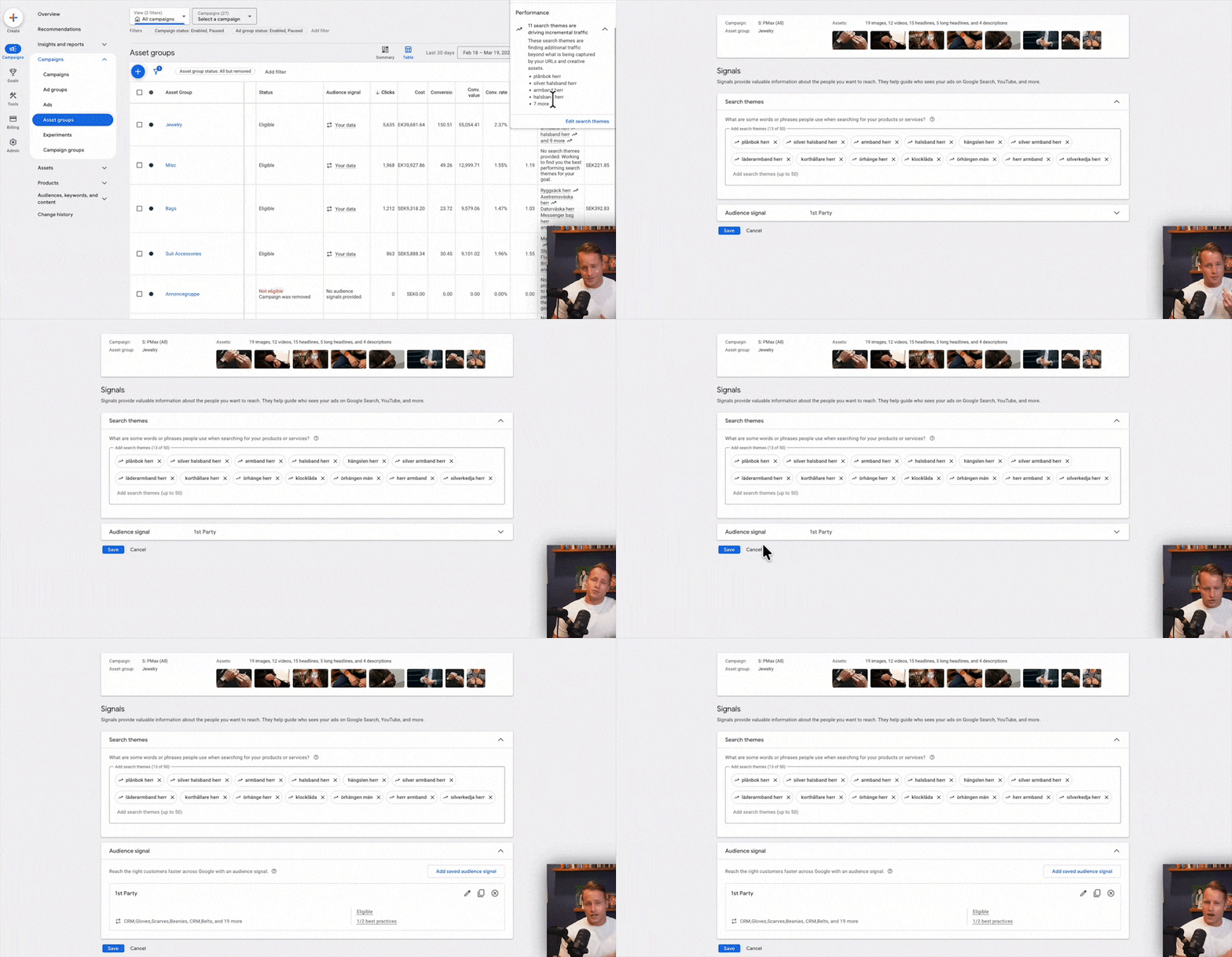
Don’t bother adding Google’s predefined in-market or affinity audiences. PMax already has access to all of them for bidding purposes. Adding them manually does very little besides nudging the algorithm slightly at the beginning. It’s not worth your time.
Search Themes
Think of Search Themes as what you would have named your ad groups back in the day (e.g., “men’s bracelets,” “reading glasses for women”). They are not keywords. Don’t treat them like keywords. Their main purpose is to help PMax understand what your asset group is about early on before it has enough conversion data to figure things out on its own. They matter most at launch or when you add new product lines.
Layer 4: The Creative: Your Text, Image & Video Assets
Your signals tell PMax who to target; your assets tell it what to show them. You need all three types: text, images, and videos.
Text Assets & The New “Brand Guidelines”
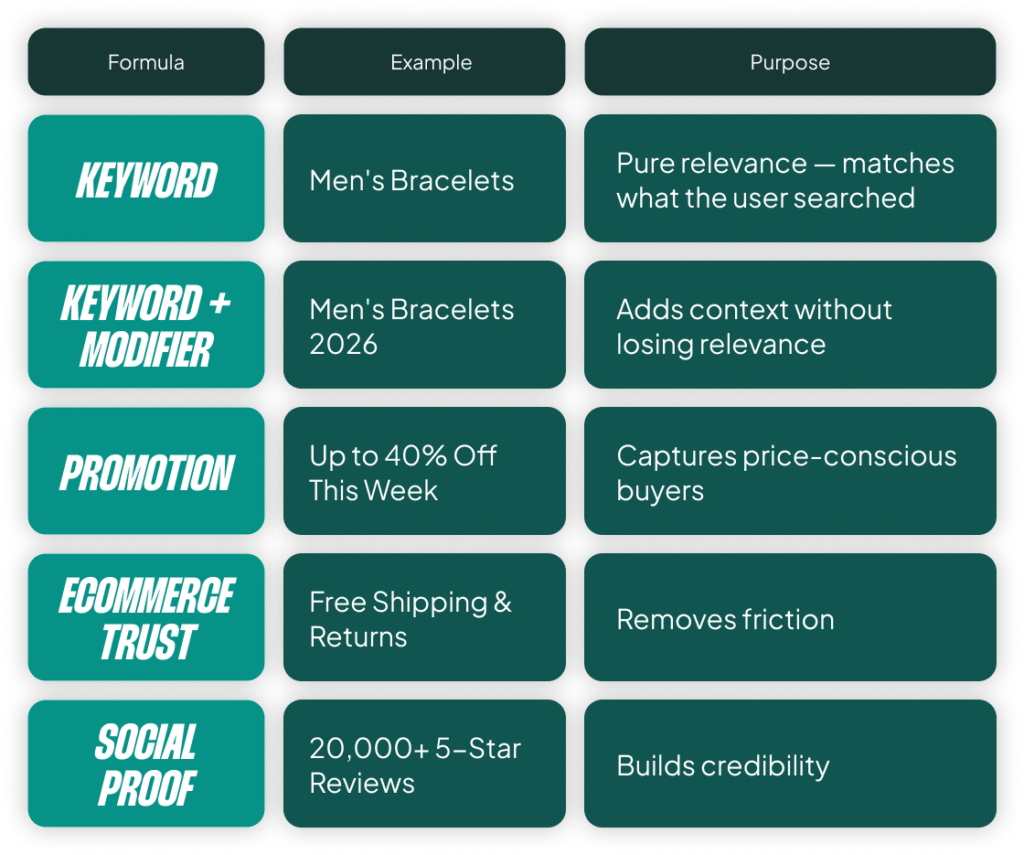
Your text assets follow the same logic as Responsive Search Ads. Use a mix of headline formulas focused on your value proposition, trust signals, and specific product features. For your descriptions, focus one on your value prop, one on trust, and one on the specific product category in the asset group.
Keep an eye on the new “Brand Guidelines” feature (currently in beta). This allows you to provide prompts about what messaging to use and what to avoid. This looks like it will become a key part of guiding Google’s AI to write better ad copy in the future, not just for PMax but for other AI-driven campaigns.
Image & Video Assets
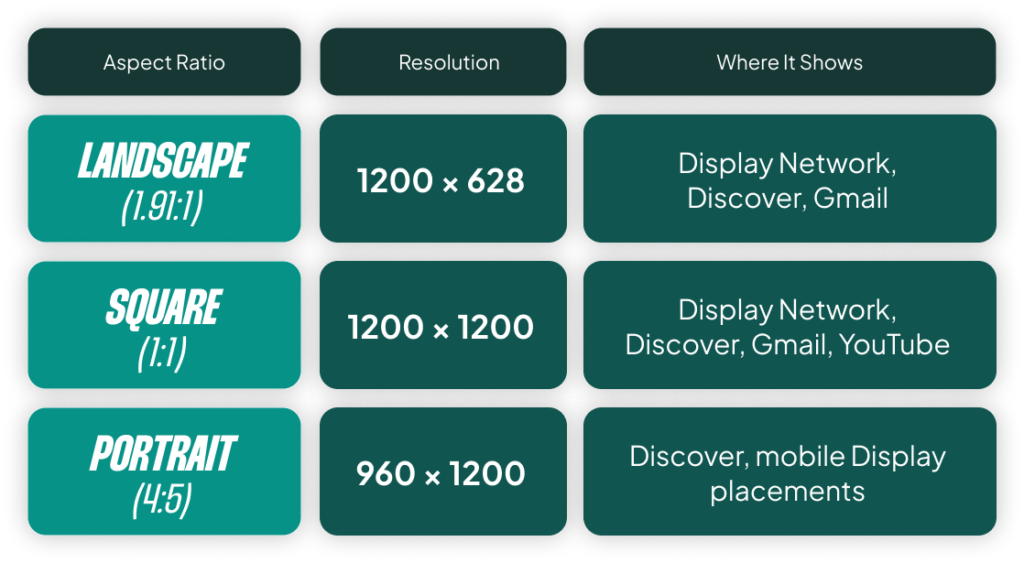
For images, upload 5-10 per asset group. Mix it up with product shots, on-model lifestyle photos, and close-ups. Google already has your standard product photos from the feed, so give it some variety to test.

For videos, aim for around five per asset group. The sweet spot is 10-30 seconds. This doesn’t mean you need a massive production budget; a clean product close-up shot on an iPhone can easily outperform a complex studio ad.
Layer 5: What to Ignore (Seriously, Skip These)
Part of a good setup is knowing what not to overdo. Here are a few things you can safely ignore, at least for now.
- Site Links: Don’t overthink them. Google autogenerates them anyway. Adding a few manually is fine, but it’s not a high-impact task.
- Customer Acquisition Settings: The settings for new vs. returning customers and lapsed customers are for very specific use cases. If this is your first PMax campaign, leave them off and come back later once the campaign is stable.
- Exclusions: Do not add device, demographic, location, or keyword exclusions initially. Most e-commerce advertisers shouldn’t exclude anything unless you see a consistent, long-term pattern of unprofitability (think 3-12 months). One bad week of tablet spend is not a reason to exclude all tablets forever. Give the algorithm good inputs and let it do its job.
The Real Problem with Performance Max (And Why This All Matters)
I’ve just walked you through how to build the best possible PMax setup. But none of these settings address the real, fundamental limitation of the campaign type: PMax treats every channel the same.
It applies one single ROAS target across YouTube (demand generation), Shopping (demand capture), and Display (retargeting). These are three completely different jobs with different economics. A YouTube ad introducing your brand for the first time should not be held to the same ROAS as a Shopping ad from a user actively searching for your product. Retargeting should have an even higher ROAS target.
Right now, I can’t tell PMax to bid aggressively on YouTube for awareness while holding a strict ROAS on Shopping. It’s one target to rule them all. This means PMax either leans into the cheapest conversions (usually brand and retargeting) or spreads the budget in ways you can’t control or fully see.
Until the day Google allows us to set different performance targets across the user journey within a single PMax campaign, I will remain a skeptic. However, the platform has improved. Many of the early issues with overspending on Display and Video are gone. If you are going to run PMax, you must do it properly. Follow this guide, give the machine good inputs, and you will have the best chance of success.
[TL;DR]
- Structure is everything. Only create new campaigns for different budget/ROAS goals. Create asset groups based on your ability to deliver unique creative for a specific set of products.
- Don’t mix products in asset groups. Use listing groups to ensure there is zero overlap between the products in each asset group. Mixing them makes your tailored assets meaningless.
- Prioritize first-party data. Your customer and email lists are the most powerful audience signals you can provide. Ignore Google’s predefined audiences.
- Don’t over-manage. Let the AI do its job. Turn on asset optimization and avoid adding exclusions (demographics, devices, etc.) unless you have long-term data proving a problem.
- Understand the core limitation. PMax’s biggest weakness is its single ROAS target across all channels (YouTube, Shopping, Display), which prevents true strategic budget allocation.