Dansk
Dansk
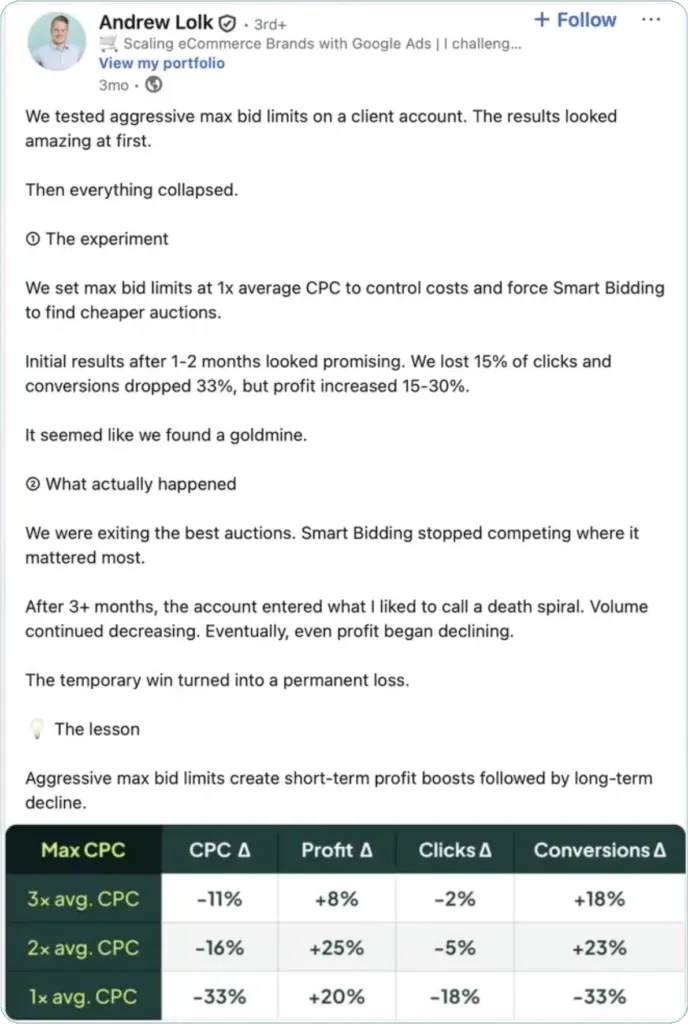
One of my more popular LinkedIn posts this year was about the results of a max bid limit test we’d done. Based on the response, I figured it was worth breaking down in more detail, along with another test we’ve run since.
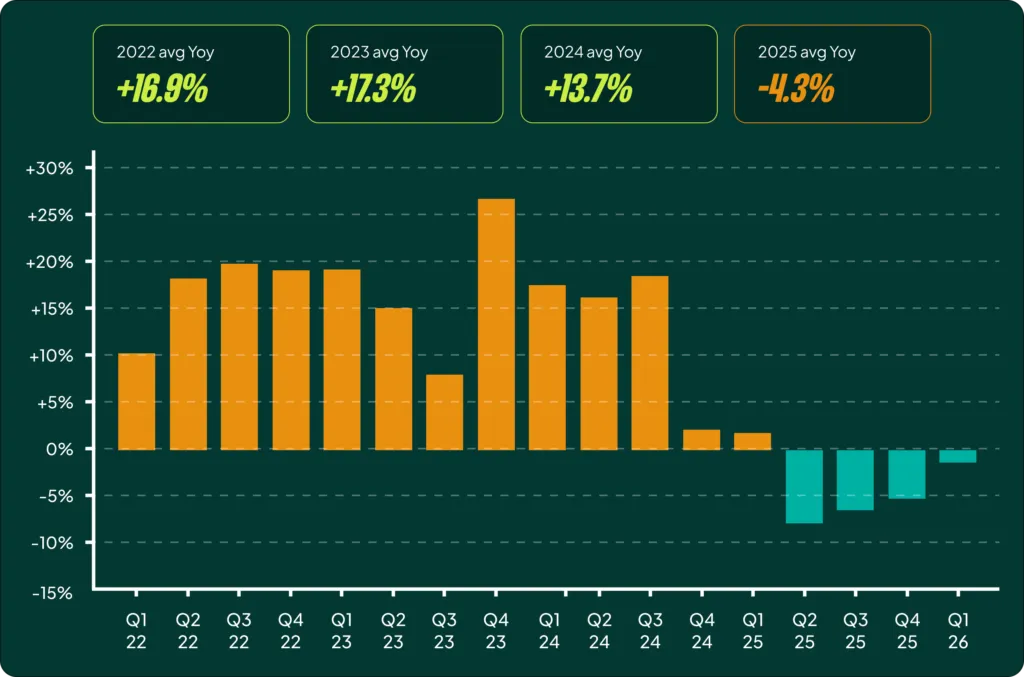
It’s my belief that one of the main reasons our clients don’t experience the dreaded CPC creep is that we use max bid limits to avoid the worst of Google’s bid inflation. This isn’t a theory; we’ve seen it happen time and again. Here’s a major account we took over that had been dealing with rising CPCs year after year:
We did more than just apply max bid limits, but it was one of the fastest ways to ensure that Smart Bidding stopped overspending on individual clicks. Yes, spend dropped a bit initially, but the business had been spending too much for too long anyway.
Now, let’s be clear: max bid limits are not child’s play. You can seriously hurt your account if you apply a limit that’s too strict. One of the top arguments against them is that they restrict Smart Bidding too much. To that, I counteract: yes, sometimes they do. But what about the click that costs 10-20x the average? There’s a middle ground here, and that’s where the value is.
Why Your CPCs Keep Creeping Up (And How to Stop It)
The core problem we’re solving is CPC creep. Smart Bidding gets more confident, competition heats up, and suddenly you’re paying more for the same traffic without a corresponding lift in revenue. A max bid limit acts as a ceiling, a hard stop that tells the algorithm, “No matter how good you think this auction is, we are not paying more than X for a single click.”
The key to doing this effectively is understanding the ratio between your average CPC and your max bid limit. You don’t want it too low (I’d argue below 2x is risky), but setting it beyond 4x will have little to no impact on most accounts.
Finding the right ratio for your account is where the work comes in. Let’s jump into the tests.
My Recommended Max Bid Limit Tests
There are two primary scenarios where we deploy max bid limits. One is a simple “hygiene” task that every account should have, and the other is a more active strategy to wrestle back control from the algorithm.
Test 1: Capping Ridiculous CPCs (The No-Brainer)
This is the easiest test that everyone should do. It usually has a small, but not insignificant, impact on 2-5% of your spend at most. The goal is simple: find and eliminate the outrageous outlier clicks that provide no extra value.
Here’s the process:
- Go to all your campaigns in the Google Ads UI.
- Set the date range to the last 30 days.
- Sort by CPC from high to low.
You’ll quickly start to see some ridiculous CPCs. To quantify the potential impact, set a filter for clicks where the CPC is greater than 3x your account’s average CPC. For one client, it looked like this:
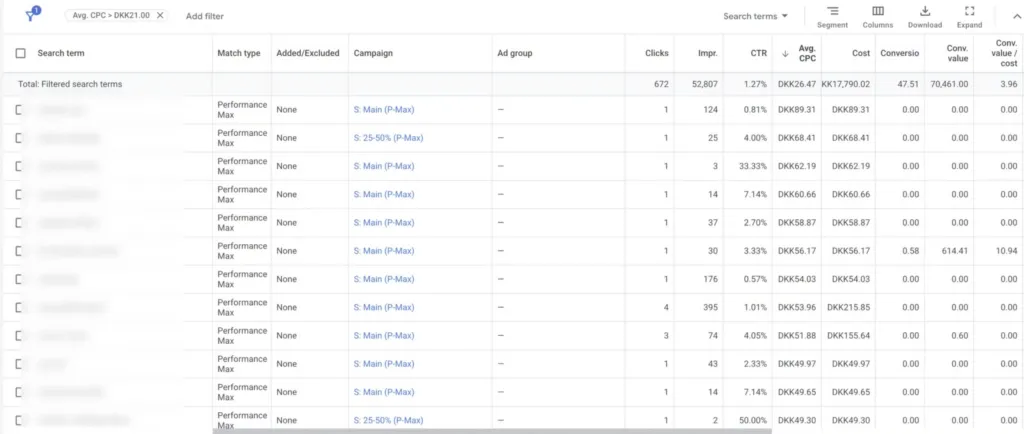
The average CPC was around 7 kr. We were spending 17,990 kr. on clicks that cost more than 21 kr. If we capped all those clicks at a max of 21 kr., we’d save about 4,000 kr. per month. In the big picture of a 1.3M kr. monthly spend, it feels like pennies.
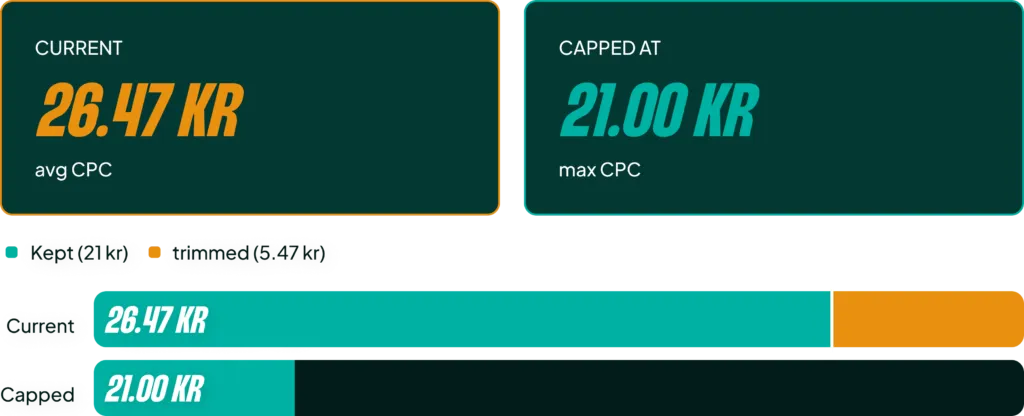
But let’s look at another account. In that case, we could save 10,000 kr. per month by capping CPCs at 3x the average, and I swear we would not see a single click lost from it.


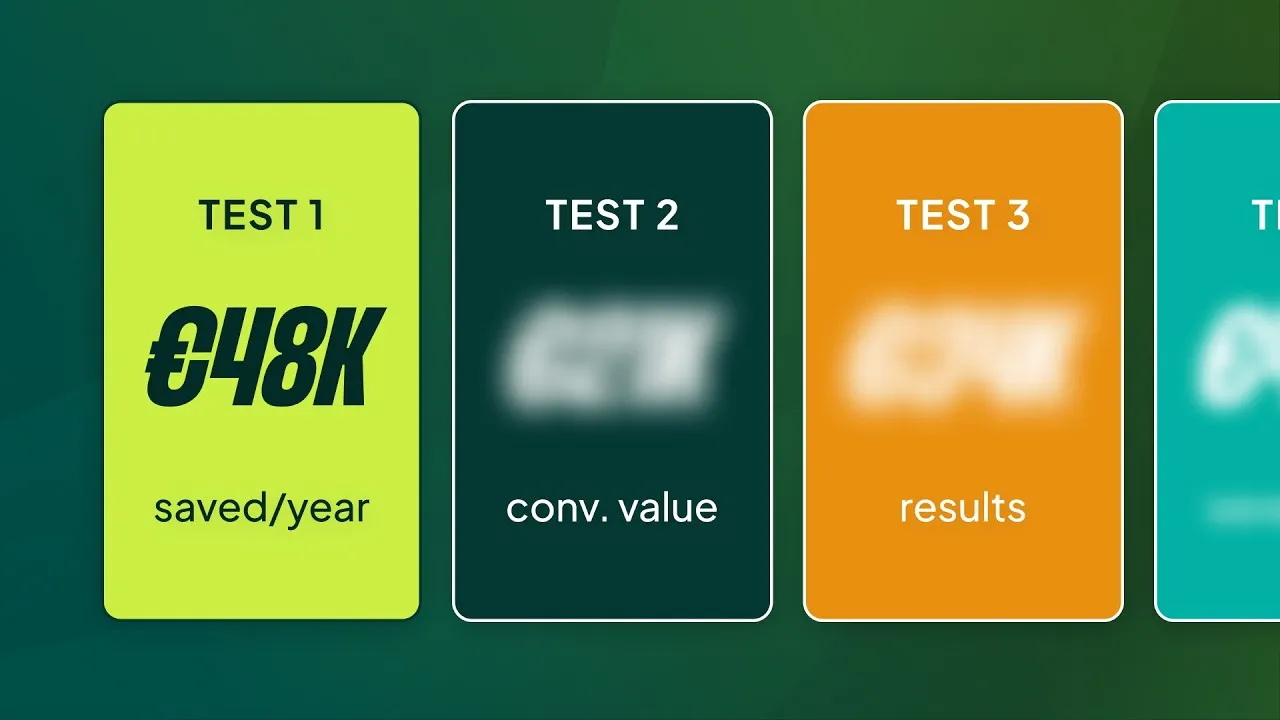
Will this save a failing account? No. Will it be the key to scaling? Also no. But as an agency, in-house manager, or freelancer, if you can show documented savings of 50,000 euros per year simply by avoiding wasted spend with no loss in performance… that’s not insignificant. It’s what we call a hygiene implementation. It’s not why you hire us, but it’s a good thing to do.


Test 2: Actively Stopping CPC Creep (The Balancing Act)
Sometimes you need to get more aggressive and stop the system from slowly inflating your costs. For this, we use a tighter limit, usually in the range of 1.5x to 2.5x the average CPC.
In my experience, it’s not healthy to limit the system below 2.5x for too long. The chances of accidentally excluding yourself from high-performing auctions becomes too high. But for short-term corrections, it’s highly effective.
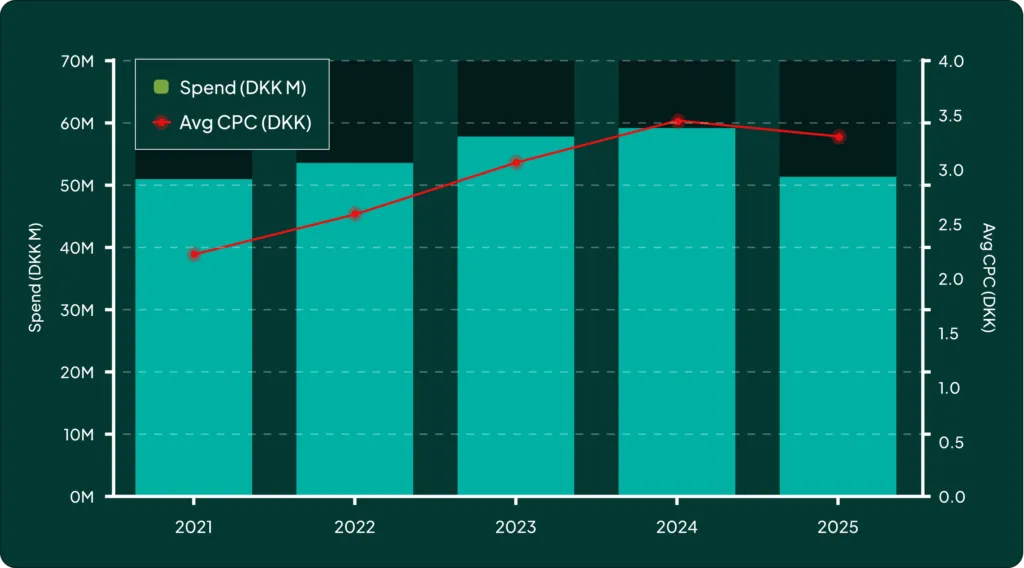
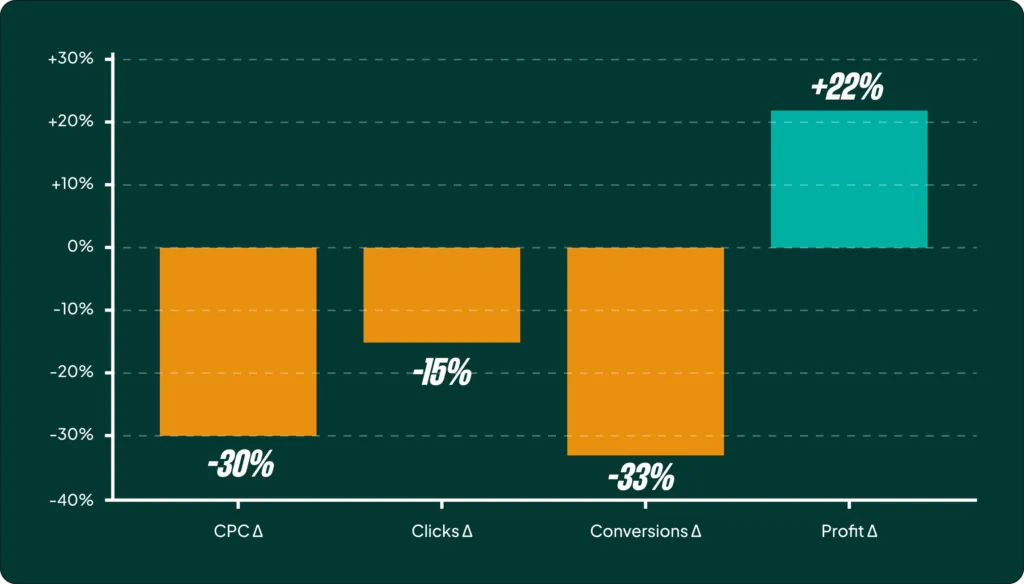
Look at this graph. Profit in the account was increasing, so Smart Bidding naturally started pushing CPCs up. But then, conversion rates decreased while CPCs kept rising, and profit tanked.
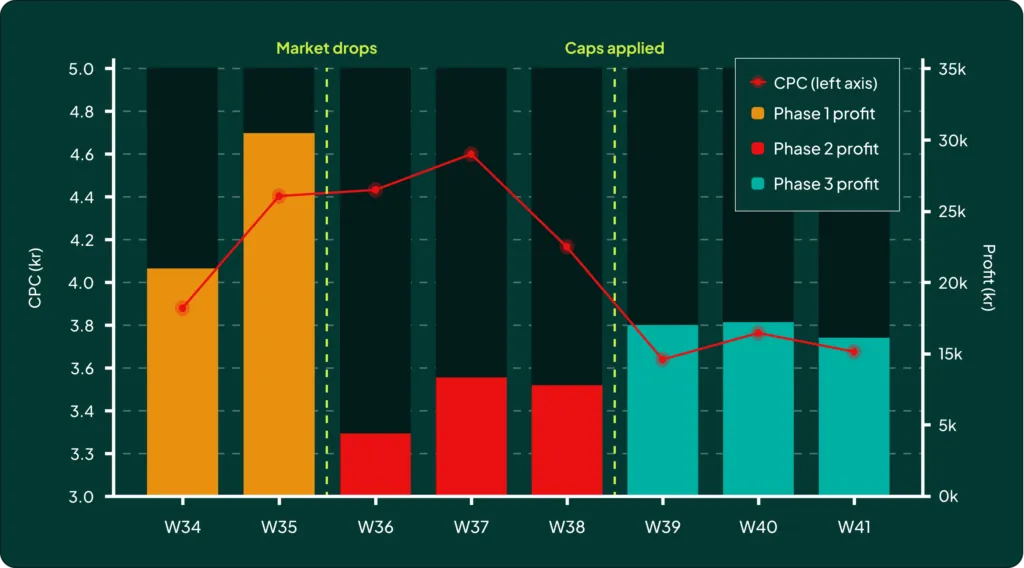

We applied max bid limits to force the CPCs back down.
Now, could we have done other things? Sure. We could have:
- Changed targets? Yes, but volume in this account was sensitive, and I didn’t want to risk entering a death spiral.
- Implemented seasonality adjustments? Yes, but this wasn’t a temporary change that would revert on its own.
- Set budget caps? Budget caps are generally not a good thing in my book. They just limit spend and can take a while to actually influence bids.
In this case, a max bid limit was the most direct and predictable lever to pull to get CPCs under control while we diagnosed the conversion rate issue.
How to Implement Max Bid Limits Without Breaking Your Account
If you’re going to do this, you have to do it right. This isn’t a set-it-and-forget-it tactic. Getting it wrong can do more harm than good. Here are the rules.
Rule 1: Segment Your Campaigns First
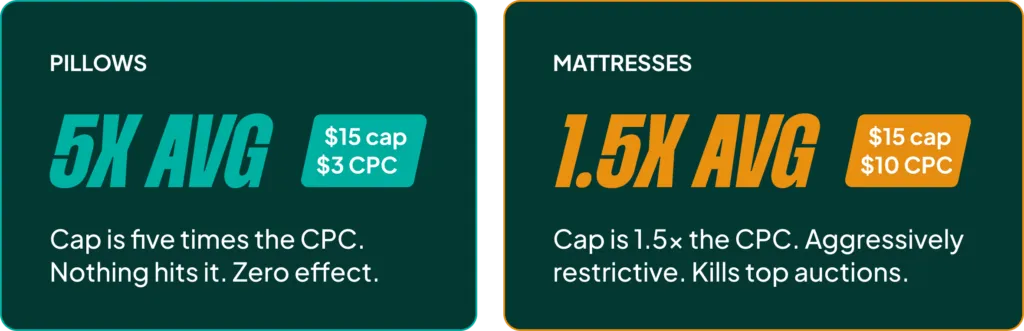
If your account has a wide variance in CPCs across different product types, you need to segment your campaigns before applying a single bid limit. Trying to use one ratio for mattresses with a $10 CPC and pillows with a $3 CPC is a mistake.
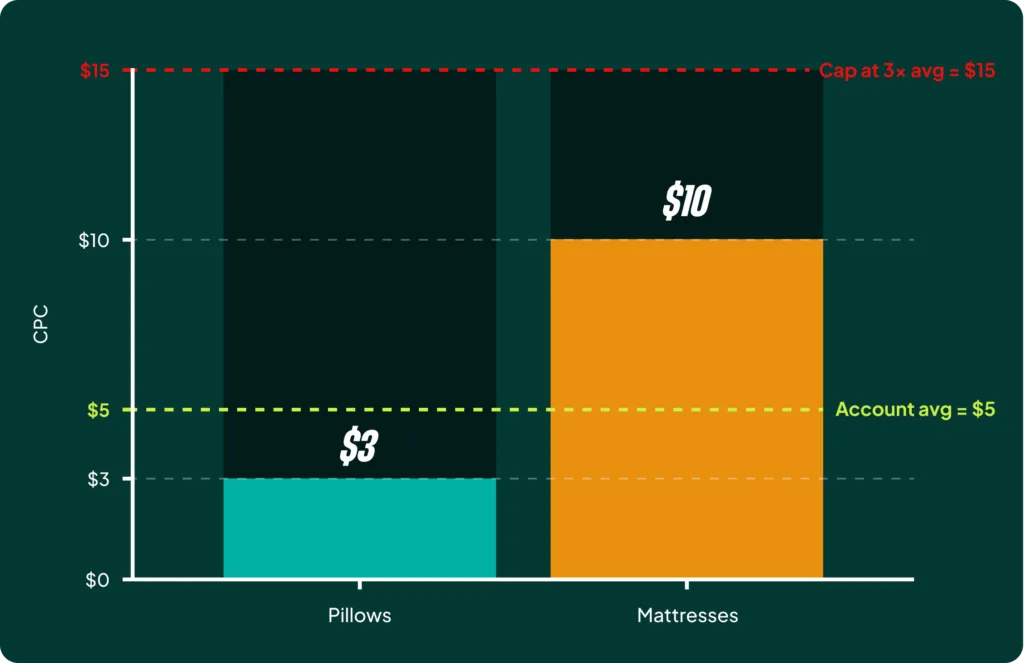
You’ll end up either limiting the mattress campaigns needlessly or having no effect at all on the pillow campaigns. If your high-CPC products aren’t split out from your low-CPC products, you can’t run these tests effectively.
Rule 2: Understand That Your Ratios Will Shift
As you implement max bid limits, your average CPC will (hopefully) change. This means your max bid limit ratio will also change. If you set a 3x limit and your CPCs drop by 10%, your effective limit is now higher than 3x.
This doesn’t mean you should constantly lower your max bid limit to stay within the ratio. That’s how you choke an account. Just be aware that the number is dynamic.
Rule 3: Review and Update Monthly (This is Non-Negotiable)
The biggest mistake people make is setting a limit that’s too low and then forgetting about it. The best way to keep an overview is to pull your bid portfolios into a Google Sheet using a script. (Just ask your favorite LLM to create one; it’s simple).
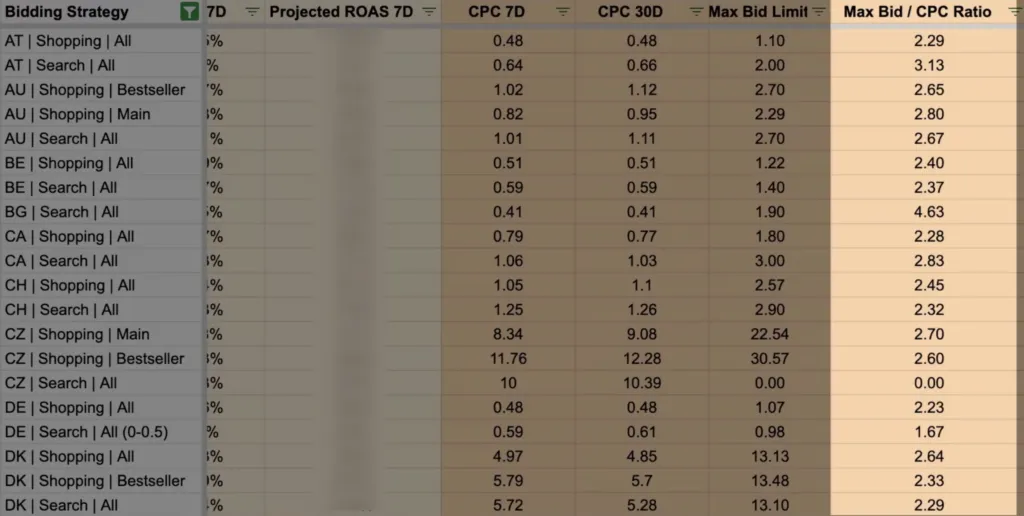
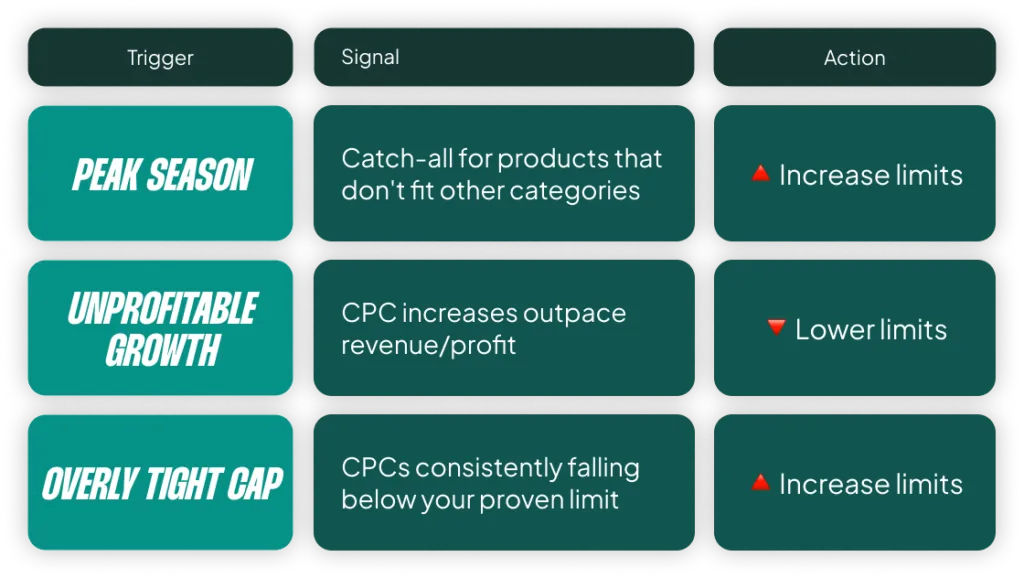
You need a visual overview of your limits across the account. Trust me. This allows you to proactively adjust them. You should raise limits heading into peak season or when you see CPCs are consistently sitting well below the cap. Conversely, you should lower them when CPC growth starts to outpace profit growth.
If any of this sounds too hard, skip working with max bid limits. Seriously. It can go horribly wrong if you’re not paying attention.
[TL;DR]
- Max bid limits are a crucial tool for fighting CPC creep, but they require active management.
- Start with the “no-brainer” test: cap CPCs at 3x your average. It’s a simple hygiene task that adds up to real savings over a year.
- For more active control, you can use a tighter 1.5x-2.5x limit, but be careful not to restrict the algorithm for too long.
- You must segment campaigns with widely different CPCs. A one-size-fits-all limit will fail.
- Review your limits monthly. The biggest risk is setting a limit and forgetting about it, accidentally throttling your best campaigns weeks or months later.