Dansk
Dansk
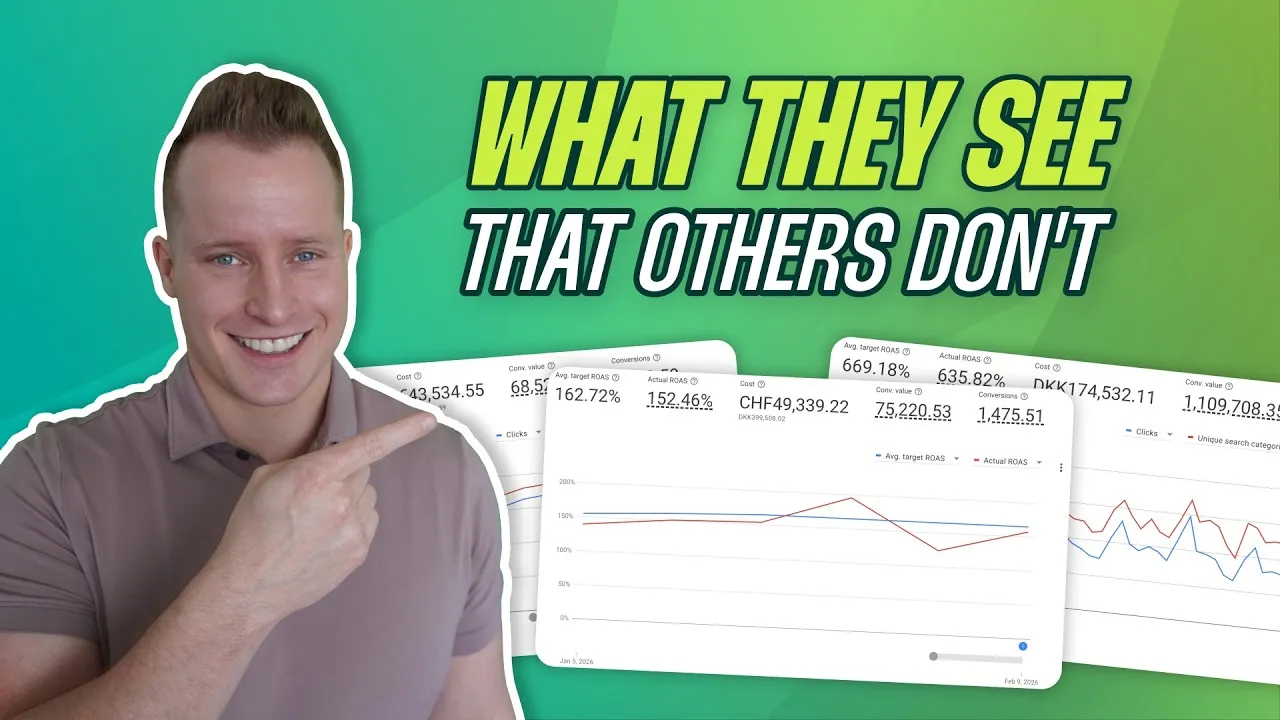
When it comes to Google’s Smart Bidding, most account managers fall into one of two camps. The first camp blindly trusts the algorithm. They set a target, walk away, and just hope for the best. The second camp micromanages it to death, constantly tweaking targets and adding bid adjustments, never letting the algorithm breathe.

The skill that separates the top 1% of practitioners from everyone else is neither of these. It’s the ability to accurately read what Smart Bidding is doing and understand why it’s doing it.
That’s what I’m going to teach you. I’ll show you the exact metrics, where to find them, and how to interpret them so you can look at any account and know if Smart Bidding is raising bids, lowering them, expanding into new auctions, or pulling back. But here’s the part that might surprise you: the most powerful thing you’ll learn isn’t when to step in. It’s developing the confidence to do absolutely nothing, knowing it’s the right call, and being able to explain to your boss or client exactly why.
The Problem: We Stopped Analyzing with Intention
Back when we ran manual bidding, there was a rhythm. We’d open an account on Monday morning, analyze performance, and decide whether to bid up or down. We made the changes and analyzed the results. It was a rinse-and-repeat model that forced us to be constantly analyzing our accounts.
Then Smart Bidding arrived. After a few years, we collectively decided “the algorithm handles it” and we stopped looking at our accounts with the same focus. Let me say that again: we stopped looking with intention.
That’s a mistake. You still need to read what’s happening; you just need to look at different things. This leads to a common paradox: if your ROAS is lower than your target, your gut tells you to increase your ROAS target. But technically, Smart Bidding should already be working to fix this on its own. So what do you do? The first step is to understand what levers the algorithm can actually pull.
How Smart Bidding Actually Works (It’s More Than Bids)
Smart Bidding doesn’t just bid up and down. It has two main actions it can take to hit your targets.

Lever 1: Increasing or Decreasing Bids
This is the one everyone knows. Based on its predictions, Smart Bidding will raise or lower the bids it places for existing auctions you’re already competing in. It’s the most straightforward part of the system.
Lever 2: Expanding or Narrowing Auctions
This is the part most managers completely miss. Smart Bidding will also decide to enter more auctions (expand) or fewer auctions (narrow) based on your target. An “auction” isn’t just a search term; it’s a unique combination of a search term, device, audience, geography, and all the other signals Google uses.

This is precisely why lowering your ROAS target by 10% can suddenly move a stagnant account into 10-30% growth mode. You’re signaling to the algorithm that it has permission to be less efficient and enter new, potentially less-qualified auctions to find more volume. The opposite is also true. We’ve seen overly aggressive accounts get shown for completely irrelevant terms (like the search term “cappuccino” showing for an Ice Spice TikTok trend) because the target was too low and the algorithm expanded too far.
The Key Metrics: How to Read What Smart Bidding is Doing
To see which lever Smart Bidding is pulling, you need to look in the right place. The data you need is in the Bid Strategy Report.
If you use campaign-level bid strategies, you can find this by scrolling down on the campaign overview page. But I recommend using Portfolio Bid Strategies, which gives you a much cleaner report under Tools & Settings > Bid Strategies.
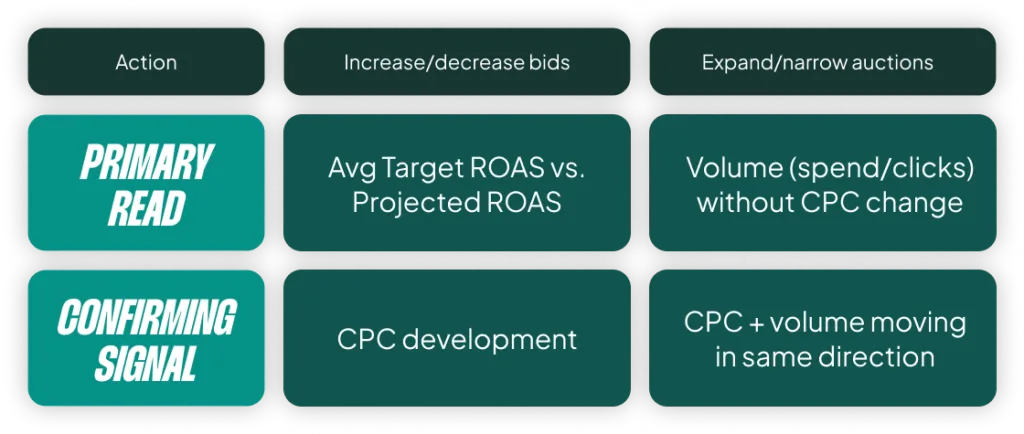
Primary Metrics: The Algorithm’s Brain
Once you’re in the report, these are the metrics that matter most:
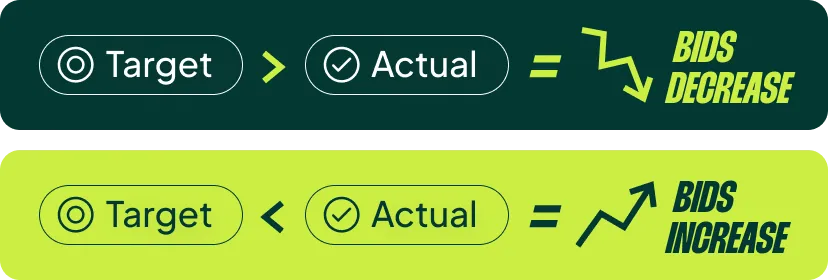
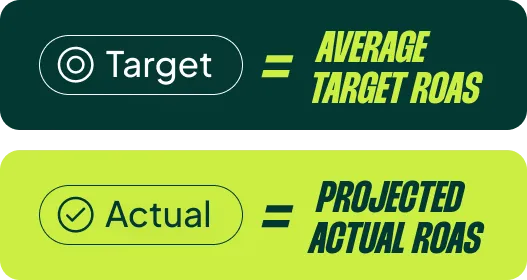
- Projected ROAS: This is the single most important metric. If you hover over your “Actual ROAS” on the graph, you’ll see it. This is the number Smart Bidding is actually using to make decisions. When the past doesn’t match the future, this is where the algorithm often goes wrong.
- Actual ROAS: This is your real-world performance over the time frame. We compare this to the projection.
- Average Target ROAS: Your “Target ROAS” setting is not what the algorithm is judged against over a 30-day period if you’ve changed it. The “Average Target ROAS” shows the true average target during that window. Comparing your Actual ROAS of 146% to an Average Target ROAS of 149% is pretty good, even if your current target is set to 155%.
Secondary Metrics: The Supporting Evidence
These metrics help confirm what the primary metrics suggest:
- CPC: Is the cost-per-click trending up or down?
- Volume (Spend & Clicks): Is overall traffic and spend increasing or decreasing?
- Unique Search Categories: This is an indicator of auction expansion or narrowing. It doesn’t always correlate perfectly, but it’s a useful signal to watch.
A quick tip: if you’re managing a lot of campaigns or countries, pull all this data into a spreadsheet. It’s much easier to see trends when the data is in a simple table.
The Four Scenarios: Decoding Smart Bidding’s Behavior
To understand what Smart Bidding is doing, you have to be like Sherlock Holmes investigating the case where the key clue was the dog that didn’t bark. We all notice when CPCs are rising, but the metric that stays flat while others move is often the most telling signal.
By combining the primary and secondary metrics, you can diagnose which of these four scenarios is happening in your account.

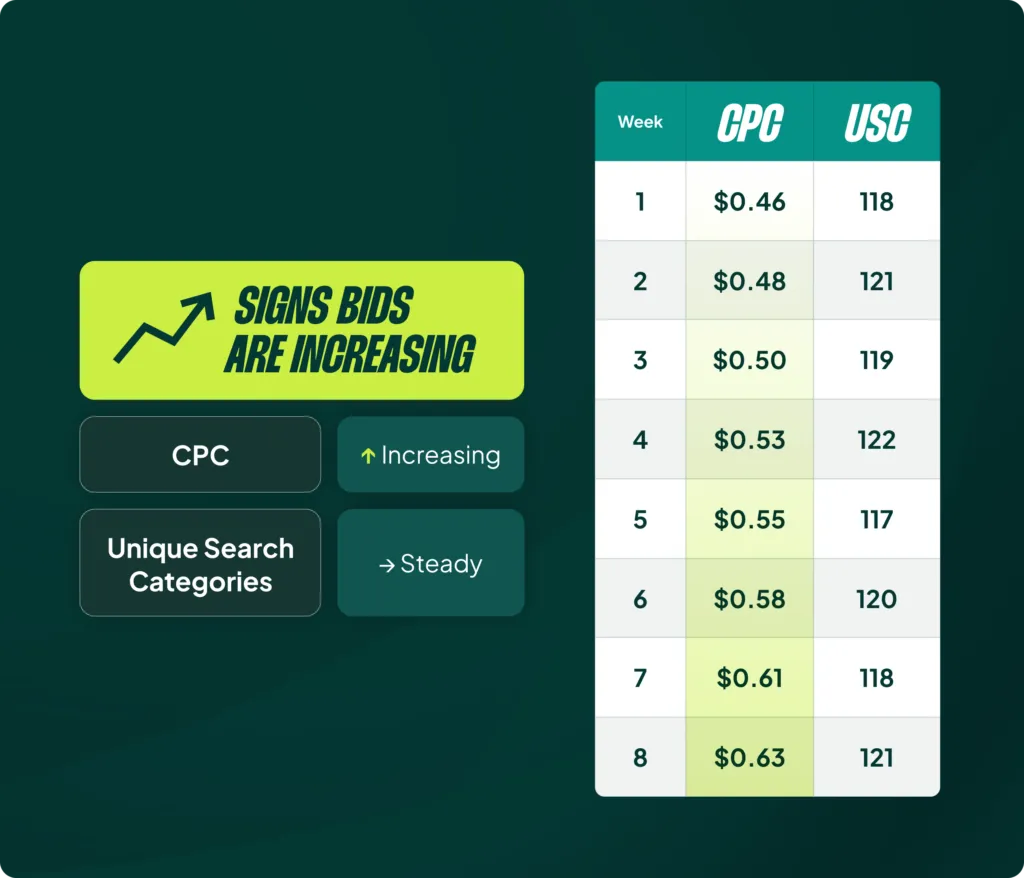
Scenario 1: Bids are Increasing
The Signs: Your CPCs are going up, but your unique search categories are remaining steady.
The Read: Smart Bidding is staying within its usual auctions and simply bidding more aggressively for them.
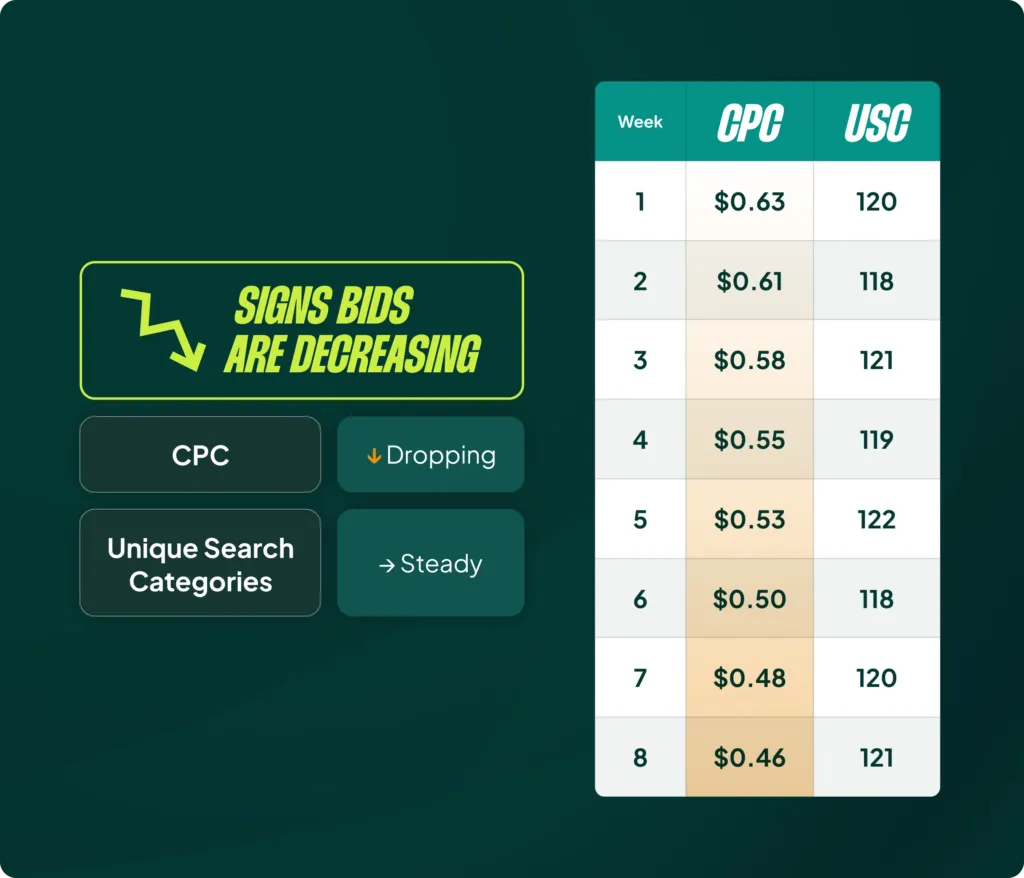
Scenario 2: Bids are Decreasing
The Signs: Your CPCs are going down, while your unique search categories remain steady.
The Read: The algorithm is pulling back its bids within the same set of auctions.
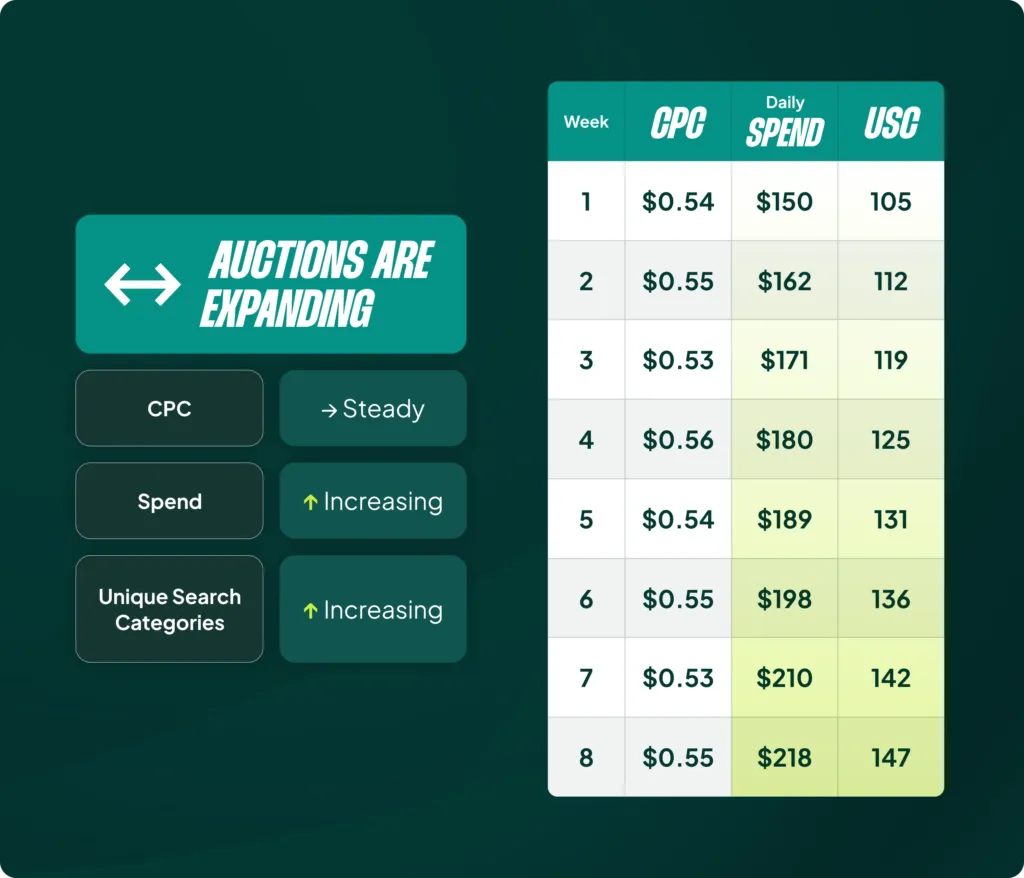
Scenario 3: Auctions are Expanding
The Signs: Your daily spend and clicks are increasing, but your average CPC is steady. This is often confirmed by a rise in unique search categories.
The Read: Smart Bidding isn’t bidding higher; it’s using the budget to enter new, broader auctions to find more volume.
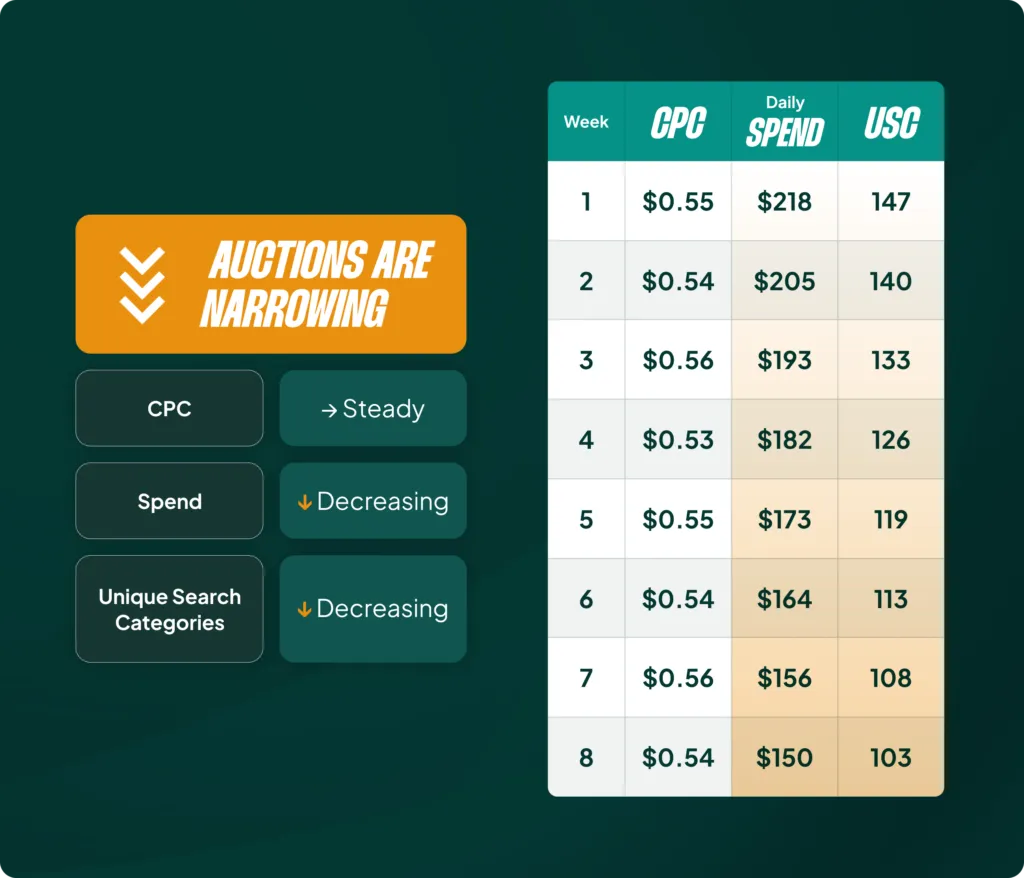
Scenario 4: Auctions are Narrowing
The Signs: Your daily spend and clicks are decreasing, but your average CPC is steady. Unique search categories are likely falling.
The Read: Smart Bidding is pulling out of less-efficient auctions to consolidate spend on what works best.
The Paradox Resolved: When to Act vs. When to Do Nothing
Now that you can read the signals, you can solve the paradox from the beginning. Should you increase your ROAS target when performance drops? The answer depends on what the algorithm is already doing.
When NOT to Act (This Should Be Your Default)
This is the most powerful use case for this skill: the confidence to do nothing. If you see that your Projected ROAS is already converging toward your Average Target ROAS, CPCs are adjusting, and volume is shifting appropriately, do not touch it. The algorithm sees the problem and is already self-correcting.
You aren’t ignoring the account; you are making an informed, strategic decision based on the data. This is active management, not neglect.
When You MUST Act (When The Past Doesn’t Equal The Future)
You should only intervene when you have information that Smart Bidding doesn’t. The algorithm steers based on historical data, so when that data no longer reflects reality, you need to step in.
- A Sale Just Ended: Your Projected ROAS is inflated from the sale period, but you know performance is about to collapse. You must act by increasing your ROAS target or setting a negative seasonality adjustment. Doing nothing is the worst thing you can do here.
- Peak Season is Approaching: You see that the algorithm has narrowed auctions right before your busiest time of year. It’s time to lower the ROAS target to encourage expansion.
- CPCs Become Unprofitable: You know from historical data that a certain CPC level makes the account unprofitable. If bids are creeping toward that line, it’s time to increase targets or set max bid limits.
- Performance is Capped: If your ROAS is consistently higher than your target but spend, CPCs, and unique categories aren’t increasing, you’re being held back by a limitation. Increase your budget or max bid limits, even if Google isn’t flagging them as “limited.”
The Real Skill is Reading, Not Reacting
I’ve spent this entire article teaching you how to read Smart Bidding, because that is the foundational skill for modern PPC management. The constant tweaking and micromanagement I see so often is just noise. I’ve seen advertisers go on vacation, stop making their daily changes out of necessity, and come back to find performance has improved.
The skill isn’t in the doing or the not-doing. It’s in the understanding. As AI becomes more integrated into our work, learning to analyze what the black box is doing—and why—is the only way to stay ahead.
[TL;DR]
- Most managers either blindly trust or constantly micromanage Smart Bidding. The correct approach is to analyze its behavior with intention.
- Smart Bidding uses two levers: adjusting bids up/down and expanding/narrowing the auctions it enters. Most people forget the second one.
- Use the Bid Strategy Report to compare your “Projected ROAS” against your “Average Target ROAS.” This, combined with CPC and volume trends, reveals what the algorithm is doing.
- You can diagnose four main scenarios: Bids Increasing, Bids Decreasing, Auctions Expanding, or Auctions Narrowing.
- Your default action should be to do nothing if the data shows the algorithm is already self-correcting. Only intervene when you have new information the algorithm doesn’t (like a sale ending).