Dansk
Dansk
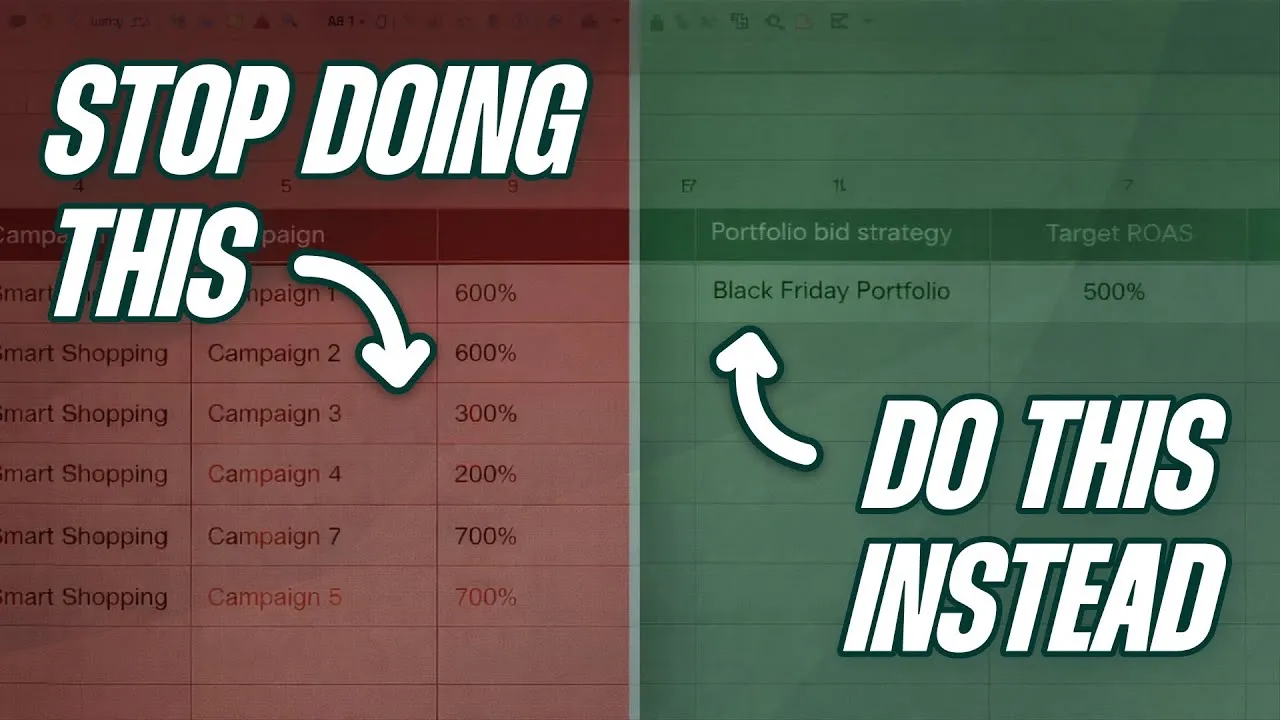
I see the same Smart Bidding mistakes in almost every Google Ads account I audit. It doesn’t matter if it’s a small e-commerce account or a massive brand spending millions a month; these issues are universal. Some are blindingly obvious. Others are more insidious, masquerading as best practices while quietly sabotaging your performance.
And let’s get one thing straight. I’m not going to include a mistake on this list about “improving your tracking” or “fixing your data.” Every other video and article out there will tell you that you need better data. Yes, we know. Let’s move on to the actual, practical mistakes that you can address in your account on a daily basis.
Mistake #1: Using Your Budget as a Performance Lever
This is easily the most common mistake I see, and it has two sides. The first is running campaigns that are constantly “limited by budget.” Google is literally telling you it could get you more conversions at your target, but your budget is holding it back.
The Problem with Being “Limited by Budget”
When you constrain a campaign with a low budget, Smart Bidding starts to cherry-pick only the most profitable clicks. This sounds great, and it can be a way to signal to the algorithm that you want it to be more efficient. But that’s not how most people use it. Instead, they get stuck in a feedback loop they don’t understand.
Here’s how it plays out: You set a ROAS target of 500% and a daily budget of $1,000. Because the budget is tight, Google only enters the absolute best auctions to impress you. Your actual ROAS climbs to 600%, 700%, maybe even 800%. You see this, think things are going great, and increase the budget. Suddenly, your ROAS drops back down to 500% and you panic.
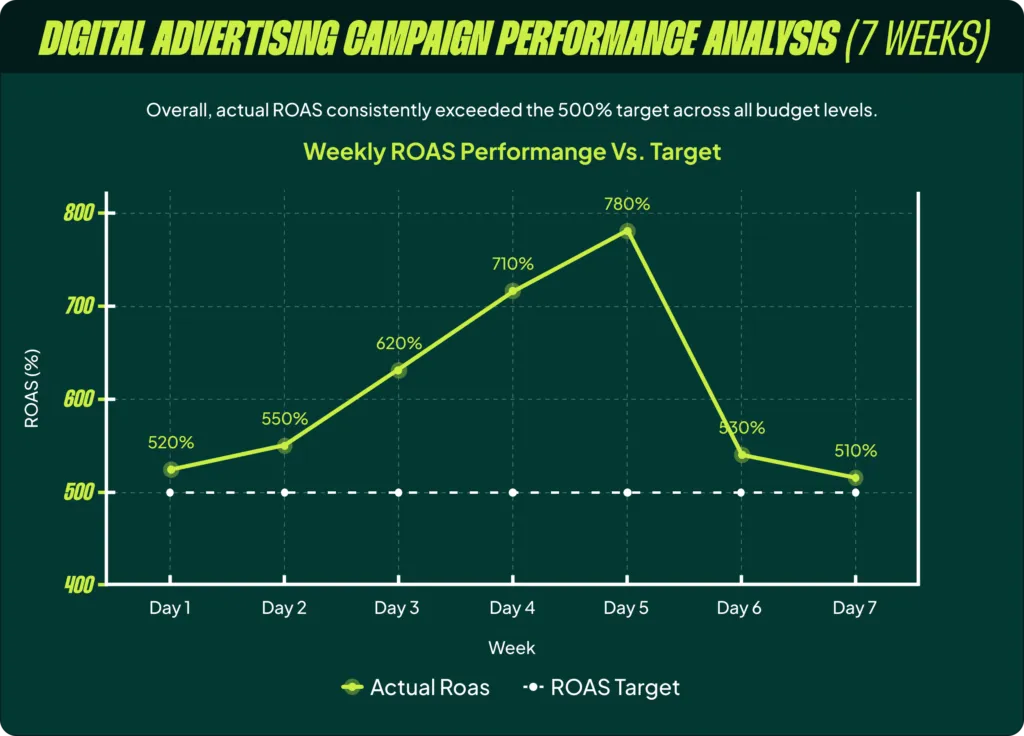
All that happened was that Google stopped being artificially constrained. The moment you gave it more room, it started bidding on the broader set of auctions that your original 500% target actually allows. The issue here is that you weren’t in control; you were accidentally getting better performance. If you want an 800% ROAS, then set an 800% ROAS target. Don’t try to force it by strangling the budget, because you have no idea if you could be spending $5,000 a day profitably instead of just $1,000.
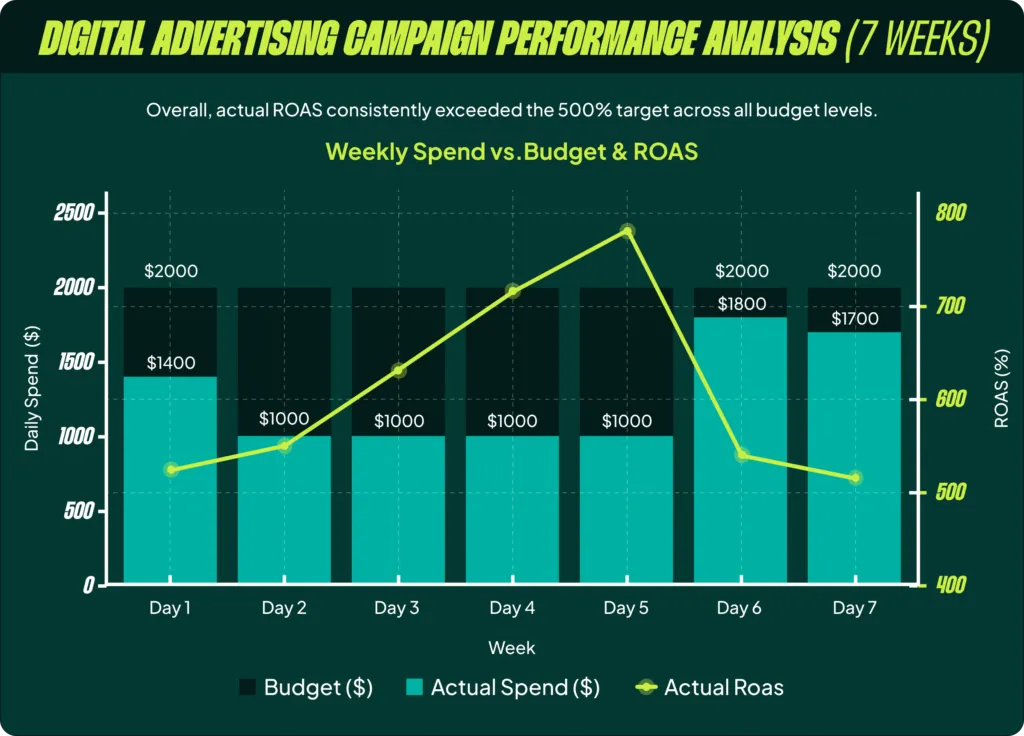
The right way to do this is to set the ROAS target you actually want to hit, and then set a daily budget that’s 20-50% higher than what the campaign typically spends. This gives Smart Bidding room to operate without the budget becoming the primary constraint.
The Even Bigger Problem: Lowering Budgets to Control Spend
This is even worse, and I see it constantly. Your ROAS is dropping, or a client says “spend less this month,” so you lower the daily budget. That’s a rookie move. When you lower the budget on a Target ROAS campaign, you’re telling the algorithm: “Keep hitting the exact same ROAS target, but just do it with less money.” This forces the same artificial cherry-picking we just discussed.
If you genuinely want to spend less, you have three correct levers:
- Increase your ROAS target. It’s less immediate, but it’s the correct long-term signal to send.
- Apply a negative seasonal bid adjustment. This has an immediate effect, but it should only be used for very temporary (3-7 day) spend decreases.
- Decrease your max bid limit. This also has an immediate effect and is an underrated tool, but it has its own complexities.
Only in an absolute emergency should you touch the daily budget to control spend. Sometimes we have large corporate clients with fixed monthly budgets, and we have to use it to avoid going over. But we treat this as an emergency, not a strategy.
Mistake #2: Choosing Max Conversion Value Over Target ROAS
It sounds counterintuitive. “Maximize my conversion value” seems like exactly what you’d want Google to do. The problem is that the only constraint you’re giving the algorithm is the budget. And as we just covered, that’s a dangerous lever to rely on.
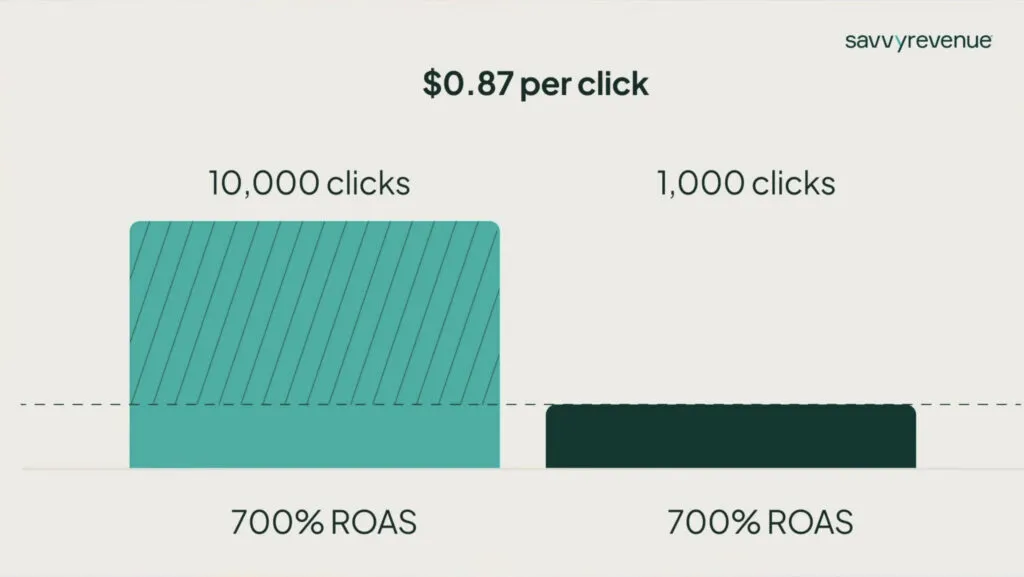
The real issue is that search demand fluctuates daily, weekly, and seasonally. Telling Google to spend the same amount of money every single day, regardless of demand, makes no sense. On days with low demand, Smart Bidding will be forced to increase your CPCs just to spend the budget. On days with high demand, it might lower CPCs to stay within the budget. This is the exact opposite of what you want. You want to spend more when demand is high and pull back when it’s low.
Target ROAS solves this. A Target ROAS bid strategy doesn’t care if there are 1,000 searches or 10,000 searches today. If it knows it can get a click for 87 cents and hit your target, it will buy every single one of those clicks it can. If there are more profitable searches available, it will spend more. If there are fewer, it will spend less. It automatically adjusts to demand.
In 99 out of 100 cases, you should use Target ROAS. The exceptions are rare: you have a client who is 100% budget-centric, you’re trying to reset an account after a tracking failure, or you need to temporarily bypass a restrictive ROAS target to kickstart spend.
Mistake #3: Sticking to Campaign-Level Targets
Most advertisers set a ROAS target on each individual campaign. It seems logical. Each campaign has its own products and performance, so each should have its own target. The problem with this approach is that each campaign only sees its own data. It’s learning in a silo.
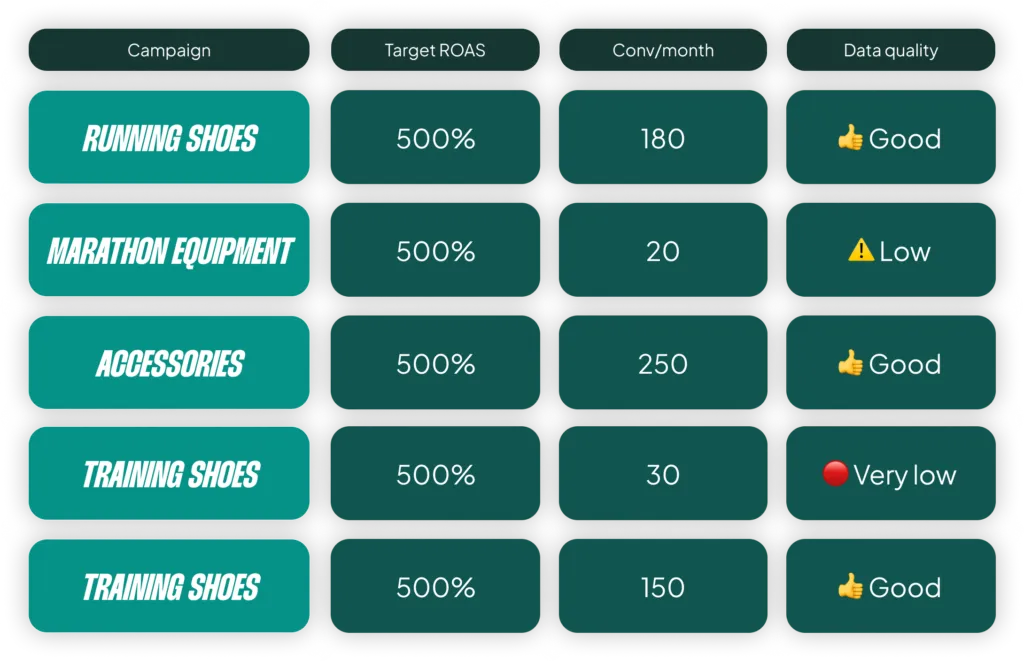
If your “Running Shoes” campaign gets 180 conversions a month, that’s fine. But if your “Marathon Equipment” campaign only gets 20, Smart Bidding is trying to make decisions with almost no data. It will react slowly, overcorrect, or fail to bid effectively.
The solution is to use Portfolio Bid Strategies. By grouping these campaigns together, all of a sudden Smart Bidding has 630 conversions a month to learn from (in this example). It aggregates learnings across audiences and CPC levels, reacts faster to market changes, and makes smarter decisions for every campaign in the portfolio.
Portfolios also unlock two critical features: max bid limits to control CPC creep and the “Projected ROAS” metric, which I’ll cover in Mistake #5. But be careful. Creating too many portfolio strategies just re-fragments your data and defeats the purpose. For most e-commerce stores, two or three well-structured portfolios are all you need.
Mistake #4: Treating Your ROAS Target as “Set and Forget”
I see accounts where someone set a 500% ROAS target in January and never touched it again. Your ROAS target is not a static number; it is your primary communication tool with the algorithm.

Every time you lower it, you’re telling Smart Bidding: “Go explore, find more volume, buy me more traffic.”
Every time you increase it, you’re telling Smart Bidding: “Tighten up, become more efficient.”
There are clear moments when you should be proactively adjusting your target:
- Before peak season: Lower your target to push the algorithm into expansion mode *before* demand spikes.
- After a big sale: Raise your target to signal that the inflated conversion rates are over and it needs to become more efficient again.
- When growth flatlines: If your performance is stable but growth has stalled, it might be a sign you’ve become too efficient. Lowering your target can push the algorithm to find new pockets of volume.
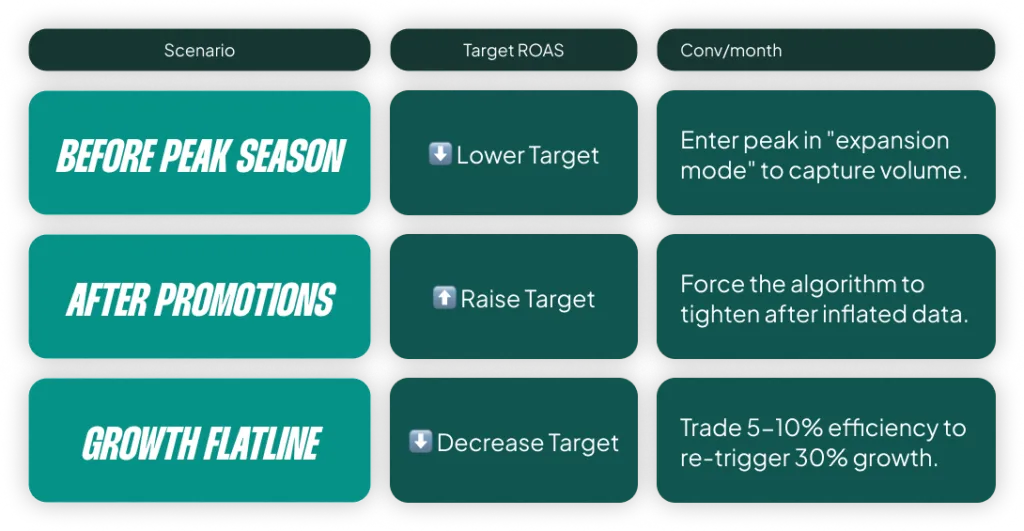
Even if you want the same ROAS year-round, temporarily lowering your target for a couple of weeks can help Smart Bidding find new volume before you raise it back up. Your target is a lever you should be adjusting strategically throughout the year.
Mistake #5: Only Looking at Actual ROAS
This is the mistake that I believe separates experienced Google Ads managers from everyone else. Most people open Google Ads, look at the “Conv. value / cost” (ROAS) column for the last 30 days, compare it to their target, and start making decisions. This is wrong. Or at least, it’s incomplete.
There are two metrics you’re probably missing:
- Projected ROAS: Your actual ROAS is a lagging indicator. It only shows conversions that have been tracked so far. It doesn’t include conversions that will happen in the future from past clicks (what we call conversion lag). Google knows more conversions are coming, and it shows you this in the “Projected ROAS.” This is the number Smart Bidding is actually steering toward. You can see it by hovering over the actual ROAS in your bid strategy report.
- Average Target ROAS: If you changed your target from 150% to 170% yesterday, your average target over the last 30 days isn’t 170%. It’s much closer to 150%. You can add the “Avg. target ROAS” column to your reports to see what the algorithm was actually aiming for during that time period.
When you look at your account and think, “My actual ROAS is below my target, why isn’t the algorithm doing anything?” the answer is often right there. It’s because the Projected ROAS is on track to hit the Average Target ROAS for that period. Understanding this is critical to giving Smart Bidding the right instructions.
Mistake #6: Tinkering Too Damn Much
Yes, I just spent this entire article telling you to make strategic changes. But there’s a huge difference between strategic adjustments and nervous, reactive tinkering.
I’m talking about changing your ROAS target every week, applying daily seasonal adjustments because your boss is worried about spend, or constantly tweaking max spend limits. I have seen advertisers stop their constant tinkering (usually because they went on vacation) only to find that performance got much better in their absence.
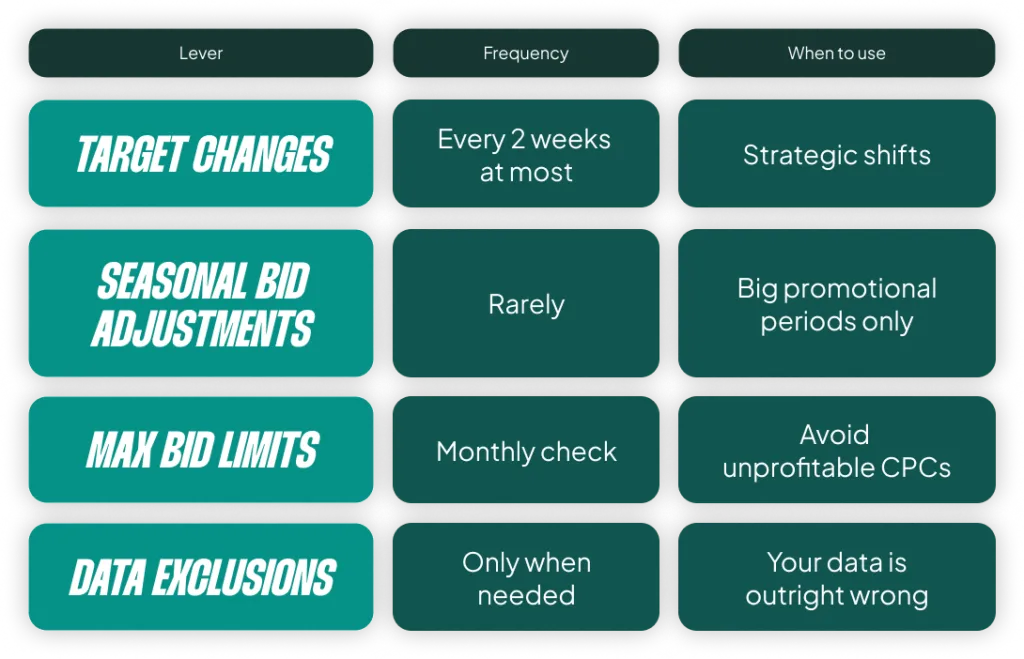
There is a point of diminishing returns with making changes, and most people are way past it. The most powerful skill in managing Smart Bidding isn’t knowing what lever to pull. It’s reading the data, understanding what the algorithm is already doing, and having the confidence to do nothing.
A Quick Bonus Mistake: Ad Group Level Targets
Just don’t do it. Setting ROAS targets at the ad group level is micromanagement in its purest form. In 99% of cases, you are just adding tiny constraints that fragment your data and prevent the algorithm from working effectively. It’s almost always the wrong thing to do.
The Common Thread: Strategy Over Micromanagement
The through-line for all these mistakes is simple: Smart Bidding is a tool that rewards you for thinking strategically and punishes you for micromanaging. It’s like anything else we do. Give it good data, give it the right constraints and targets, adjust those constraints strategically when needed, and then get out of the way.
[TL;DR]
- Mistake #1: Limited by Budget. Stop using your budget as a control lever. Set the ROAS target you want and give the budget 20-50% headroom.
- Mistake #2: Max Conversion Value. Use Target ROAS instead. It adapts to fluctuations in demand, while Max Conv. Value forces a fixed spend.
- Mistake #3: Campaign-Level Targets. Consolidate campaigns into a few portfolio bid strategies to aggregate data and improve learning.
- Mistake #4: Static Targets. Adjust your ROAS target strategically throughout the year to tell the algorithm when to expand or become more efficient.
- Mistake #5: Ignoring Projected ROAS. Make decisions based on Projected ROAS and Average Target ROAS, which is what Smart Bidding is actually using.
- Mistake #6: Tinkering Too Much. The most powerful skill is knowing when to do nothing. Make strategic changes, not reactive ones.