Dansk
Dansk

When a Google product manager showed me Smart Bidding Exploration in Mountain View, she called it the biggest smart bidding update ever. And honestly, I think she might be right. I was invited by Ginny Marvin as part of a small group of PPC practitioners to sit down with product managers and discuss new features, and this one stood out.
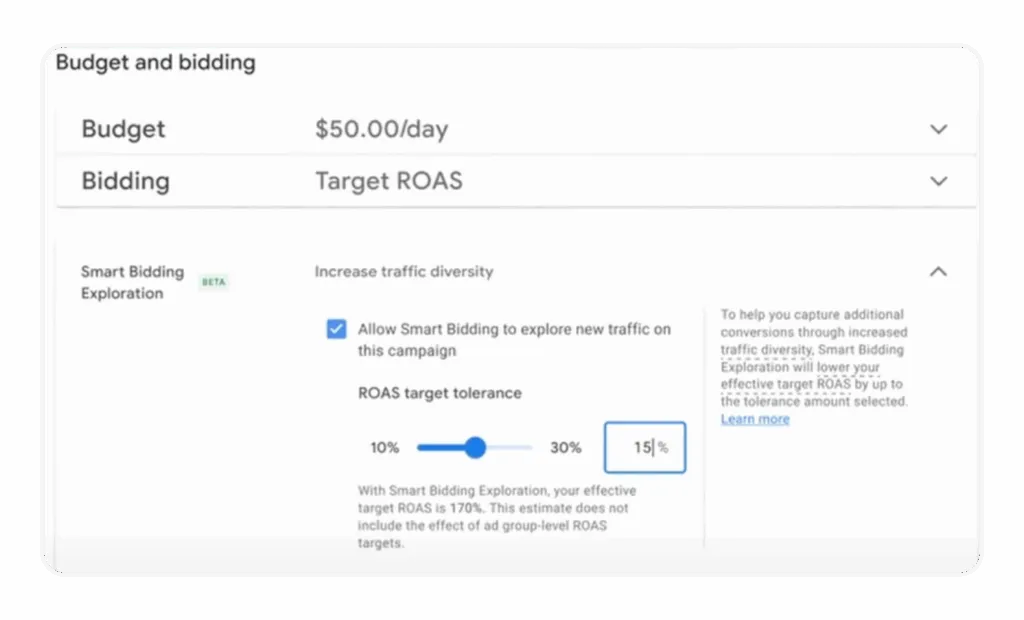
After several months of working with Smart Bidding Exploration, we can now draw some meaningful conclusions. Today, I’ll walk you through the key differences between just lowering your ROAS target and enabling this feature, how to analyze its impact, when to implement it, and how to use it effectively.
Exploration vs. Lowering ROAS: It’s Not the Same Thing
Let’s get this straight first. When you lower your ROAS target, you’re essentially telling Google to increase all your bids to get more volume. It’s a blunt instrument. Smart Bidding is just chasing a new, lower efficiency target across the board.
The problem is that this often just means paying more for the traffic you’re already getting. We used to have to do this to trigger an “exploration mode,” but it was inefficient. Smart Bidding Exploration changes the game.
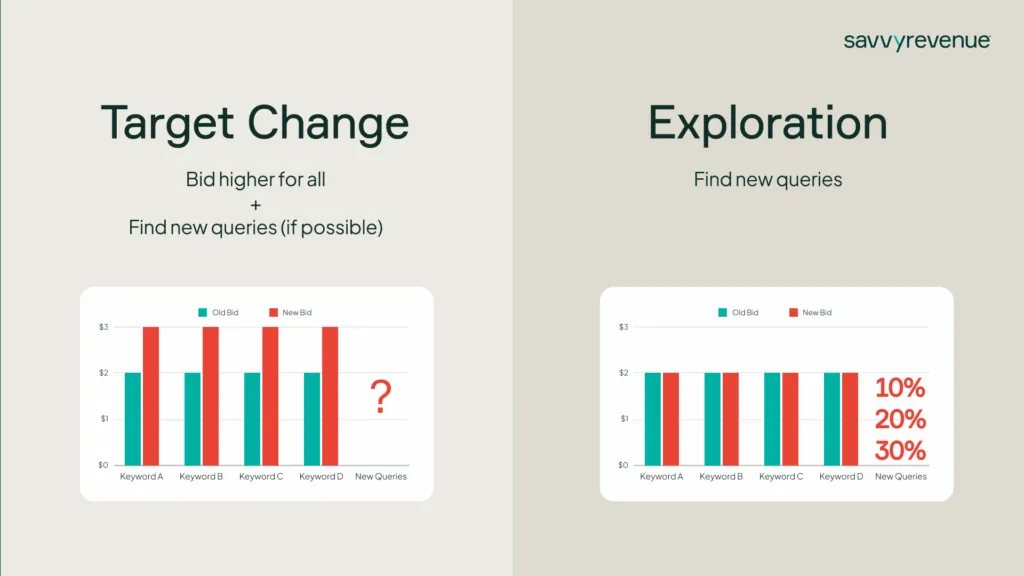
With this feature, we can tell Google: “Don’t increase the bids for our existing auctions. Instead, I want you to take 10% (or 20%, or 30%) of my ROAS headroom and go find completely new queries.” Instead of just paying more for the same auctions, you’re allocating a specific part of your budget to true discovery. That’s why it’s so powerful.
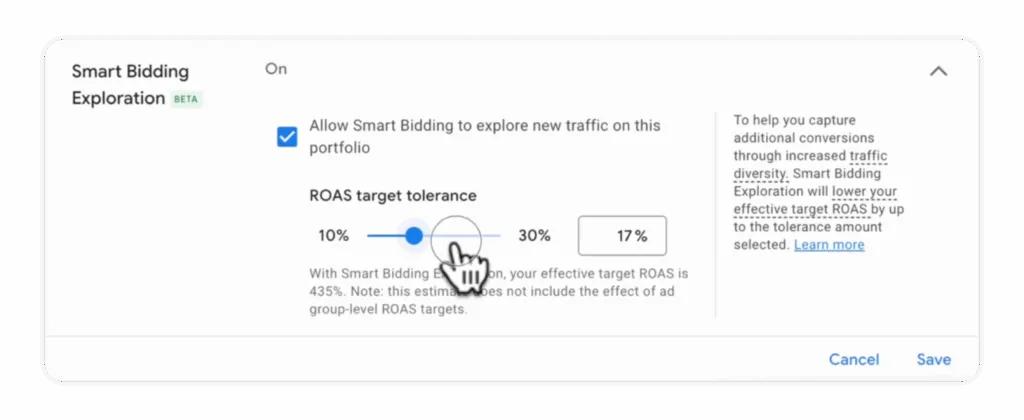
Be prepared, though: enabling exploration will lower the total ROAS of the campaign or bid strategy. If you enable a 10% exploration on a campaign hitting a 500% ROAS, your new effective target is 450%. It doesn’t mean your performance will drop by a clean 10%—the new queries are expected to bring in some conversion value—but it’s not a free lunch. You need to pick a percentage that you can afford to let run for 2-3 weeks without panicking.
How to Analyze If It’s Actually Working
So, how do you know if this is doing anything besides lowering your ROAS? You need to look at traffic diversity. The best way to do this is to analyze the number of “Unique search categories with clicks.”
(I prefer looking at clicks over conversions for this analysis, as the data is denser and gives you a much clearer signal on whether the exploration is actually happening.)
Here’s a look at an account where we implemented Smart Bidding Exploration over the summer, right before peak season. The green portion is when the feature was active.
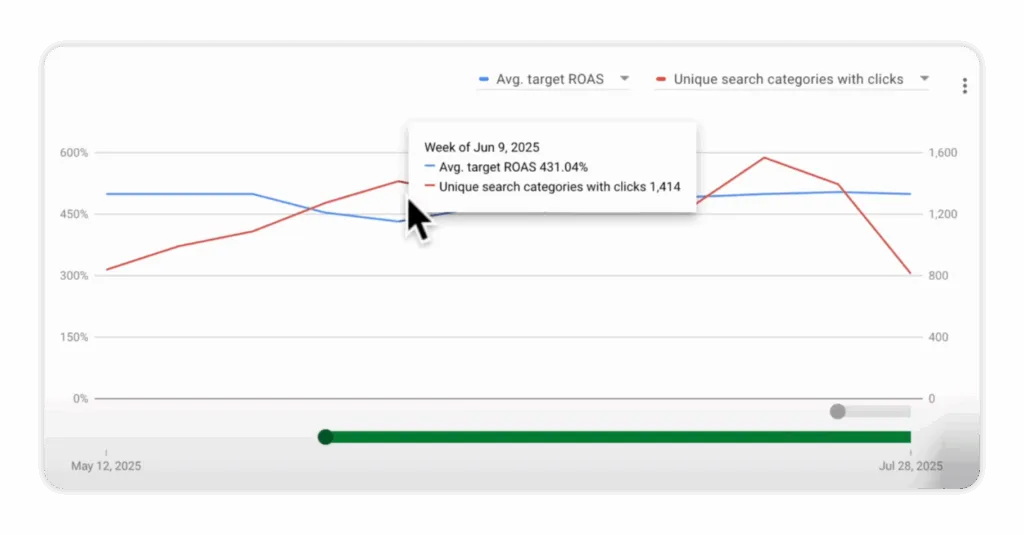
As you can see, when we enabled exploration (and slightly lowered the ROAS target to give it room to work), the number of unique search categories with clicks jumped from around 840 to over 1,400. It did exactly what it was supposed to do: it went out and found new pockets of traffic.
Even more telling is what happened when we turned it off after the peak. We removed the exploration setting, and the number of unique search categories immediately dropped back down to the pre-peak baseline. This basically proves that it works.
This report is an amazing addition to our toolkit. It explains so much about what Smart Bidding is doing under the hood, even when you aren’t using the exploration feature.
When to Use Smart Bidding Exploration (And When to Avoid It)
This is not a set-it-and-forget-it feature. I believe it should be used strategically throughout the year on three main occasions.
The Best Times to Flip the Switch
- When Peak Season Starts: This is the number one use case. Right before or as your high season begins, turn on exploration at 10% or 20%. As you saw in our example, even 10% can have a big effect.
- During a Big Sale: This is another perfect time to find new customers who might be searching differently due to the promotion. I’ve only tried it a handful of times, but so far, it’s been very successful.
- To “Re-Educate” the Algorithm: If you’re constantly adding new product categories or have been running at a very high ROAS target for a long time, the algorithm can get stuck in a rut. Using exploration for a few weeks can teach it that there are new, profitable queries out there.
When to Steer Clear: The Dealbreakers
There are also times when using this is a genuinely bad idea. Don’t use Smart Bidding Exploration if:
- You have 90%+ Impression Share: There probably aren’t many more queries for you to find. You’ve already saturated your potential market.
- You Have Consistently Low ROAS Targets: If your targets are already low, Smart Bidding is likely in a constant state of exploration anyway. This feature becomes redundant.
- You Have No More Budget to Spend: This is critical. If you are budget-capped, exploration will find new queries that you can’t afford to capitalize on. It’s a complete waste.
- Demand is Seasonally Low: This tool won’t solve a low-demand problem. Trying to find new customers for swimwear in September or diet supplements in December is just throwing money away.
My Best Practices for Implementation
If you’ve decided to give it a try, here’s how we approach it to get the best results.
- Think Sprint, Not Marathon: Use it in short, focused bursts. Run it for 2-3 weeks minimum to give it time to work, but don’t leave it on for more than 6 weeks. Align these bursts with a peak season, a sale, or a product launch.
- Ensure Budget Freedom: I can’t stress this enough. If you don’t have budget headroom, you won’t be able to take advantage of any new search queries it finds. You might as well just increase your budget.
- Use Portfolios (Usually): While you can apply this to individual campaigns, I typically recommend doing it at the portfolio bid strategy level. It joins everything together and gives the algorithm more data and flexibility to work with.
- Be Careful Layering Adjustments: If you’re already running New Customer Acquisition bidding and have value rules in place, adding Smart Bidding Exploration on top can make it impossible to know what you’re actually targeting. It gets confusing, fast. Keep your adjustments clean.
- Stick to the Test: Don’t judge it after three days. Smart Bidding has to kiss a lot of frogs to find its prince. It will test many new queries, and most won’t work out. But the ones that do convert are the gold you’re looking for. When you turn exploration off, the algorithm will remember the winners.
So, Was the Google PM Right?
After months of testing, I’d have to say yes. Smart Bidding Exploration is genuinely the biggest and most useful addition we’ve seen to Google’s bidding toolkit in the last 10 years.
Used strategically, it’s an incredibly effective way to break out of performance plateaus and find new growth opportunities without blindly slashing your targets.
Try it out. You won’t regret it.
[TL;DR]
- Exploration isn’t just lower ROAS: It specifically allocates budget to find new search queries, rather than just increasing bids on existing ones.
- Use it in short sprints: Implement it for 2-6 weeks during strategic periods like peak season, sales, or product launches—not as an “always-on” feature.
- Analyze traffic diversity: Measure success by looking at the increase in “Unique search categories with clicks,” not just top-line performance metrics.
- Avoid it if you’re maxed out: It’s a bad idea if you have a very high impression share, already-low ROAS targets, or are limited by budget.
- Don’t layer too many adjustments: Be careful when combining it with other bid modifiers like New Customer Acquisition or value rules, as it can obscure your actual targets.