I’m going to say something controversial: Smart Bidding has made negative keywords mostly irrelevant. For the last couple of years, some of our biggest performance gains haven’t come from adding negative keywords, but from removing them. Yep, I said removing.
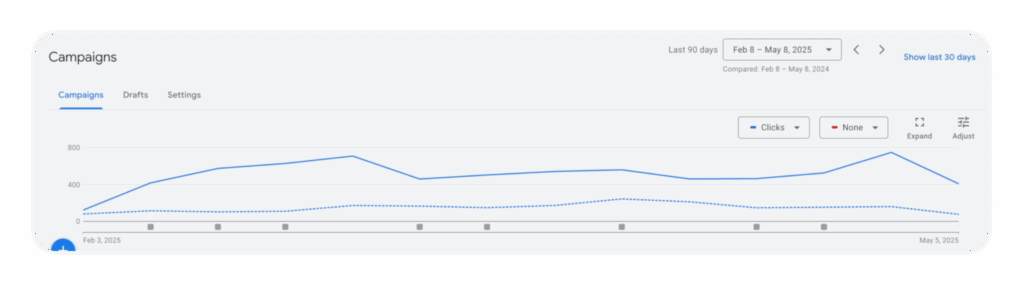
The reason is simple. Most advertisers are stuck in a 2018 mindset, over-using a tool that was designed for a different era. They add negatives based on gut feelings, a single bad week, or a handful of clicks, strangling their campaigns in the process. We recently saw a client’s DSA campaign 3x its clicks and nearly 3x its revenue year-over-year. The key change? We stopped the two most common and destructive negative keyword habits: proactive blocking and premature exclusion.
It’s time to rethink the entire approach. Let’s break it down.
Go Beyond the Article
Why the Video is Better:
- See real examples from actual client accounts
- Get deeper insights that can’t fit in written format
- Learn advanced strategies for complex situations
The Old Playbook is Broken: Why Negatives Became a Liability
The common belief is that negative keywords help you save money and improve ROAS by cutting waste. Five years ago, that was 100% true. Back then, I was setting bids manually for every single keyword. The negative keyword was my only real defense against irrelevant traffic.
But Smart Bidding flipped the script completely.
Smart Bidding Changed the Game
Unlike the old system, Smart Bidding doesn’t just bid at the keyword level; it bids at the search term level. It analyzes dozens of signals in real-time for every single auction. If a specific search term isn’t converting, Smart Bidding automatically lowers the bid for that term, often to pennies. It does this without you having to lift a finger.
In other words, the algorithm already has a built-in negative keyword system, but one that’s faster, has more data, and is far more nuanced than you could ever be. It doesn’t use a sledgehammer; it uses a scalpel.
The 2018 Mindset That’s Killing Your Scale
The problem is that most people are still swinging that sledgehammer. You see nine clicks and no conversions on a search term and your gut tells you to exclude it. The result? You’re permanently cutting out search terms that might have just needed a lower bid, a different season, or simply more time to prove their worth.
Let me break down how Smart Bidding handles this better than you can:
- A search term might be profitable on desktop but a money pit on mobile. Smart Bidding adjusts for that.
- A search term might lose money at a $1 CPC but be wildly profitable at $0.25. Smart Bidding handles that nuance.
- In Shopping campaigns, a search term could be unprofitable for one SKU but a top performer for another. You can’t segment for that, but Smart Bidding can.
In all three cases, when you go in and manually exclude the search term, you lose all that potential revenue. You can’t scale. Full stop.
The New Rules: When Negative Keywords Still Make Sense
Does this mean we should abandon negative keywords entirely? No. But we need to be a heck of a lot more strategic about it.
Here’s when adding negative keywords is still the right move:
- Long-Term Poor Performance: If a search term performs poorly over a long period (think 6-12 months) with statistically significant data, it’s a candidate for exclusion. This is especially true for low-volume terms where Smart Bidding may not have enough data to react effectively.
- New Campaigns or Accounts: In the early stages of a new build, there isn’t enough conversion history for Smart Bidding to work optimally. Here, a foundational negative list is a smart defensive move.
- The Obvious Stuff: You don’t need statistical significance to know you should exclude competitor brand names (usually), completely irrelevant products, or other nonsensical search terms. Get that junk out immediately.
How to Manage Negatives with Data, Not Guesswork
Adding negatives shouldn’t be a random, one-off task. It requires a system. The easiest way is to use a simple Google Sheet to analyze your search term data with statistical rigor.
Setting Up the Analysis
I pull all search term data from an account using a tool like Supermetrics (or you can export directly from Google Ads). The key is to bring in raw data: clicks, spend, and conversion value. Do not pull in the ROAS metric from the platform.
Why? Because when you start aggregating data, you can end up with an “average of an average,” which is completely misleading. I always calculate ROAS manually in the sheet (`Conversion Value / Spend`). I also create “click buckets” (0-10 clicks, 10-20, 20-30, etc.) to group search terms by their level of statistical significance.
The Problem with Low-Click Data
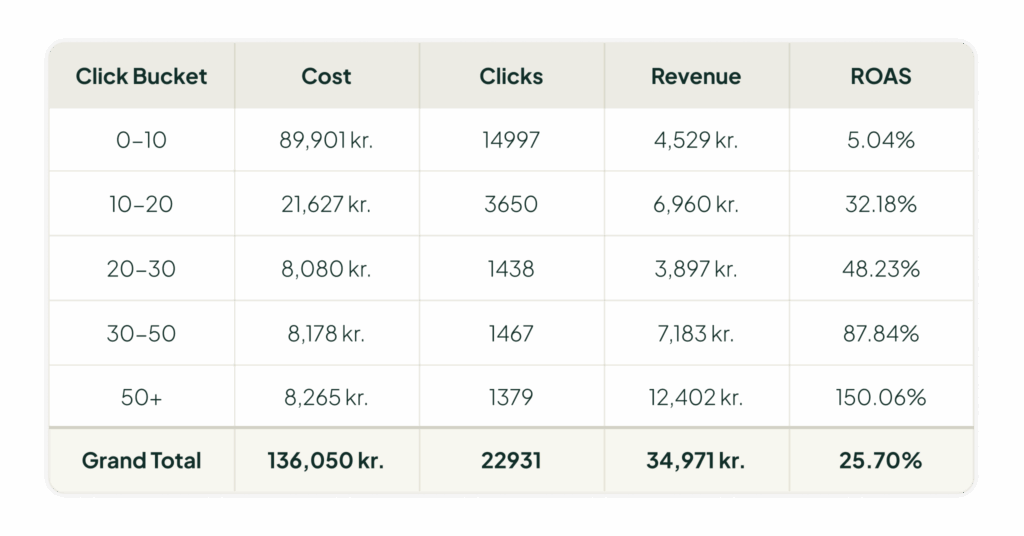
Using pivot tables, I can now analyze performance. Let’s look at a sample pivot table for search terms with a ROAS below 200%.
You might see a huge amount of spend—say, $136,000—that only generated $35,000 in revenue, for a horrible 25% ROAS. The temptation is to exclude everything. The issue, however, is that the vast majority of that spend is in the “0-10 clicks” bucket. These search terms don’t have enough data to be judged.
If you exclude all of them, you’re also throwing out terms that might have converted on their 11th click and become wildly profitable. You can’t separate the future winners from the losers at this stage, so you have to let them run.
Finding the *Actual* Waste
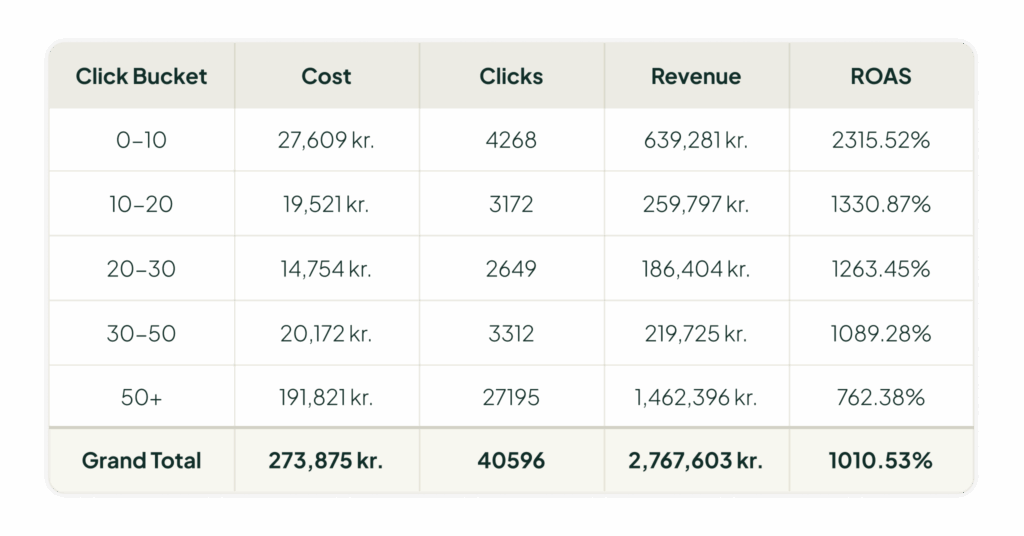
The real opportunity for adding negatives lies in the higher click buckets. In my analysis, I look at the buckets with 20+ clicks. These are terms where we have enough data to make a confident decision.
Often, you’ll find that the “true waste” is a tiny fraction of your total spend. In a typical well-run account, we might identify only 4-8% of total spend that can be safely cut by adding negative keywords. I’d be very cautious about excluding terms in the 10-20 click bucket, especially if the account is in scaling mode. Cutting those might give you a small profitability boost, but it will almost certainly come at the cost of future growth.
Your Action Plan for a Modern Negative Keyword Strategy
To summarize, here’s how to put this into practice.
Keep Two Lists: Evergreen vs. Seasonal
Don’t just use one master list. Create two:
- Evergreen: This is for the truly horrible performers. The search terms you never want to see again, based on long-term data.
- Seasonal (or “Low Season”): This is for terms that don’t work right now but might perform well later. For a swimsuit company, certain terms might perform poorly in February but be cash cows in June. Add them to this list and then—this is the important part—remove them when you enter peak season.
The Annual “Negative Keyword Purge”
Your business changes. You add new products, your prices shift, and new competitors emerge. A negative keyword from 2018 is based on obsolete data.
So, here’s my challenge to you:
- Run an experiment. If you haven’t touched your negatives in years, try removing all of them. Seriously. Let Smart Bidding do its thing for four weeks and see what happens. You’ll be surprised.
- Build this into your routine. At least once a year, conduct a full “purge.” Remove your old negatives (especially seasonal ones) and let the algorithm re-learn. Then, run the data-driven analysis I outlined above to build a new, smarter list based on fresh data.
Once you get out of the way and let the machine work, you’ll find that many of your “bad” search terms were just waiting for the right conditions to become winners.
[TL;DR]
- Smart Bidding now handles most of the work that negative keywords used to do, but at the search term level and with more data.
- Adding negatives based on gut feelings or low-click data is a recipe for cutting potential revenue and limiting your ability to scale.
- Only add negative keywords when you have long-term, statistically significant data showing poor performance, or for obviously irrelevant searches.
- Use a data-driven system with “click buckets” to identify true waste, which is often only 4-8% of total spend in a healthy account.
- Regularly prune your negative lists. A negative keyword from a year ago may be a profitable term today due to changes in your business or the market.