Dansk

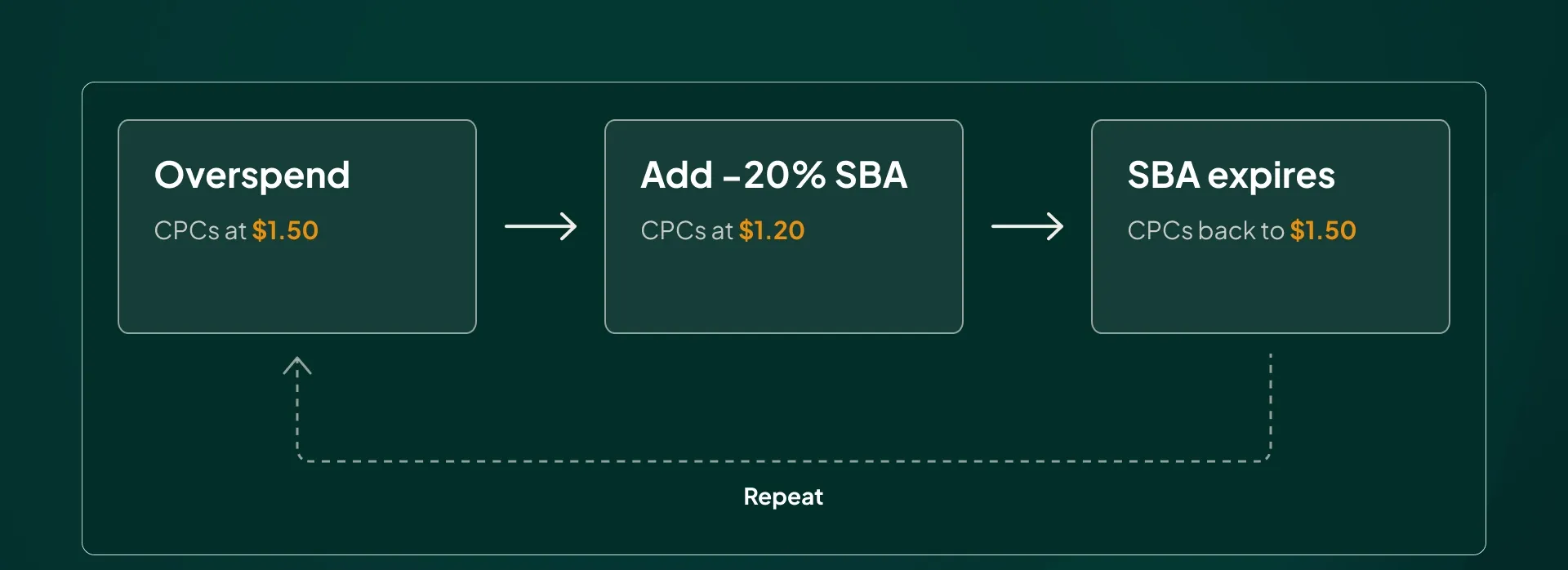
Hardly a month goes by without me auditing an account that has become dependent on seasonal bid adjustments (SBAs) to keep Smart Bidding from overspending. The story is always the same, and it plays out in three steps:
- Smart Bidding starts overspending.
- An SBA is implemented to stop it.
- The SBA expires, and Smart Bidding goes right back to overspending.
Using seasonal bid adjustments as your standard response to overspend is a mistake. It treats the symptom and leaves the cause untouched, and over time it erodes the very thing you’re paying Smart Bidding to do (find growth). The correct fix is almost always a target ROAS change, but you can quickly get it wrong.
Why Smart Bidding Overspends in the First Place
In this article I’ll walk you through why overspend happens, why constant SBA use damages performance, and the exact method we use at savvy to stop overspend without hurting the algorithm.
Overspend happens when your actual ROAS exceeds your target ROAS. That’s it. That gap is the signal Smart Bidding uses to conclude it should explore more auctions, which means spending more money in one of two ways:
- Higher bids: CPCs go up while traffic stays roughly the same.
- More auctions: CPCs stay the same, but you show up more often and traffic goes up.
In general, this is a good thing. If your actual ROAS is consistently above your target and Smart Bidding didn’t respond by spending more, it would be a bad bidding algorithm. You’d be leaving profitable revenue on the table.
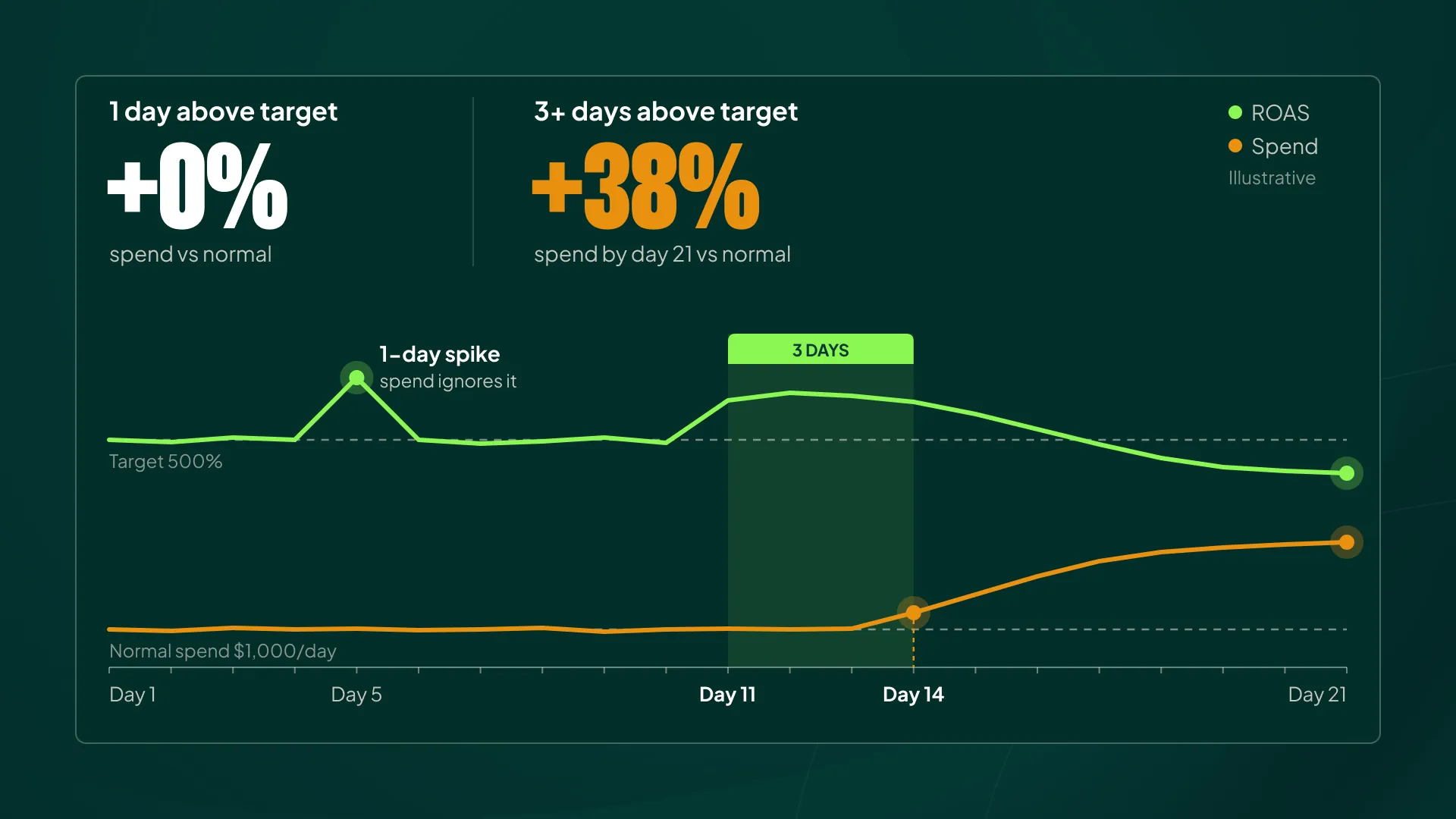
The problem arises when the higher ROAS is a temporary bump. A promotion, payday, or just a random streak of better performance. Smart Bidding does have a mechanism to filter out minor fluctuations, so a spike lasting one to three days usually won’t change your spend much.
Once you’re hitting a higher ROAS than your target for more than three days, though, that’s when most advertisers start seeing spend climb.
Sometimes that’s good. Sometimes it’s bad. Some advertisers are stable and know exactly where their ceiling is. Maybe a CPC jump is fine for a few days, but for a large ecommerce store going from $1.00 CPCs to $1.50 CPCs is usually not sustainable in the regular season.
You know that, and the advertiser knows that. Smart Bidding doesn’t. It predicts based on historical values, and its memory isn’t infinite.
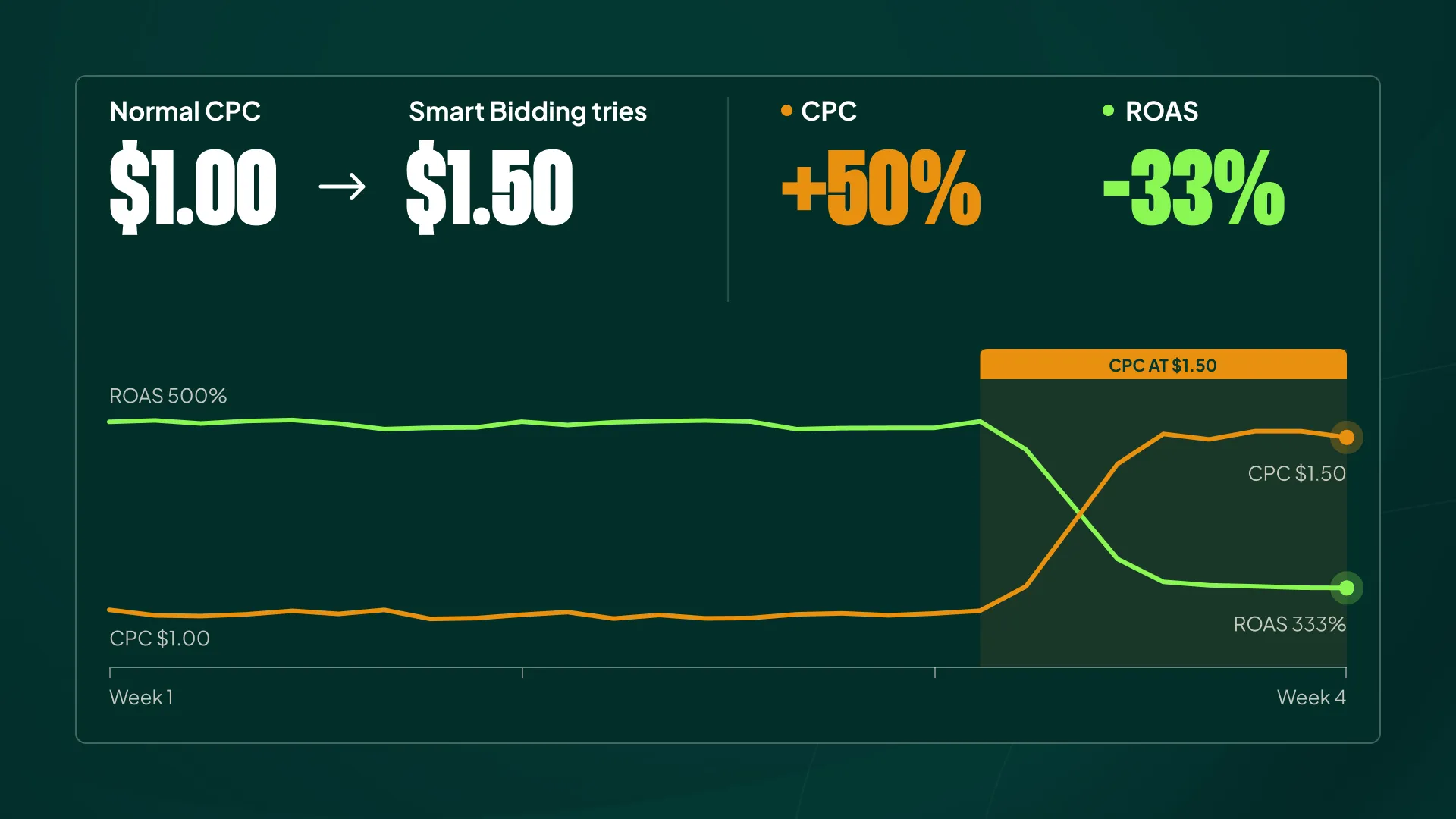
If it’s been long enough since Smart Bidding last tried a $1.50 CPC, it will have forgotten how that went and will try again. Spend rises, ROAS drops, and the whole exercise turns out to be wasted budget.
To be fair to the algorithm, this is the cost of exploration. Smart Bidding has to test new bid levels to find growth. But when you already know the outcome of that test, watching it rerun on your budget is professionally painful.
How Advertisers Get Hooked on Seasonal Bid Adjustments
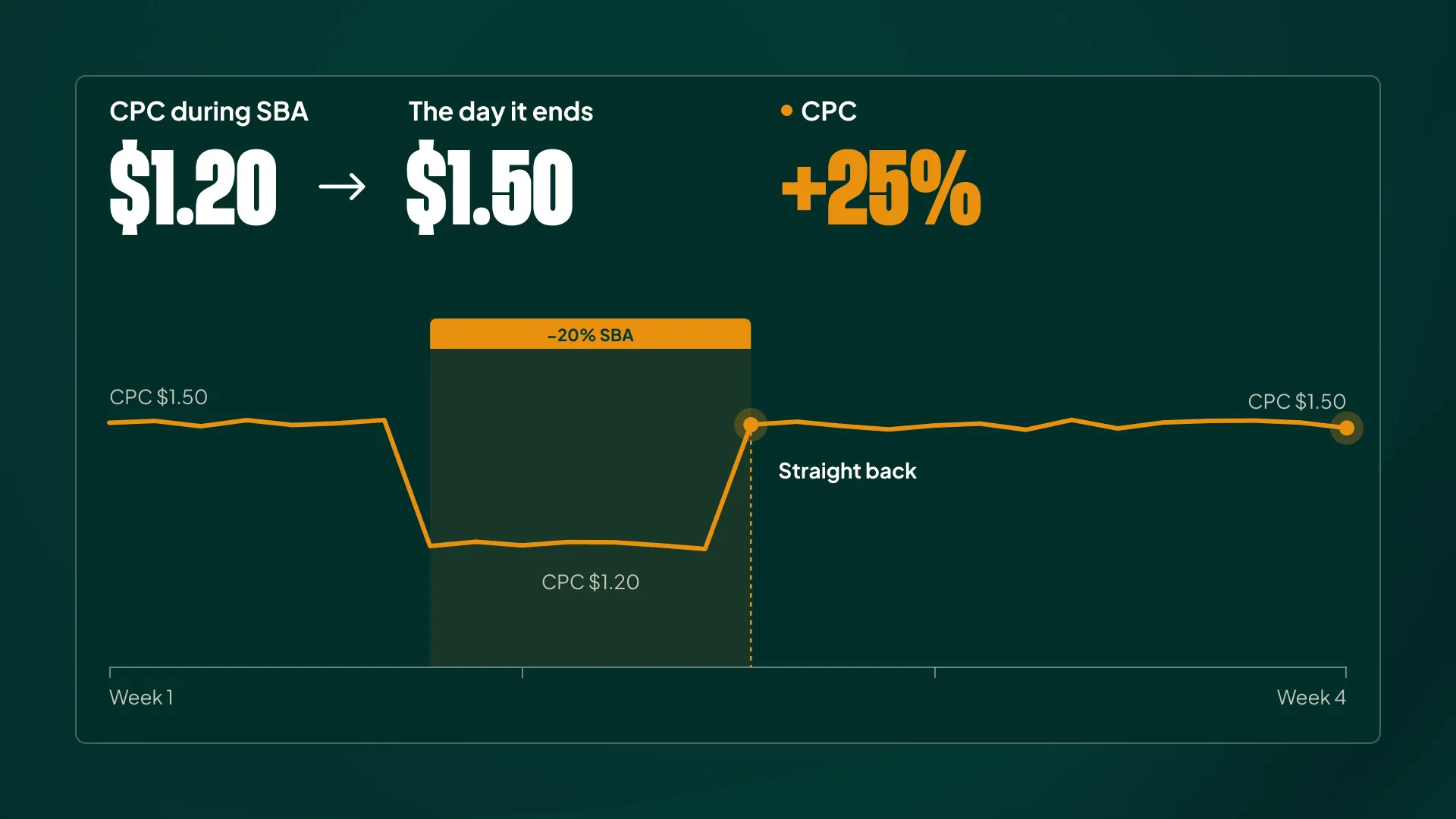
This is why advertisers reach for seasonal bid adjustments: SBAs impact bidding immediately. Set a -20% SBA and you’ll typically see roughly a 20% drop in CPCs. It works, and it feels like control.
Then the SBA expires, and spend often goes straight back to the unsustainable level you were trying to escape. So you run another SBA. And another. Maybe you break the habit for a while, but within a few weeks or months you’re back on the SBA drip.
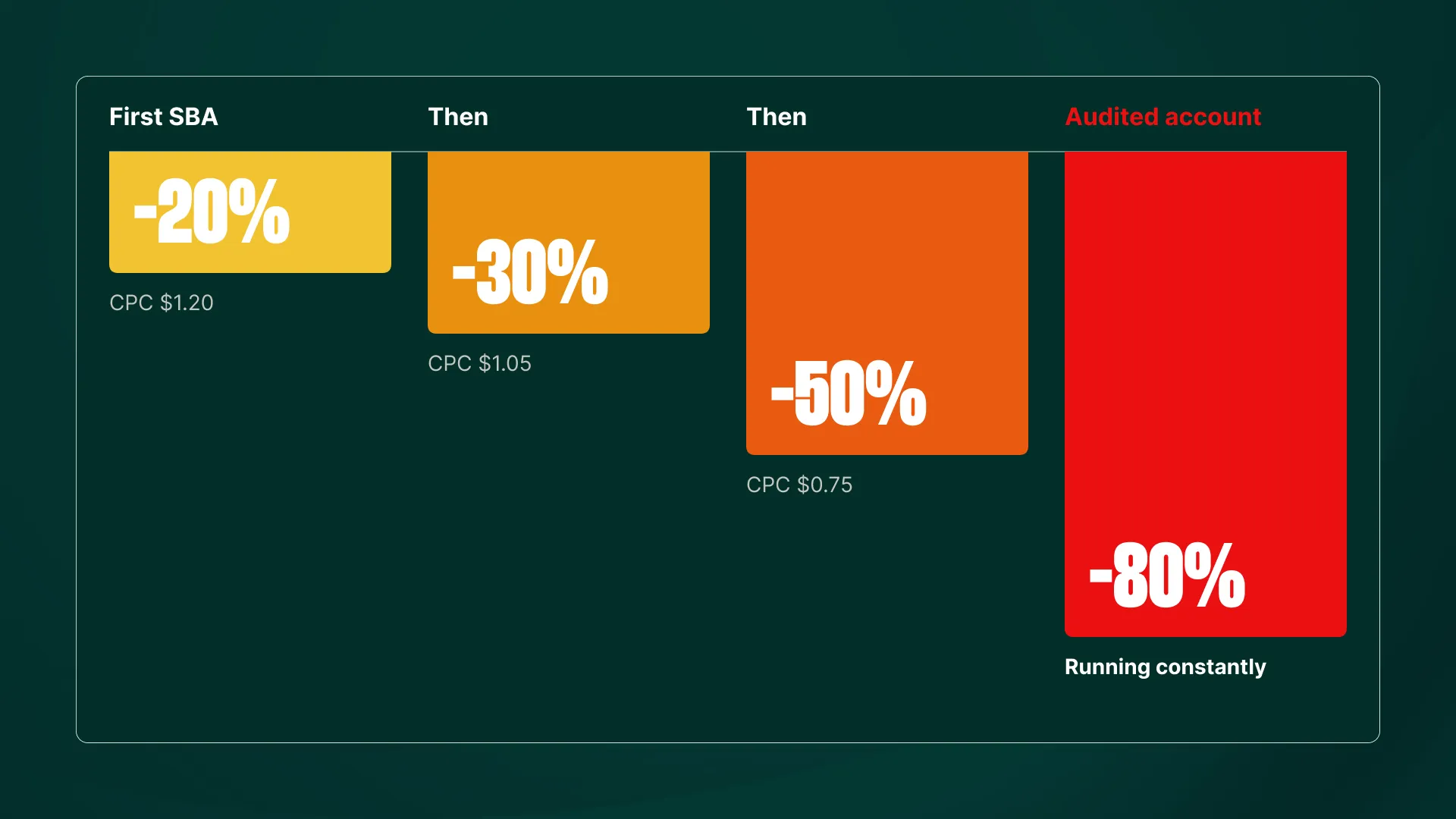
In some cases it escalates. I’ve seen advertisers move from -20% to -30% to -50%. We’ve audited accounts running a constant -80% SBA.
At that point you’re permanently overriding the bidding algorithm while still paying the performance cost of having it in the driver’s seat.
Why Constant SBA Use Hurts Smart Bidding
A disclaimer before I go further: I don’t have official documentation for what I’m about to say. It’s not in Google’s docs or in any algorithm patent I can point you to. What I can share is what we’ve consistently observed at Savvy, and my theory on why it happens.
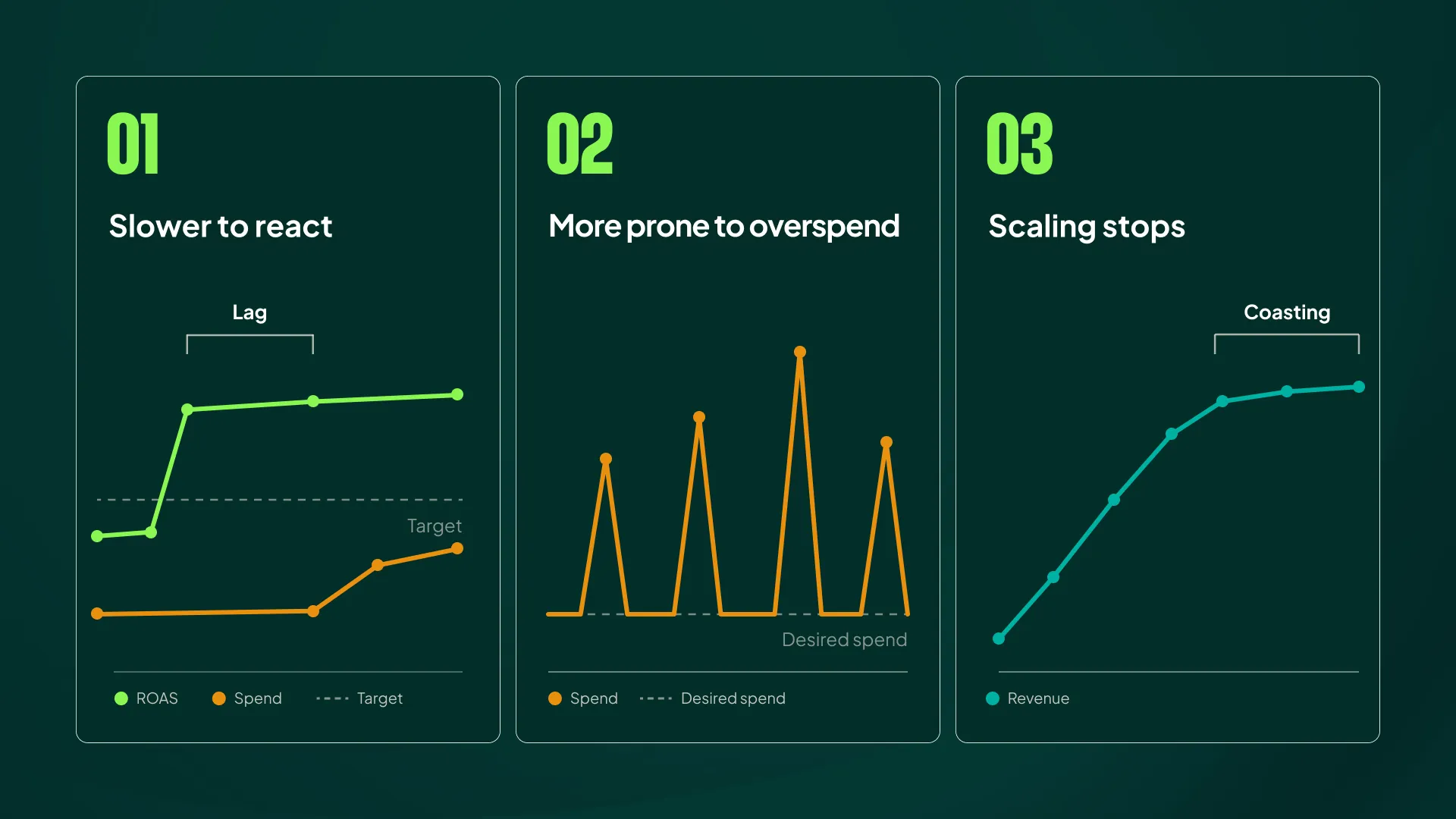
In our experience, the longer an account runs endless seasonal bid adjustments, the worse Smart Bidding performs. Specifically:
- It gets slower to react.
- It becomes more prone to overspending.
- Scaling stops. It’s as if the algorithm no longer knows how to explore new auctions.
The result is that the advertiser ends up coasting at whatever level they’re at today. There’s no dramatic decline to warn you; the account just stays stuck.
After Many SBAs, Smart Bidding Becomes Worse
This is hard to spot. Growth decays slowly, over months.
Maybe you go from growing 30% per year to 22%, then 18%, then 14%. Each step looks like a reasonable market slowdown on its own. None of them look like a bidding problem.
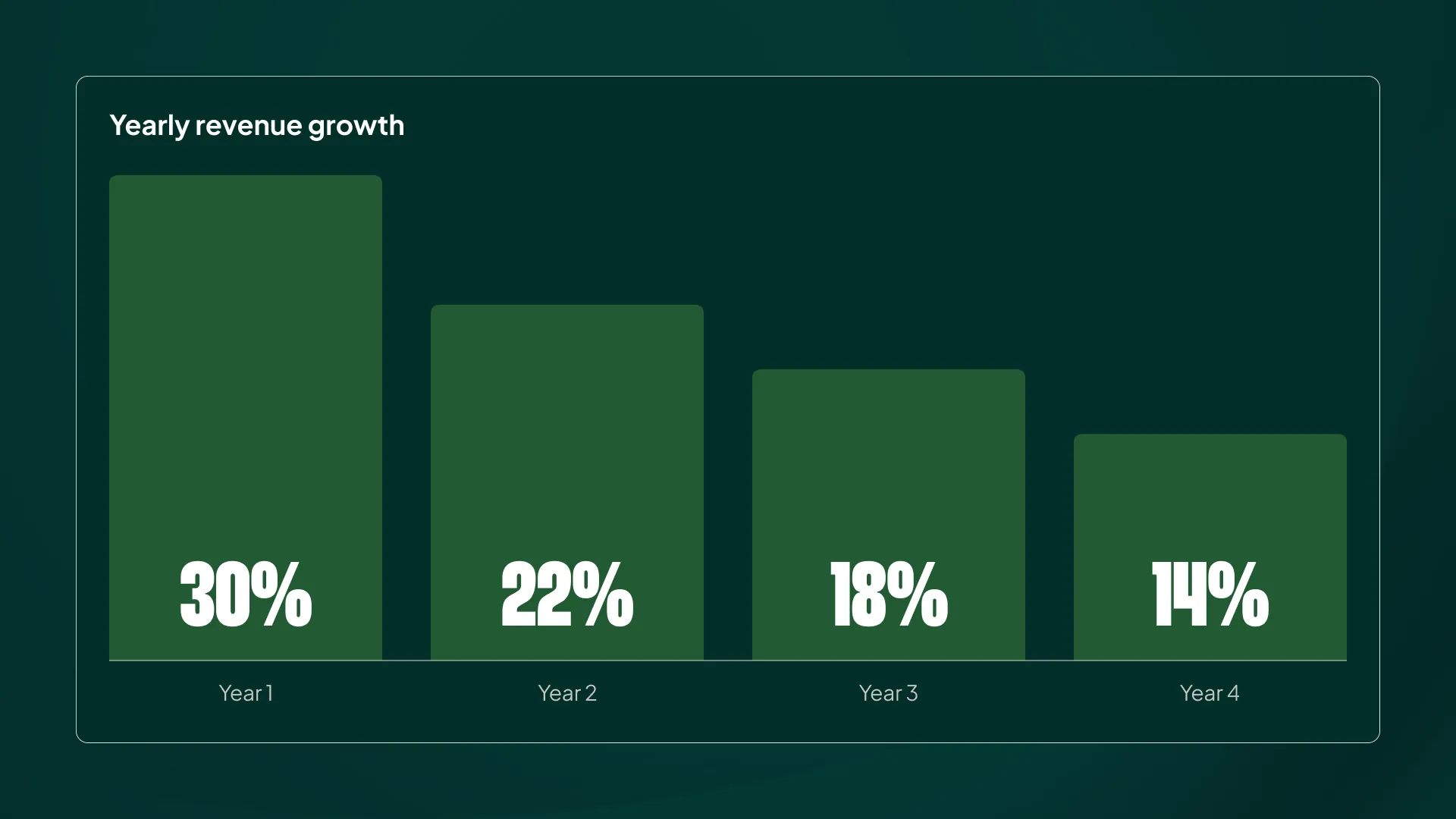
Because it happens slowly, you never stop to consider that your bidding algorithm is deteriorating. Competitors get blamed. Performance Max gets blamed. Pricing gets blamed.
Everything except the big fat elephant in the room.
My Theory: You’re Poking Holes in Your Own Data
Google’s guidance used to state this quite plainly in the Help Center: Smart Bidding discounts data during a seasonal bid adjustment (not exact wording, from memory). That language has since disappeared, though I could still get it confirmed by asking Google’s support agent very specifically:
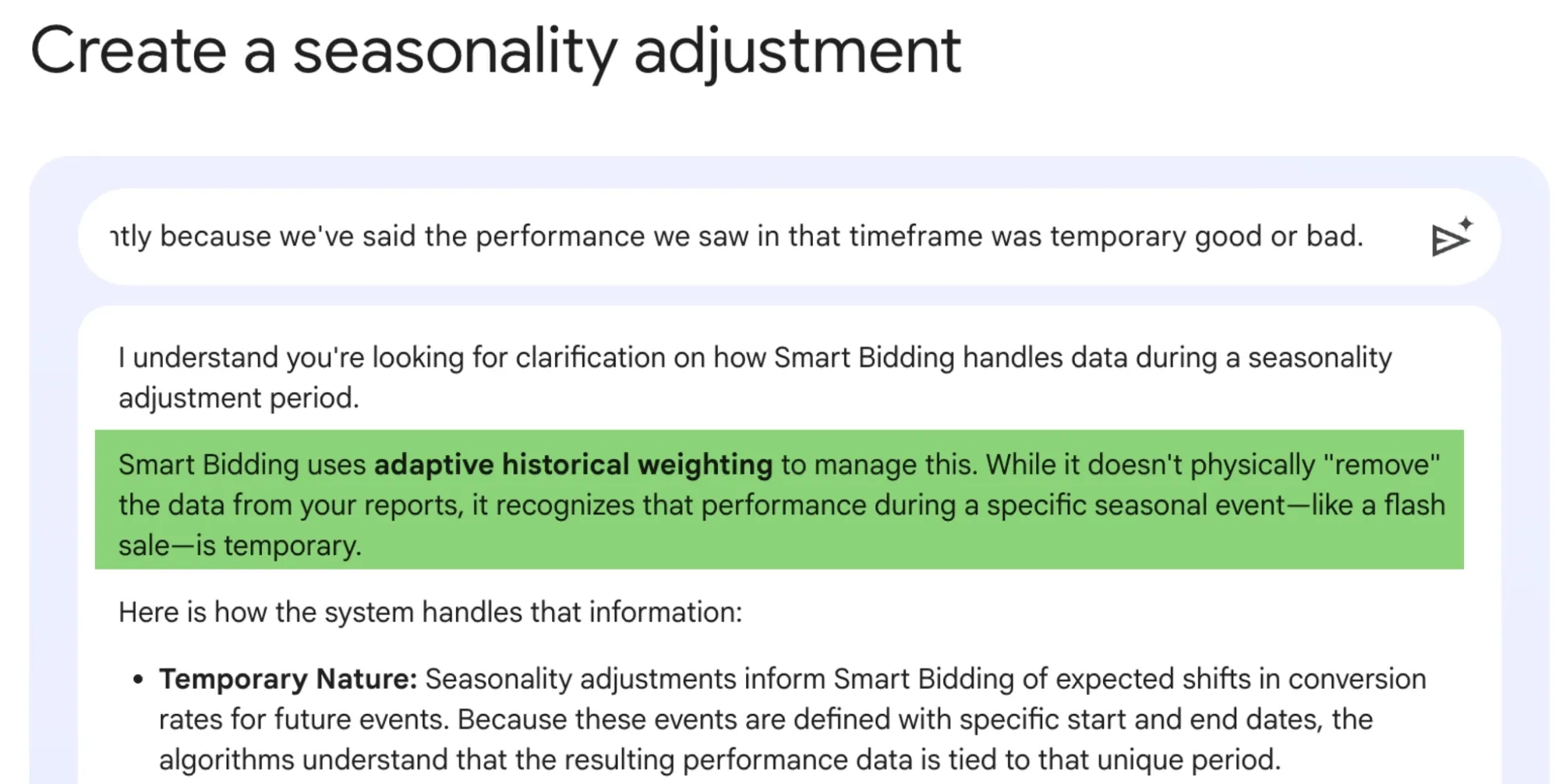
My theory on why constant SBAs are harmful comes down to what an SBA actually communicates. Every time you apply one, you’re telling the algorithm that this period is special. It’s temporary. It doesn’t represent normal conditions.
Technically, that means Smart Bidding shouldn’t fully rely on data from that period when making future bidding decisions. It doesn’t exclude the data entirely, but it can’t trust it entirely either.
Now run SBAs back to back for months.
The data Smart Bidding relies on becomes full of holes, and the most recent data (the data it should weigh most heavily) is the least trustworthy. So Smart Bidding does the safe thing: it stays in its lane and stops trying anything new.
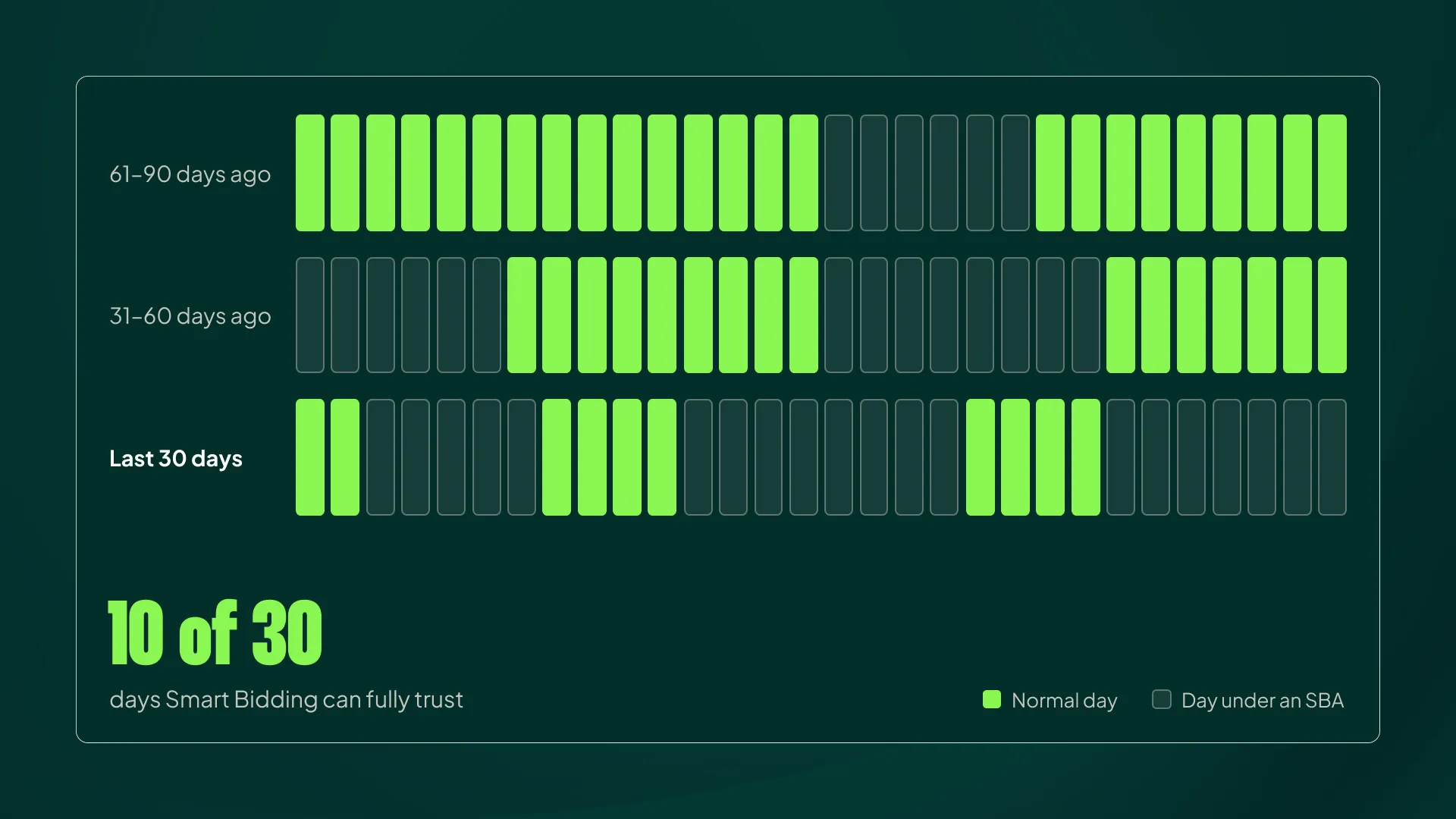
That limits your ability to scale, and it limits your ability to get back into auctions you’d previously been pushed out of.
It’s Never Just One
Just like a Friday night rarely means just one beer (or one chip, or whatever your vice is), an SBA used to counter overspend is rarely just one. Once it runs out, bidding goes straight back to reacting to the performance it saw before the SBA was applied.
Nothing was fixed. The underlying signal (actual ROAS above target) is still sitting there waiting for you.
You can technically avoid the snap-back by tapering your SBAs off gradually:
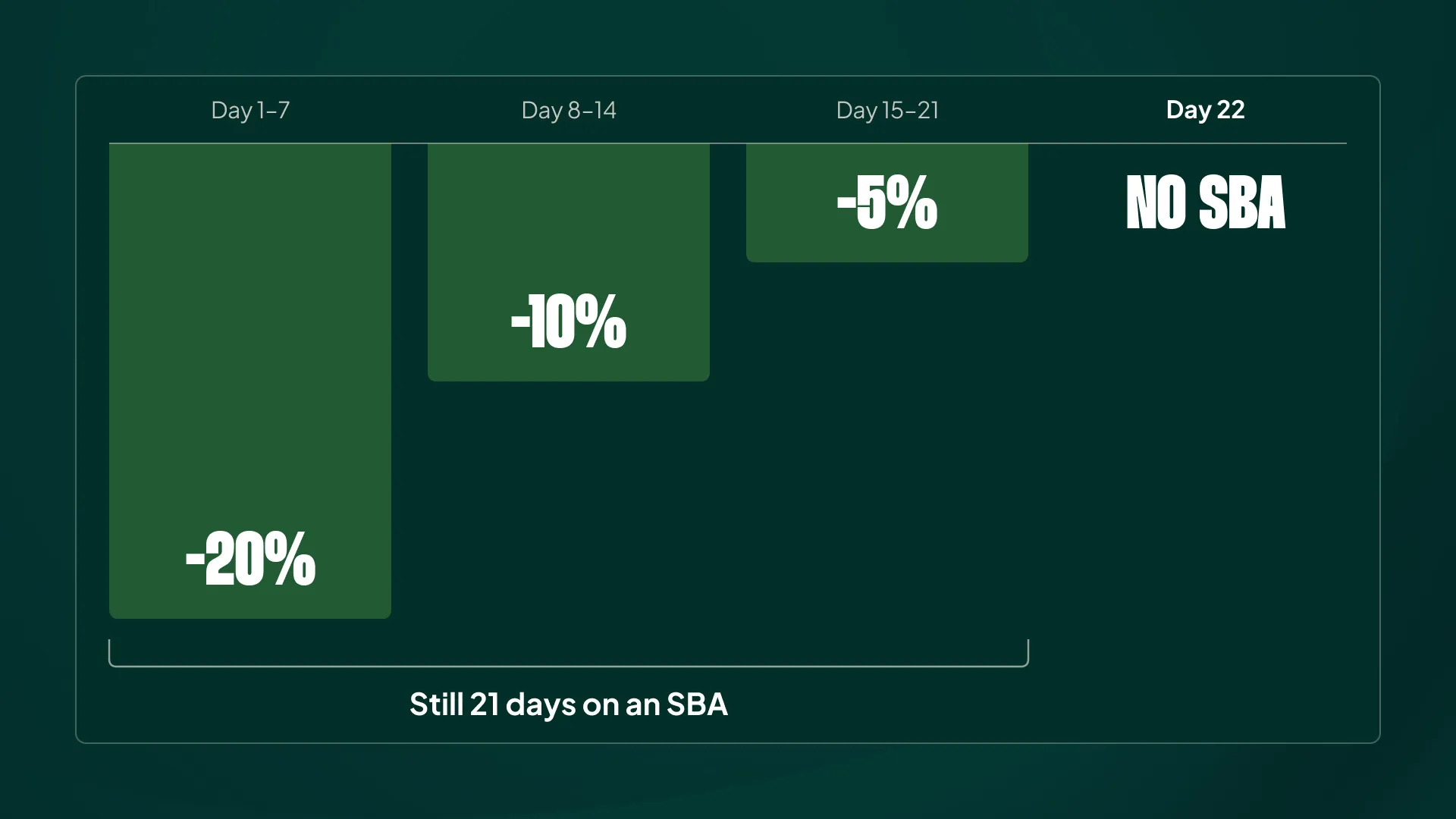
You can compress that schedule, and it’s a valid approach. But it still means running an SBA for a long time, which puts you right back where you started: telling Smart Bidding that the data it sees right now can’t be trusted to reflect the long term.
The Correct Method to Stop Overspend
Now that you know why overspend happens and why SBAs are the wrong default answer, the rest of this article covers how I actually solve it.
Two Rules Before You Touch Anything
- Never react to one or two days. Short spikes are usually temporary, and Smart Bidding handles them on its own.
- Confirm that it’s actually bad. Spending more because demand is higher is not a problem. Check your CPCs and your efficiency metrics (ROAS, MER, Contribution Margin) before you change anything.
A good portion of the “overspend” I’m asked to fix turns out to be Smart Bidding doing exactly what it should: capturing more profitable demand.
The Toolbox
When overspend is real and sustained, these are the tools available:
- Change your ROAS target
- Set a budget cap
- Tighten your max bid limit
- Apply a negative seasonal bid adjustment (yes, it’s a legitimate tool)
- Use a data exclusion
Notice that SBAs are on the list. The tool works fine; the trouble starts when you use it for a job it wasn’t built for.
The Decision Tree
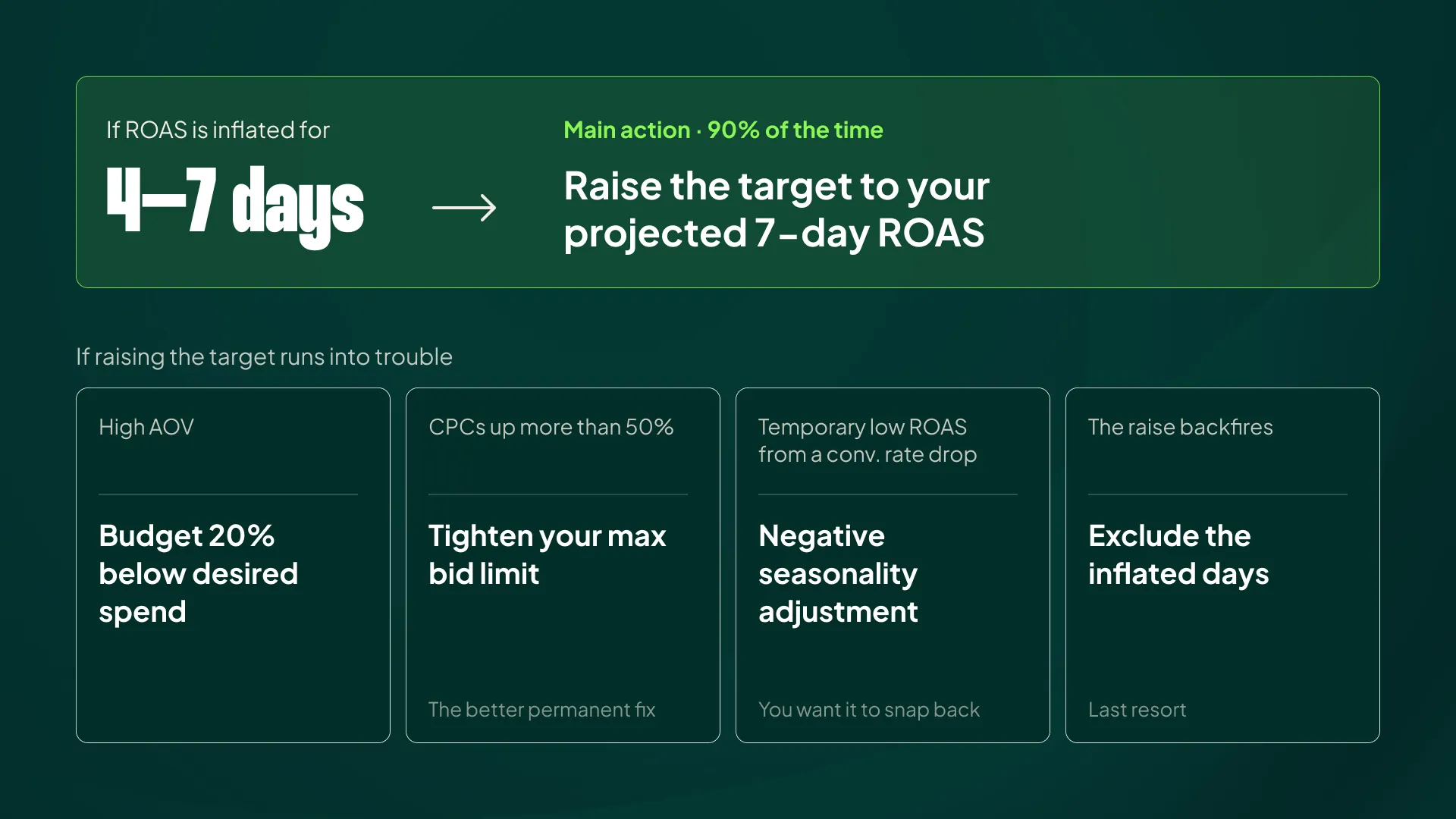
Main action → Raise your ROAS target: If you’ve had 4-7 days of inflated ROAS, raise your ROAS target based on your projected ROAS from the past 7 days. I’ll show you exactly how to calculate it below.
In about 90% of overspend cases, this is what I do. The harder part is how much to change it (and, most importantly, when to change it back).
Before digging into how to do that, let’s just get the alternatives out of the way:
- Budget decrease
- Max bid limits
- Seasonal Bid Adjustment (yes, it works in the right case)
- Data exclusion
The 10% of cases where I do this is because of the following:
- High AOV: Set your daily budget 20% lower than your desired daily spend. With high-ticket products, a handful of orders can swing ROAS significantly, so a budget cap gives you a reliable guardrail.
- CPCs up by more than 50%: Tighten your max bid limit. This is the better permanent fix for runaway bids. Some accounts we manage run max bid limits at 2x their normal CPCs.
- Temporarily low ROAS due to a conversion rate drop: This is where a negative seasonal bid adjustment belongs. The difference is that you want Smart Bidding to return to normal once the dip is over, which is exactly what an SBA is designed to do.
- Negative effects from the ROAS spike itself: Exclude the days with inflated ROAS using a data exclusion. This is the last resort, because you’re removing data from Smart Bidding. Do it too often and you’re back in the same hole-riddled data situation SBAs create.
Pick the tool that matches the cause. That’s the entire difference between steering the algorithm and fighting it.
Getting the Target ROAS Change Right
There are two things you need to understand to make this work: 1) how to set the right target, and 2) how to bring it back down.
1) Understand Average Target ROAS
When you change your ROAS target today, Smart Bidding only tries to hit that target moving forward. But it still evaluates performance over the last 30 days to determine whether it should bid higher or lower.
If it tried to hit the new target across that entire 30-day window, it would massively overreact.
For example:
- You spend $1,000 every day.
- Your target, and your actual performance, has been 500% ROAS.
- Four days ago, you raised the target to 600%, leaving three complete days at the new target.
To average 600% across all 30 days, you’d need $180,000 in revenue from $30,000 in spend. The first 27 days generated $135,000. That leaves $45,000 to be generated in three days, or $15,000 per day. That’s 1,500% ROAS on each of those days, despite the new target being only 600%.
Aka, you’d need to severely overperform:
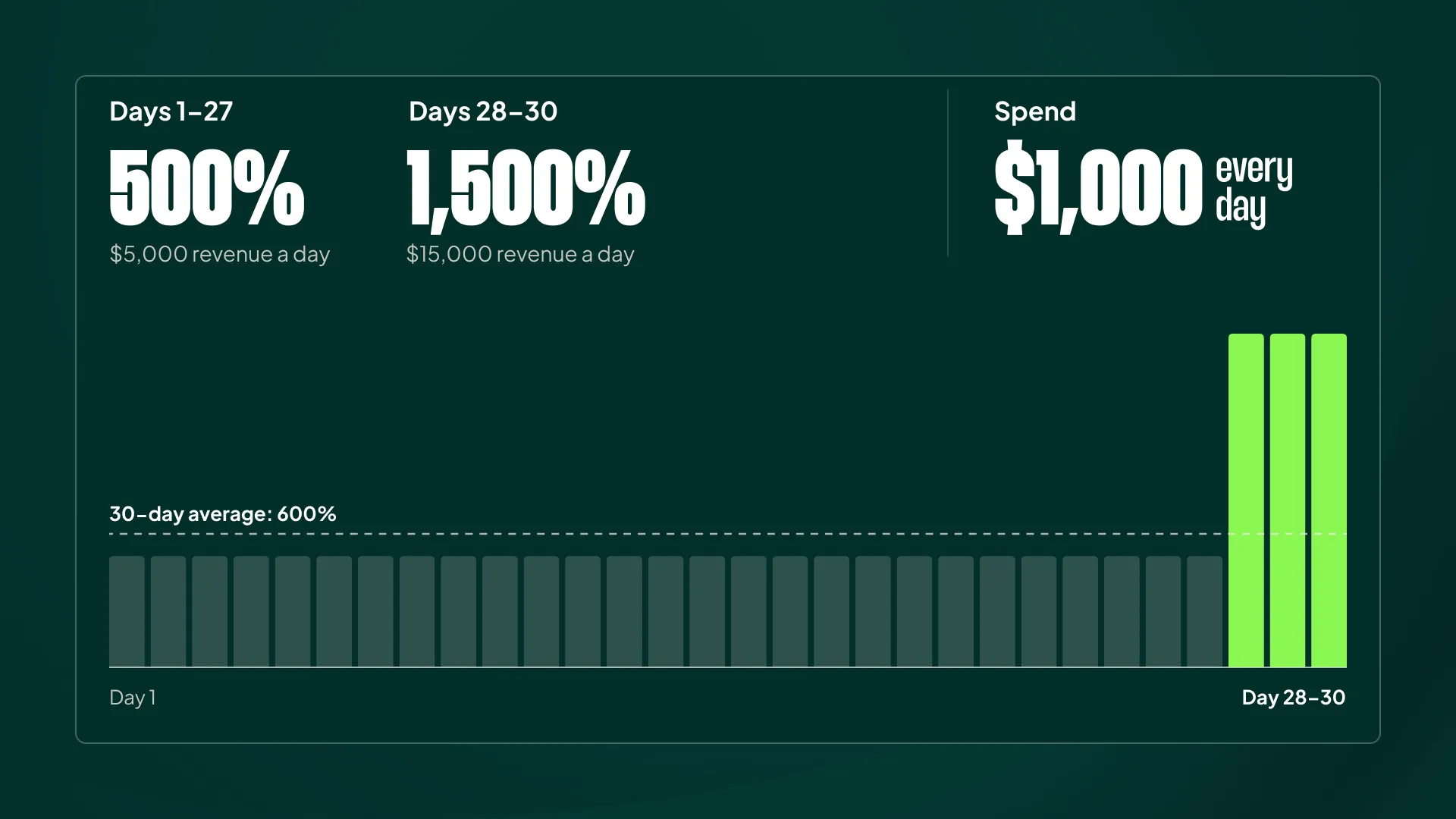
That’s impossible, and it would send Smart Bidding haywire every time someone touched a target.
So Google compares performance against the average target ROAS instead. Assuming equal traffic each day, 27 days at 500% and 3 days at 600% gives you an average target of 510%. Every day you keep the new target, that average creeps a little closer to 600%.
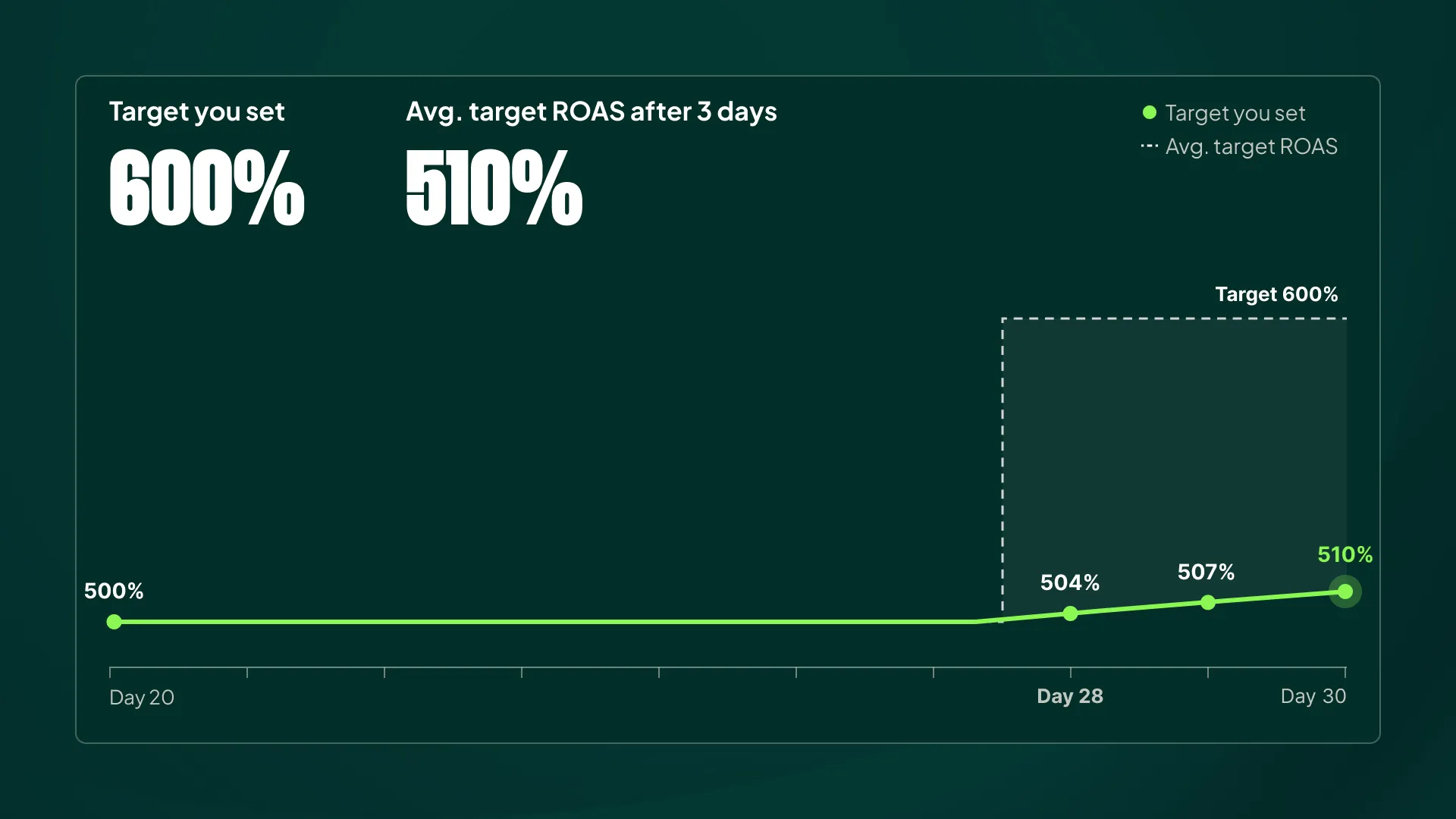
This is why changing your target from 500% to 600% to fight overspend often seems to do nothing. You’re not telling Google to hit 600% now. You’re slowly nudging it toward a slightly higher average.
In reality it’s a bit more nuanced.
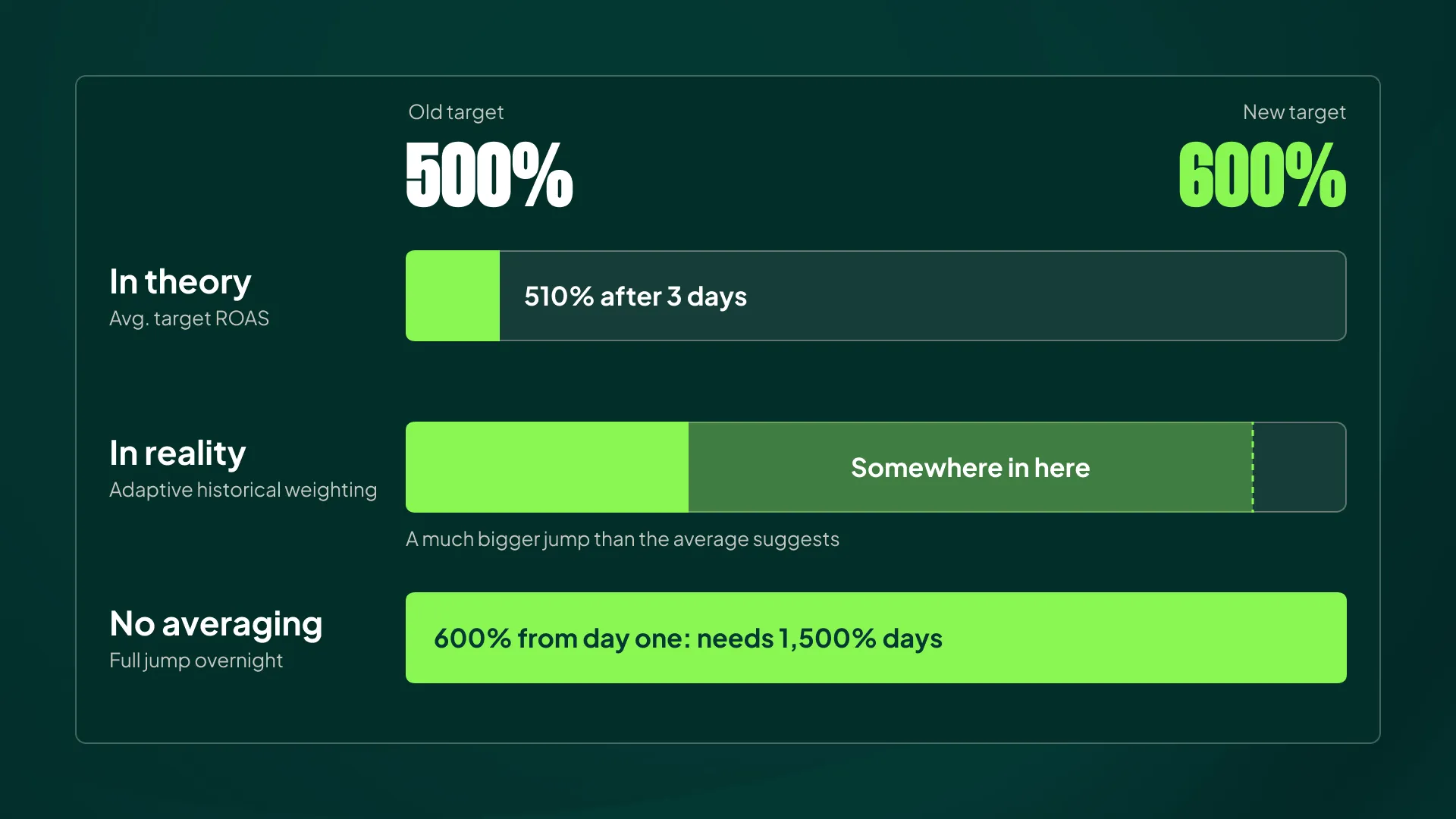
Smart Bidding runs on what Google calls “adaptive historical weighting,” which is a fancy way of saying recent data matters more than old data.
So my example isn’t 100% accurate: Smart Bidding takes bigger jumps than the math above suggests, just not as big as it would if average target ROAS didn’t exist at all:
2) Setting the Right Target
Given that dampening effect, a modest increase won’t cut it, so I use this rule:
- Find your projected ROAS for the past 7 days.
- Set your target higher than that, roughly 20% higher as a starting point
An example: your target is 500%, and you’ve noticed overspend for the past four days. Looking at the last 30 days, you see the period before the overspend started was actually hitting 620% ROAS. Applying the rule, 620% x 1.2 = 744%.
That might be a bit aggressive, but it’s not far off. I’d set it at 700% and monitor closely:
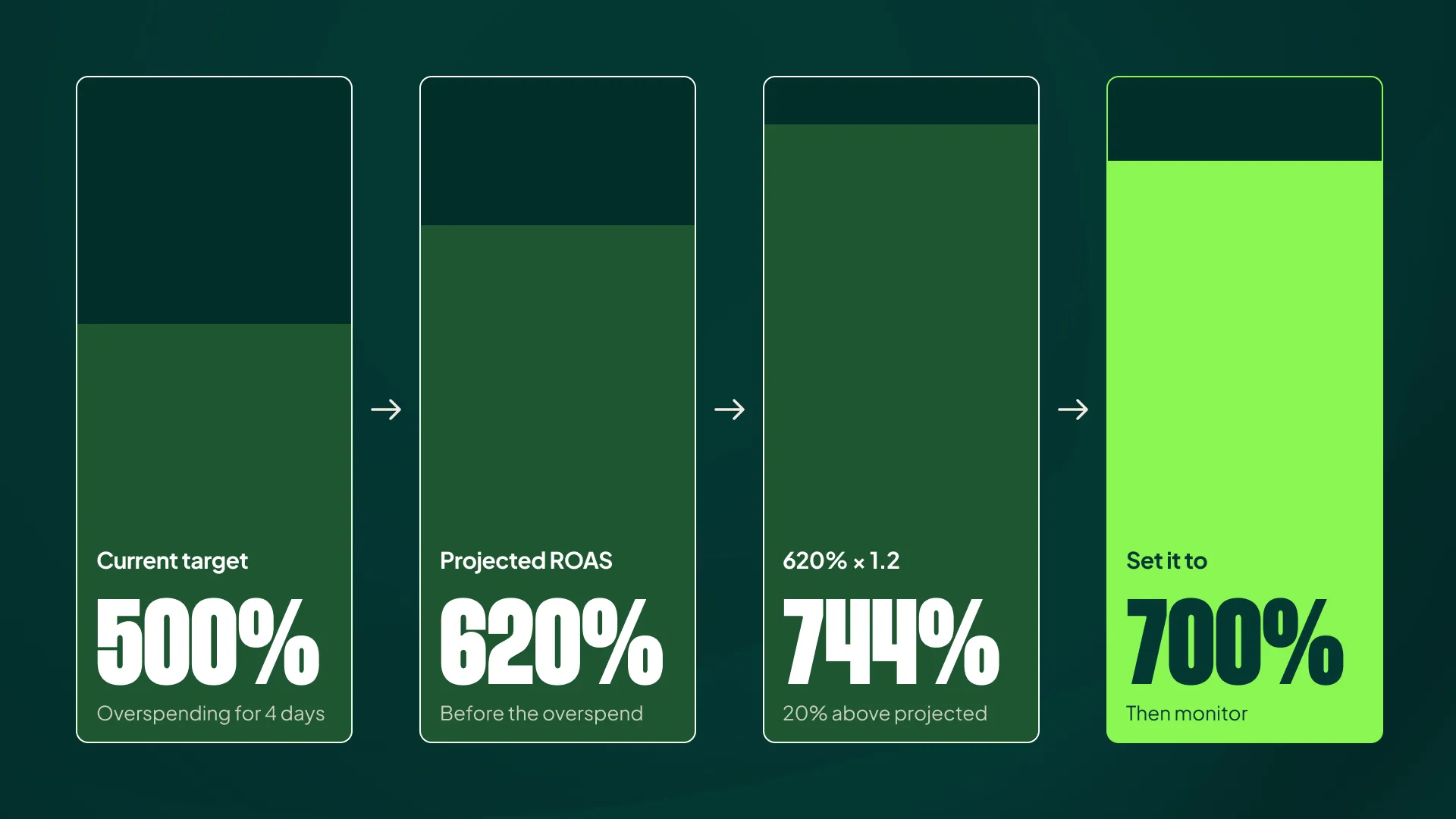
This is account-dependent. Some accounts need a gentle push. Others need a hit with a shovel. Starting 20% above your projected ROAS puts you in a reasonable range for both.
The Downside: Swinging the Pendulum
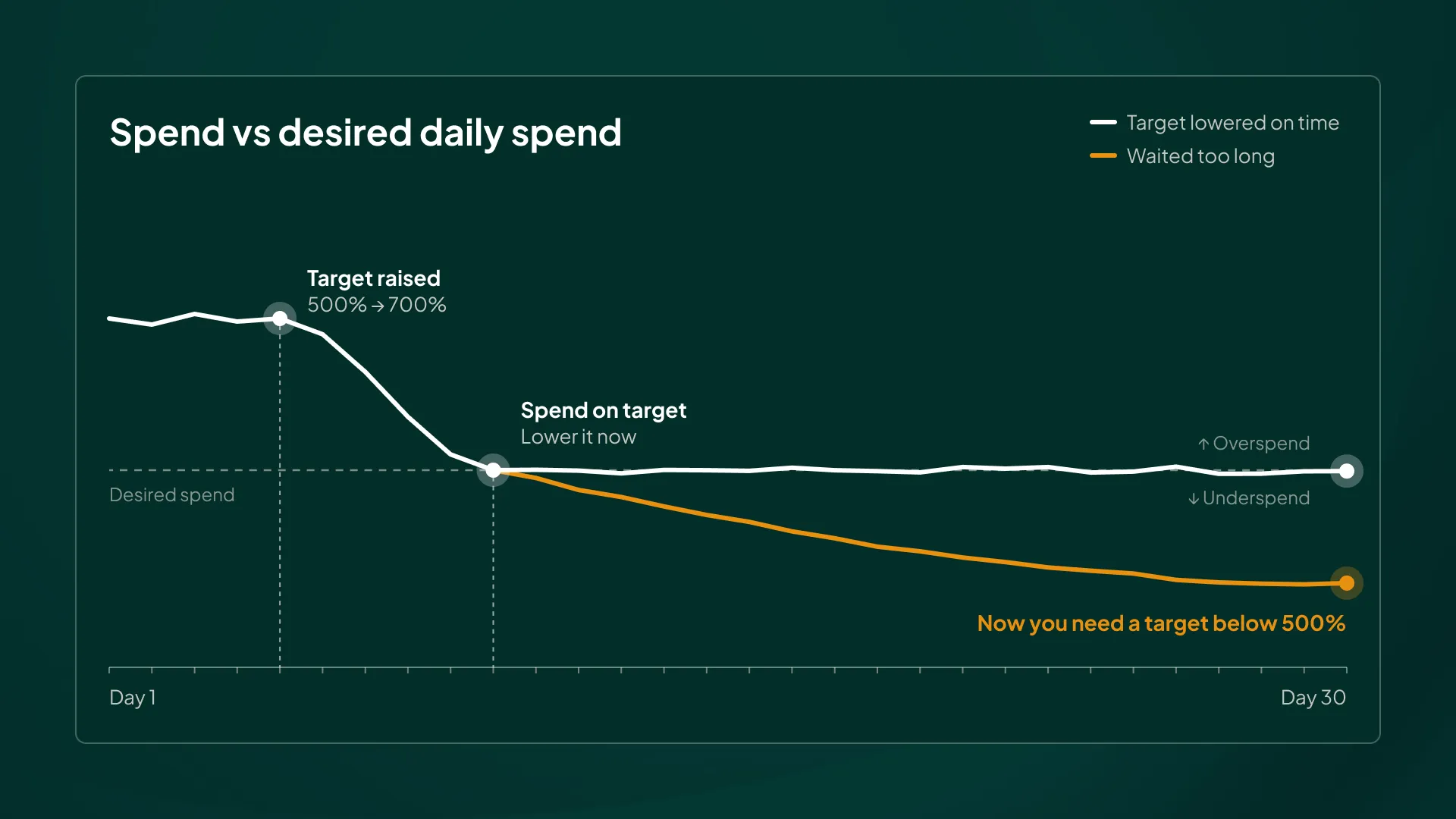
You’ve probably noticed the risk with this approach already. Raising a target from 500% to 700% can kill an account’s volume. That risk is real, which is why every increase must be followed by a proactive decrease.
The moment you’re spending at your desired daily level (or within 10% of it), you must start lowering the target again. Wait too long, and the average target ROAS swings too far in the other direction. Then you’ll need to drop your target below your original 500% just to stop the account from underspending.
I call this the pendulum effect when explaining it to clients. They get understandably frustrated and ask why we “can’t just fix it.” The answer is that we’re swinging a pendulum, and the job is to keep it from swinging too far in either direction.
The Two-Step Decrease
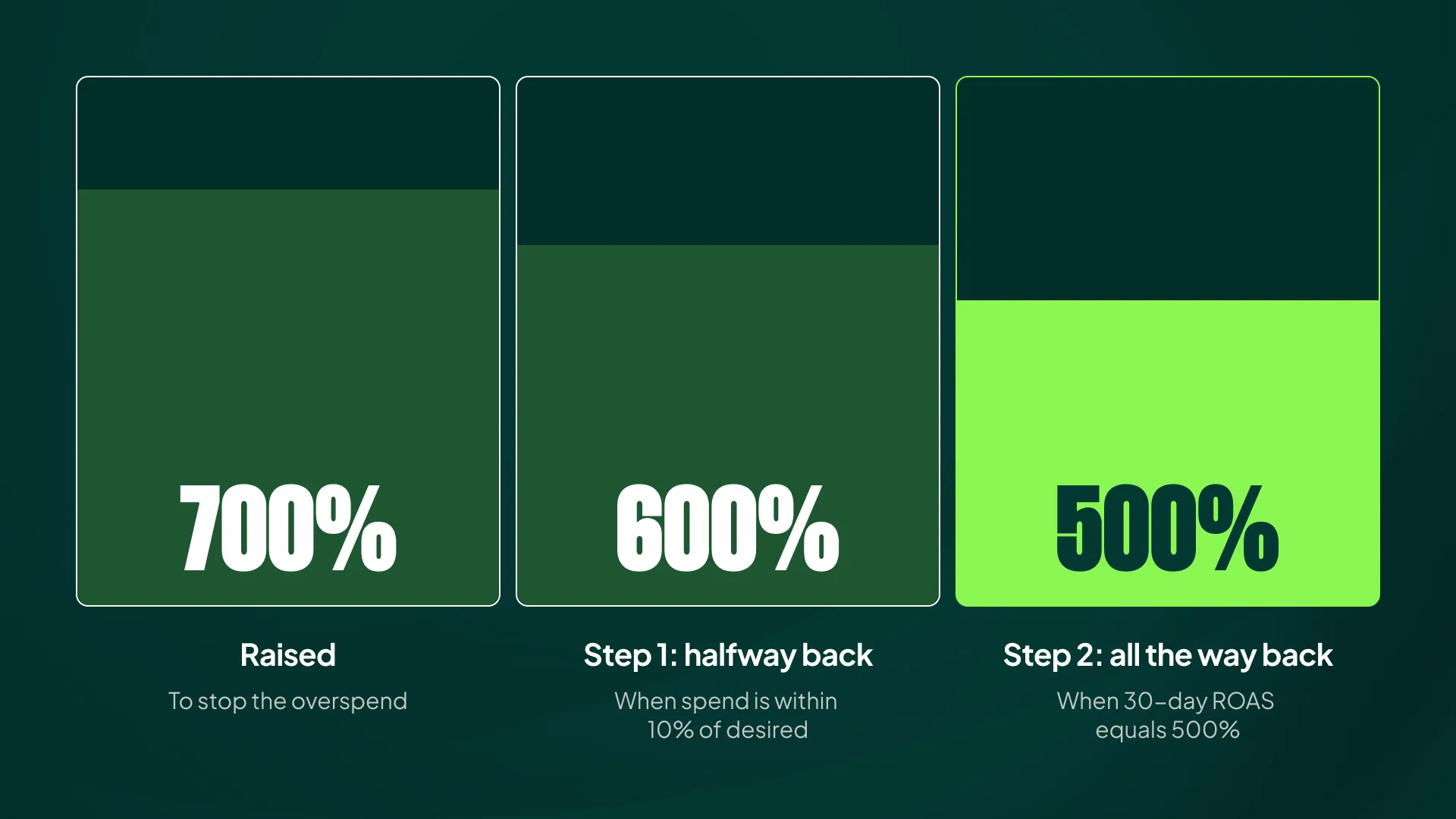
The good news is that the decrease can happen just as fast as the increase. I usually do it in two steps:
- When spend is within 10% of your desired level: move the target 50% of the way back to normal. In the example above, that’s 700% down to 600%.
- When your last-30-day ROAS equals your normal target: move the target all the way back (500%).
What you’re aiming for is a state where your normal target matches your actual performance over the past 14-30 days.
Keep in mind this isn’t an exact science. If days 1-7 underperform on ROAS but days 8-30 overperform, Smart Bidding weighs the recent days more heavily, so the neat 30-day average won’t tell you the full story.
So monitor spend and ROAS daily instead of calculating once and walking away. The math only gets you into the right range.
Stop Overriding, Start Steering
Seasonal bid adjustments feel like control because they work instantly. But when you use them to fight overspend, you’re overriding the algorithm while the signal it’s reacting to stays uncorrected. The overspend comes back the moment the SBA expires, and the constant “this period is special” messaging leaves Smart Bidding with patchy data, which shows up as slower reactions and a declining appetite for growth.
The better approach is less exciting but far more effective: confirm the overspend is real and actually harmful, raise your target ROAS meaningfully above your recent projected ROAS, and bring it back down in two deliberate steps before the pendulum swings too far. Save SBAs for what they’re built for: short, temporary events.
[TL;DR]
- Overspend happens when your actual ROAS beats your target for more than about three days. Smart Bidding reads that as a signal to spend more, which is usually correct, but not when the bump is temporary.
- Using seasonal bid adjustments to stop overspend only delays the problem, and constant use appears to degrade Smart Bidding over time (slower reactions, more overspend, stalled scaling).
- Before acting, ignore one or two-day spikes and verify the overspend is actually hurting efficiency (CPCs, ROAS, MER, Contribution Margin).
- In about 90% of cases, the fix is to raise your target ROAS roughly 20% above your projected ROAS from the past 7 days, because average target ROAS dampens small changes.
- Every increase needs a proactive two-step decrease: halfway back once spend is within 10% of target, fully back once your 30-day ROAS matches your normal target.