Dansk


Seasonal bid adjustments are a staple in every Google Ads manager’s toolbox, or they should be. The problem is that if you use them out of the box, the way Google still says you’re supposed to, you’ll overspend and conclude that they don’t work.
They do work. You just have to set them based on how the auction actually behaves, which rarely matches how the math looks in a help center article.
I’ve used seasonal bid adjustments (SBAs) for as long as I can remember. In this article I’m sharing what I’ve learned and exactly how I use them.
If you’re reading this outside of Black Friday, then know that they are just as relevant whenever you run a sale or see a temporary swing in performance.
What a Seasonal Bid Adjustment Actually Is
A seasonal bid adjustment is a way to tell Smart Bidding to raise or lower bids immediately, without waiting for the algorithm to catch up on the latest data.
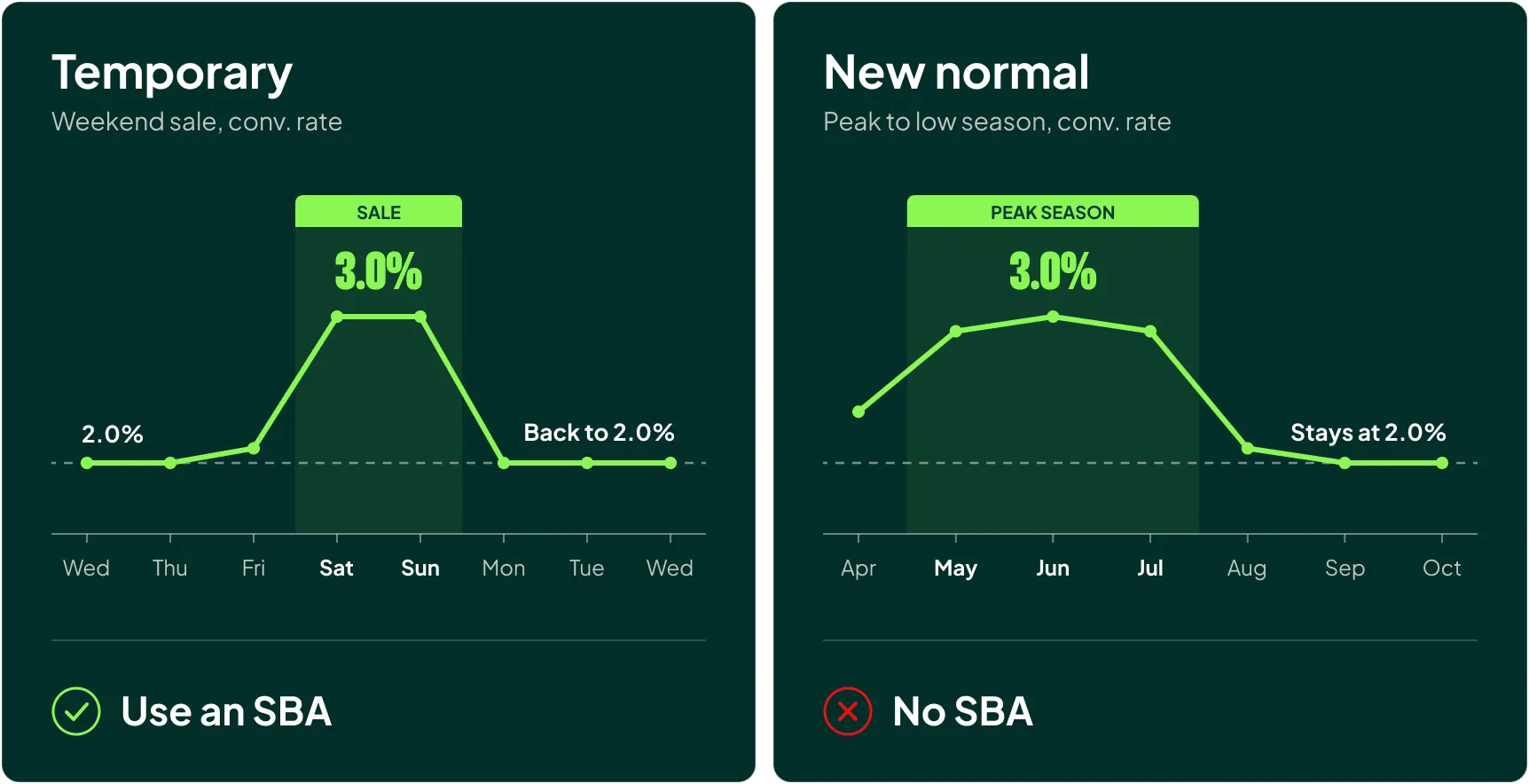
The key word is “temporary.” SBAs are built for performance you’re seeing (or expect to see) for a short window, as opposed to what I call a new normal. A weekend sale is temporary. Moving from peak season into low season is a new normal, and Smart Bidding should be allowed to adapt to that on its own.
So why do SBAs exist in the first place?
Because Smart Bidding tries to predict the optimal bid for every auction relative to your targets, but that prediction is built on historical performance. It can’t know that your conversion rate is about to double on Saturday morning because you started a sale.
The consequence is that Smart Bidding is always about 2-4 days behind your latest account data when it comes to setting the optimal bid.
This is generally a good thing as it stops the algorithm from overreacting to one unusually good or bad day.
During that sale Smart Bidding underbids during the weekend while your conversion rate is inflated, and then increases spend on Monday (because it’s finally “learned” from the great weekend) right when your conversion rate drops back to normal.
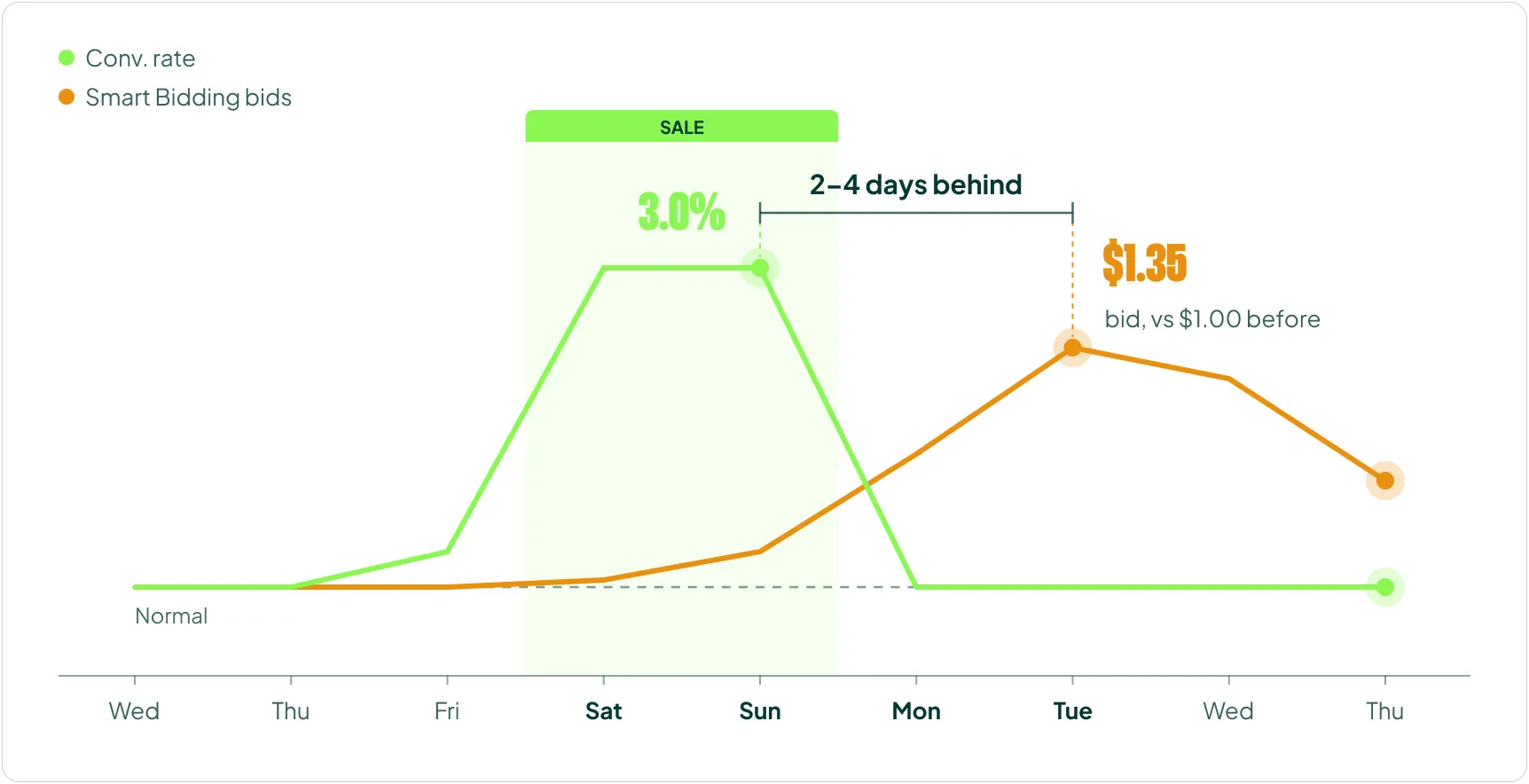
Seasonal bid adjustments let you put a modifier on top of whatever Smart Bidding was already planning to bid, instead of waiting days for it to learn anew.
How Seasonal Bid Adjustments Work (Three Things Most People Get Wrong)
There are three things you need to understand before you touch an SBA:
- Google is wrong about how to set it.
- It multiplies your bid, which only indirectly moves your CPC.
- It doesn’t trigger exploration (it won’t get you into more auctions).
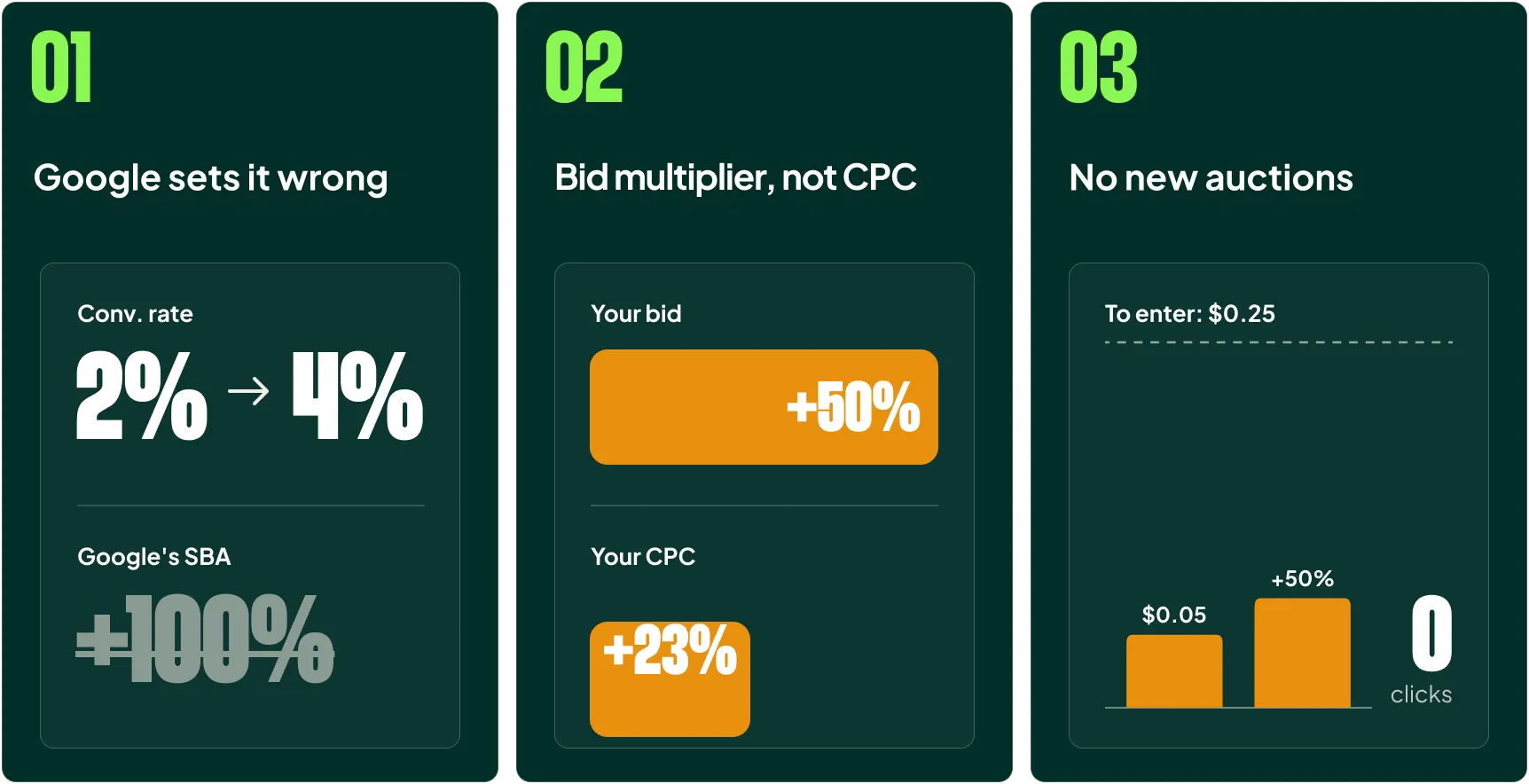
1) Google’s Recommendation Will Make You Overspend
Google recommends setting your seasonal bid adjustment equal to the expected increase in conversion rate. If your conversion rate doubles, set a +100% adjustment.
Mathematically, I get why they say it. If your ROAS is 500% at a 2% conversion rate and $1 CPCs, then you should be able to hit the same 500% ROAS at a 4% conversion rate and $2 CPCs.
That’s a lot of math but:
- Revenue per click doubles
- Cost per click doubles
- ROAS stays flat
Everybody’s happy.
But that’s not how it works in reality.
If you can get that 4% conversion rate and max out your available clicks at $1.50 CPCs, that’s clearly better than inflating your CPCs to $2. Using the same numbers, you’d land at roughly 667% ROAS instead of 500%, on the same traffic.
Google’s approach assumes you need to pay the maximum you can afford, and you rarely do.
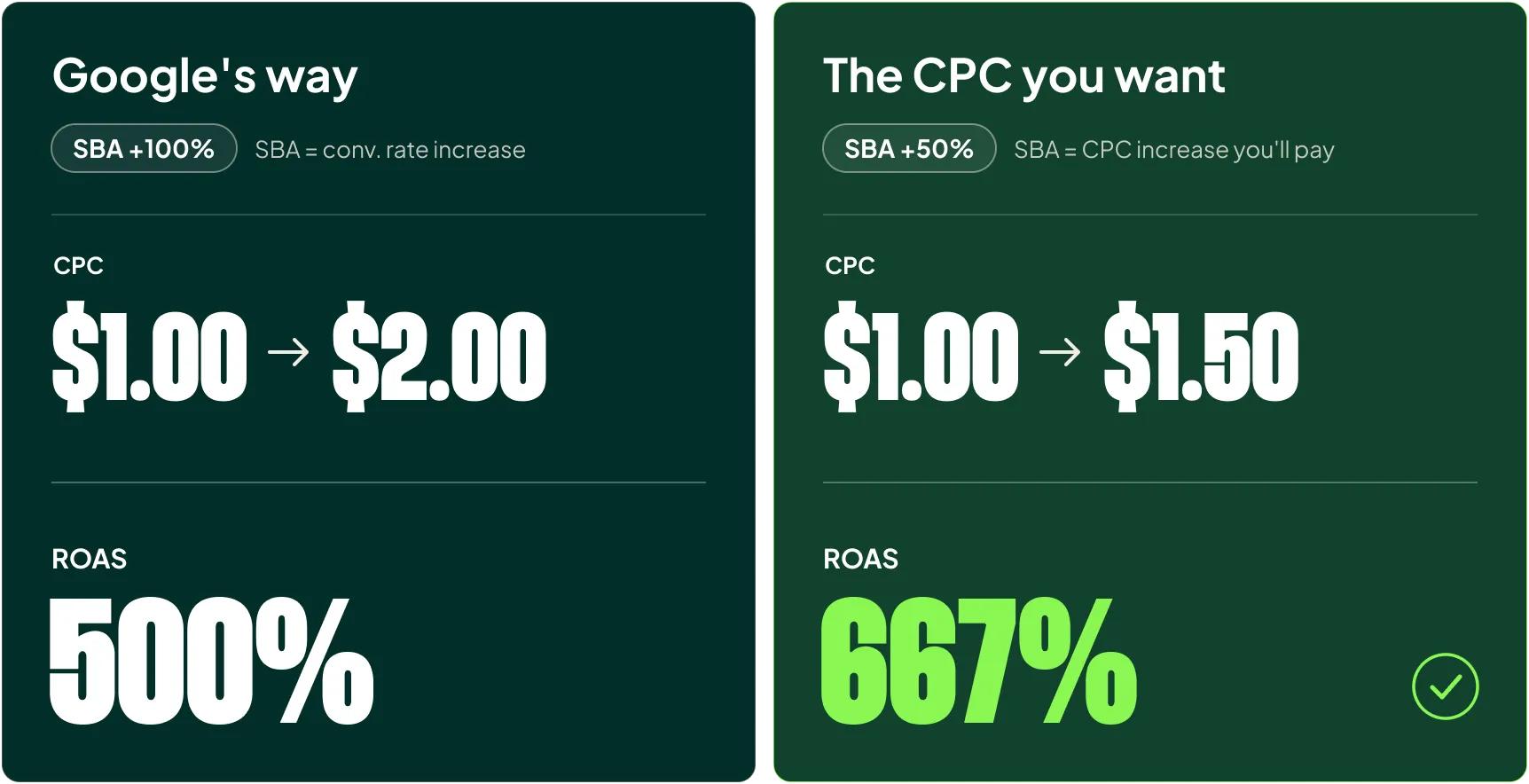
A better approach: set your SBA to match the CPC increase (or decrease) you want, and leave the conversion rate increase out of the number.
2) It’s a Bid Multiplier, Not a CPC Multiplier
A seasonal bid adjustment applies to your bids, and only indirectly to your CPCs.
That means a +50% SBA often won’t increase your actual CPCs by 50%. In the auction, what you pay is largely determined by what the advertiser below you is bidding. Your bid is the ceiling. The price you actually pay is set by the competition underneath you.
So if you raise your bid by 50% and the next advertiser below you is bidding well under your new ceiling, your CPC only rises to roughly their level.
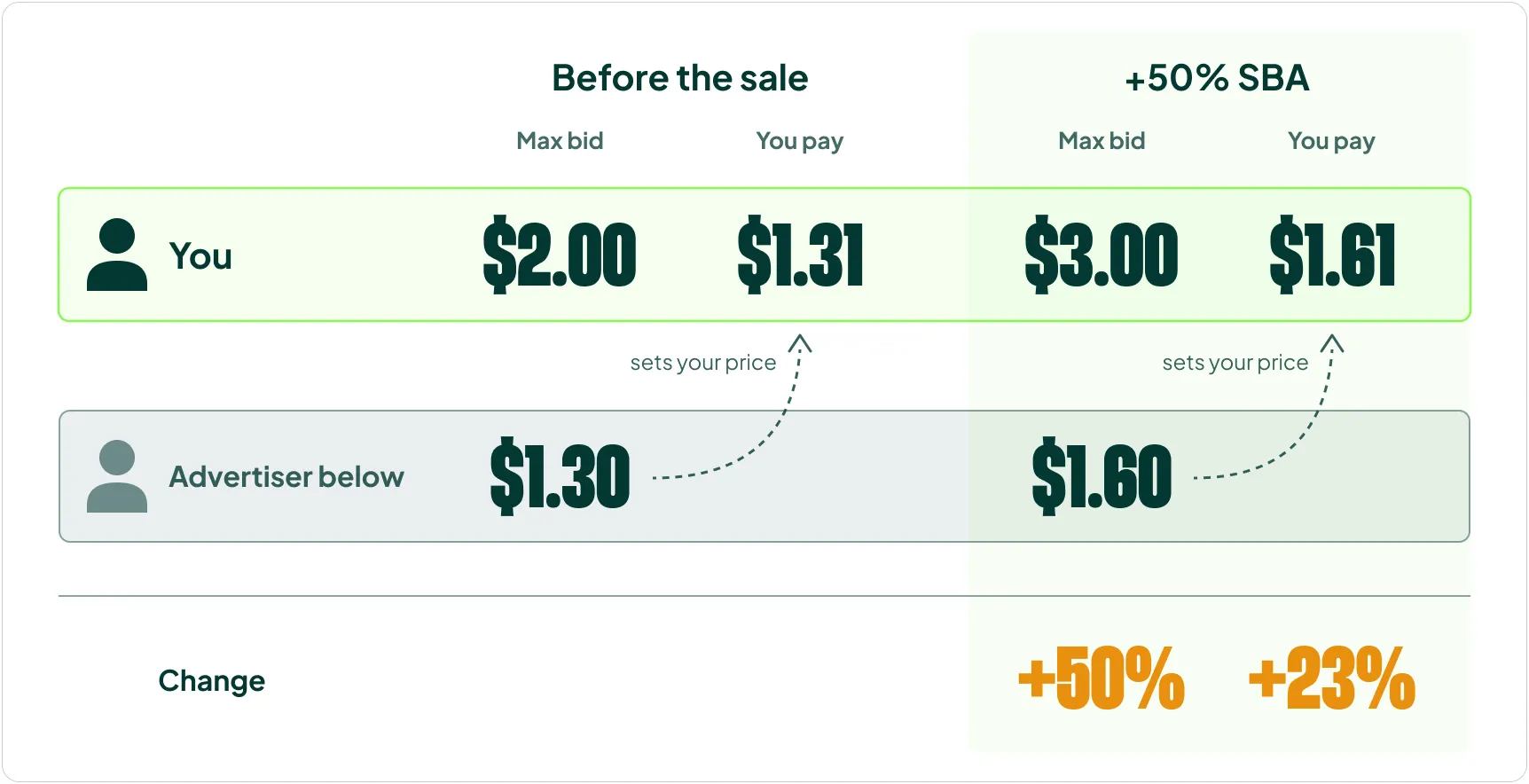
In this example, the bid went up 50%, but the CPC only went up 23%, because the advertiser below was bidding less than the increase.
Yes, I’m oversimplifying how the auction works here. But it’s the gist of it, and it’s enough to explain most of the “why didn’t my SBA do what I expected?” questions I get.
3) SBAs Don’t Trigger Exploration
I’ve used the word “multiplier” a few times now, and that’s deliberate. An SBA is not the same as lowering your ROAS target or using Smart Bidding Exploration.
SBAs only apply as multipliers to auctions you’re already in. They don’t get you into new auctions. And if your bid for a given auction is very low to begin with, multiplying it does little to nothing. Fifty percent more than almost zero is still almost zero:
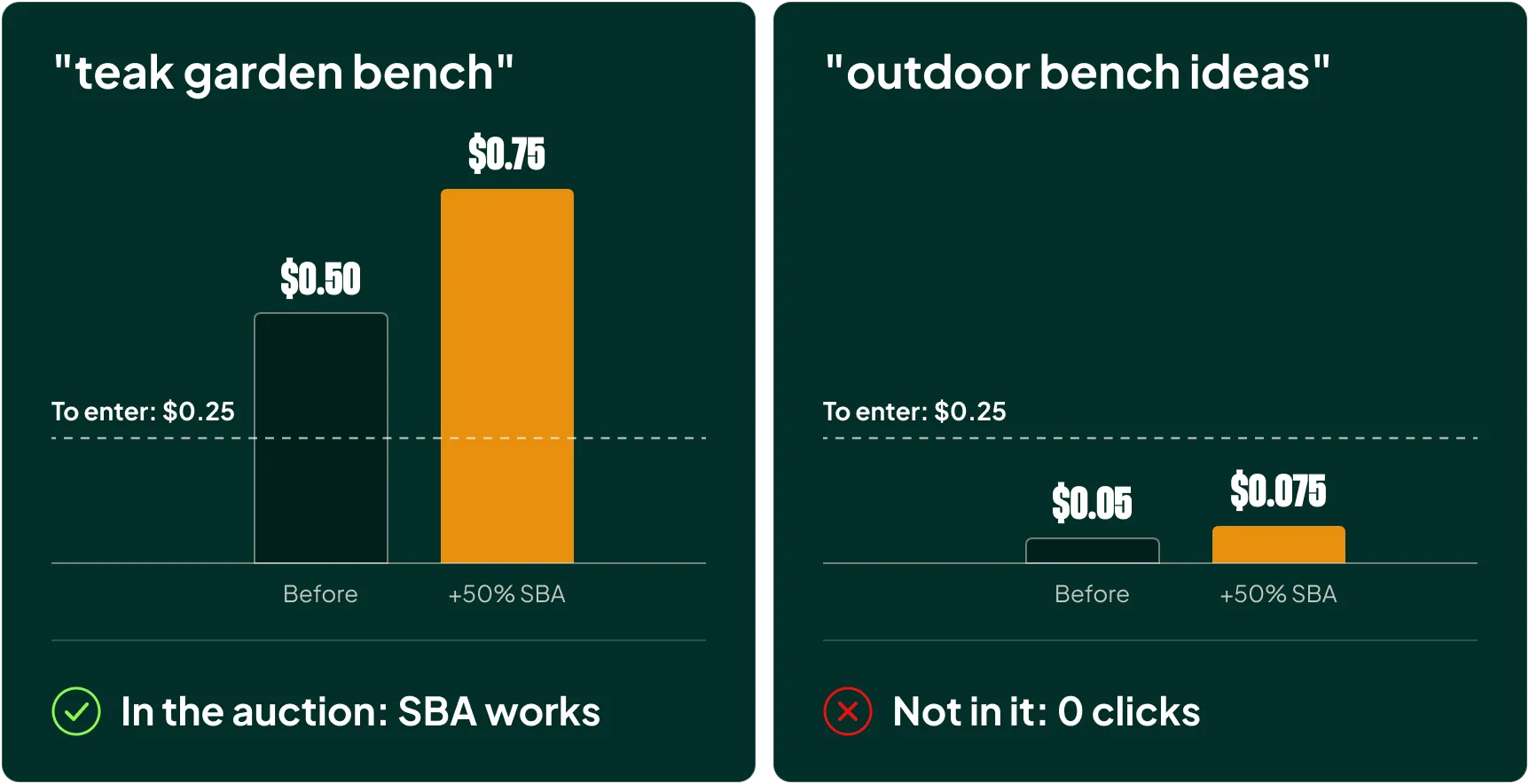
If your goal is to get wider into the auctions ahead of a promotion, that’s a job for strategically lowering your targets (or Smart Bidding exploration) that I cover in the link before.
Three Operational Details You Need to Know
Beyond the mechanics, three practical details matter:
- They take effect immediately. No learning period. No algorithm that needs time. You can read results in the next full hour. If you implement at 3:15 pm, wait until you have a complete read on 4 to 5 pm, so check around 5:20 pm.
- Keep them to 1-7 days. Do not let them run longer than that.
- You can apply them across multiple accounts and campaigns via your MCC, but not via Google Ads Editor. Any good MCP setup also has access, which I highly recommend if you manage SBAs at scale.
When to Use Seasonal Bid Adjustments
There are three situations where I use SBAs, and each one needs a different approach:
- During a sale
- After a sale (!!!)
- To counteract overspend
1) Using Seasonal Bid Adjustments During a Sale
During a sale, the goal is to increase traffic for as long as the higher conversion rate lasts. A higher conversion rate means you can afford higher bids. Higher bids buy you more impression share. More impression share means more traffic.
The end result is the maximum amount of revenue your sale can generate from Google Ads.
There are exceptions. If your conversion rate doesn’t increase during a sale, or you’re already maxing out your impression share, an SBA will do little to nothing for you. Every account is different and you need to understand your own. But in my experience, most accounts benefit from a higher bid during a sale.
How to Set the Right SBA for a Sale
Because an SBA moves your bid and not your CPC directly, a +40% SBA will do nothing for a position where the advertiser above you is bidding 50% more than you.
In reality, most auctions have dozens of advertisers competing for the same spot, so it’s far more nuanced than a two-advertiser example.
The reason I want you to understand the principle is that it explains why one account can double its spend with a +20% SBA while another needs +100% to do the same, and why the ideal setting is specific to every account.
The best way to find your starting point:
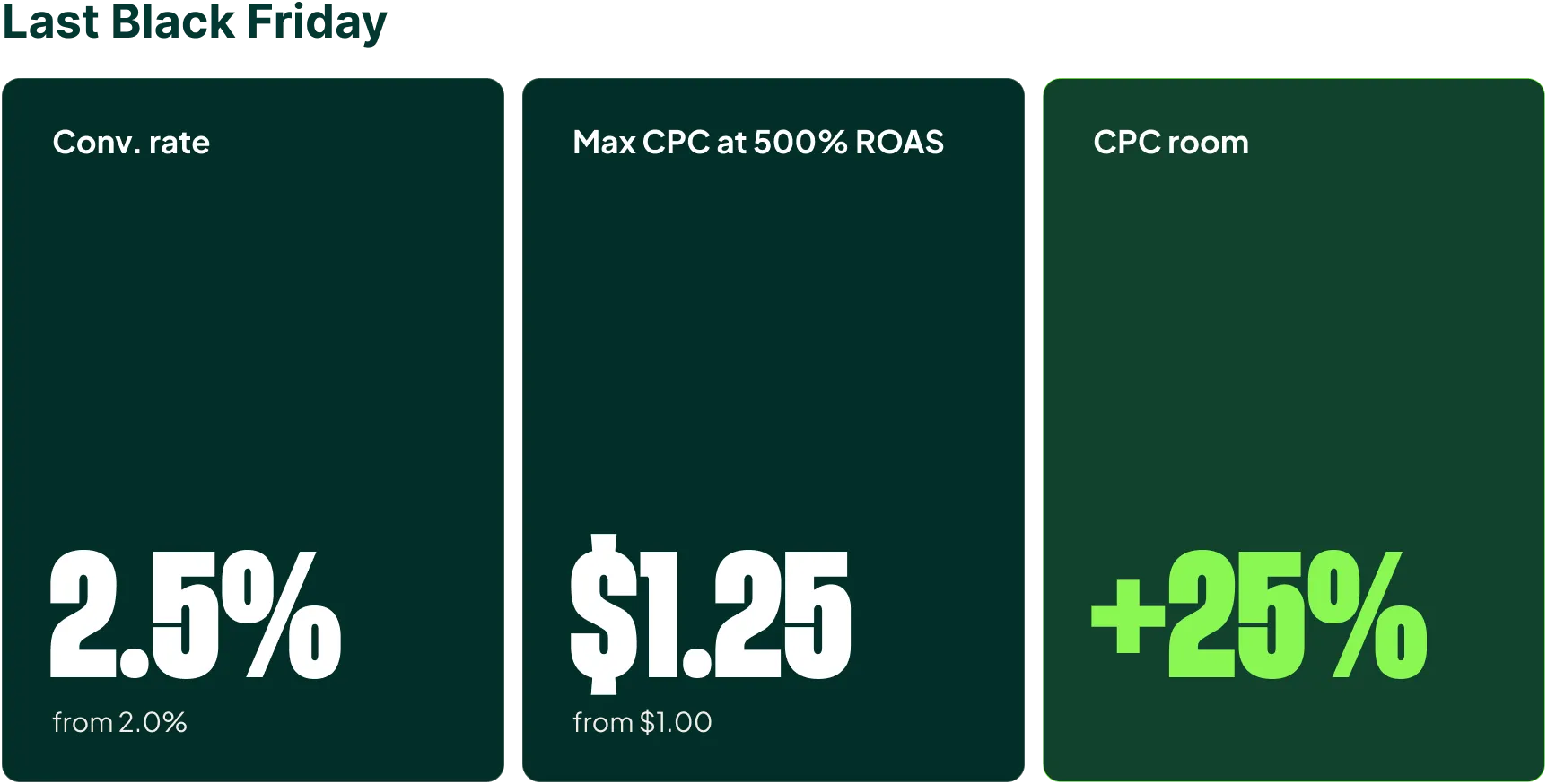
- Look at your last equivalent sale and see what your conversion rate in Google Ads increased to.
- Calculate what your CPC could have been while still staying profitable.
- If that CPC is more than 20% above normal, start your SBA at +20%.
- If it’s between 10% and 20% above normal, start at +10%.
- If it’s less than 10%, don’t use an SBA.
Notice that the starting points are deliberately conservative.
Remember, an SBA moves your bid ceiling, and you don’t know in advance how much of that increase the auction will actually pass through to your CPC.
Starting low and stepping up is cheaper than starting high and finding out on Monday.
During the sale, measure performance against the last sale.
Compare clicks and CPC per hour against the same weekday of the previous equivalent sale. That tells you how well the day is progressing in terms of traffic compared to last time, and whether your SBA is moving the needle.
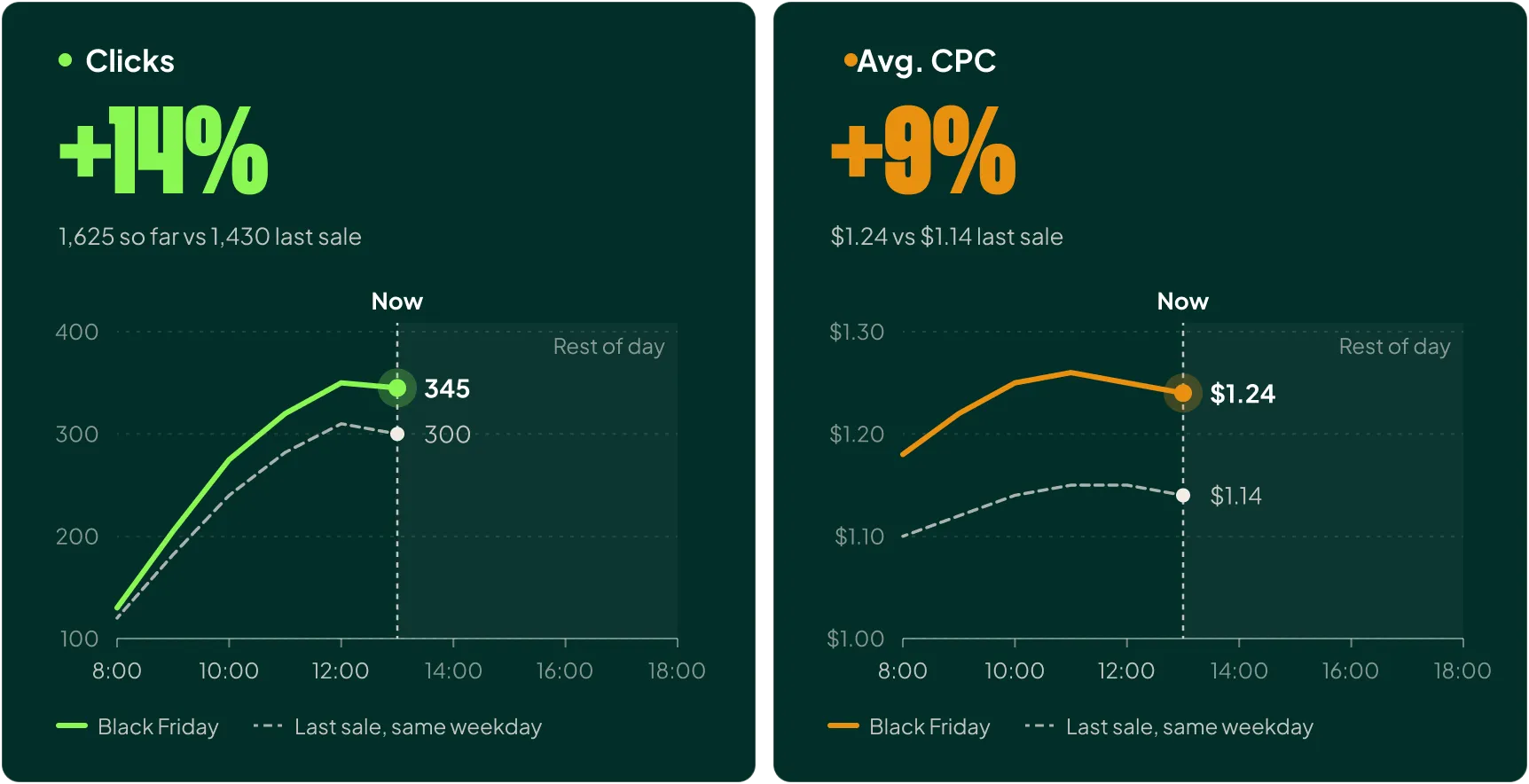
To truly know whether you can push harder, you need to look at your blended efficiency metric: MER, Blended ROAS, contribution margin, whatever you use. That’s too much to cover here, but I go in depth in my video on how to use Blended ROAS to bid in Google Ads.
For tracking the direct impact of your seasonal bid adjustment, though, clicks and CPC per hour is the best signal you have.
2) Using Negative Seasonal Bid Adjustments After a Sale
The thing bosses hate more than anything is watching the profit made during a sale get handed back because Google Ads ramps up spend in the days afterwards.
This happens for the reason I described earlier. Smart Bidding is still digesting the weekend’s higher ROAS, so it bids aggressively into a week where conversion rates have already returned to normal.
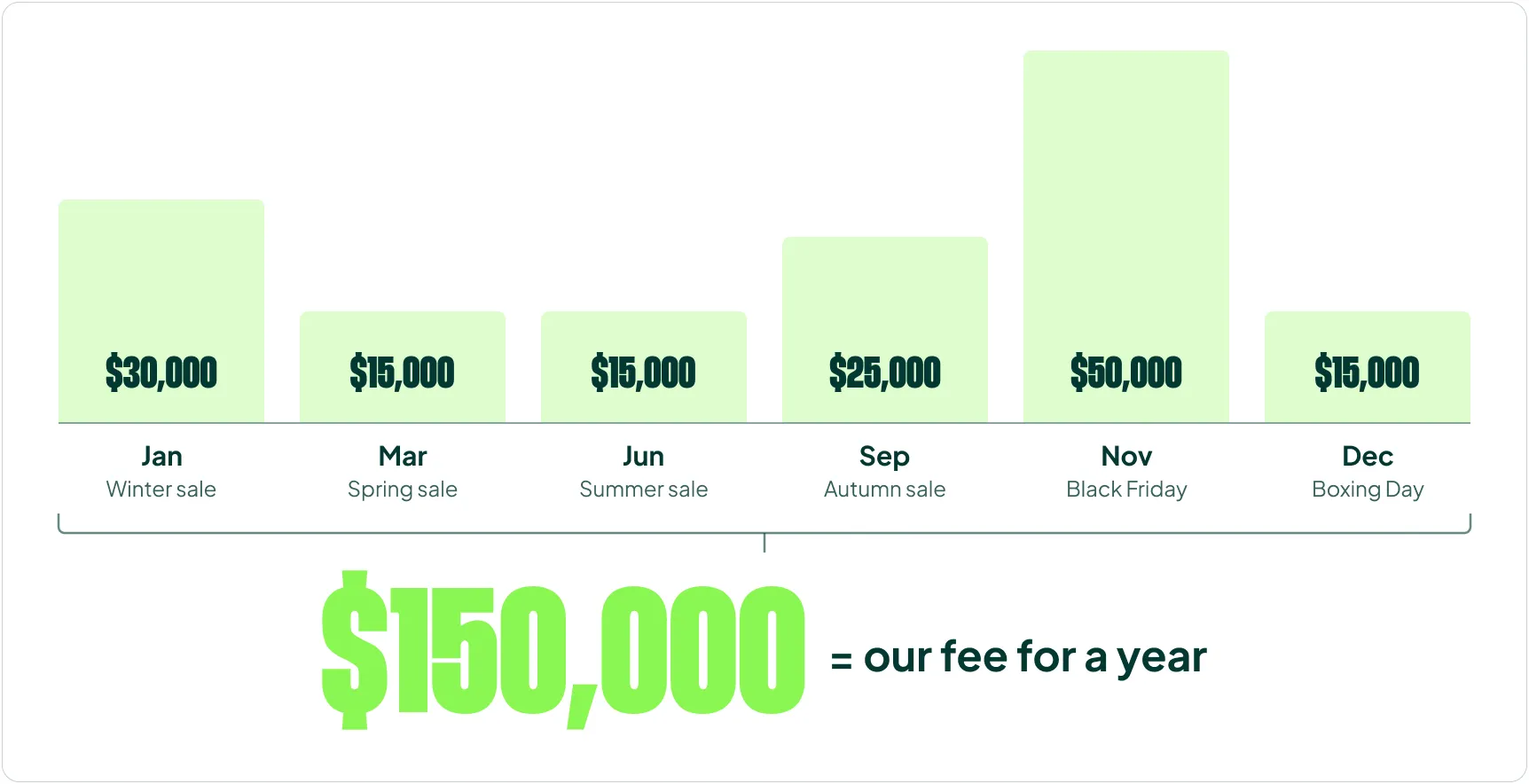
Sometimes the cost is significant. For one client, we estimated that simply reducing post-sale overspend after their six big promotions per year would save the equivalent of our $150,000 annual fee, so that fix alone paid for our fees the first year:
I want to mention something:
Google has stated for years that this isn’t necessary.
Our experience says otherwise, time and time again.
We’re at the point where we don’t test it anymore. When we onboard a new client, we look in their last year for sales periods where negative seasonal bid adjustments weren’t used, and confirm (yet again) that they were needed.
Here’s how to prevent overspend after a sale
Let’s say you run a weekend sale. To avoid overspending the following week, you should do two things:
- Implement a data exclusion for the weekend
- Set a negative bid adjustment of -20%
The problem is that the second the negative SBA expires, you snap right back to the previous bid levels.
You’ve only delayed the overspend. The idea is to get “away” from the high-performing weekend gradually, and slowly wean the account off its dependence on the adjustment.
That’s why you should stagger your negative SBAs:
- Monday-Wednesday: -20%
- Thursday-Saturday: -10%
- Sunday onward: no adjustment
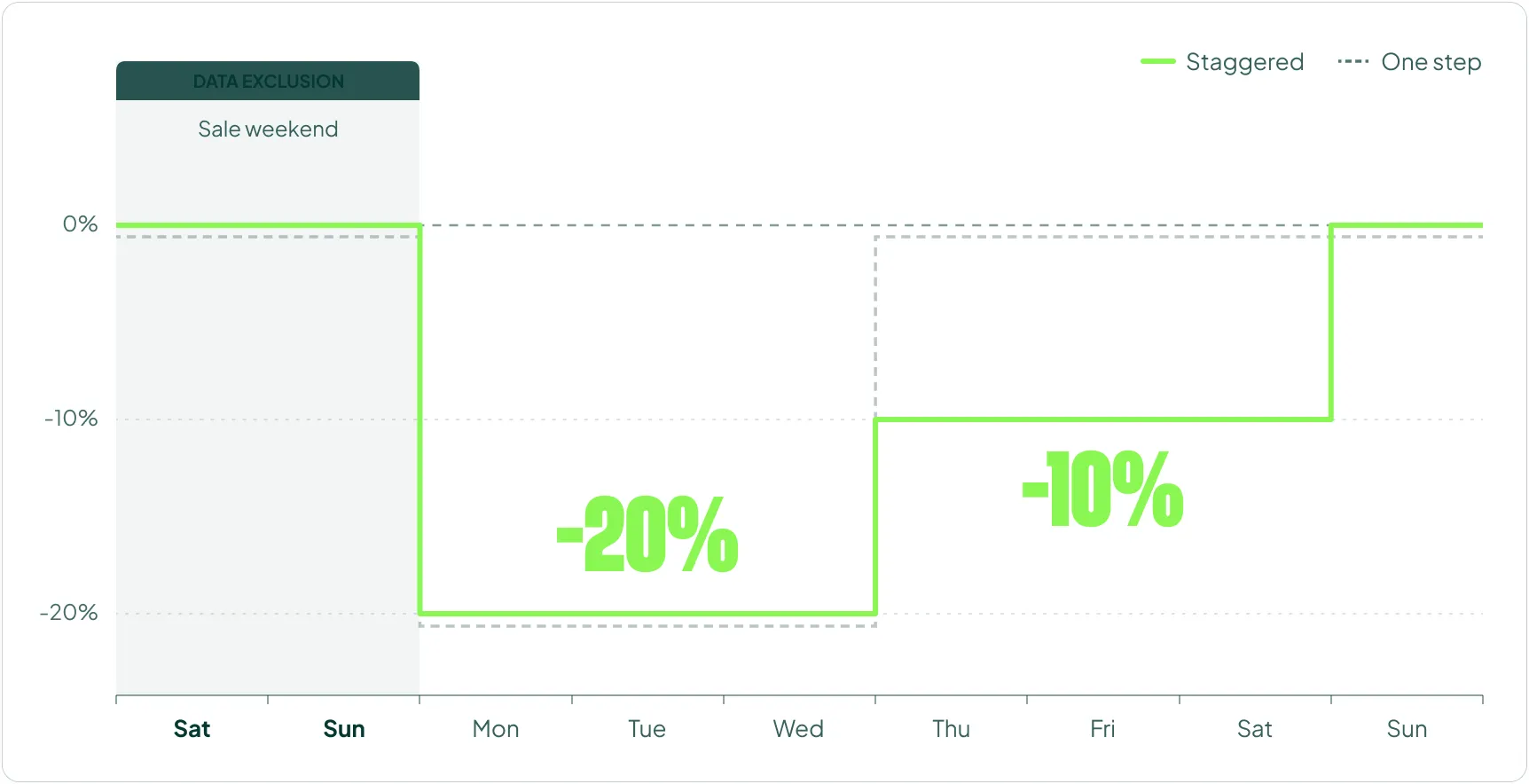
The exact steps depend on the account and the size of the sale. Sometimes you need three steps, sometimes four. Sometimes a single adjustment for a few days is enough.
The goal is to hit your normal ROAS once the sale ends. In reality, you’ll often have to bite the bullet and accept a 10-15% ROAS decrease that week.
3) Using Seasonal Bid Adjustments to Counteract Overspend
I love Smart Bidding. It’s made my job easier and our results better. Win-win.
The one thing I dislike is watching it do something clearly wrong, like overspending randomly or a few days after a strong period. I have a separate video (How to Stop Google Ads Overspend Without Seasonal Bid Adjustments) on how not to rely on SBAs for this.
But sometimes you have to. You can’t sit back and let Google eat your budget.
When you do, think like a bank robber: don’t overstay your welcome. Get in. Get out.
A negative SBA is a temporary solution, and you need to treat it as one. In most cases, overspend should be fixed by temporarily increasing the ROAS target.
If you override Smart Bidding with a negative SBA instead, understand the risk of not fixing the underlying problem. If you’re overspending today and set a -20% SBA for the rest of the day, chances are you’ll overspend tomorrow too.
You’re kicking the can down the road. Just like after a sale.
There’s nothing wrong with that, as long as you do it on purpose.
When I do use SBAs here, I apply the exact same staggered technique as after a sale:
- Monday-Wednesday: -20%
- Thursday-Saturday: -10%
Combine it with a data exclusion for the few high-ROAS days that triggered the overspend. The staggered approach gets you to the other side without the overspend rebounding the moment the adjustment ends.
Six Common Seasonal Bid Adjustment Mistakes
These are the mistakes I see most often when auditing accounts.
1) Using SBAs as a Daily Efficiency Lever
Running SBAs constantly to fine-tune daily efficiency is a mistake. You feed extra noise into the Smart Bidding algorithm, and it slowly becomes less efficient in a way you won’t notice until it’s too late.
2) Editing the Same SBA Over and Over
SBAs stop working once you’ve edited them 3-5 times. As a rule, create a new SBA once you’ve edited an existing one once or twice.
3) Using SBAs as a “Learning Period”
SBAs are temporary overrides, and Google disregards part of the data from the period when an SBA was applied, so don’t use one to “get data Smart Bidding can learn from.”
4) Applying One SBA to Every Campaign
Not all campaigns perform the same during a promotion. Group campaigns based on their expected sale performance and apply different SBAs to each group.
5) Forgetting Budgets and Max Bid Limits
This one is operational, and it’s surprisingly common. People keep raising the SBA and can’t understand why nothing happens. The next day they discover the campaign ran out of budget, or a max bid limit was set too low and quietly voided the increase. Adjust both before you adjust the SBA.
6) Letting It Run Too Long
If your sale runs for 2-3 weeks, Smart Bidding should be able to adjust on its own without an SBA.
How Seasonal Bid Adjustments Compare to Promotion Mode
A quick note on Promo Mode, because I know some of you will ask.
Promo Mode lets you schedule a 3-14 day promotion window where Google relaxes your ROAS tolerance and boosts your daily budget. When the promo ends, everything reverts automatically.
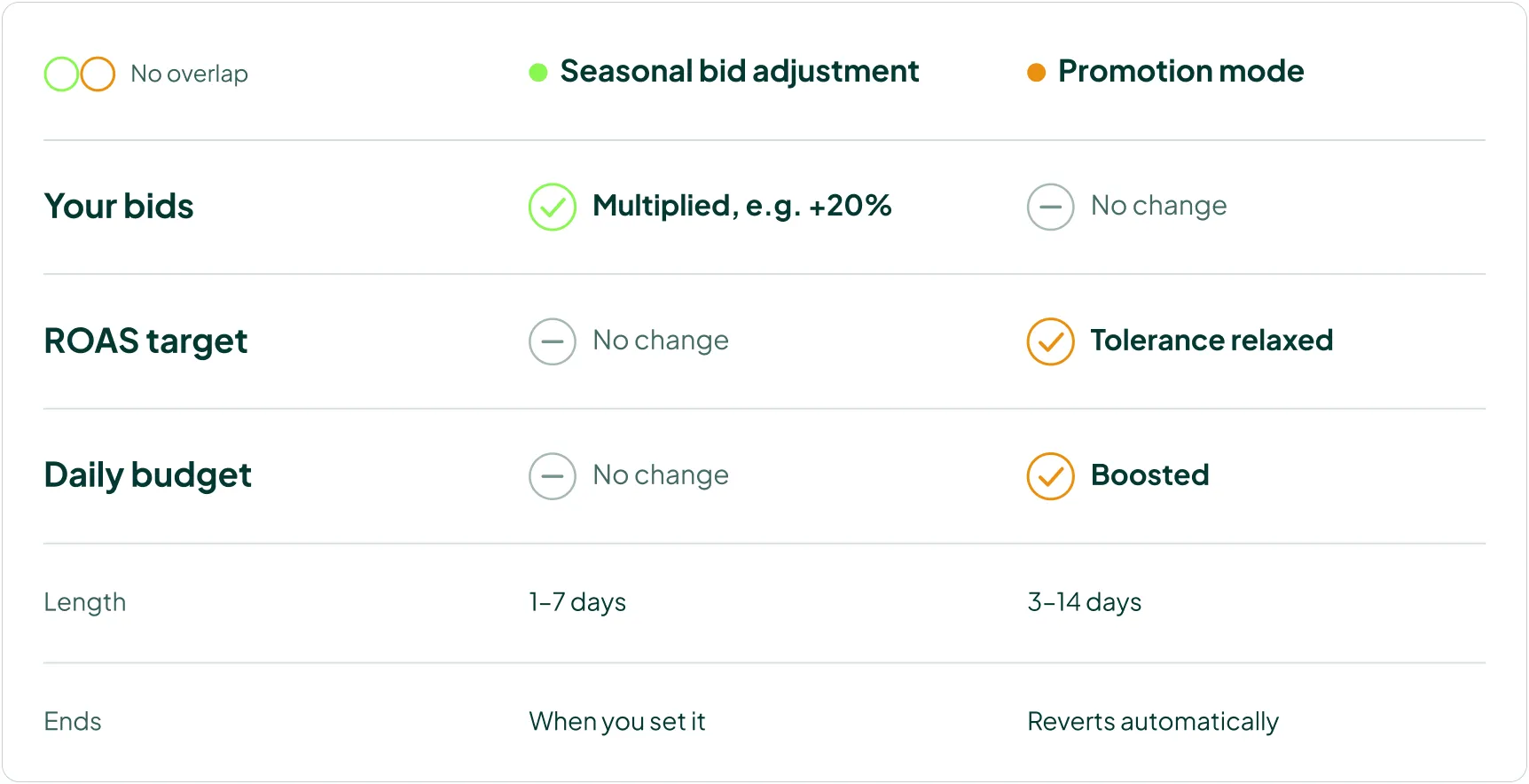
Promo Mode does not directly overlap with seasonal bid adjustments. The effect an SBA has on your bids is not reflected in Promotion Mode, so don’t assume one replaces the other. I’m doing a full deep dive on Promotion Mode in an upcoming video, including a decision framework for when to use which.
The Bottom Line
Seasonal bid adjustments work fine; the default advice is the problem. Smart Bidding will always lag 2-4 days behind reality, and an SBA is the cleanest way to close that gap for short, temporary swings in performance.
Set them based on the CPC you want to pay, and remember that you’re moving the ceiling on your bid while the auction sets the price. Use positive adjustments to capture more traffic during a sale, staggered negative adjustments to protect your profit afterwards, and treat any overspend override as the short-term fix it is. Do that, and SBAs go from “doesn’t work” to one of the most profitable levers in your account.
[TL;DR]
- Seasonal bid adjustments exist because Smart Bidding lags 2-4 days behind your latest data. Use them only for temporary performance swings, and let Smart Bidding adapt to a new normal on its own.
- Ignore Google’s advice to match your SBA to your conversion rate increase. Set it based on the CPC you actually want to pay, starting at +10% or +20% based on your last equivalent sale.
- SBAs multiply your bids, and the auction decides how much of that reaches your CPC. They also don’t get you into new auctions. Your actual CPC increase will usually be smaller than the SBA.
- After a sale, use a data exclusion plus staggered negative SBAs (e.g., -20% Monday-Wednesday, -10% Thursday-Saturday) to avoid handing your sale profit back to Google.
- Avoid the common mistakes: daily use, editing the same SBA repeatedly, using it as a learning period, one SBA for all campaigns, ignoring budgets and max bid limits, and running it longer than 7 days.