Dansk
Dansk

We’ve seen more changes to Smart Bidding in the last year than we did in the past 5 years.
The algorithm improved, but the functionality stayed the same. You had a target, a budget, a few override levers, and a playbook that barely moved from one year to the next.
That changed over the past twelve months. We got Smart Bidding Exploration. Google changed how the algorithm treats campaigns that are limited by budget. Promo Mode arrived. Standard Shopping finally got Maximize Conversion Value.
Each of these is modest on its own. Together, they’re enough that I went back through my own Smart Bidding playbook line by line. Some tactics I’ve relied on for years are now obsolete. Some survived untouched. And I’m skeptical of one of the shiny new features.
Here are my new rules for bidding in Google Ads, and the old ones that still stand.
What Actually Changed in Smart Bidding
Watch this part (0:00) (opens in a new tab)Before the rules, here’s a quick overview of the changes that triggered them:
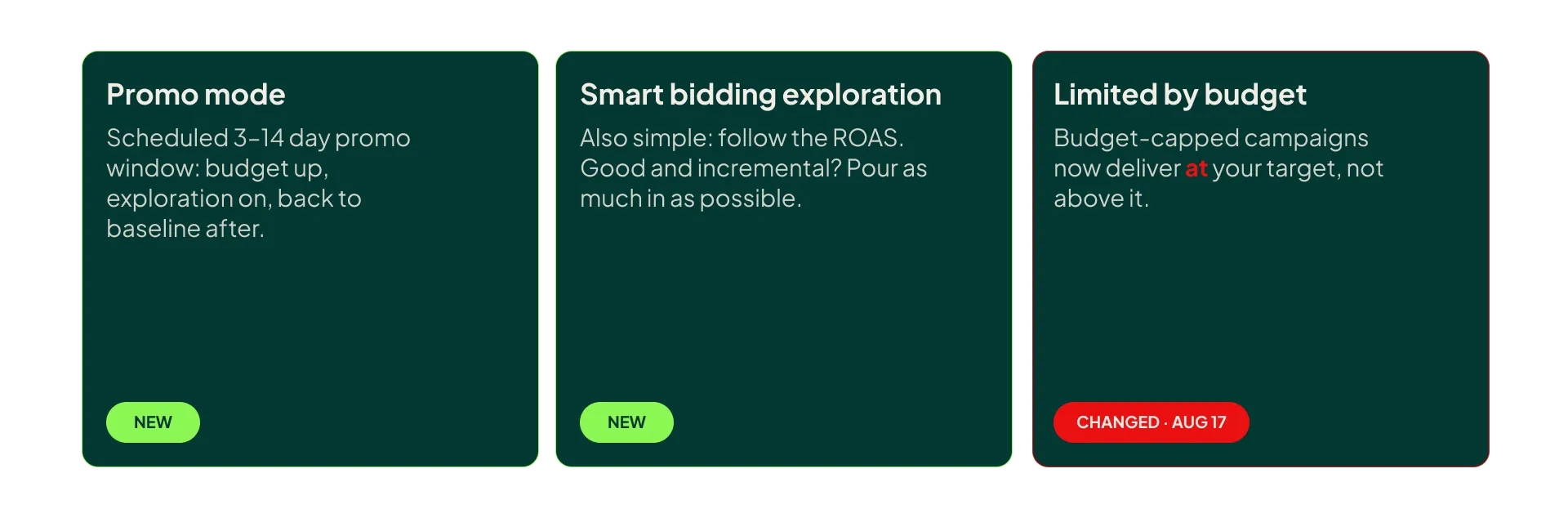
- Smart Bidding Exploration (SBE): This lets Smart Bidding bid on queries it currently avoids because they might put your ROAS target at risk. The premise is that some of those queries could be profitable, and Smart Bidding is simply being too cautious. (I have a separate video that goes in-depth on the functionality.)
- The limited by budget change: Since August 17, budget-limited campaigns on tROAS deliver at your target instead of beating it. This one quietly changes how you should think about budget changes.
- Promo Mode: You schedule a 3-14 day promotional window where the budget increases and Smart Bidding Exploration is temporarily enabled. There’s more behind the curtain, but that’s all I’m allowed to say until it’s officially live.
- Maximize Conversion Value for Standard Shopping: A smaller change, but it matters for how we launch new accounts.
1. Stop Lowering Your ROAS Target to Trigger Exploration
Watch this part (0:42) (opens in a new tab)Given the feature’s name, this one sounds obvious. But in my experience, most advertisers barely use Smart Bidding Exploration, because it isn’t available for Performance Max or Standard Shopping, which is where roughly 80% of ecommerce spend sits.
SBE for PMax and Shopping is currently in beta, so I expect we’ll be folding it into the core playbook soon. When that happens, the entire practice of lowering your ROAS target before a big sale (or just to spark exploration) becomes obsolete.
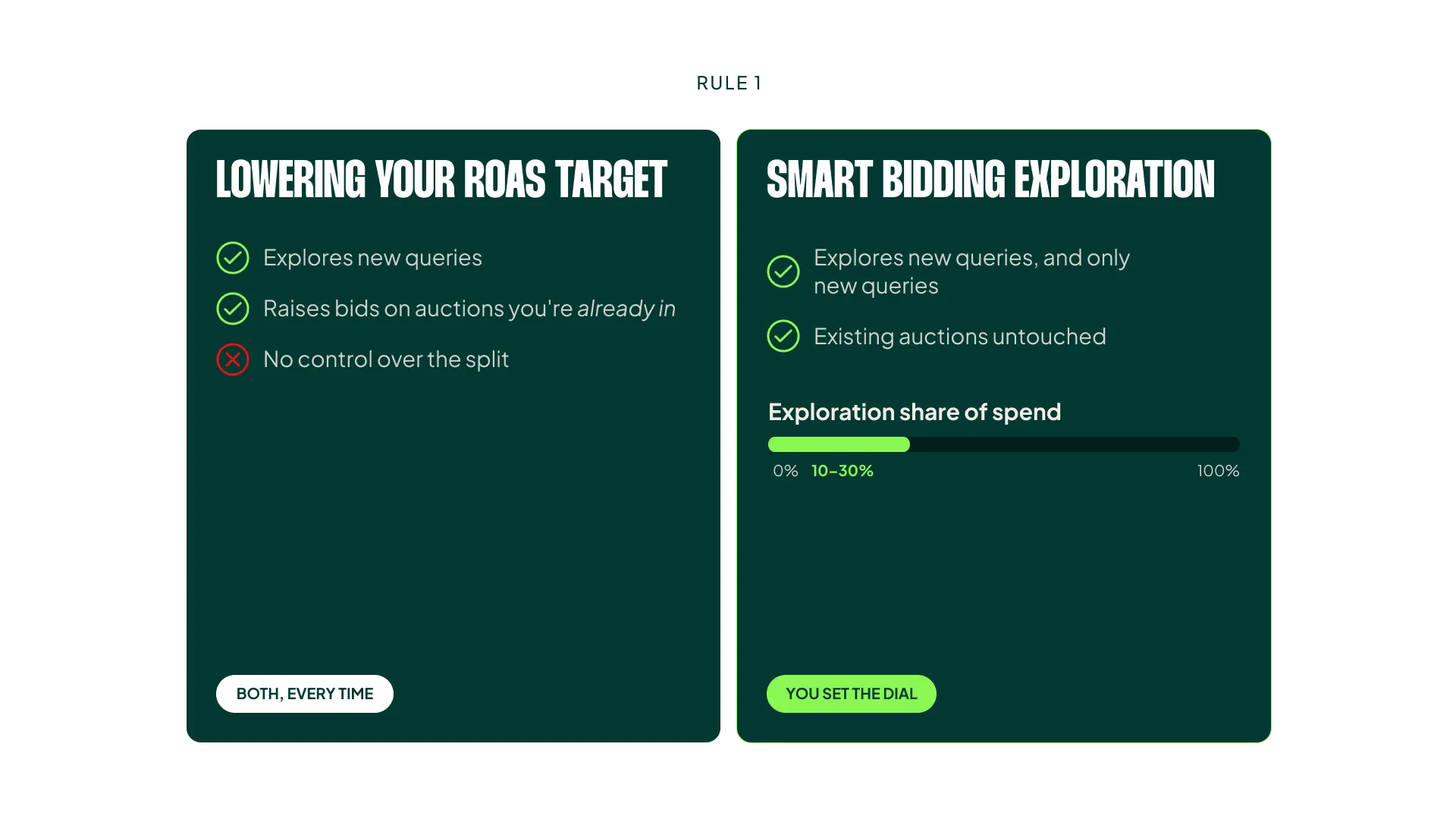
Instead, you leave your target alone for the entire year. When you need more exploration, you turn on Smart Bidding Exploration at 10-30%, and you control exactly how much of your spend goes to exploring.
The whole point of Exploration is that you’re telling the algorithm: only bid more (only enter more auctions) on queries you don’t already know. That’s what we were trying to achieve when we lowered the ROAS target.
Lowering the target, though, does two things at once. It triggers exploration, and it also raises bids on the auctions you’re already winning. You’re paying more for traffic you already had in order to find traffic you didn’t.
You never really knew which effect would dominate. (To be fair, if you know an account well, you develop a decent feel for when a lower target will actually trigger exploration. But that’s experience compensating for a blunt tool.)
Smart Bidding Exploration gives you precise control where we only had that blunt tool, and I welcome it a lot.
2. Increase Budgets Faster When You’re Limited by Budget
Watch this part (2:28) (opens in a new tab)The change to how Smart Bidding handles budget-limited campaigns has, in my opinion, been largely positive. Yes, if you were in the group that deliberately overperformed its targets and used the budget to cap spend, you need new tactics (more on that in Rule 3). For everyone else, Google Ads just became more predictable.
Under the old logic, you had to raise budgets carefully if you were limited by budget and overperforming your target. If you didn’t, you got the exact opposite cause and effect any advertising platform should want:
- Increase your budget
- See ROAS decrease
- Decrease your budget
- See ROAS increase
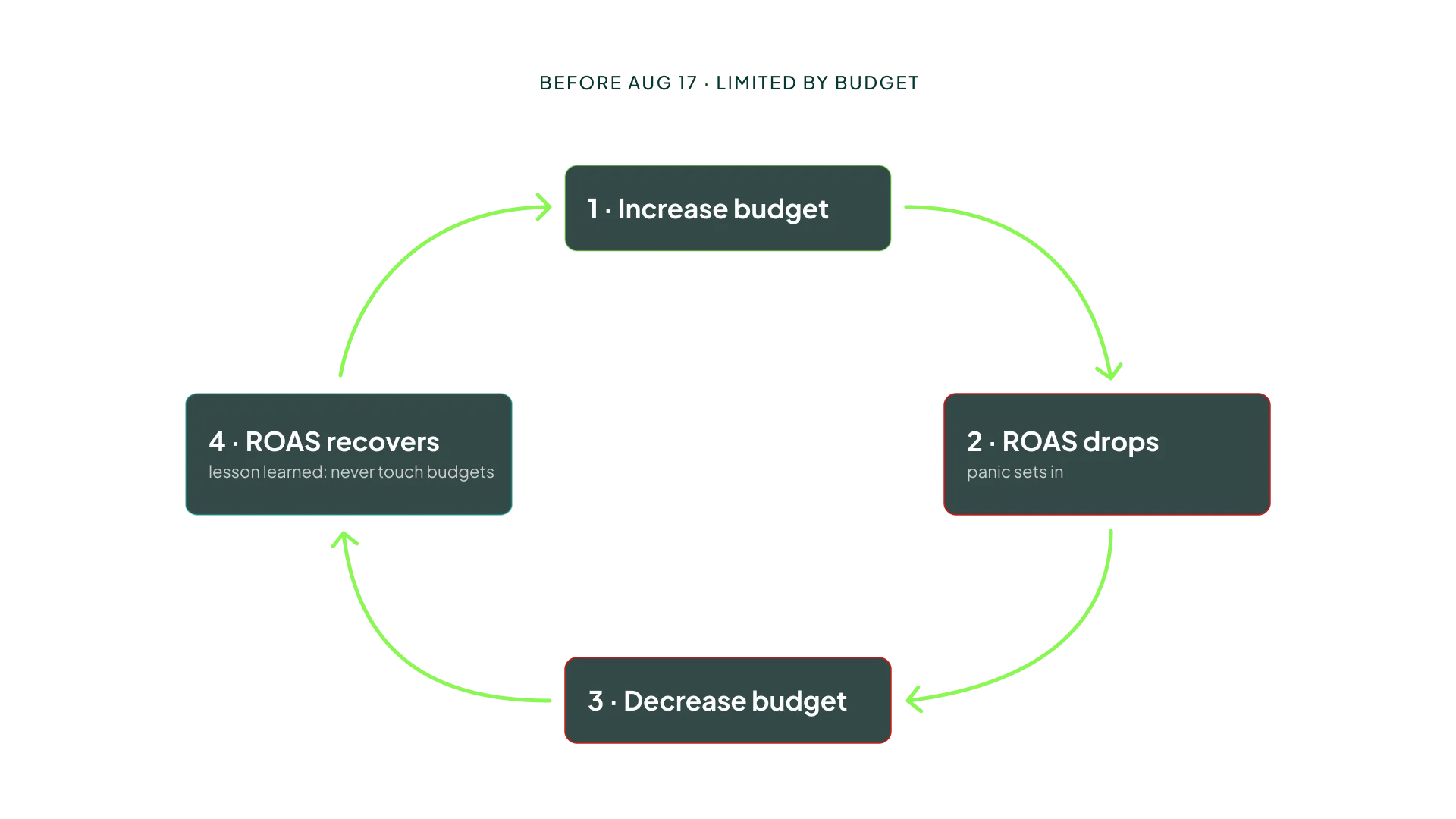
For practitioners who knew this mechanic, it was manageable. We’d raise budgets in small steps and accept the dip. But for a lot of advertisers, that negative cycle taught them to never increase budgets at all. Every time they tried, performance got worse, so they stopped trying.
That won’t happen anymore, which means the tactics change too. From now on, when you increase the budget on a budget-limited campaign, you’ll spend more, and your ROAS should (within reason) stay the same.
Ginny Marvin confirmed that the bidding logic is now identical whether or not a campaign is limited by budget. Budget is now purely a pacing control.
Before the change, Smart Bidding would favor the best-performing auctions and buy those first until the budget ran out:
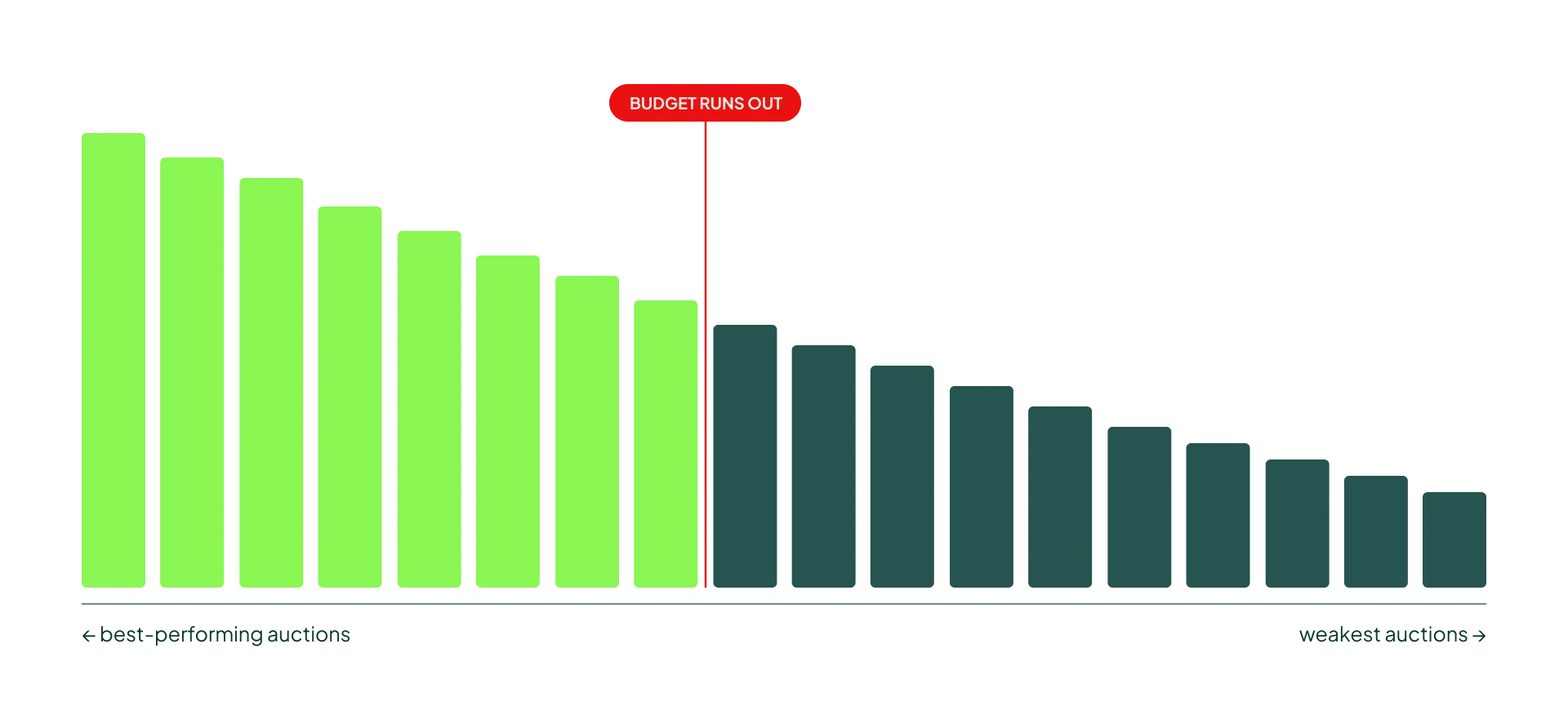
That’s exactly why the old cycle existed. If the budget only covered your top auctions, you’d beat your target comfortably. Raise the budget, and Smart Bidding would move down the list into weaker auctions it had previously skipped. More spend, lower average ROAS. Cut the budget, and it retreated back to the best auctions. Efficiency was a function of how tightly you squeezed the budget.
That logic punished growth. The advertisers most likely to scale (those already beating their targets) were the ones who got the worst feedback the moment they tried.
After the change, Smart Bidding spreads you evenly across all auctions, as long as it hits your ROAS target:
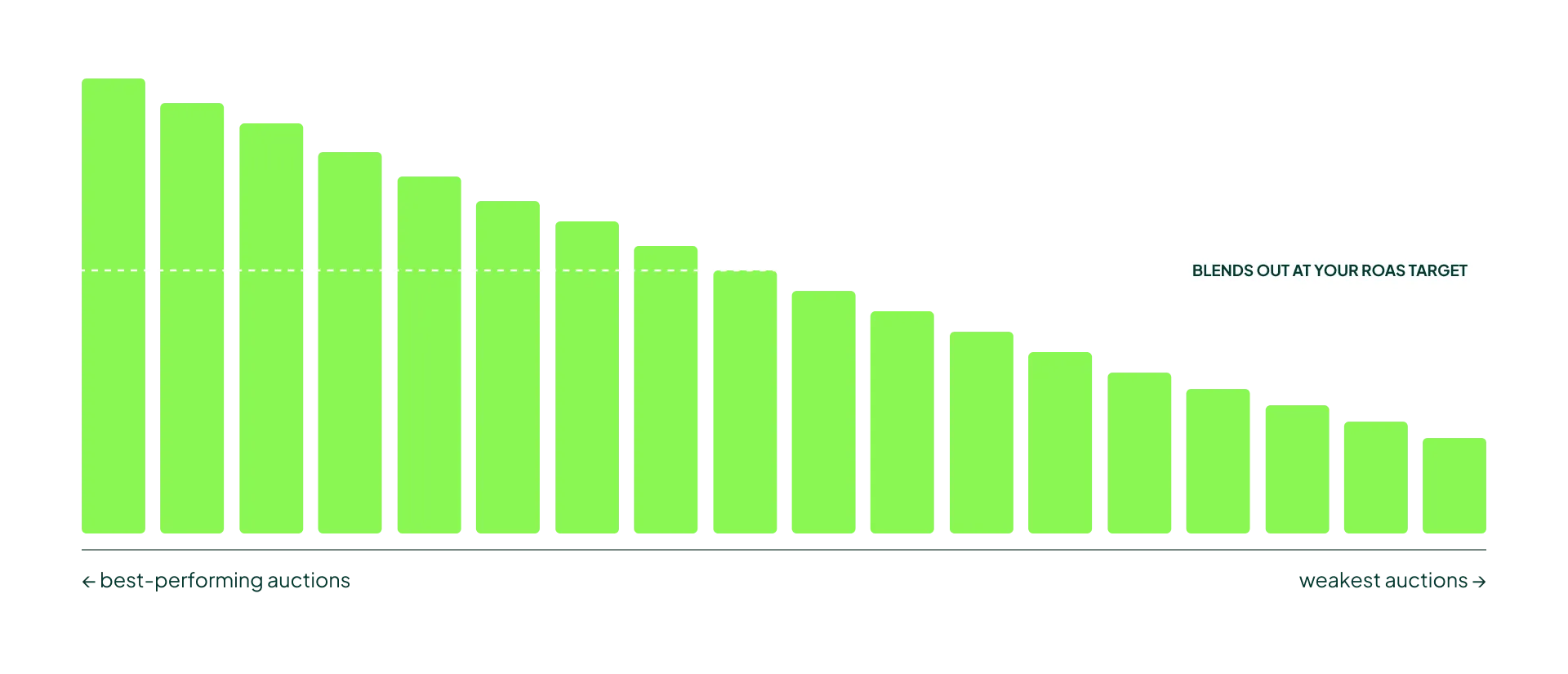
In practice, you can be far less cautious about raising budgets on campaigns that are limited by budget. The ROAS drop that used to follow a budget increase is gone, because the campaign was never cherry-picking its best auctions in the first place.
3. The Death Spiral Trick Is Dead, Use Max Conversion Value
Watch this part (3:34) (opens in a new tab)Low-volume accounts have a well-known problem. With too few conversions, a demanding ROAS target makes Smart Bidding hold back, which produces even fewer conversions, which makes it hold back further. That’s the death spiral.
The old workaround was to set a ROAS target lower than what you were actually hitting and cap the campaign with your budget. Because the budget forced Smart Bidding to buy the best auctions first, you got the volume of a loose target with the efficiency of a tight one.
You can’t do that anymore. With budget now acting purely as pacing, a low target plus a budget cap just gives you a campaign running at the low target.
The best replacement is Maximize Conversion Value with a budget cap.
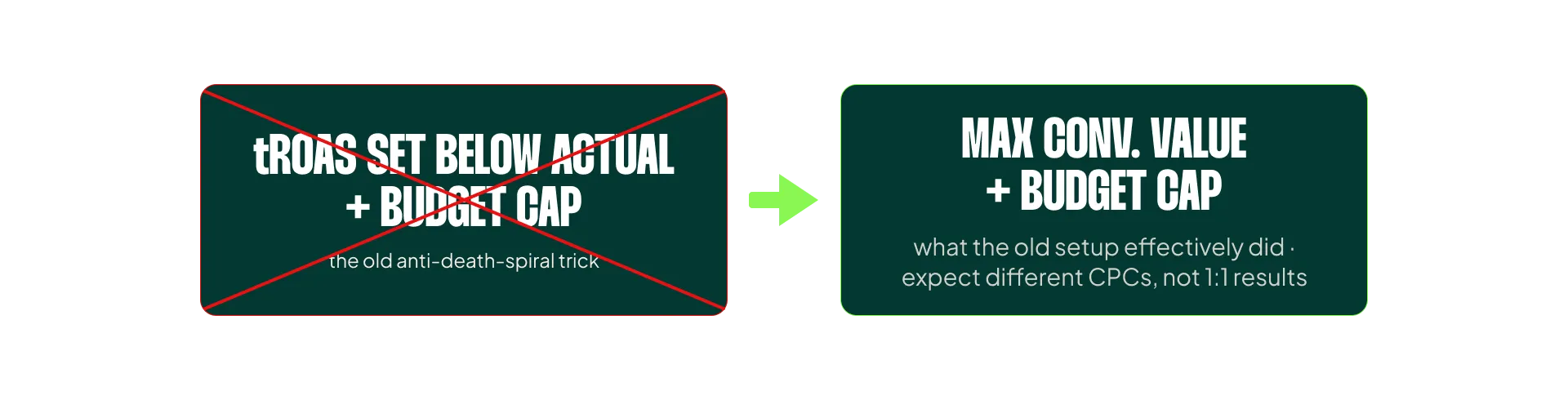
That’s essentially what the old algorithm was doing anyway, so you should get somewhat similar results. Don’t expect them to be 1:1, though. Maximize Conversion Value works differently, and I expect CPCs to run higher than they did under the old trick. Still, it beats running a low-volume campaign at a ROAS target it can’t realistically hit.
4. Promo Mode Rolls Two Old Changes Into One (and I’m Skeptical)
Watch this part (4:29) (opens in a new tab)It took me a while to get my head around Promo Mode. The more I read into it, the less relevant I think it is for most advertisers.
Promo Mode is a combination of:
- ✅ Increasing your budget
- ✅ Enabling Smart Bidding Exploration
- ❌ Seasonality Bid Adjustments (not included)
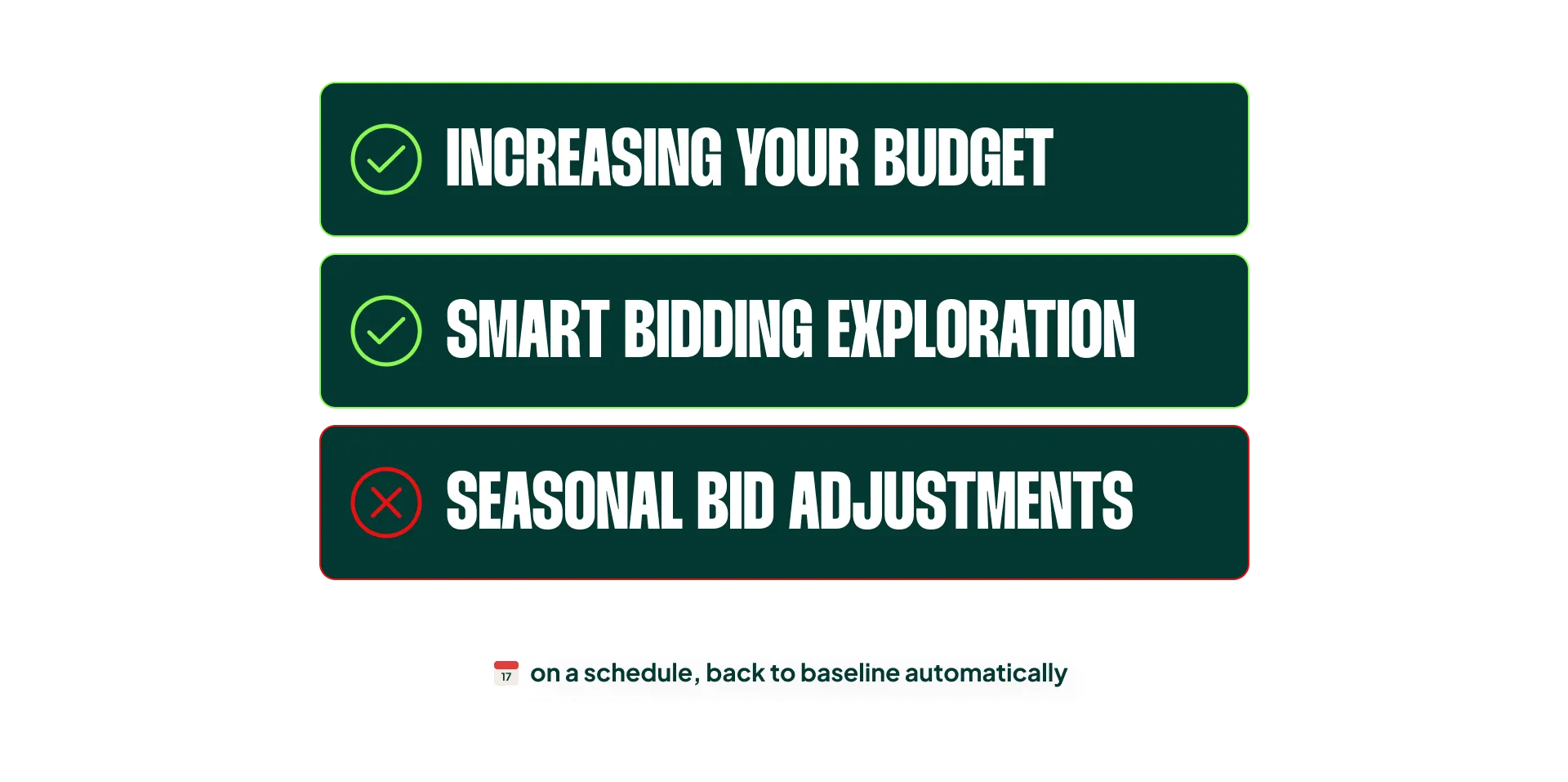
My read is that Promo Mode bundles two changes into a single action and puts a schedule on it. That’s the good part.
The underlying premise is sound, too. Raising the budget during a promotion makes sense, and having it automatically return to baseline afterward removes the classic “forgot to turn it back” mistake that costs advertisers money every January.
What feels odd is the current structure, where you have to update it on a campaign level. For any account with more than a handful of campaigns, that’s a lot of clicking for something that should be account-wide.
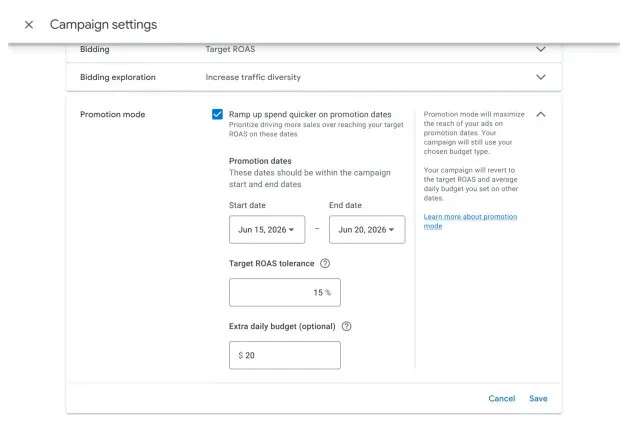
(Image credit: Smarter Ecommerce, since I can’t share anything that’s not openly available.)
So, as it stands, the only real benefit of Promo Mode is that it can be scheduled. Everything else, you could already do manually.
How to Use Promo Mode During a Big Sale
If you’re going to use it, follow these three steps:
- Run your normal Seasonality Bid Adjustment strategy. Promo Mode doesn’t touch your existing queries. If you normally use SBAs for a sale, keep doing it.
- Set the extra daily budget to what you’re actually willing to let it spend.
- Set the Target ROAS tolerance carefully. This is the trickiest setting.
The tolerance translates to how low your overall ROAS is allowed to go. If you’re targeting 500% ROAS and set a 20% tolerance, your overall ROAS is allowed to drop to 400% (excluding any impact from Seasonality Bid Adjustments).
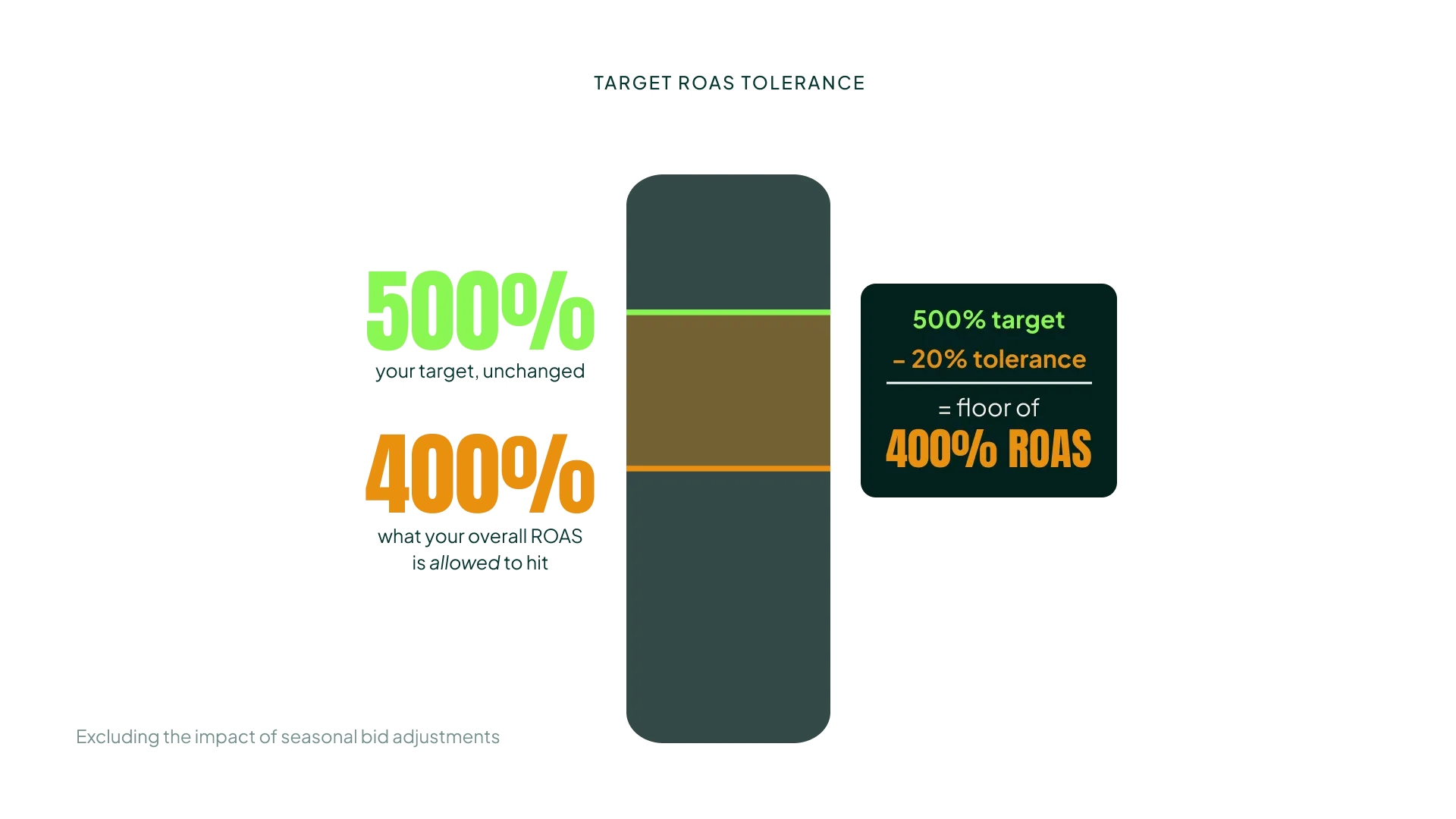
What you’re really hoping for is that the exploration portion of Promo Mode doesn’t actually drag you down to 400%. You’re hoping exploration finds more revenue at a decent ROAS.
But you don’t know that.
That’s why I’d be cautious at the start and run real tests. Take a few medium-spend campaigns, try different tolerance levels with and without Seasonality Bid Adjustments, and read the results before you commit your entire account to a new tactic during your biggest sale of the year. You can learn without risking everything. Within 2-4 sale periods of structured testing, you’ll have your final playbook.
Two limitations to keep in mind. Promo Mode isn’t currently available for Portfolio Bid Strategies, and there’s no indication of when it will be. And while the Smart Bidding Exploration beta suggests Standard Shopping is on the roadmap, there’s no clear date for that either.
5. Manual Bidding for New Accounts Is No Longer Needed… or Is It?
Watch this part (7:06) (opens in a new tab)Standard Shopping finally has access to Maximize Conversion Value. On paper, that means we no longer need to launch new accounts on Manual CPC or Maximize Clicks.
Let me get Maximize Clicks out of the way. I’ll never be a fan. It does the opposite of what you want a bid strategy to do: it hunts for the cheapest auctions, which, by definition, have the lowest chance of converting. It’s a poor strategy to start an account on.
Manual bidding is the middle ground. You set a bid, and it applies across all auctions. You get some control over spend, you land in some good auctions and some bad ones, and on average you produce conversions. The results won’t be what you want, but once you’ve accumulated enough conversions, you switch to Target ROAS.
The appeal of jumping straight to Maximize Conversion Value is that you skip the manual bidding stage, which isn’t fun for anybody.
But Maximize Conversion Value still tends to run with CPCs that are too high. That’s why I don’t think it fundamentally changes how we launch new accounts. Here’s an example from an account we recently launched. It hasn’t been successful by any means, but it shows how Maximize Conversion Value can stop you from getting off to a good start.
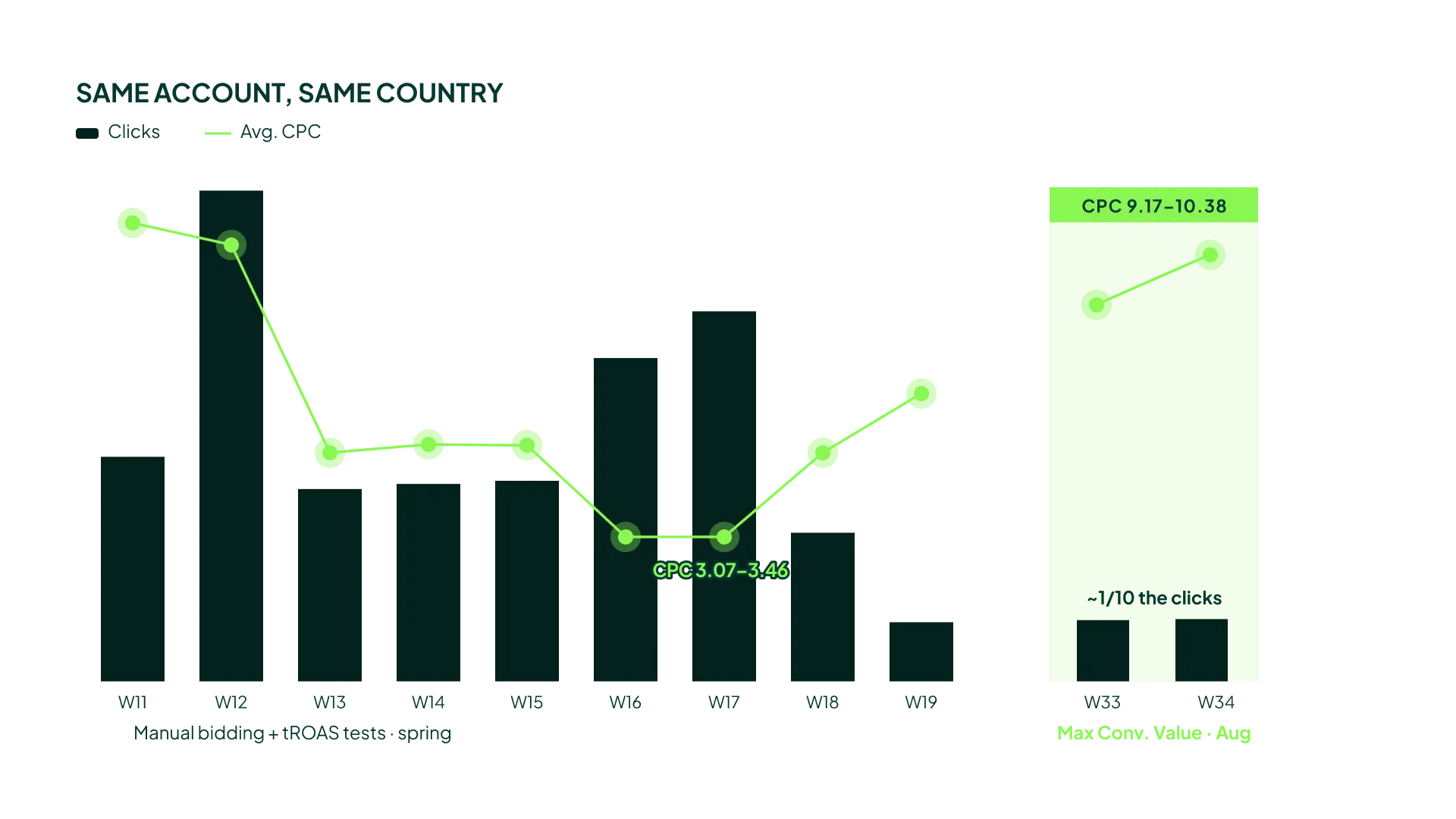
Over a 9-week period, we tried manual bidding with a high bid, manual bidding with a lower bid, adjustments to Target ROAS, and finally PMax with Maximize Conversion Value. Nothing worked.
Then the client made changes to the site and to paid social, so we decided to try again. This time we went with Standard Shopping on Maximize Conversion Value, which is the slightly safer option.
Still nothing. My concern is that we’re now at a very low number of clicks, at roughly 2-3x the CPC we paid under manual bidding.
If those expensive clicks produced a lot of conversions, high conversion value, and a decent POAS, I wouldn’t care about the CPCs. But they didn’t. This is the pattern I see in some accounts with Maximize Conversion Value: it pulls in unnecessarily expensive clicks, and on a new account with no conversion history, that’s an expensive way to learn nothing.
So yes, you can skip manual bidding now. I’m just not convinced you should.
The Rules That Haven’t Changed
These four rules hold up just as well as they did before.
Seasonality Bid Adjustments Are Still the Best Override
You’d think Promo Mode makes Seasonality Bid Adjustments obsolete. It doesn’t, because they pull different levers.
An SBA is a direct, immediate change to your bids: “bid X% higher” on the queries you’re already in. Promo Mode loosens your ROAS tolerance and lets Google decide what happens next.
When CPCs need to rise right now for an upcoming sale (still the most common use case), the SBA is the tool. It works immediately in all but the rarest cases. I’ve seen maybe 1 in 32 accounts where it didn’t.
A 10%, 20%, or 30% Seasonality Bid Adjustment before a sale gets you more volume, higher positions, and more revenue at essentially the same ROAS, as long as your conversion rate rises more than your CPCs do.
It works in reverse, too. When an account is overspending and you can’t wait for Smart Bidding to bring bids down, a negative adjustment is an excellent short-term brake.
The watch-out: a lot of advertisers set a negative adjustment and never get out of it, so decide when you’re leaving it at the moment you set it.
Budget Increases: Ride the Wave of Demand
90% of advertisers should not be limited by budget. Ride the wave of demand.
The only thing that changed here is covered in Rule 2: you no longer need to be careful when increasing budgets, because ROAS doesn’t drop right afterward. The principle is the same as it always was. When you’re limited by budget, increase it. Aim for a budget 1.5-2x above your daily spend.
The exception is the roughly 10% of cases where limiting by budget is the right call. One example is a fixed budget where you struggle to keep the campaign from overpacing.
Max Bid Limits Are Still a Cornerstone
None of the new features touch max bid limits. They’re still your only hard ceiling, and I use them on every account I manage. I set them aggressive or lenient depending on the account and adjust them throughout the year. It’s one of the reasons our clients don’t experience CPC creep.
The core metric is the ratio between your max bid limit and your average CPC.

Below 2x is too tight to run for long, because you risk excluding yourself from the best-performing auctions. Beyond 4x, the limit has little to no impact.
I use them in four ways:
- A hygiene cap at 3x average CPC to eliminate the absurd 10-20x clicks. It’s only 2-5% of spend, but it’s free savings straight to the bottom line.
- Tighter caps at 1.5-2.5x when I need to stop CPC creep.
- Caps on “saboteur” products that Smart Bidding won’t bid down enough on its own.
- Taking the edge off the highest CPCs when Smart Bidding reacts too slowly.
The trap is going too aggressive.
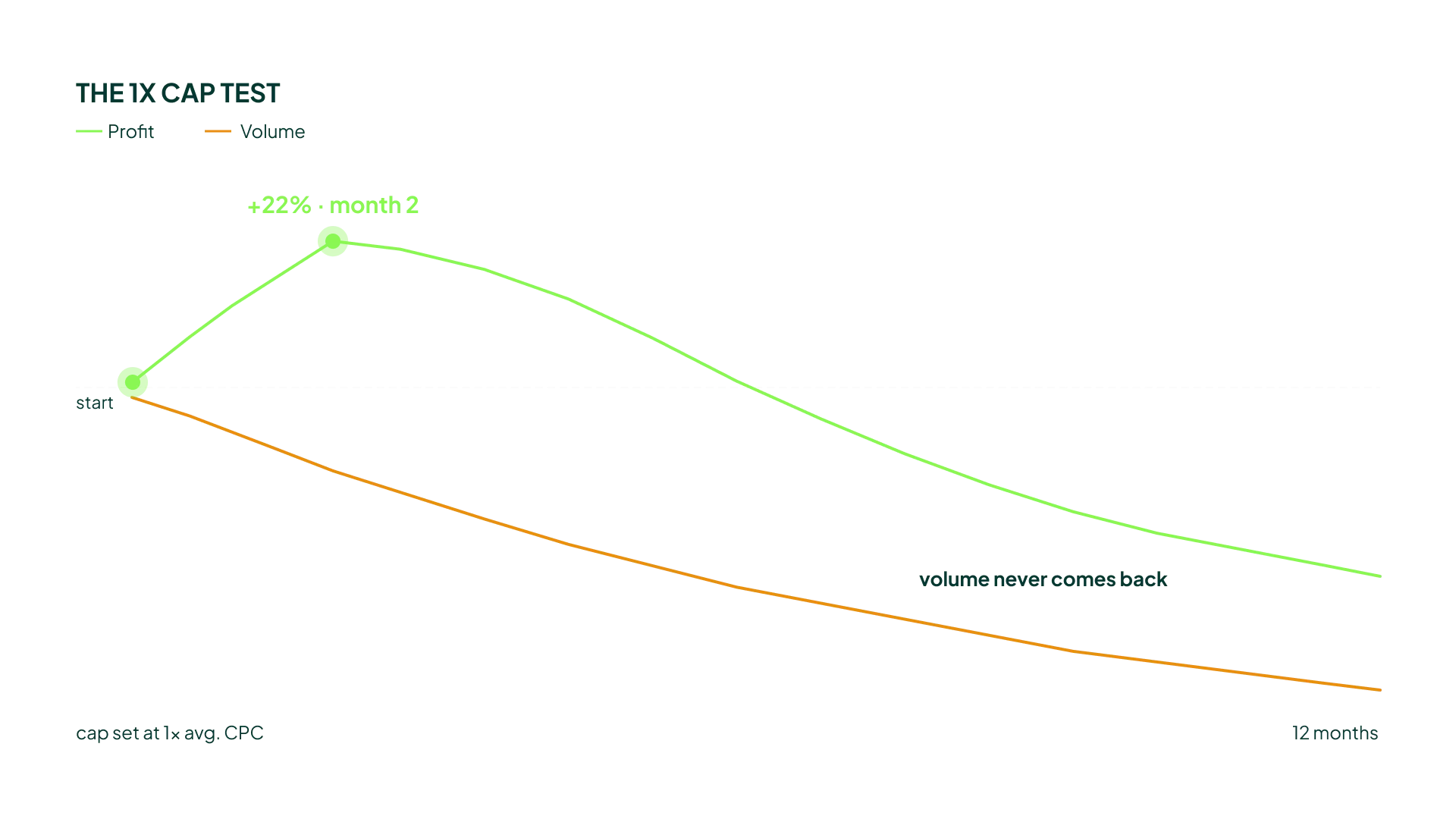
We once tested a cap at 1x average CPC, and it looked like a goldmine: profit up 22% in two months. Then we realized we had exited the best auctions. Volume kept declining, and eventually profit followed.
Max CPCs also don’t work “algorithmically.” When you raise a cap, Smart Bidding jumps straight to the new ceiling, because it has no idea what happens at higher CPCs, so it goes all in. Get out of old caps slowly.
Maintenance matters too. Review your caps monthly. Raise them before peak season, otherwise your SBAs will max out against the cap and do nothing. And segment campaigns if CPCs vary widely, because $3 pillows and $10 mattresses can’t share one ratio.
(If you want to go deeper, I have previous videos on how min/max bids work and on the max bid limit tests you should run, including results from five of them.)
Smart Bidding Target Changes: Still Valid (and Where I Disagree With a Whole School of Thought)
There’s a school of thought that says if you know what your ROAS should be, there’s no reason to change your target during the year. Everyone agrees you adjust when tracking changes (if you suddenly track 20% more conversions, fine). But outside of that? Leave it alone.
I understand the logic. But everything I see in the accounts we run says it doesn’t hold.
Our core KPI is blended ROAS: the share of total revenue we spend on Google. Sometimes Google’s numbers look fine while the business as a whole is overspending. In those cases, we need a higher target. We’re telling the system: “Don’t bid so high.”
The other case is preempting spend spikes.

I ran an in-depth analysis on one account and found that when we overperformed our ROAS target by more than 30%, the likelihood of spend increasing by more than 20% was 6 out of 10. So if I know a €1 bid produces 500% ROAS, and I know a €1.20 or €1.50 bid turns unprofitable once conversion lag catches up, I preempt the increase instead of letting Smart Bidding chase it.
Smart Bidding sees weeks of overperformance and responds by bidding even higher. That creates an unsustainable yo-yo effect in otherwise very stable accounts, which is why I still preempt it.
And yes, I’m aware Rule 1 says to stop lowering targets to explore. But Smart Bidding Exploration isn’t there yet for Shopping and PMax, so we still lower targets in those campaigns. The jury is still out on SBE versus simply lowering the target across the board. I hope lowering-to-explore dies (I dislike doing it), but there can still be value in confirming that Smart Bidding truly can’t bid higher on the queries it already knows.
The Playbook, Updated
The pattern across all these changes is the same: Google is replacing blunt tools with precise ones. Lowering your target to explore was a blunt tool, and SBE is the precise replacement. Using budget as an efficiency filter was a side effect, and it’s now gone. Promo Mode adds a schedule to things we could already do.
What hasn’t changed is that the direct, immediate levers (Seasonality Bid Adjustments, max bid limits, and deliberate target changes) are still where experienced advertisers earn their keep. Smart Bidding is getting smarter. It still needs someone telling it when it’s wrong.
Test the new features on campaigns where a bad result won’t hurt. Keep the old rules where they still work. And don’t let a new toggle in the interface replace judgment you’ve built over years of watching your own accounts.
[TL;DR]
- Stop lowering your ROAS target to trigger exploration. Use Smart Bidding Exploration at 10-30% instead, so you only bid more on unknown queries without inflating bids on existing ones (once it rolls out to PMax and Shopping).
- Raise budgets faster when limited by budget. Since August 17, budget is purely pacing, so increasing it no longer drags ROAS down.
- The “low target + budget cap” trick for low-volume accounts is dead. Replace it with Maximize Conversion Value and a budget cap, but expect higher CPCs.
- Promo Mode is mostly a scheduler. Keep using Seasonality Bid Adjustments alongside it, treat the ROAS tolerance with caution, and test on medium-spend campaigns before trusting it in a major sale.
- The old cornerstones still hold. SBAs, max bid limits (2-4x average CPC), aggressive budget increases, and preemptive target changes remain essential, and Maximize Conversion Value hasn’t made manual bidding obsolete for new accounts.