Dansk
Dansk

On August 17th, Smart Bidding changes how it works with campaigns that are limited by budget, and the industry is up in arms. Some believe it’s another sign of Google being evil, while others are just shrugging their shoulders.
I have never entertained the “Google is evil” mentality. I think it’s a loser mentality, one that’s prone to just giving up instead of adapting. Your job as a specialist is to help your client or company navigate the platform. The more hurdles the platform puts up, the more impactful your work becomes.
This is meant to be a roundup of the different viewpoints on this change, but most of all, it’s meant to be actionable. I genuinely believe that there are outcomes here that could make it better to run Google Ads campaigns, not worse.
What Exactly Is Changing with Smart Bidding?
Let’s get the facts straight. Up until August 17th, running a campaign that was limited by budget would often result in the algorithm chasing higher efficiency. In other words, it would deliver a better ROAS or CPA than your target.
As of August 17th, that behavior stops. Campaigns limited by budget will no longer systematically overperform their ROAS target:
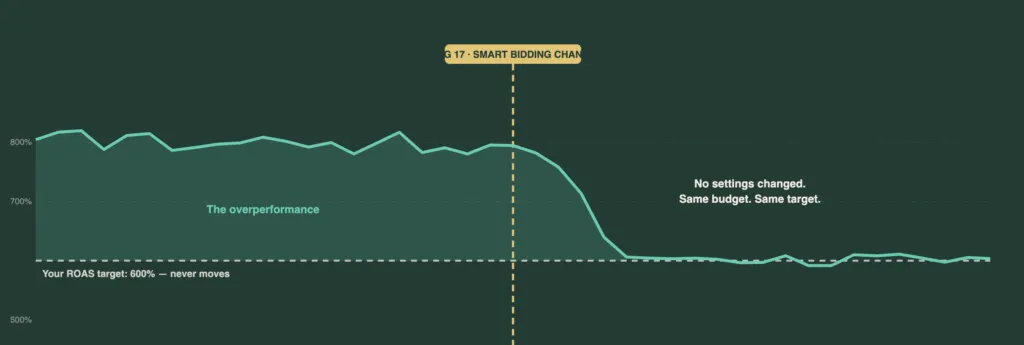
This impacts all campaign types (except for Display) and is universal across campaign and portfolio bidding strategies, including Target ROAS and Target CPA.
It’s very important to understand that we don’t know exactly what is going to happen under the hood.
Google hasn’t disclosed the specific algorithmic changes, only the expected outcome. I’ve been doing Google Ads for 15 years, and we’ve seen changes like this constantly.
Google will release an update with a certain intended outcome, but in an ecosystem with hundreds of thousands of consultants, someone will inevitably find a way to game the new system. That’s why you can’t say for certain what will happen. We know what Google wants to happen, but we won’t know the reality until we see it live in accounts.
How Will This New Bidding Logic Actually Work?
A lot of people are asking how this will make things more expensive for the advertiser. Something has to give. Based on what we’ve been told, the most likely culprit is a decrease in conversion rates as your ads enter a wider range of auctions, instead of only the ones Smart Bidding previously cherry-picked for efficiency:
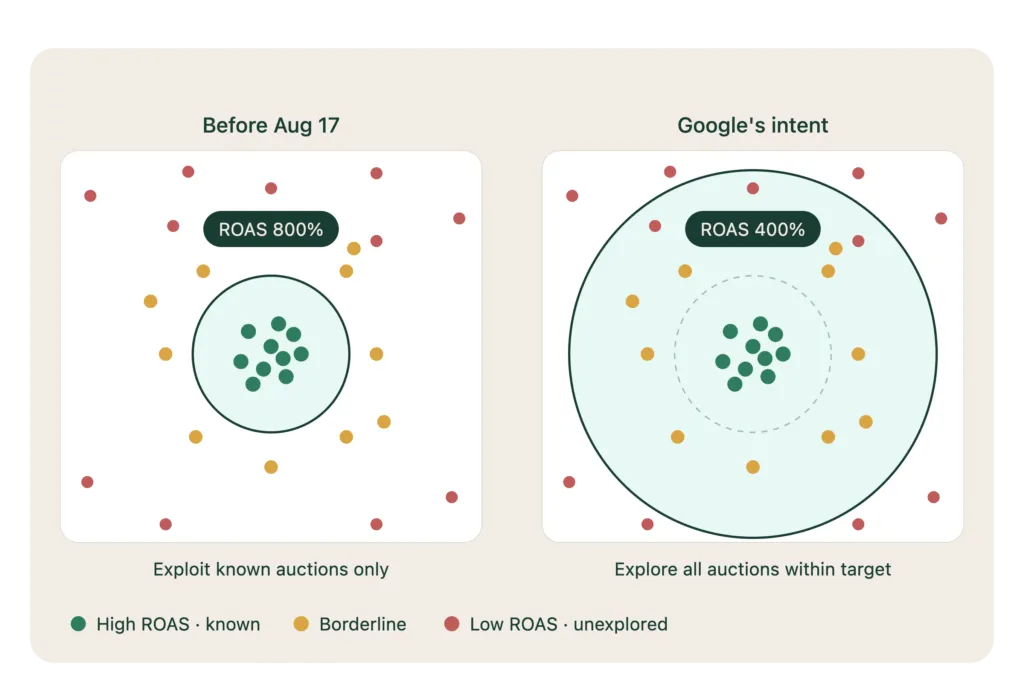
After a lot of digging, I think Ginny Marvin gave us the clearest explanation of what’s happening:
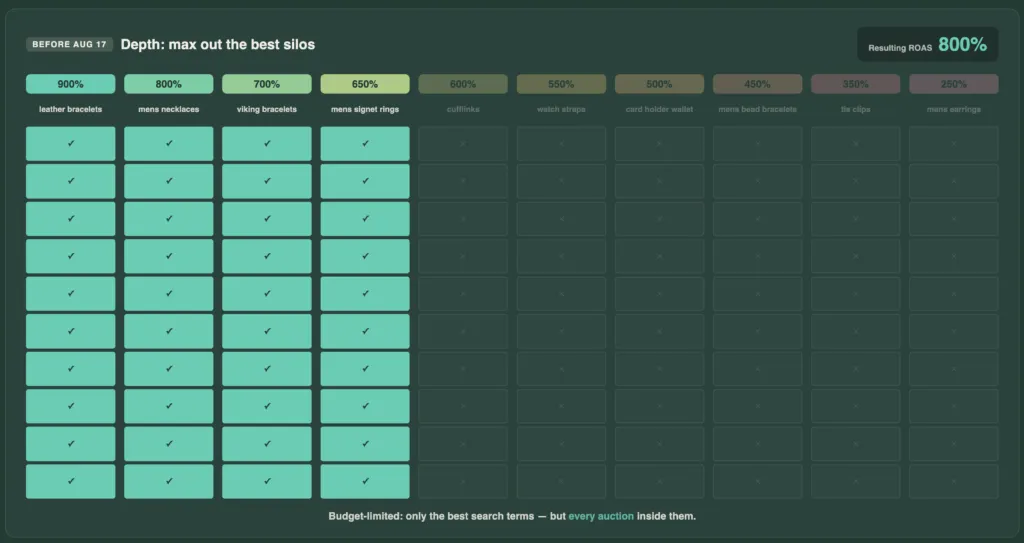
“Ginny Marvin confirmed the bidding logic will be identical whether or not a campaign is budget-limited. Budget becomes pure pacing, not an efficiency filter.”
That last line is the key. The function of your budget is changing.
Before, it acted as a filter, forcing the algorithm to find the most efficient auctions:
Now, it’s just a pacing tool. Smart Bidding will see all auctions that meet your ROAS target as equal and will show your ads evenly across them throughout the day:
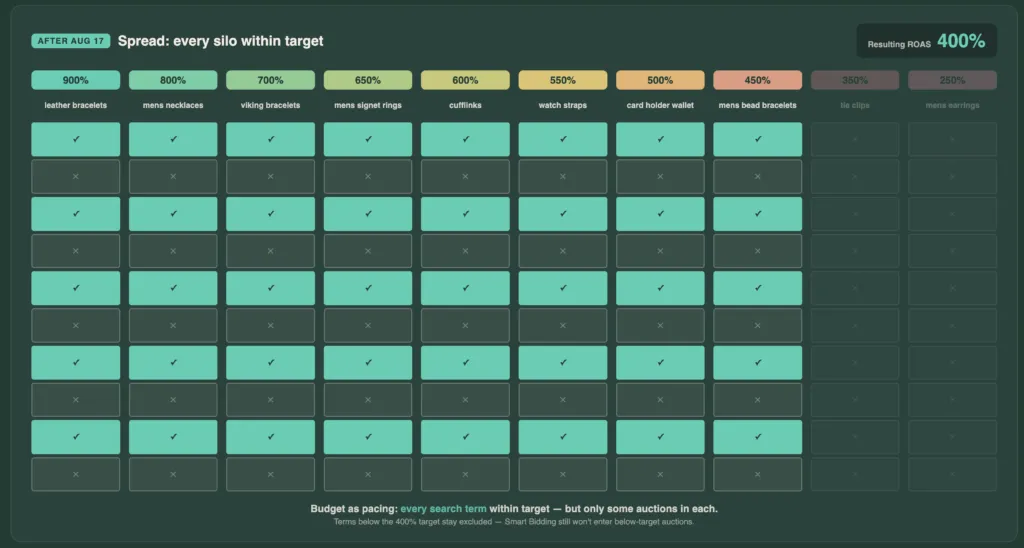
It reminds me of the old Accelerated vs. Standard delivery setting. (Yup, I’m that old). Accelerated would show you in every possible auction until you ran out of money, often early in the day.
Standard would pace your delivery, showing you in every 2nd, 3rd, or 4th auction to ensure your budget lasted all day.
What Ginny describes is a shift toward that Standard delivery logic, where the goal is to provide a steady ROAS equal to your target, no matter your budget.
Why Is Google Doing This? (It’s Not What You Think)
I’ve made the same argument that Google is making many times. The old system created a bizarre and counterintuitive experience. Trying to increase a budget on a campaign that was overperforming was tricky. You’d increase spend, and ROAS would often tank immediately.
For people like us, this was a known quirk we could navigate. But imagine the thousands of advertisers who would experience this feedback loop:
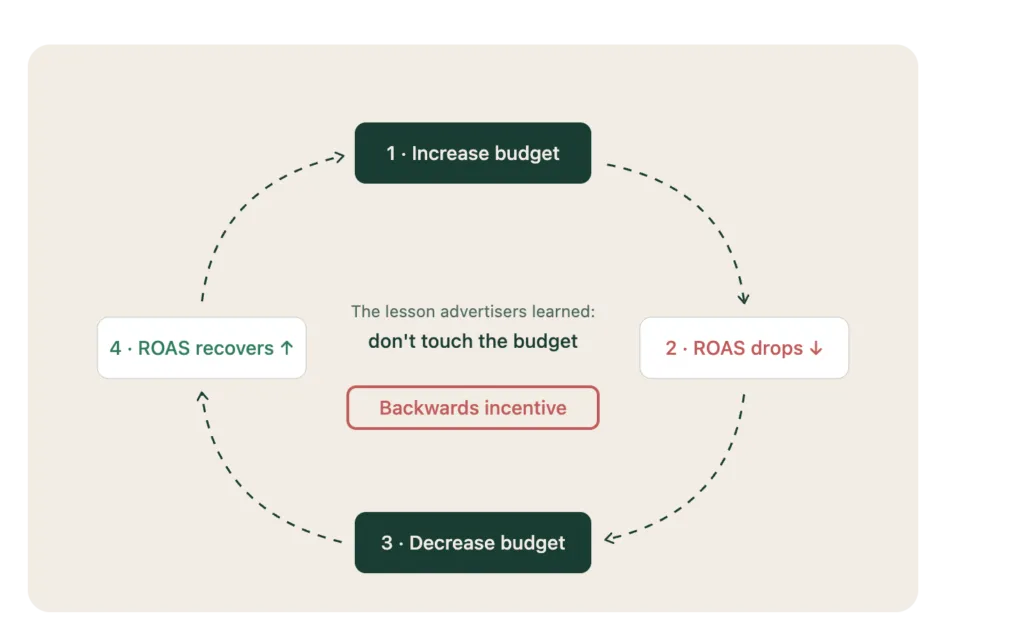
- Increase their budget to get more sales.
- See ROAS decrease.
- Panic and decrease their budget.
- See ROAS increase again.
That is the exact opposite cause-and-effect an advertising platform wants to create. You get punished for trying to spend more. So, I don’t blame Google for changing it. I do think they could have handled the transition better by implementing some guardrails instead of going cold turkey, but I’m okay with the change itself.
The Unintended (and Potentially Positive) Consequences
Many predict the auctions will be flooded, CPCs will increase, and performance will drop for everyone. I think the opposite might happen. Yes, auctions that were previously less competitive will see new advertisers.
But based on the algorithm change, the highest-performing auctions should see less aggressive competition.
When Smart Bidding can no longer only enter the best auctions for budget-limited campaigns, the intense competition for those top-tier auctions should decrease:
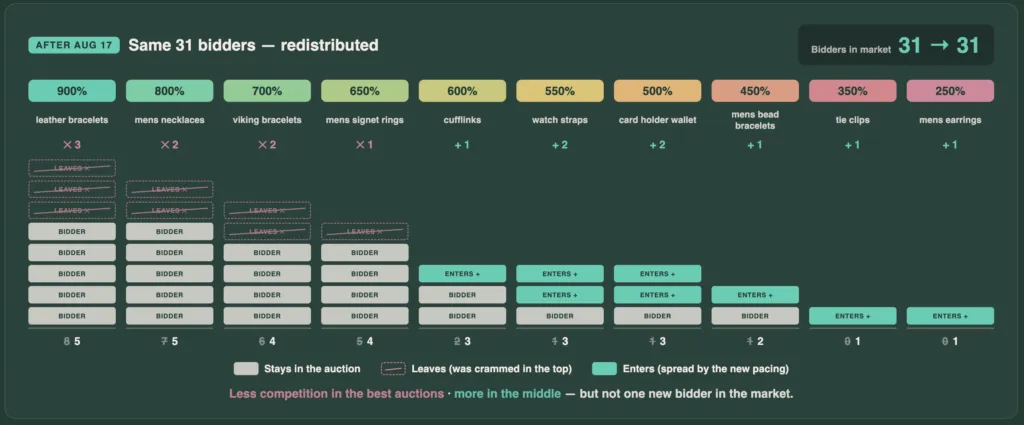
The cynical read is that this is all designed to inflate auctions, but I actually think it will have the opposite effect in the places that matter most.
There is no more pie to go around; the pie stays the same. It just gets distributed differently.
Your Action Plan: 4 Ways to Respond to the Change
Here are my ranked options for what actions you should take, from the most straightforward to the more nuanced.
1. The Obvious Move: Increase Your ROAS Target
This is Google’s recommendation, and that doesn’t make it wrong. If you’ve been hitting a better-than-target efficiency because your budgets were limited, you now need to set your targets closer to what you actually want to achieve.
Here’s how I recommend doing it:
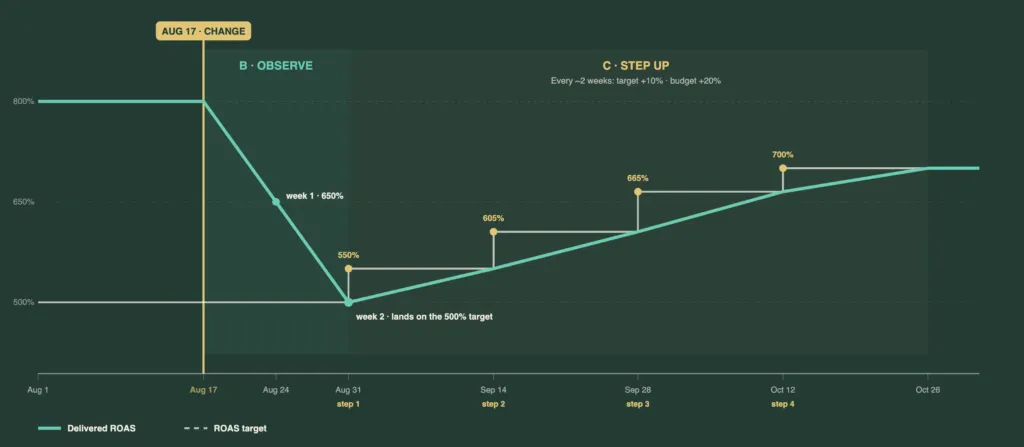
- A) WAIT until after August 17th. The algorithm hasn’t changed yet, so making changes now is pointless.
- B) Observe the effect of the change in your account for 1-2 weeks.
- C) Increase your ROAS target by 10% and your budget by 20%.
- D) Continue this process until you’re at a ROAS level you’re comfortable with.
2. The Under-the-Radar Option: Maximize Conversion Value
This has flown under the radar, but Maximize Conversion Value was recently expanded to Standard Shopping campaigns. If you want to spend a consistent daily amount and know that spending X typically results in Y ROAS, this strategy should produce a similar effect to the old system.
The stated goal of this bidding method is to get the most value within your budget, which means it will naturally favor the best auctions:
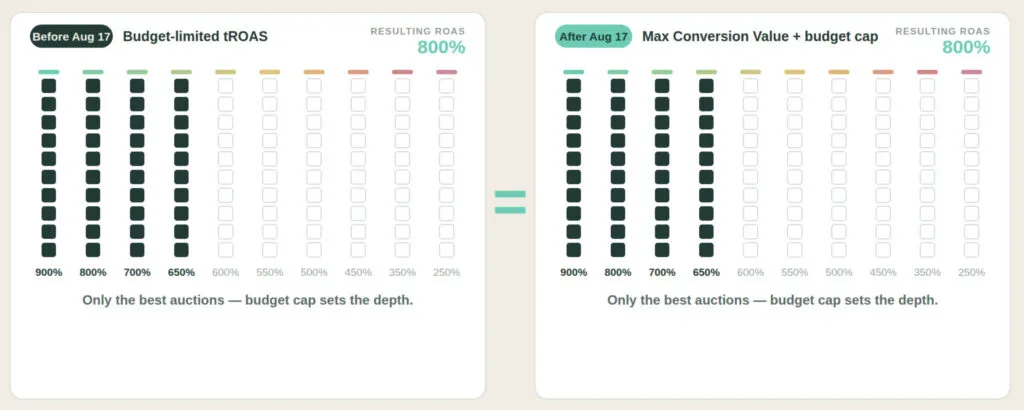
The big caveat here is that you lose the ROAS target as a safety net. If underlying demand changes and your assumption that $1,000/day yields 500% ROAS is no longer true, the campaign will keep spending. You’ll need to be more on top of making budget changes to match demand.
3. The Guardrail Tactic: Use Max Bid Limits
Max Bid Limits is one of my favorite features in Google Ads, and it’s highly underrated. On top of adjusting your ROAS target, you can use max bid limits to get back some of the guardrails that a budget limit used to give you. We’ve used this successfully in many accounts to resist CPC creep.
Here’s how I would implement it:
- Set your ROAS target closer to where you want it to be.
- Set your budget to what you roughly want to spend.
- Limit your exposure and cap your bids with max bid limits.
This should, in theory, help you maintain a healthier efficiency level by preventing Smart Bidding from chasing conversions at any cost.
4. The Contrarian Approach: Wait and See
Finally, you can do nothing for now. I don’t think this change will be as bad as people think, and for many advertisers, it could be a net positive. The simplest approach is to just wait, see what happens in your accounts, and then react accordingly.
[TL;DR]
- The “Google is evil” take on the Smart Bidding change is a loser mentality. Your job is to adapt, not complain.
- The core change is that your budget will now act as a pacing tool, not an efficiency filter. Campaigns will hit their target, not exceed it.
- Google is doing this to fix a broken feedback loop where increasing budgets punished advertisers by tanking ROAS.
- This may actually decrease competition in the very best auctions, as spend from budget-limited campaigns gets distributed more evenly.
- Your best action is to wait, observe the impact, and then incrementally raise your ROAS targets to match your actual goals.