When I get access to a new Google Ads account with Performance Max campaigns, I ignore 99% of the settings. It’s too easy to get lost in the weeds, tweaking things that have little to no impact. Instead, when I start auditing a PMax campaign, I only look at three things to begin with. These are the big levers that tell me almost everything I need to know about performance.
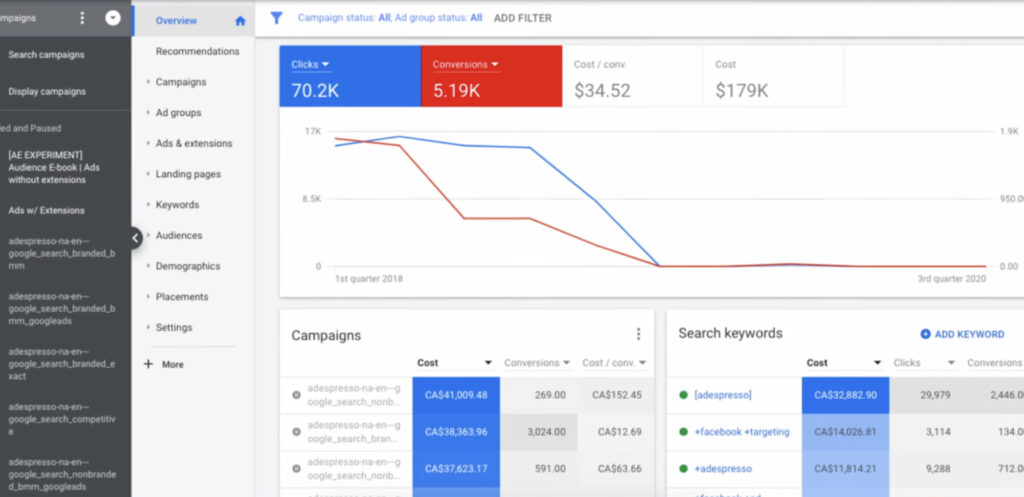
The very first one is the Channel Performance report. Go look at yours right now. If you see more than 10% of your spend going to Display or Video, that’s a red flag. It’s an easy one to spot, but it’s a big one. The rest of what I look for is more detailed, especially around areas like New Customer Acquisition—a feature that’s used wrong by most advertisers because Google encourages you to misuse it. So, let’s get started on how you can audit your own PMax campaigns.
Go Beyond the Article
Why the Video is Better:
- See real examples from actual client accounts
- Get deeper insights that can’t fit in written format
- Learn advanced strategies for complex situations
Stop Tinkering: The 3-Point PMax Audit That Matters
There are countless areas to audit, but let’s start with the things that actually move the needle. These are the first places I look to diagnose the health of a campaign.
1. The Channel Performance Report: Where’s Your Money Really Going?
You can find this report under Insights & Reports > Channel Performance. (If it’s not in your account yet, it should be there very, very soon). The top of this report is confusing and unnecessary, so just scroll down to where it says “Channel distribution.”
First, clean up the view. Click on “Columns” and remove everything. Then add back what we need: Cost, Conversions, Conversion Value, and Conv. value / cost (ROAS). Now it’s much more usable.
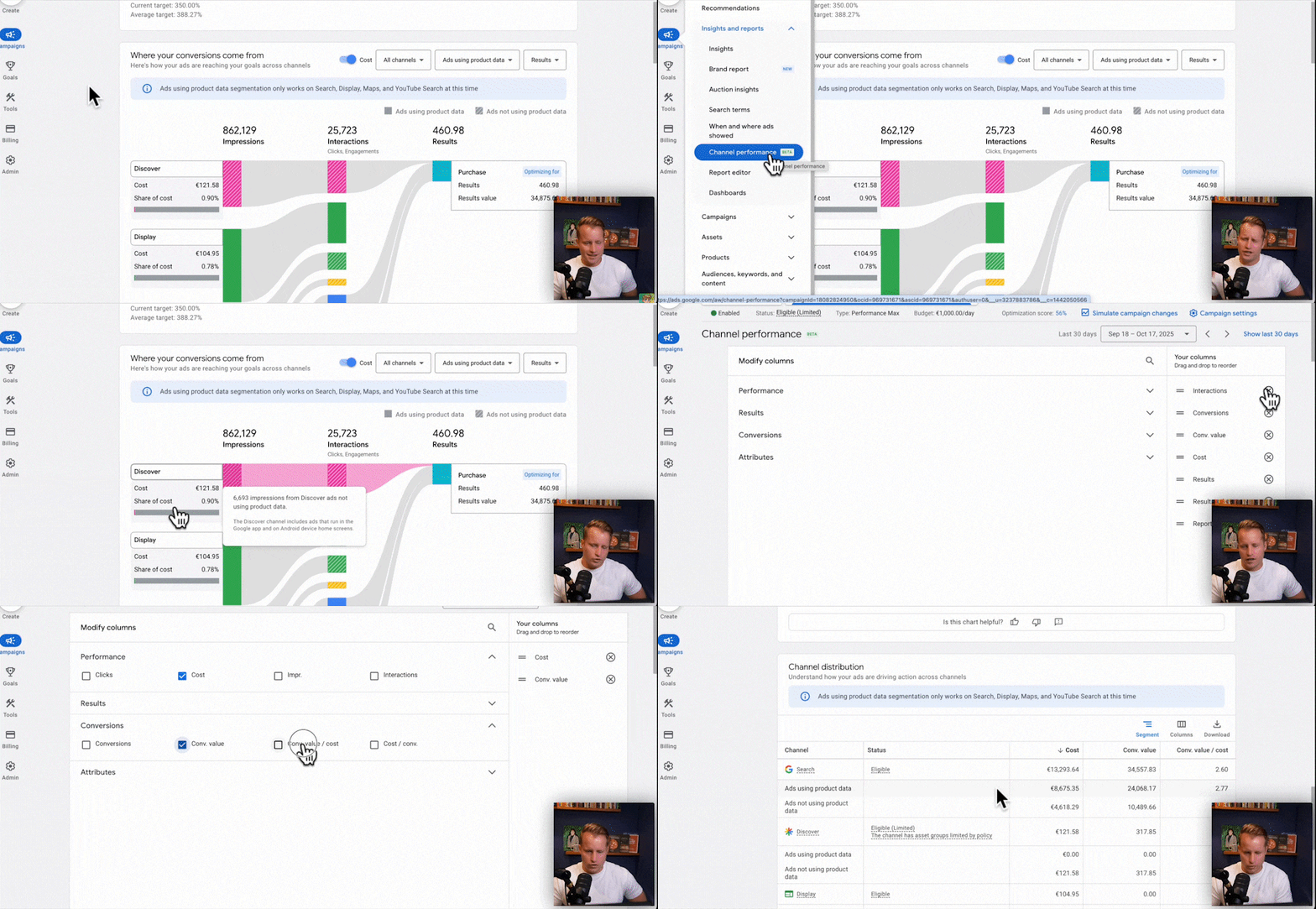
The first thing I check is the overall channel split. Are you spending a ton on Discover, Display, Gmail, or YouTube? For most e-commerce stores, significant spend here is just waste.
Next, and this is the important part, you want to segment by Ads using product data. This tells you the difference between your Shopping ads and your text ads within each channel. For instance, you can see how much of your “Search” spend is going to Shopping ads versus text ads. If 90% of your spend is in Shopping and you want to run a “full” PMax campaign, your goal should be to write better headlines to get more spend and conversions from your text ads.
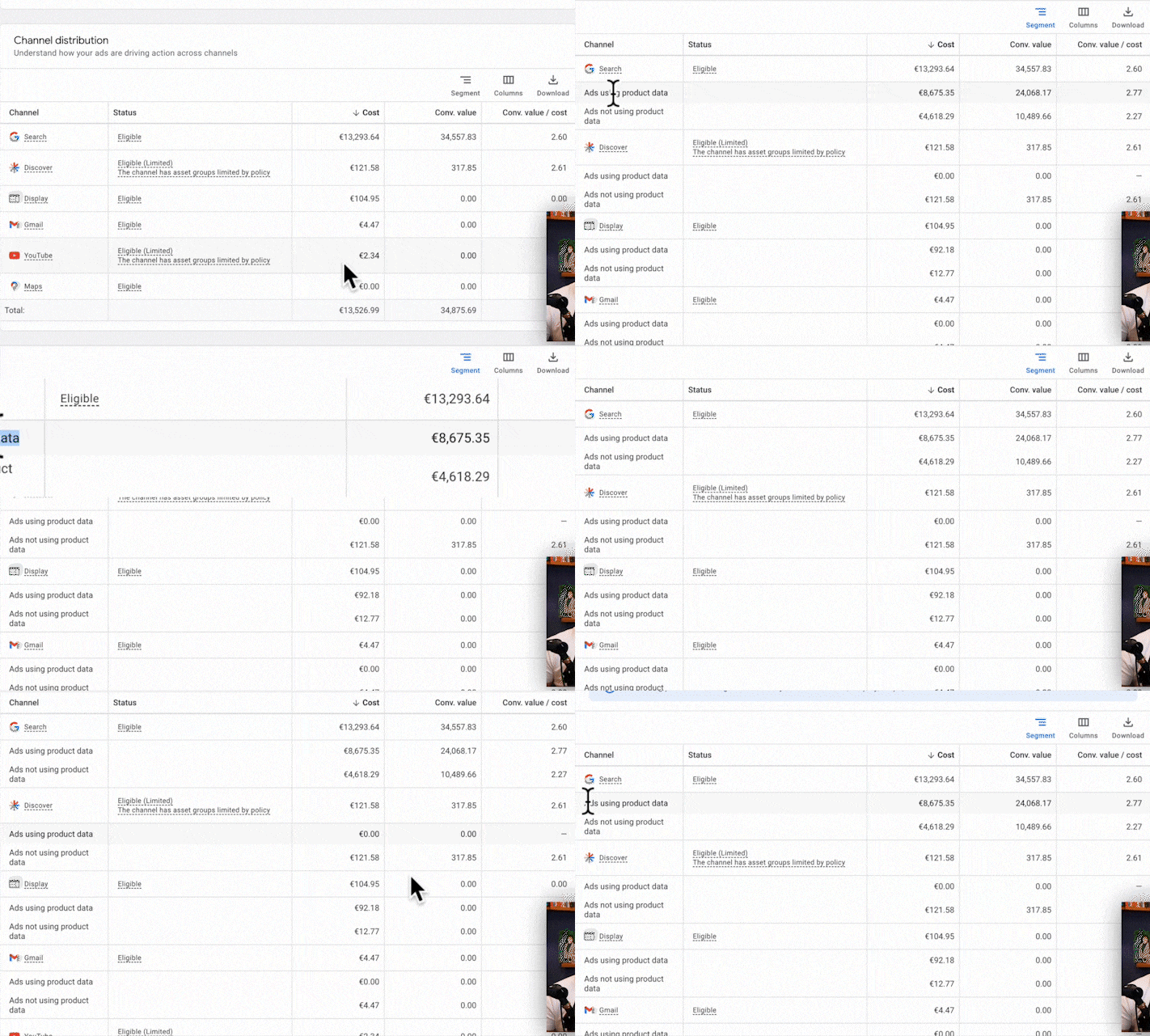
This segmentation also exposes waste. Let’s say you see 5% of your spend going to Display, but it’s performing okay. You might think your image assets are working. But by segmenting, you might discover that 90% of that spend is just on responsive display ads that automatically pull in your products, not the creative assets you spent so much time on. In my opinion, for e-commerce, you have nothing to do with spending on Display and Video inside PMax. It’s a bad idea. If you see waste, your best bet is to simply remove your image and video assets.
2. Search Terms: Finding the Brand Spend & Wasted Clicks
The Search Terms report in PMax is finally useful. The first thing I do here is hunt for brand spend. You can often spot it immediately in the data without even reading the terms—you’ll see a term with a massively higher conversion rate or ROAS than everything else. That’s your brand.
In one recent audit, I filtered for the client’s brand name and saw it was spending a few thousand euros at a 5.5x ROAS. When I excluded the brand term, the non-brand performance was a 2.2x ROAS. The brand spend was inflating the overall performance, and worse, we were overspending on it. You can always get brand term spend down.
This data gives me the validation I need to pull branded search out of PMax and move it to a Standard Shopping campaign where I can control the spend deliberately. Branded search doesn’t belong in PMax in the first place.
The other task here is to look for waste, just like a normal search term report. You can filter for terms with high cost and zero conversions. But be very careful with over-excluding. I’ll get into that more in a bit.
3. Asset Performance & Structure: The Only Part That Needs Your Attention
When it comes to assets, headlines are the most important ones to review. Images and videos? Honestly, they are rarely important for e-commerce PMax because the volume just isn’t there.
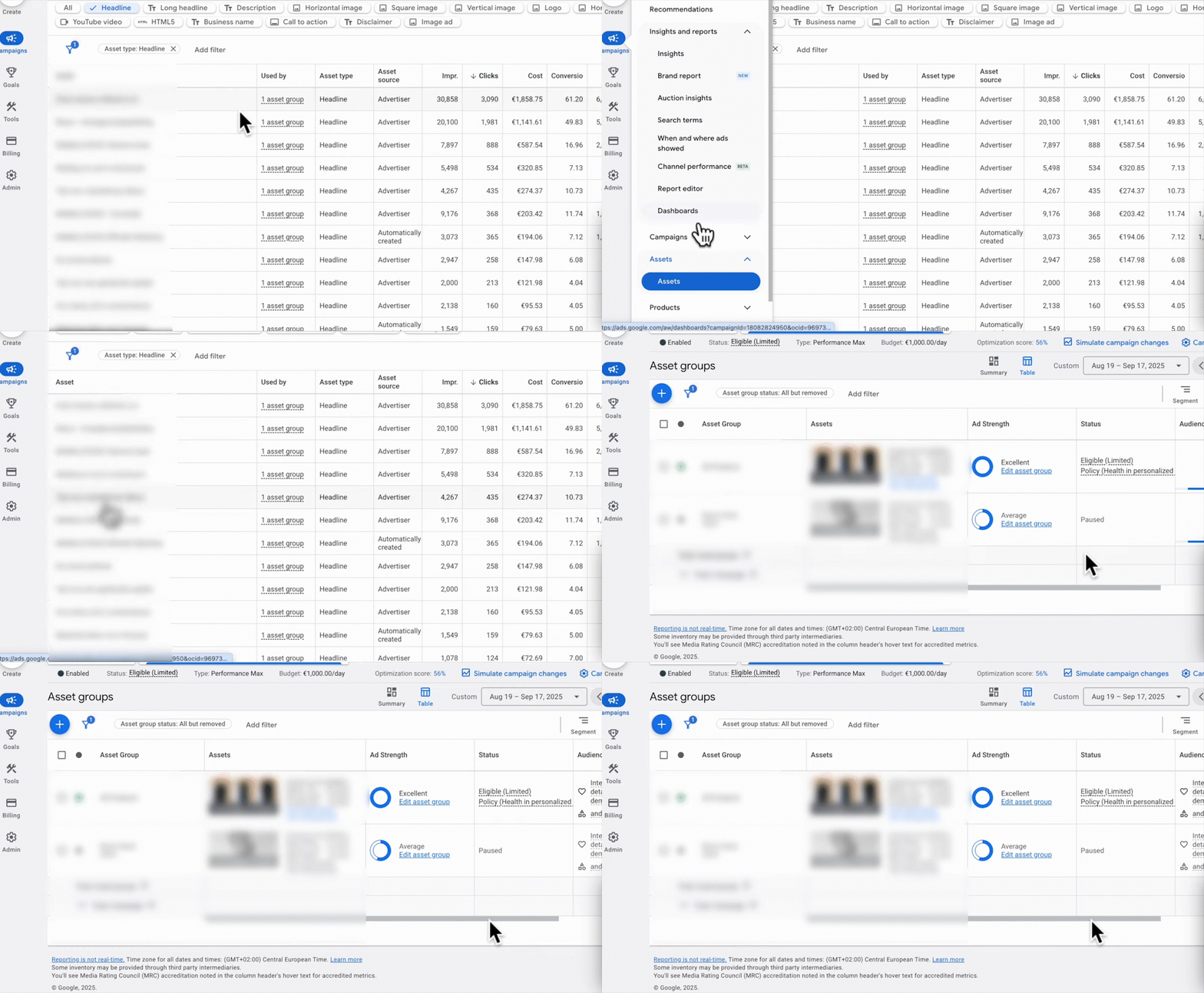
Go to your asset group and filter by asset type to see just your headlines. Add columns for CTR and Conversion Rate. Now you can get to work:
- A headline with a 0.4% CTR that’s getting a lot of impressions? It needs to go immediately.
- A headline with a decent CTR but a horrible conversion rate? Out.
Your job is to remove the headlines that don’t work and write more variations of the ones that do. This is where asset groups come in. If you’re running a feed-only PMax campaign, asset groups do nothing. But if you are running a full PMax campaign, structuring your asset groups correctly can have a significant impact.
Think of it like this: PMax gets ad copy from your page titles (like Dynamic Search Ads) and the headlines you provide. For long-tail searches (e.g., “best dry shampoo and conditioner for curly hair”), your product page title will probably be the best headline. But for the big money keywords (“shampoo for curly hair”), your provided headlines are critical. Your asset group should contain headlines written specifically for those terms and be paired with the relevant products. Yes, this can be a cumbersome process, which is why PMax isn’t always the right choice.
The Two PMax “Features” That Are Actually Landmines
Beyond the core audit, there are two specific features that cause more harm than good if you’re not extremely careful. Google pushes them hard, but they require a level of understanding that the interface completely hides.
The New Customer Acquisition (NCA) Feature: A Warning
I’m doing a much more in-depth video on this soon, but in the context of a PMax audit, you need to be careful. The feature lets you add an artificial value to new customer conversions (e.g., add €30 to every new customer purchase) to encourage Smart Bidding to find more of them. In theory, it’s a good feature. In practice, there are three things you need to know.
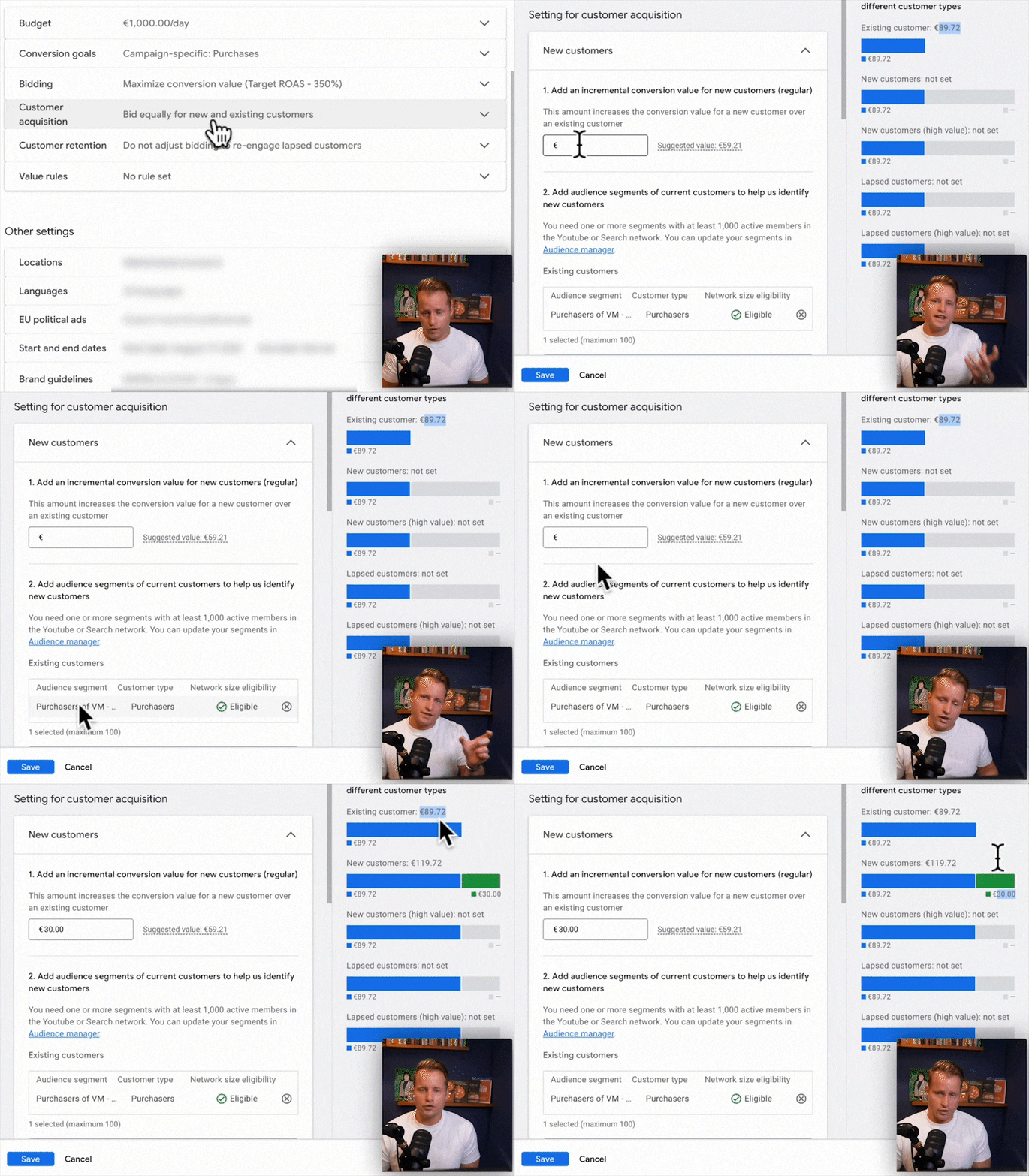
- It’s only as good as your data. The feature relies on you providing Google with complete and accurate existing customer lists. Any existing customer that Google can’t identify will default to being a “new” customer, getting that extra value and skewing your bidding.
- It inflates your reported conversion value. This is the big one. That extra €30 gets added directly to the conversion value you see in your account. This messes with your ability to view trends, and if you ever change the value, you can’t compare performance year-over-year. I asked the PMax product managers why they did this, and their explanation was that it shows the value Smart Bidding is actually using. It makes some sense, but I would have preferred it to be a separate column.
- It effectively lowers your ROAS target. This is what Google doesn’t explain well. Adding “fake” value to new customers simply tells the algorithm it’s okay to hit a lower real ROAS to get them. It’s a backdoor way of reducing your target, and it’s done in a slightly confusing and opaque way.

Negative Keywords: Why You Should Probably Remove Most of Them
I’ve said it before, but it applies even more to PMax: most advertisers should remove negative keywords, not add more. The problem is that with PMax, you can’t see if a search term performs poorly on Search, Shopping, or both. A term might be a disaster on Search but convert great on Shopping. If you exclude it at the campaign level, you lose those great Shopping conversions. It’s really tough to exclude anything with confidence.
What About the Rest? The Small Stuff I Usually Ignore
Once the big three are in order, I rarely spend time on the smaller settings. Things like Search Themes are mostly overkill; in 95% of cases, if Google isn’t targeting a search term, it’s because the performance isn’t there. Adding it as a theme won’t magically fix that.
Campaign settings are also pretty basic. Your bidding should be set, brand exclusions should be in place (if in doubt, you probably should exclude your brand), and the rest is standard. Don’t touch the age exclusions, and don’t worry about settings like “re-engaging lapsed customers”—it’s such a niche use case that it’s irrelevant for most e-commerce businesses.
A Note on Campaign Structure: Keep It Simple
My rules for PMax structure are simple:
- Fewer campaigns are better. Don’t split your data too thin.
- Only split into more campaigns if you need a different budget or a different ROAS target. That’s it.
I firmly believe that if you start venturing into advanced campaign structures (splitting by margin, price, category, etc.), then PMax is the wrong tool for the job. The benefit of PMax is simplicity and data aggregation. Once you lose that, you’re better off using Standard Shopping where you actually have control.
[TL;DR]
- Check the Channel Performance Report first. If more than 10% of your budget is going to Display or Video, it’s likely wasted. Segment by “Ads using product data” to see your true Shopping vs. Search split.
- Audit your Search Terms for brand spend. PMax often overspends on brand terms, inflating your ROAS. Pull brand into a separate Standard Shopping campaign for better control.
- Focus on optimizing your headlines. In PMax, headlines are your most important creative asset. Continuously remove poor performers and add new variations based on what works.
- Be extremely careful with the New Customer Acquisition (NCA) feature. It inflates your reported conversion value and effectively lowers your ROAS target without being transparent about it.
- Keep your campaign structure simple. The value of PMax is in data aggregation. If you need complex structures, you’re better off with Standard Shopping.